---
title: Turn on the risk scoring engine
description: You can preview risky entities before installing the latest risk engine. The preview shows the riskiest hosts, users, and services found in the 1000 sampled...
url: https://docs-v3-preview.elastic.dev/elastic/docs-content/pull/5739/solutions/security/advanced-entity-analytics/turn-on-risk-scoring-engine
products:
- Elastic Cloud Serverless
- Elastic Security
applies_to:
- Serverless Security projects: Generally available
- Elastic Stack: Generally available
---
# Turn on the risk scoring engine
To use entity risk scoring, your role must have the appropriate user role or privileges. For more information, refer to [Entity risk scoring requirements](https://docs-v3-preview.elastic.dev/elastic/docs-content/pull/5739/solutions/security/advanced-entity-analytics/entity-risk-scoring-requirements).
## Preview risky entities
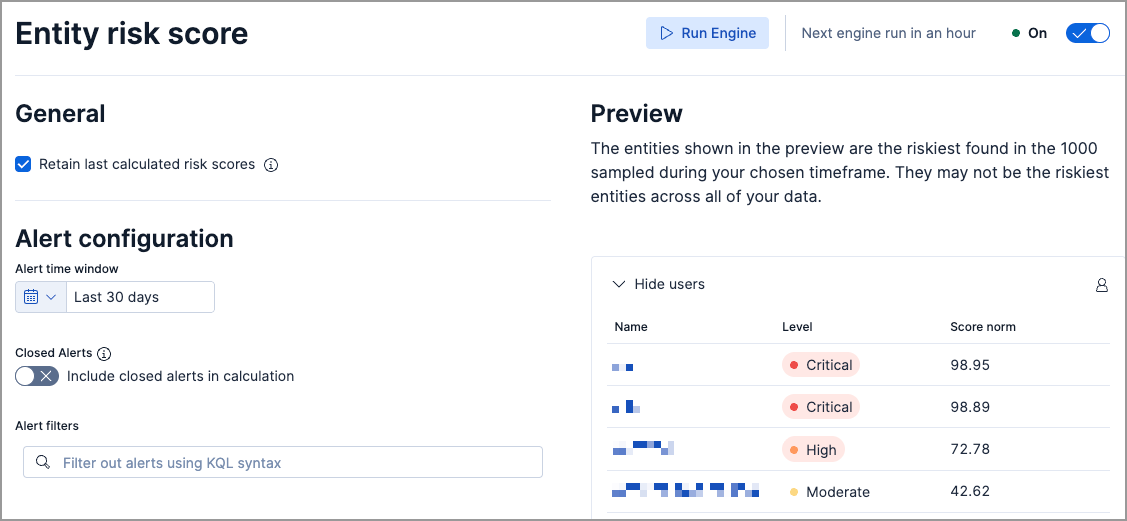
You can preview risky entities before installing the latest risk engine. The preview shows the riskiest hosts, users, and services found in the 1000 sampled entities during the time frame selected in the date picker.
The preview is limited to two risk scores per Kibana instance or serverless project.
To preview risky entities, find **Entity risk score** in the navigation menu or by using the [global search field](https://docs-v3-preview.elastic.dev/elastic/docs-content/pull/5739/explore-analyze/find-and-organize/find-apps-and-objects).
## Turn on the latest risk engine
- To view risk score data, you must have alerts generated in your environment.
- In Elastic Stack, if you previously installed the original user and host risk score modules, and you’re upgrading to Elastic Stack version 9.0 or later, refer to [Upgrade to the latest risk engine](#upgrade-risk-engine).
If you’re installing the risk scoring engine for the first time:
1. Find **Entity risk score** in the navigation menu or using the [global search field](https://docs-v3-preview.elastic.dev/elastic/docs-content/pull/5739/explore-analyze/find-and-organize/find-apps-and-objects).
2. On the **Entity risk score** page, turn the toggle on.
3. Elastic Stack: Generally available since 9.2 Elastic Cloud Serverless: Generally available Choose whether to retain [residual risk scores](/elastic/docs-content/pull/5739/solutions/security/advanced-entity-analytics/entity-risk-scoring#residual-risk-score).
4. Optionally, specify a date and time range for the calculation.
5. Choose whether to include `Closed` alerts in risk scoring calculations.
6. Elastic Stack: Generally available since 9.3 Elastic Cloud Serverless: Generally available Optionally, filter out alerts by defining conditions for the entity types or attributes that you want to exclude from the calculation. For example, if you don't want to calculate risk scores for users with a **Low impact** asset criticality level, enter `not user.asset.criticality: "low_impact"`.
## Upgrade to the latest risk engine
- Elastic Stack: Generally available
If you upgraded to 9.0 or later from an earlier Elastic Stack version, and you have the original risk engine installed, you can upgrade to the latest risk engine. You will be prompted to upgrade in places where risk score data exists, such as:
- The Entity Analytics dashboard
- The **User risk** tab on the Users page
- The **User risk** tab on a user’s details page
- The **Host risk** tab on the Hosts page
- The **Host risk** tab on a host’s details page
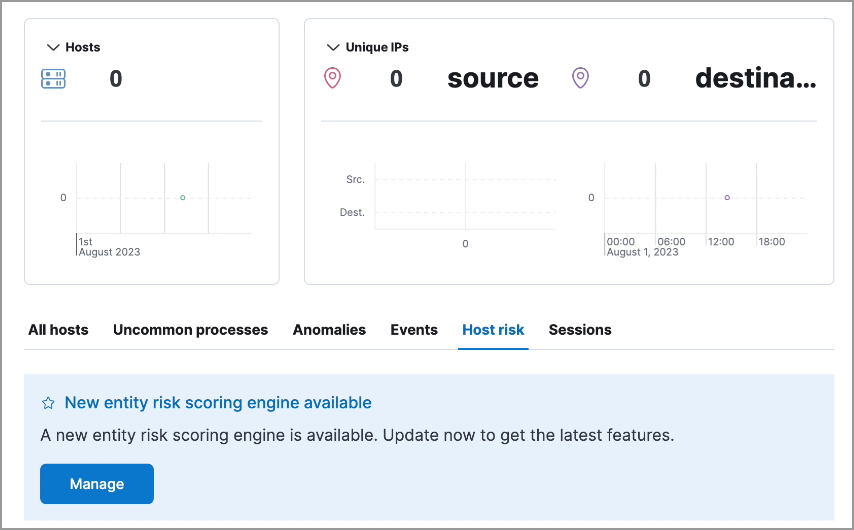
1. Click **Manage** in the upgrade prompt, or find **Entity risk score** in the navigation menu.
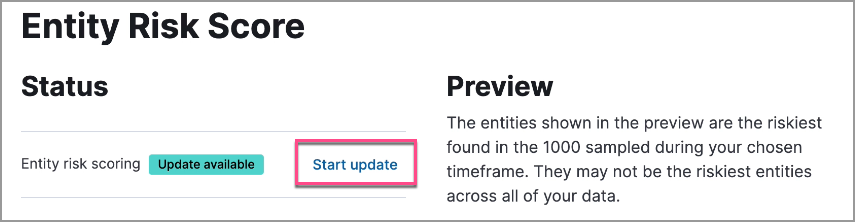
2. On the Entity Risk Score page, click **Start update** next to the **Update available** label.
3. On the confirmation message, click **Yes, update now**. The old transform is removed and the latest risk engine is installed.
4. When the installation is complete, confirm that the **Entity risk score** toggle is on.

Previous risk score data is retained when you upgrade to the latest risk engine.