---
title: Chat UI modes in Elastic Agent Builder
description: Learn how to use Agent Builder chat UI modes. Switch between the full-page standalone interface and the persistent sidebar for seamless multitasking in Kibana.
url: https://docs-v3-preview.elastic.dev/elastic/docs-content/pull/5867/explore-analyze/ai-features/agent-builder/standalone-and-flyout-modes
products:
- Elastic Cloud Serverless
- Elastic Observability
- Elastic Security
- Elasticsearch
- Kibana
applies_to:
- Elastic Cloud Serverless: Generally available
- Elastic Stack: Generally available since 9.3, Preview in 9.2
---
# Chat UI modes in Elastic Agent Builder
The Elastic Agent Builder [chat UI](/elastic/docs-content/pull/5867/explore-analyze/ai-features/agent-builder/chat#agent-chat-gui) is available in two modes:
1. [Standalone mode](#standalone-mode)
2. [Sidebar mode](#sidebar-mode)
The standalone and sidebar modes have the same functionalities and can be used interchangeably. Conversation history is preserved across both modes.
## Standalone mode
- Elastic Cloud Serverless: Generally available
- Elastic Stack: Generally available since 9.3
- Elastic Stack: Preview in 9.2
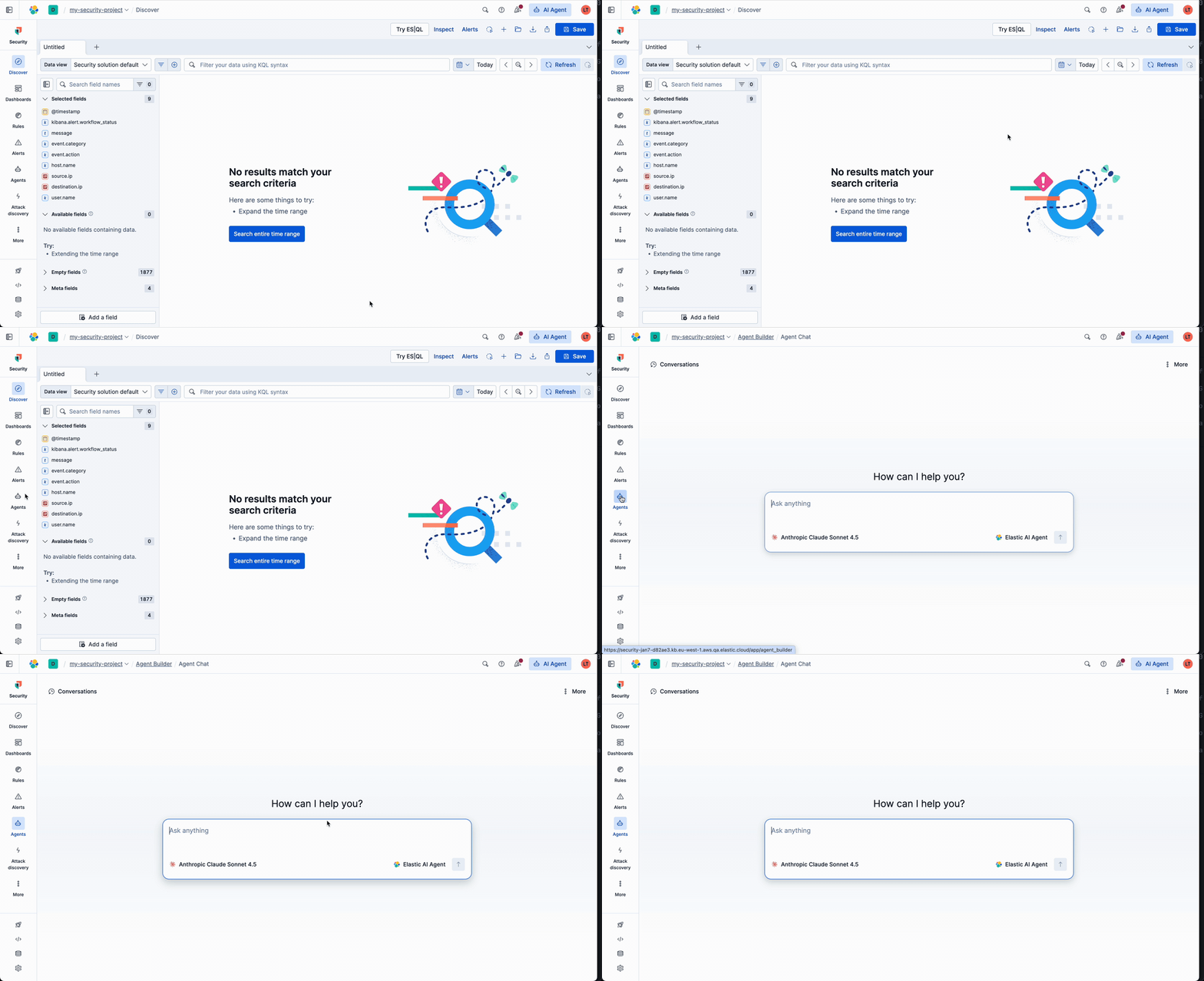
Access Agent Builder by selecting **Agents** in the main navigation.
Elastic Stack: Generally available in 9.3, Elastic Stack: Preview in 9.2 In Elastic Observability and Elastic Security solution views, you must first [switch from AI Assistant to Agent Builder](/elastic/docs-content/pull/5867/explore-analyze/ai-features/ai-chat-experiences/ai-agent-or-ai-assistant#switch-between-chat-experiences) to access the standalone experience.
The following GIF shows how to access the standalone chat experience in an Elastic Security project:
## Sidebar mode
- Elastic Cloud Serverless: Preview
- Elastic Stack: Preview in 9.3
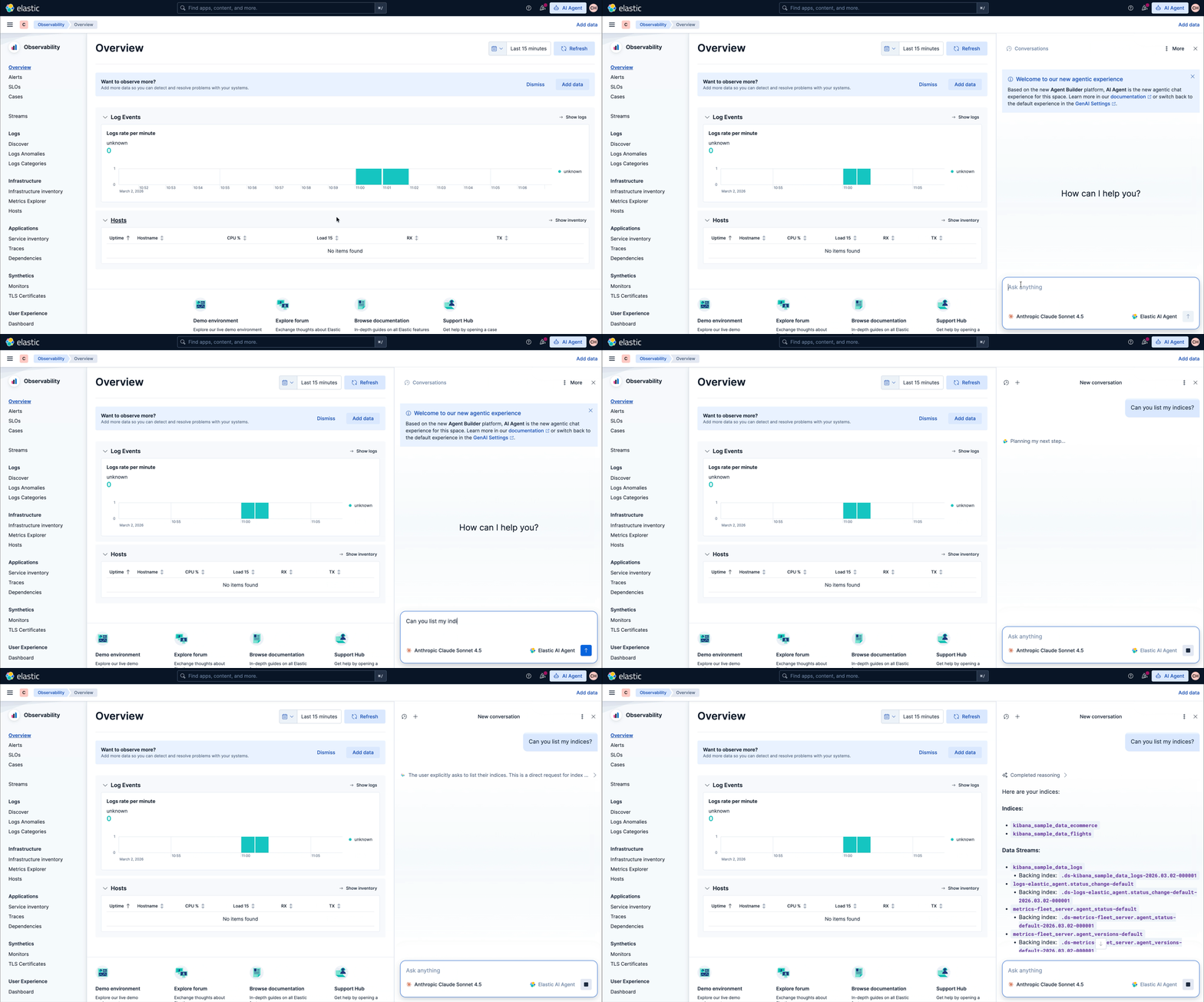
Once you [switch from AI Assistant to Agent Builder](/elastic/docs-content/pull/5867/explore-analyze/ai-features/ai-chat-experiences/ai-agent-or-ai-assistant#switch-between-chat-experiences), you can access the sidebar in two ways:
1. Select the **AI Agent** button from the header bar in any page:

1. Use the keyboard shortcut:
- Mac: Cmd + ;
- Windows/Linux: Ctrl + ;
You can resize the sidebar by dragging its side edge. The sidebar persists when you change pages in the main navigation.
## Default chat experiences
Elastic Agent Builder is the default chat experience for all solutions. It appears in the navigation automatically.If you need to revert to the legacy AI Assistant, you can opt out by changing your space's **Chat Experience** to **Classic AI Assistant** in the **GenAI Settings**. Learn more about how to [switch between chat experiences](/elastic/docs-content/pull/5867/explore-analyze/ai-features/ai-chat-experiences/ai-agent-or-ai-assistant#switch-between-chat-experiences).
The default chat experience varies by solution:
- **Elastic Observability and Elastic Security:** Each solution's classic AI Assistant is the default chat experience. You must [switch between chat experiences](/elastic/docs-content/pull/5867/explore-analyze/ai-features/ai-chat-experiences/ai-agent-or-ai-assistant#switch-between-chat-experiences) to enable Agent Builder.
- Once enabled:
- The sidebar experience replaces the AI Assistant chat experience.
- The standalone experience is available through the **Agents** button in the main navigation.
- **Elasticsearch:** Agent Builder appears in the navigation automatically.
## Related pages
- [Agent Builder chat UI](/elastic/docs-content/pull/5867/explore-analyze/ai-features/agent-builder/chat#agent-chat-gui)
- [Switch between AI assistant and Agent Builder chat](/elastic/docs-content/pull/5867/explore-analyze/ai-features/ai-chat-experiences/ai-agent-or-ai-assistant#switch-between-chat-experiences)