---
title: Skills in Elastic Agent Builder
description: Learn how Agent Builder skills extend agents with specialized knowledge and tools for specific task domains.
url: https://docs-v3-preview.elastic.dev/elastic/docs-content/pull/6087/explore-analyze/ai-features/agent-builder/skills
products:
- Elastic Cloud Serverless
- Elastic Observability
- Elastic Security
- Elasticsearch
- Kibana
applies_to:
- Elastic Cloud Serverless: Generally available
- Elastic Stack: Planned
---
# Skills in Elastic Agent Builder
A skill is a reusable capability pack that gives an [agent](https://docs-v3-preview.elastic.dev/elastic/docs-content/pull/6087/explore-analyze/ai-features/agent-builder/agent-builder-agents) specialized expertise for a particular type of task. Each skill bundles three things:
- **Instructions**: domain-specific guidance written in Markdown that shapes how the agent approaches the task.
- **Tools**: [built-in](https://docs-v3-preview.elastic.dev/elastic/docs-content/pull/6087/explore-analyze/ai-features/agent-builder/tools/builtin-tools-reference) or [custom](https://docs-v3-preview.elastic.dev/elastic/docs-content/pull/6087/explore-analyze/ai-features/agent-builder/tools/custom-tools) tools the agent can call while the skill is active.
- **Context**: additional knowledge the skill can draw on, such as reference documents or runbooks.
This makes skills different from [tools](https://docs-v3-preview.elastic.dev/elastic/docs-content/pull/6087/explore-analyze/ai-features/agent-builder/tools), which are discrete operations like running a query or retrieving a document. Skills sit one level higher, combining tools with the instructions and context needed to complete a workflow end to end.
Skills also differ from the agent's system prompt. The system prompt is always in context, while skills load selectively. An agent can have access to many skills without loading them all into the context window at once. You author a skill once and assign it to any agent that needs it, keeping agent configurations clean and making expertise easy to share across your team.
## How skills are invoked
Skills can be invoked in three ways:
The agent receives a list of available skills with their names and descriptions. Based on the user's natural language input, it automatically selects and invokes the most relevant skill. No special syntax is needed.
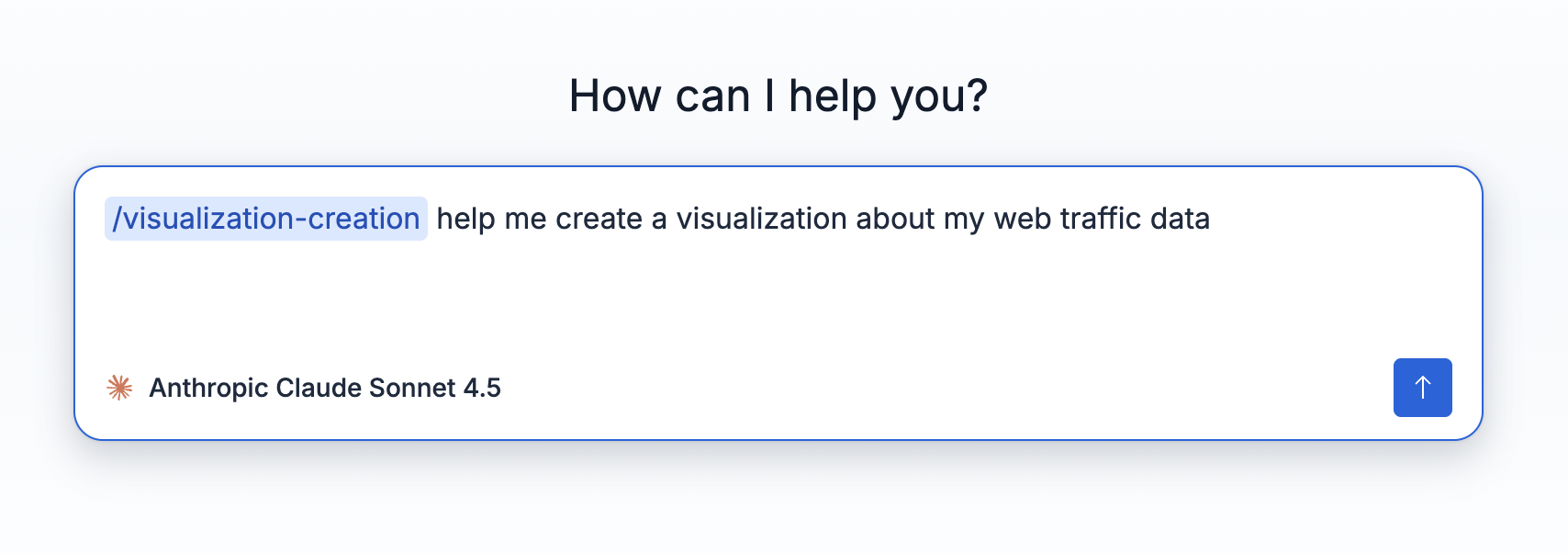
Users can explicitly invoke a skill by typing `/` followed by the skill name and a prompt. This is useful when you know exactly which skill you need.
When a user attaches contextual data to a message (for example, an alert from the alert flyout), the agent can automatically invoke the relevant skill based on the attachment type.
## Use cases
Use skills when you have domain-specific knowledge or procedures that multiple agents should follow consistently. Some examples:
- An [Elastic Security](https://docs-v3-preview.elastic.dev/elastic/docs-content/pull/6087/solutions/security/ai/agent-builder/agent-builder) user asks about a suspicious host. The [`entity-analytics`](/elastic/docs-content/pull/6087/explore-analyze/ai-features/agent-builder/builtin-skills-reference#agent-builder-entity-analytics-skill) skill activates and guides the agent through finding the entity, analyzing its risk score, asset criticality, and behavioral history.
- An [Elastic Observability](https://docs-v3-preview.elastic.dev/elastic/docs-content/pull/6087/solutions/observability/ai/agent-builder-observability) user asks why a service is slow or why an alert fired. The [`observability.investigation`](/elastic/docs-content/pull/6087/explore-analyze/ai-features/agent-builder/builtin-skills-reference#agent-builder-observability-investigation-skill) skill activates and diagnoses the issue across APM services and infrastructure.
- An Elasticsearch user asks how to combine keyword and vector search for a product catalog. The [`search.hybrid-search`](/elastic/docs-content/pull/6087/explore-analyze/ai-features/agent-builder/builtin-skills-reference#agent-builder-search-hybrid-search-skill) skill activates and guides the agent through building a hybrid search solution.
## Built-in skills
Elastic Agent Builder ships with built-in skills for common task domains. The skills available depend on your solution or serverless project type: some skills are available across all deployments, while others are specific to Elasticsearch, Observability, or Elastic Security. Built-in skills are **read-only** and cannot be modified or deleted.
For the complete list, refer to [Built-in skills reference](https://docs-v3-preview.elastic.dev/elastic/docs-content/pull/6087/explore-analyze/ai-features/agent-builder/builtin-skills-reference).
## Custom skills
You can extend the built-in catalog with your own custom skills. Custom skills are saved to your skill library, which you can manage from **Manage components > Skills**. Creating a skill adds it to the library, but it is not available to any agent until you add it from **Customize > Skills** on that agent. This separation means you can maintain a shared library of skills and choose which ones each agent has access to.
To learn how to create and manage custom skills, refer to [Custom skills](https://docs-v3-preview.elastic.dev/elastic/docs-content/pull/6087/explore-analyze/ai-features/agent-builder/custom-skills).
## List skills using the API
To retrieve all available skills programmatically, use the [List skills](https://www.elastic.co/docs/api/doc/kibana/operation/operation-get-agent-builder-skills) API endpoint: `GET /api/agent_builder/skills`. For the full set of skills CRUD operations, refer to [Custom skills](/elastic/docs-content/pull/6087/explore-analyze/ai-features/agent-builder/custom-skills#skills-api).
## Next steps
- Review all built-in skills in the [Built-in skills reference](https://docs-v3-preview.elastic.dev/elastic/docs-content/pull/6087/explore-analyze/ai-features/agent-builder/builtin-skills-reference).
- Learn how to create your own in [Custom skills](https://docs-v3-preview.elastic.dev/elastic/docs-content/pull/6087/explore-analyze/ai-features/agent-builder/custom-skills).
- Write effective custom skill instructions with the [Skill creation guidelines](https://docs-v3-preview.elastic.dev/elastic/docs-content/pull/6087/explore-analyze/ai-features/agent-builder/skill-creation-guidelines).
- Explore [Tools in Elastic Agent Builder](https://docs-v3-preview.elastic.dev/elastic/docs-content/pull/6087/explore-analyze/ai-features/agent-builder/tools) to understand how tools and skills relate.
## Related pages
- [Built-in tools reference](https://docs-v3-preview.elastic.dev/elastic/docs-content/pull/6087/explore-analyze/ai-features/agent-builder/tools/builtin-tools-reference)
- [Elastic Agent Builder Kibana APIs](https://docs-v3-preview.elastic.dev/elastic/docs-content/pull/6087/explore-analyze/ai-features/agent-builder/kibana-api)