---
title: View entity details
description: You can learn more about an entity (host, user, or service) from the entity details flyout, which is available throughout the Elastic Security app. To...
url: https://docs-v3-preview.elastic.dev/elastic/docs-content/pull/6201/solutions/security/advanced-entity-analytics/view-entity-details
products:
- Elastic Cloud Enterprise
- Elastic Cloud Hosted
- Elastic Cloud Serverless
- Elastic Cloud on Kubernetes
- Elastic Security
- Elastic Stack
applies_to:
- Serverless Security projects: Generally available
- Elastic Stack: Generally available
---
# View entity details
You can learn more about an entity (host, user, or service) from the entity details flyout, which is available throughout the Elastic Security app. To access this flyout, click on an entity name in places such as:
- The Alerts table
- The Entity Analytics overview
- The **Users** and user details pages
- The **Hosts** and host details pages
## Entity details flyout
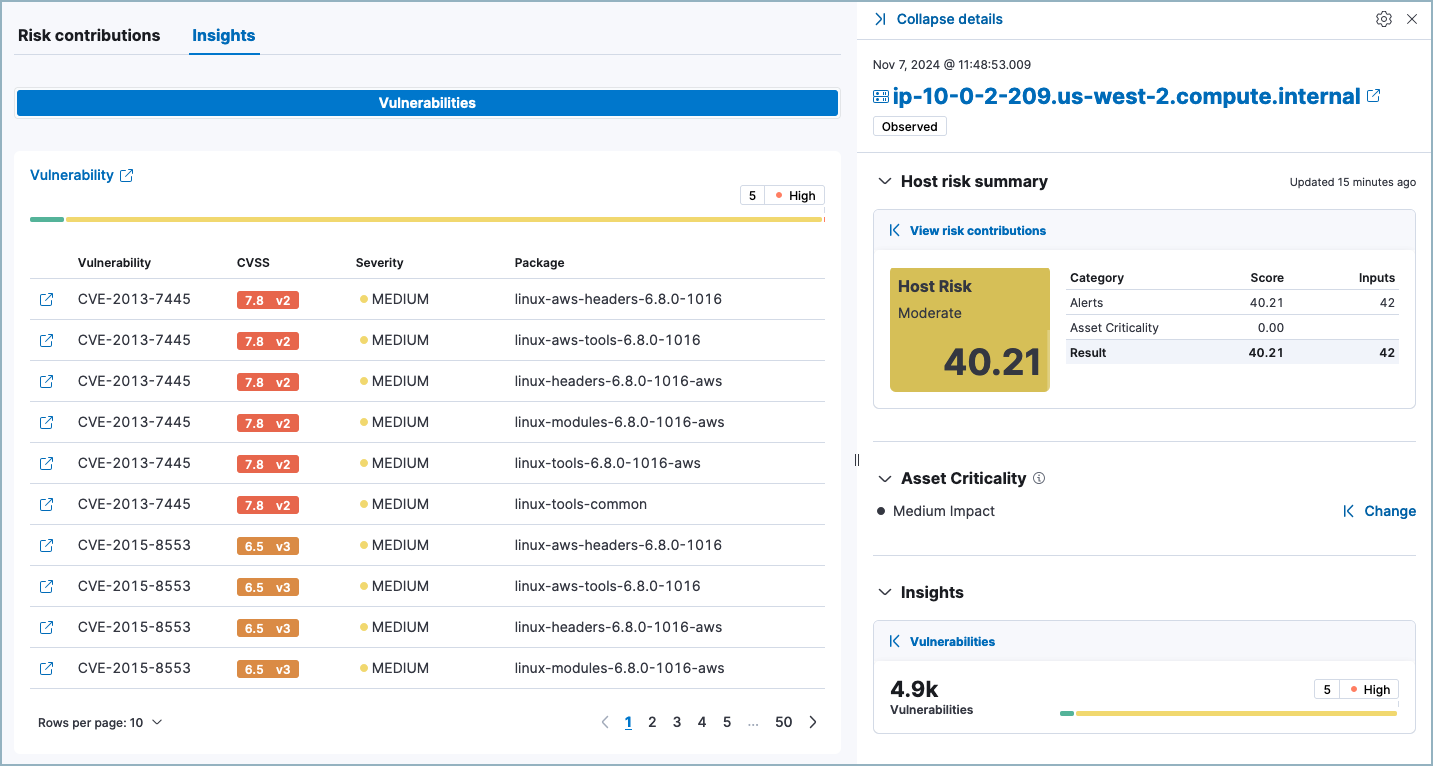
The entity details flyout includes the following sections:
- Elastic Cloud Serverless: Generally available Elastic Stack: Generally available since 9.3 [Entity summary](#entity-summary), which allows you to generate an AI summary of the entity.
- [Entity risk summary](#entity-risk-summary), which displays entity risk data and inputs.
- [Asset Criticality](#asset-criticality), which allows you to view and assign asset criticality.
- Elastic Stack: Generally available since 9.4 Elastic Cloud Serverless: Planned [Resolution](#resolution), which allows you to view and manage the entity's resolution group.
- Elastic Stack: Preview since 9.4 Elastic Cloud Serverless: Planned [Visualizations](#visualizations), which shows a graph preview of the entity's connections and relationships.
- [Insights](#insights), which displays vulnerabilities or misconfiguration findings for the entity.
- [Observed data](#observed-data), which displays entity details.
### Entity summary
- Elastic Cloud Serverless: Generally available
- Elastic Stack: Generally available since 9.3
- To generate an AI summary, you need to configure a [generative AI connector](https://docs-v3-preview.elastic.dev/elastic/kibana/tree/main/reference/connectors-kibana/gen-ai-connectors).
- This feature is only available for users and hosts.
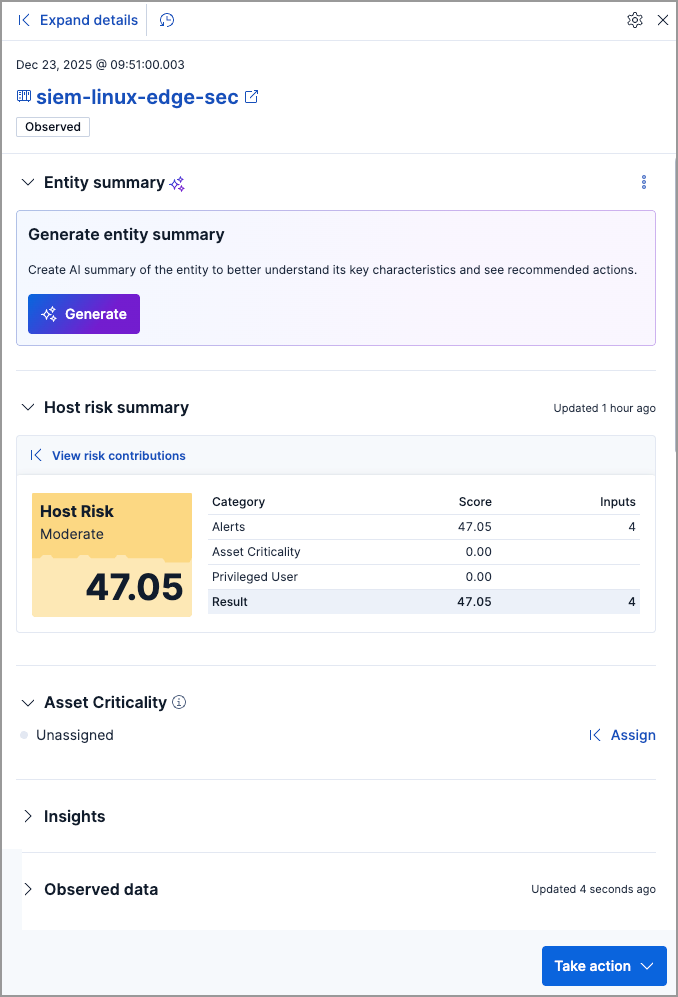
The **Entity summary** section allows you to generate an AI-powered summary of the entity's security context. Click **Generate** to create a comprehensive overview that aggregates information from:
- Risk scores and risk inputs
- Asset criticality levels
- Vulnerabilities
- Machine learning anomalies associated with the entity
The summary provides a consolidated view of the entity's security posture, helping you quickly assess its significance and prioritize investigations. It includes information such as:
- The entity's current risk score with details about which alerts or rules contribute most significantly to the score
- The entity's asset criticality level and how it contributes to the overall risk score
- Details about detected vulnerabilities, including CVE identifiers, CVSS scores, affected packages or systems, and remediation guidance
- Recommended next steps based on the entity's security posture, such as updating vulnerable packages, investigating specific alerts, or implementing additional security controls
If you have [AI Assistant](https://docs-v3-preview.elastic.dev/elastic/docs-content/pull/6201/solutions/security/ai/ai-assistant) or [Agent Builder](https://docs-v3-preview.elastic.dev/elastic/docs-content/pull/6201/explore-analyze/ai-features/elastic-agent-builder) set up, you can select **More actions** (`boxes_vertical`) → **Ask AI Assistant** or **Add to chat** to continue the conversation about the entity in AI Assistant or Agent Builder.
### Entity risk summary
The entity risk summary section is only available if the [risk scoring engine is turned on](https://docs-v3-preview.elastic.dev/elastic/docs-content/pull/6201/solutions/security/advanced-entity-analytics/turn-on-risk-scoring-engine).
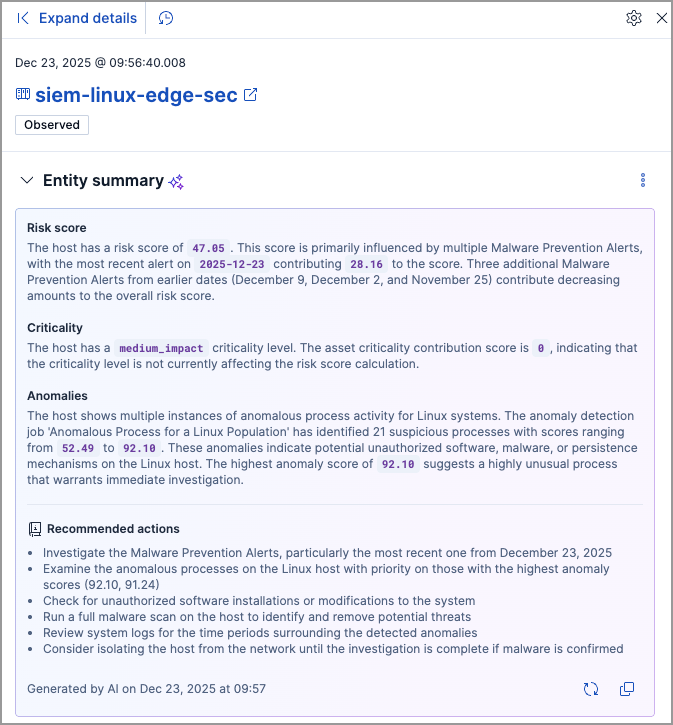
The entity risk summary section contains a risk summary visualization and table.
The risk summary visualization shows the entity risk score and risk level. Hover over the visualization to display the **Options** menu. Use this menu to inspect the visualization's queries, add it to a new or existing case, save it to your Visualize Library, or open it in Lens for customization.
The risk summary table shows the category, score, and number of risk inputs that determine the entity risk score. Hover over the table to display the **Inspect** button, which allows you to inspect the table's queries.
Elastic Stack: Generally available since 9.4 Elastic Cloud Serverless: Generally available For entities that belong to a [resolution group](https://docs-v3-preview.elastic.dev/elastic/docs-content/pull/6201/solutions/security/advanced-entity-analytics/entity-resolution), the section shows both the individual **Entity risk score** and the **Resolution group risk score** — the aggregated score across all linked entities in the group — each with their own score and inputs breakdown.
To expand the entity risk summary section, click **View risk contributions**. The **Risk contributions** tab displays additional details about the entity's risk inputs:
- Non-alert risk inputs and their contribution scores, including:
- Asset criticality level
- Elastic Stack: Generally available since 9.4 Elastic Cloud Serverless: Generally available Watchlist membership
- Elastic Stack: Deprecated in 9.4, Elastic Stack: Generally available in 9.3, Elastic Stack: Preview from 9.1 to 9.2 Privileged user status
- The top 10 alerts that contributed to the latest risk scoring calculation, and each alert's contribution score. If more than 10 alerts contributed to the risk scoring calculation, the remaining alerts' aggregate contribution score is displayed below the **Alerts** table.
Elastic Stack: Generally available since 9.4 Elastic Cloud Serverless: Generally available For entities that belong to a [resolution group](https://docs-v3-preview.elastic.dev/elastic/docs-content/pull/6201/solutions/security/advanced-entity-analytics/entity-resolution), each risk input row includes an **Entity ID** column identifying which group member contributed that input.
Elastic Stack: Generally available since 9.2 Elastic Cloud Serverless: Generally available If you have [AI Assistant](https://docs-v3-preview.elastic.dev/elastic/docs-content/pull/6201/solutions/security/ai/ai-assistant) set up, you can also ask it to explain how the risk inputs contributed to the entity's risk score and recommend next steps.
### Asset Criticality
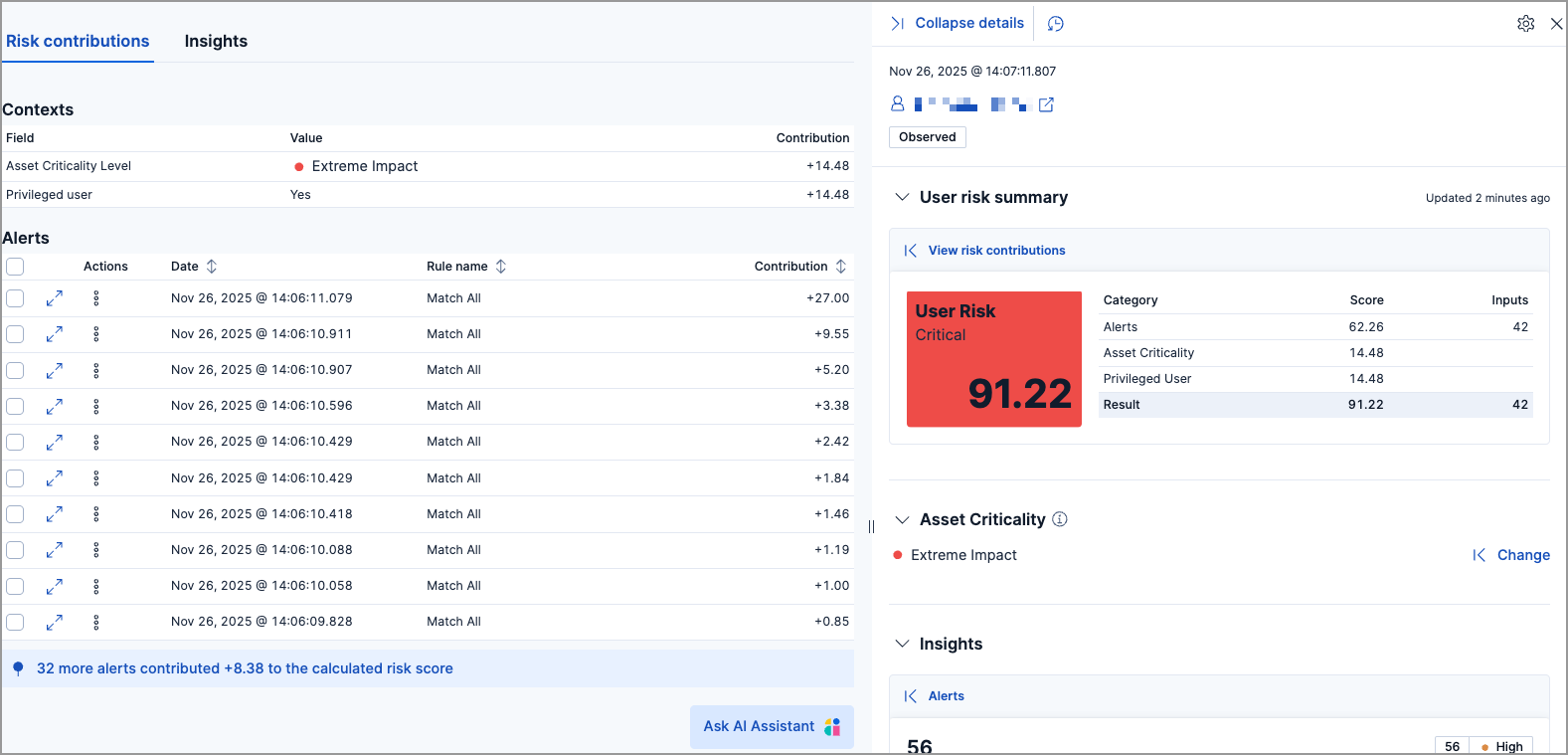
The **Asset Criticality** section displays the selected entity's [asset criticality level](https://docs-v3-preview.elastic.dev/elastic/docs-content/pull/6201/solutions/security/advanced-entity-analytics/asset-criticality). Asset criticality contributes to the overall [entity risk score](https://docs-v3-preview.elastic.dev/elastic/docs-content/pull/6201/solutions/security/advanced-entity-analytics/entity-risk-scoring). The criticality level defines how impactful the entity is when calculating the risk score.

Click **Assign** to assign a criticality level to the selected entity, or **Change** to change the currently assigned criticality level.
### Resolution
- Elastic Cloud Serverless: Generally available
- Elastic Stack: Generally available since 9.4
The **Resolution** section shows whether the entity belongs to a [resolution group](https://docs-v3-preview.elastic.dev/elastic/docs-content/pull/6201/solutions/security/advanced-entity-analytics/entity-resolution). Click **Resolution group** to open the tab, which displays all entity records linked to this entity — including the primary entity and any aliases — with their entity name, ID, source, and risk score.
To add an entity to the group, search by entity name or ID in the **Add entities to resolution group** table and click the Add icon (`plus_in_circle`) next to the entity you want to link. To remove an entity from the group, click **X** (`cross`) in the **Actions** column of the **Resolution group** table. Entities must be removed individually.
### Visualizations
- Elastic Cloud Serverless: Planned
- Elastic Stack: Preview since 9.4
[Entity store v2](https://docs-v3-preview.elastic.dev/elastic/docs-content/pull/6201/solutions/security/advanced-entity-analytics/entity-store) must be enabled and populated in the active space.
The **Visualizations** section shows a collapsible graph preview centered on the entity, covering the last 30 days of connections and relationships. To open the full interactive graph, click **Graph preview** to expand the flyout. In the graph view, you can:
- Hover over an entity node and click the plus `plus_in_circle` to open the actions menu, where you can show or hide entity relationships, the entity's actions, actions done to the entity, or related events, or show the entity's details.
- Filter the graph using KQL syntax in the search bar. Supported fields include EUID values (for example, `entity.id : "user:alice@example.com"`) and raw ECS identity fields such as `user.id`, `user.email`, or `user.name`.
- Select **Investigate in Timeline** (`timeline`) to open the current graph view in Timeline.
### Insights
The **Insights** section displays [Vulnerabilities Findings](https://docs-v3-preview.elastic.dev/elastic/docs-content/pull/6201/solutions/security/cloud/findings-page-3) for the host or [Misconfiguration Findings](https://docs-v3-preview.elastic.dev/elastic/docs-content/pull/6201/solutions/security/cloud/findings-page) for the user. Click **Vulnerabilities** or **Misconfigurations** to expand the flyout and view this data.
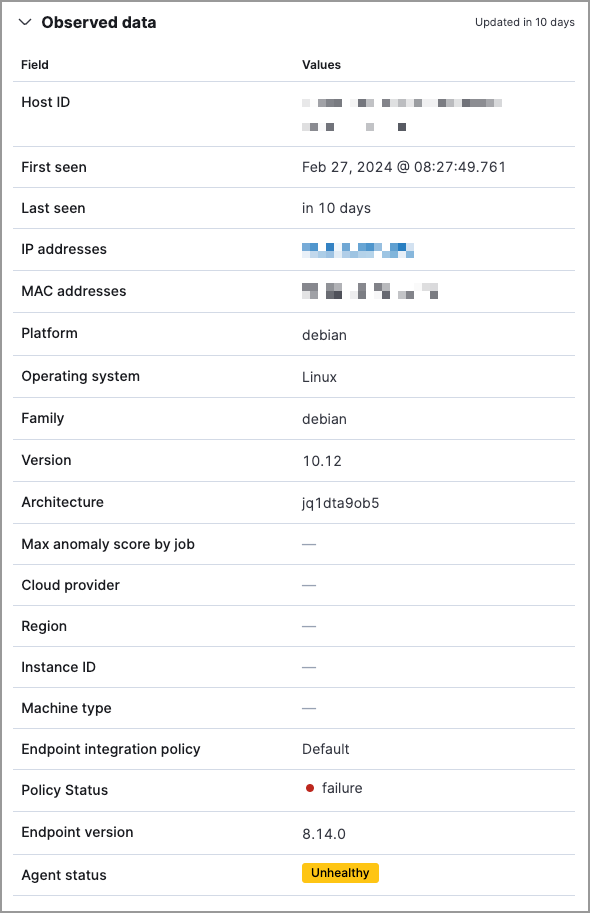
### Observed data
This section displays details such as the entity ID, when the entity was first and last seen, and the associated IP addresses and operating system.