---
title: Elastic Inference Service for self-managed clusters
description: Use Elastic Inference Service (EIS) with your self-managed, ECE, and ECK clusters through Cloud Connect.
url: https://docs-v3-preview.elastic.dev/elastic/docs-content/pull/6239/explore-analyze/elastic-inference/connect-self-managed-cluster-to-eis
products:
- Elastic Cloud Enterprise
- Elastic Cloud on Kubernetes
- Elastic Stack
applies_to:
- Elastic Stack: Generally available since 9.3
---
# Elastic Inference Service for self-managed clusters
[Elastic Inference Service (EIS)](https://docs-v3-preview.elastic.dev/elastic/docs-content/pull/6239/explore-analyze/elastic-inference/eis) is available with zero setup on Elastic Cloud Hosted and Serverless deployments. To use EIS with other deployment types, you can use [Cloud Connect](https://docs-v3-preview.elastic.dev/elastic/docs-content/pull/6239/deploy-manage/cloud-connect). Cloud Connect enables you to use Elastic Cloud services in your self-managed cluster without having to install and maintain their infrastructure yourself.
You can use EIS to enable features such as:
- [Semantic search](https://docs-v3-preview.elastic.dev/elastic/docs-content/pull/6239/solutions/search/semantic-search)
- [AI Assistants](https://docs-v3-preview.elastic.dev/elastic/docs-content/pull/6239/explore-analyze/ai-features/ai-chat-experiences/ai-assistant)
- [Agent Builder](https://docs-v3-preview.elastic.dev/elastic/docs-content/pull/6239/explore-analyze/ai-features/elastic-agent-builder)
- [Attack Discovery](https://docs-v3-preview.elastic.dev/elastic/docs-content/pull/6239/solutions/security/ai/attack-discovery)
For a full list of EIS-powered features, refer to [AI features powered by EIS](/elastic/docs-content/pull/6239/explore-analyze/elastic-inference/eis#ai-features-powered-by-eis).
## Prerequisites
Before you can use EIS with your self-managed cluster, ensure you meet the following requirements:
- Your self-managed cluster is on an [Enterprise self-managed license](https://www.elastic.co/subscriptions) or an [active self-managed trial license](https://cloud.elastic.co/registration)
- You have an Elastic Cloud account with either an [active Cloud Trial](https://cloud.elastic.co/registration) or [billing information configured](https://docs-v3-preview.elastic.dev/elastic/docs-content/pull/6239/deploy-manage/cloud-organization/billing/add-billing-details)
## Set up EIS with Cloud Connect
In your self-managed Kibana instance, navigate to the **Cloud Connect** page using the [search bar](https://docs-v3-preview.elastic.dev/elastic/docs-content/pull/6239/explore-analyze/find-and-organize/find-apps-and-objects).
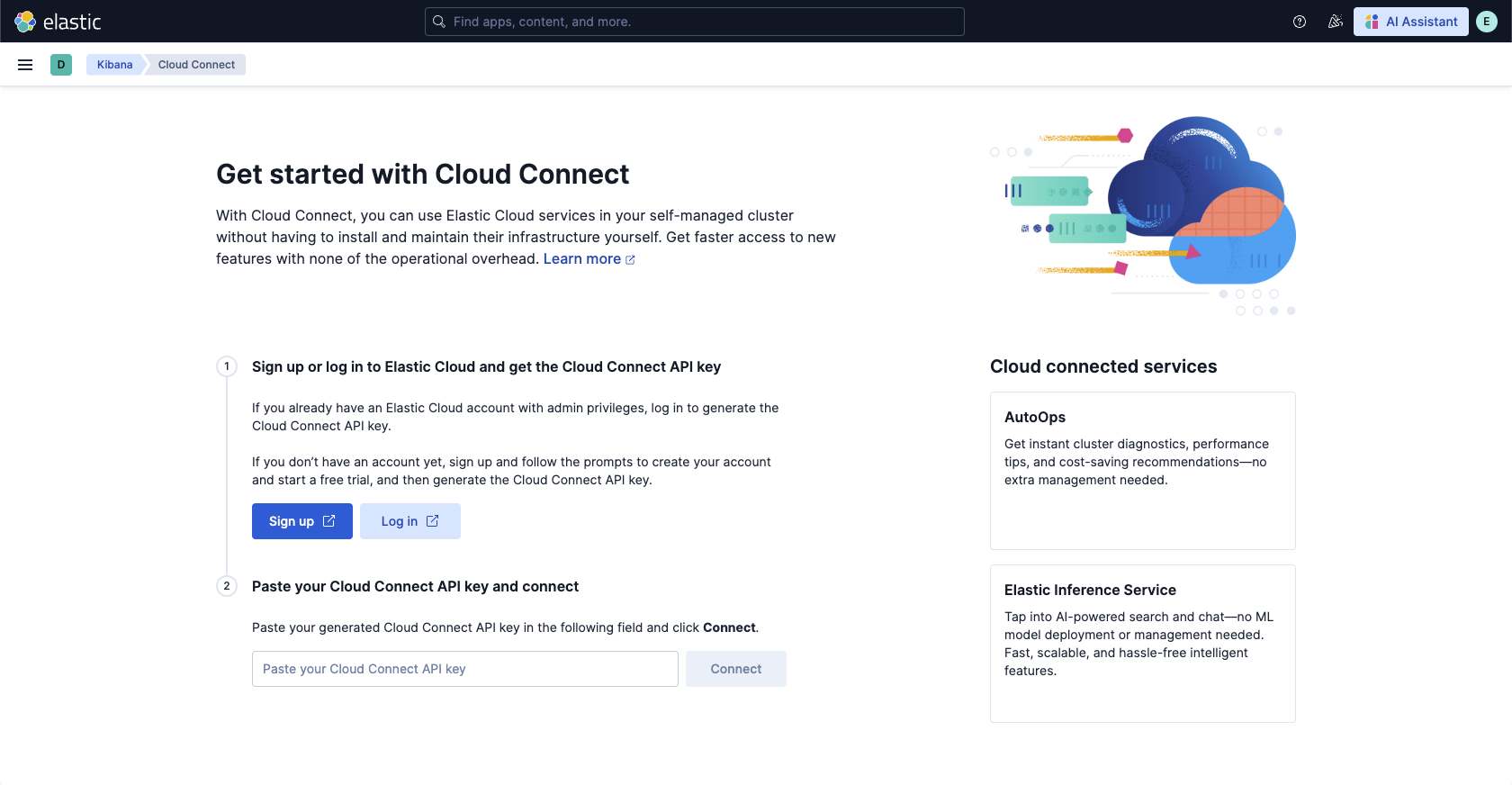
Sign up or log in to Elastic Cloud and get the Cloud Connect API key:
- If you don’t have an account yet, click **Sign up** and follow the prompts to create your account and start a free Cloud Trial.
- If you already have an Elastic Cloud account, click **Log in**.
Copy the Cloud Connect API key, paste it into your self-managed cluster's Cloud Connect page, then click **Connect**.
On the **Cloud connected services** page, click **Connect** for Elastic Inference Service.
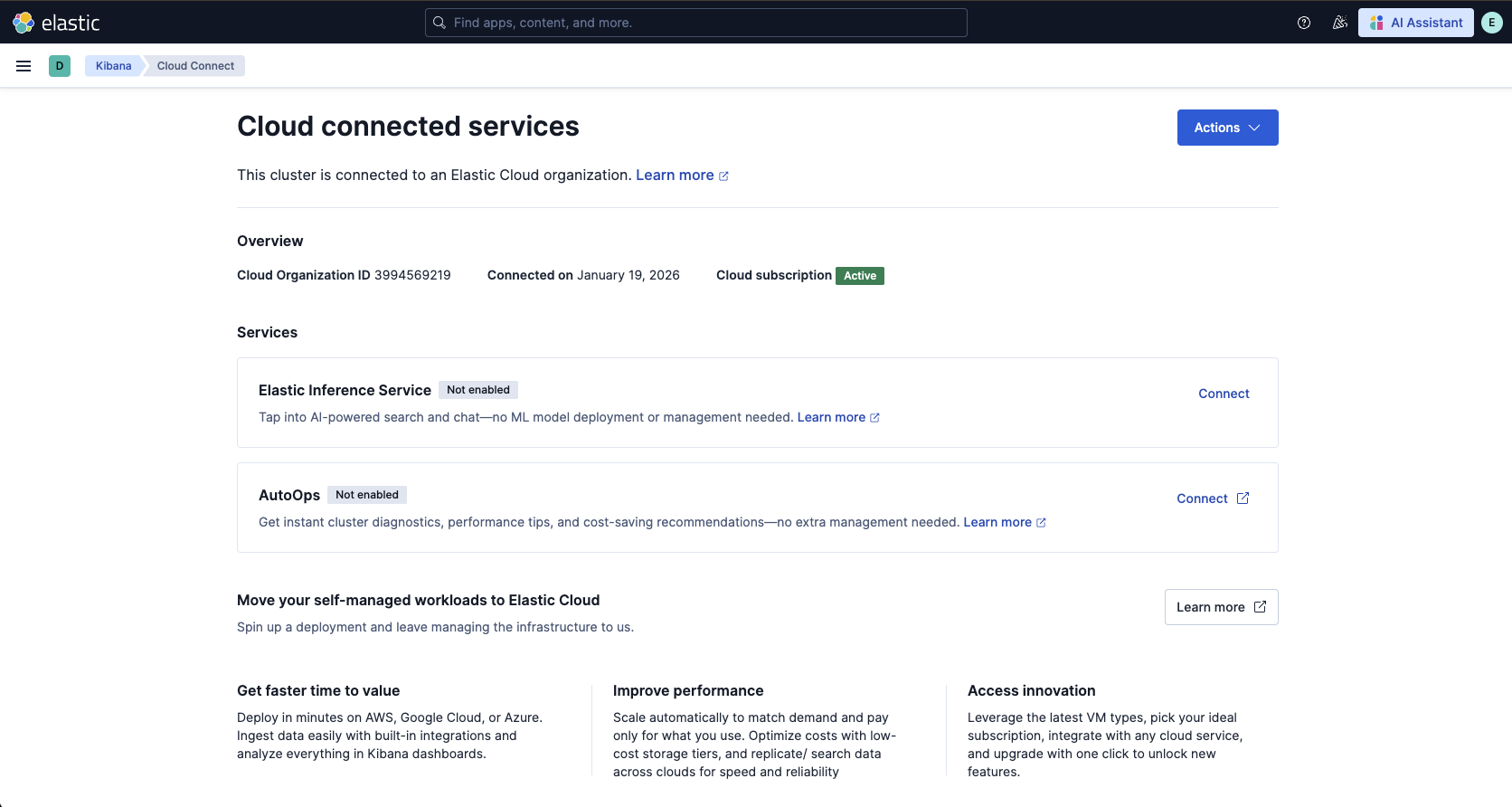
After you connect Elastic Inference Service through Cloud Connect, Elasticsearch automatically creates multiple inference endpoints for search and chat use cases.
Supported Kibana features now use these endpoints automatically.
## Test EIS through Cloud Connect with semantic search
In this example, you create an index with a `semantic_text` field, index a document, then run a query that returns a semantically related match.
In **Dev Tools**, run the following requests:
```json
{
"mappings": {
"properties": {
"text": {
"type": "semantic_text" <1>
}
}
}
}
```
```json
{
"text": "Aberdeen Football Club"
}
```
```json
{
"query": {
"match": {
"text": "soccer"
}
}
}
```
The response should include the indexed document:
```json
{
"took": 161,
"timed_out": false,
"_shards": {
"total": 1,
"successful": 1,
"skipped": 0,
"failed": 0
},
"hits": {
"total": {
"value": 1,
"relation": "eq"
},
"max_score": 4.729913,
"hits": [
{
"_index": "semantic-search-eis",
"_id": "oyH935sBG2FaZ-zOMrer",
"_score": 4.729913,
"_source": {
"text": "Aberdeen Football Club"
}
}
]
}
}
```
## Supported models with EIS through Cloud Connect
Using Elastic Inference Service through Cloud Connect, you have access to all available models listed under [Supported models](https://docs-v3-preview.elastic.dev/elastic/docs-content/pull/6239/explore-analyze/elastic-inference/eis-supported-models), including LLMs, embedding models, and rerankers.
To use these models:
- Elastic Stack: Generally available since 9.3 You need [Kibana connectors](https://docs-v3-preview.elastic.dev/elastic/kibana/tree/main/reference/connectors-kibana) (for LLMs) or [inference endpoints](https://www.elastic.co/docs/api/doc/elasticsearch/group/endpoint-inference). There are preconfigured inference endpoints for all models. For some LLMs, connectors need to be created manually.
- Elastic Stack: Planned Use the preconfigured inference endpoints or create custom endpoints as described in [Elastic Inference Service](https://docs-v3-preview.elastic.dev/elastic/docs-content/pull/6239/explore-analyze/elastic-inference/eis).
### LLMs
For Claude 3.7 and Claude 4.5, connectors are preconfigured and ready to be used.
To use other LLMs listed under [Supported models](https://docs-v3-preview.elastic.dev/elastic/docs-content/pull/6239/explore-analyze/elastic-inference/eis-supported-models), you must [create the Kibana connectors](https://docs-v3-preview.elastic.dev/elastic/kibana/tree/main/reference/connectors-kibana#creating-new-connector) manually. The corresponding inference endpoints are preconfigured.
### Embedding and rerank models
Predefined inference endpoints and connectors are available for all models listed under [Embedding models](/elastic/docs-content/pull/6239/explore-analyze/elastic-inference/eis-supported-models#embedding-models) and [Rerankers](/elastic/docs-content/pull/6239/explore-analyze/elastic-inference/eis-supported-models#rerankers).
For these models, you only need to create new inference endpoints if you want to use custom settings.
## Regions and billing
For information about EIS regions and request routing, refer to [Region and hosting](/elastic/docs-content/pull/6239/explore-analyze/elastic-inference/eis-supported-models#eis-regions).
EIS is billed per million tokens and consumes ECUs. For details on pricing and usage tracking, refer to [Pricing](/elastic/docs-content/pull/6239/explore-analyze/elastic-inference/eis-supported-models#pricing) and [Monitor your token usage](/elastic/docs-content/pull/6239/explore-analyze/elastic-inference/eis-supported-models#monitor-your-token-usage).