---
title: Host isolation exceptions
description: You can configure host isolation exceptions for specific IP addresses that isolated hosts are still allowed to communicate with, even when blocked from...
url: https://docs-v3-preview.elastic.dev/elastic/docs-content/pull/6378/solutions/security/manage-elastic-defend/host-isolation-exceptions
products:
- Elastic Cloud Serverless
- Elastic Security
applies_to:
- Serverless Security projects: Generally available
- Elastic Stack: Generally available
---
# Host isolation exceptions
You can configure host isolation exceptions for specific IP addresses that [isolated hosts](https://docs-v3-preview.elastic.dev/elastic/docs-content/pull/6378/solutions/security/endpoint-response-actions/isolate-host) are still allowed to communicate with, even when blocked from the rest of your network. Isolated hosts can still send data to Elastic Security, so you don’t need to set up host isolation exceptions for them.
Host isolation exceptions support IPv4 addresses, with optional classless inter-domain routing (CIDR) notation.
- You must have the **Host Isolation Exceptions** [privilege](https://docs-v3-preview.elastic.dev/elastic/docs-content/pull/6378/solutions/security/configure-elastic-defend/elastic-defend-feature-privileges) or the appropriate user role to access this feature.
- Host isolation requires the appropriate [subscription](https://www.elastic.co/pricing) in Elastic Stack or [project feature tier](https://docs-v3-preview.elastic.dev/elastic/docs-content/pull/6378/deploy-manage/deploy/elastic-cloud/project-settings) in Serverless.
- Each host isolation exception IP address should be a highly trusted and secure location since you’re allowing it to communicate with hosts that have been isolated to prevent a potential threat from spreading.
- If your hosts depend on VPNs for network communication, you should also set up host isolation exceptions for those VPN servers' IP addresses.
By default, a host isolation exception is recognized globally across all hosts running Elastic Defend. You can also assign a host isolation exception to a specific Elastic Defend integration policy, affecting only the hosts assigned to that policy.
## Add a host isolation exception
To add a host isolation exception:
1. Depending on your version, do one of the following:
- Elastic Cloud Serverless: Generally available Elastic Stack: Generally available since 9.4 Go to the **Artifacts** page using the navigation menu or the [global search field](https://docs-v3-preview.elastic.dev/elastic/docs-content/pull/6378/explore-analyze/find-and-organize/find-apps-and-objects), then select the **Host isolation exceptions** tab.
- Elastic Stack: Generally available from 9.0 to 9.3 Go to the **Host isolation exceptions** page using the navigation menu or the global search field.
2. Click **Add Host isolation exception**.
3. Fill in these fields in the **Add Host isolation exception** flyout:
1. `Name your host isolation exceptions`: Enter a name to identify the host isolation exception.
2. `Description`: Enter a description to provide more information on the host isolation exception (optional).
3. `Enter IP Address`: Enter the IP address for which you want to allow communication with an isolated host. This must be an IPv4 address, with optional CIDR notation (for example, `0.0.0.0` or `1.0.0.0/24`, respectively).
4. Select an option in the **Assignment** section to assign the host isolation exception to a specific integration policy:
- `Global`: Assign the host isolation exception to all integration policies for Elastic Defend.
- `Per Policy`: Assign the host isolation exception to one or more specific Elastic Defend integration policies. Select each policy where you want the host isolation exception to apply.
You can also select the `Per Policy` option without immediately assigning a policy to the host isolation exception. For example, you could do this to create and review your host isolation exception configurations before putting them into action with a policy.
5. Click **Add Host isolation exception**. The new exception is added to the **Host isolation exceptions** list.
To add multiple host isolation exceptions at once, you can import an NDJSON file instead. Refer to [Import and export host isolation exceptions](#import-export-host-isolation-exceptions).
## View and manage host isolation exceptions
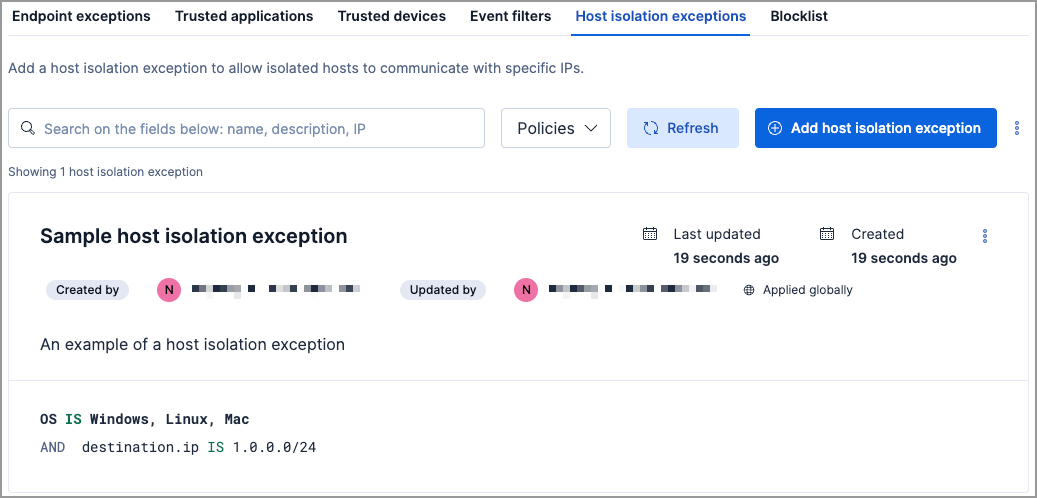
The **Host isolation exceptions** UI displays all the host isolation exceptions that have been configured for Elastic Security. To refine the list, use the search bar to search by name, description, or IP address.
### Import and export host isolation exceptions
- Elastic Cloud Serverless: Generally available
- Elastic Stack: Generally available since 9.4
- To export host isolation exceptions, you need the **Host Isolation Exceptions: Read** [privilege](https://docs-v3-preview.elastic.dev/elastic/docs-content/pull/6378/solutions/security/configure-elastic-defend/elastic-defend-feature-privileges).
- To import per-policy items, you need the **Host Isolation Exceptions: All** privilege.
- To import global items, you need the **Host Isolation Exceptions: All** and the **Global artifact management: All** privilege.
- To import items to a different space, you need the **Global artifact management: All** privilege.
You can import and export host isolation exceptions as NDJSON files:
- **When the list is empty**: click **Import host isolation exceptions**.
- **When the list has entries**: click the actions menu (`boxes_vertical`), then select **Import host isolation exceptions** or **Export host isolation exceptions**.
When you import an NDJSON file, the imported host isolation exceptions are appended to your existing entries — existing entries are not removed or overwritten.
Items are processed individually on import — per-policy items that are not visible in the current space are skipped, while the remaining items are imported.
If an imported per-policy item is assigned to a policy that doesn't exist in the current environment, the item is imported with the policy assignment removed.
### Edit a host isolation exception
You can individually modify each host isolation exception and change the policies that a host isolation exception is assigned to.
To edit a host isolation exception:
1. Click the actions menu (**…**) for the exception you want to edit, then select **Edit Exception**.
2. Modify details as needed.
3. Click **Save**. The newly modified exception appears at the top of the list.
### Delete a host isolation exception
You can delete a host isolation exception, which removes it entirely from all Elastic Defend integration policies.
To delete a host isolation exception:
1. Click the actions menu (**…**) on the exception you want to delete, then select **Delete Exception**.
2. On the dialog that opens, verify that you are removing the correct host isolation exception, then click **Delete**. A confirmation message is displayed.