---
title: Select and switch Kibana spaces
description: Select and switch Kibana spaces, and control whether Kibana returns to your last space when you log in.
url: https://docs-v3-preview.elastic.dev/elastic/docs-content/pull/7418/deploy-manage/choose-and-switch-spaces
products:
- Elastic Cloud Serverless
- Kibana
applies_to:
- Elastic Cloud Serverless: Generally available
- Elastic Stack: Generally available
---
# Select and switch Kibana spaces
The spaces you can access depend on your roles. Switching spaces does not change your permissions.
## Switch spaces
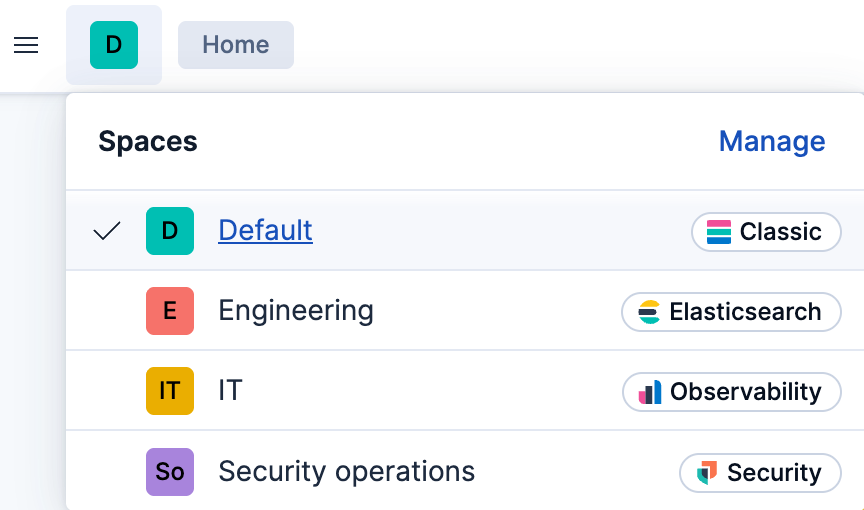
From the global header, select your current space, then select the space you want to open.
## Understand what happens when you log in
Elastic Cloud Hosted: Generally available Elastic Cloud Enterprise: Generally available Elastic Cloud on Kubernetes: Generally available Elastic Cloud Serverless: Generally available If you can access more than one space, Kibana asks you to select a space when you log in.
Self-managed Elastic deployments: Generally available On self-managed deployments, what Kibana opens when you log in depends on your version and whether it has remembered a space:
- Self-managed Elastic deployments: Planned Kibana can remember the space you use and return you to it. If Kibana has no remembered space or you no longer have access to it, Kibana asks you to select a space. A direct link continues to open the linked Kibana app or object instead of redirecting you to the remembered space.
- Self-managed Elastic deployments: Generally available from 9.0 to 9.4 If you can access more than one space, Kibana asks you to select a space.
## Change whether Kibana remembers your space
- Self-managed Elastic deployments: Planned
This personal preference controls whether Kibana returns you to your last space or shows the space selector when you log in and can access multiple spaces.
1. From the global header's user menu, select **Edit profile**.
2. In **Space Configuration**, turn **Remember last selected space** on or off.
3. Select **Save changes**.
When you turn off **Remember last selected space**, Kibana shows the space selector the next time you log in and can access more than one space.
To create, configure, or delete spaces, refer to [Manage spaces](https://docs-v3-preview.elastic.dev/elastic/docs-content/pull/7418/deploy-manage/manage-spaces).