---
title: Time-bound indices and dimension-based routing
description: Unlike regular data streams that only write to the most recent backing index, time series data streams (TSDS) use time-bound backing indices that accept...
url: https://docs-v3-preview.elastic.dev/elastic/docs-content/pull/7558/manage-data/data-store/data-streams/time-bound-tsds
products:
- Elasticsearch
applies_to:
- Elastic Cloud Serverless: Generally available
- Elastic Stack: Generally available
---
# Time-bound indices and dimension-based routing
Unlike regular data streams that only write to the most recent backing index, time series data streams (TSDS) use time-bound backing indices that accept documents based on their timestamp values. This page provides details and best practices to help you work with time-bound indices.
## How time-bound indices work
Each TSDS backing index has a time range for accepted `@timestamp` values, defined by two settings:
- [`index.time_series.start_time`](https://docs-v3-preview.elastic.dev/elastic/elasticsearch/tree/main/reference/elasticsearch/index-settings/time-series#index-time-series-start-time): The earliest accepted timestamp (inclusive)
- [`index.time_series.end_time`](https://docs-v3-preview.elastic.dev/elastic/elasticsearch/tree/main/reference/elasticsearch/index-settings/time-series#index-time-series-end-time): The latest accepted timestamp (exclusive)
When you add a document to a TSDS, Elasticsearch adds the document to the appropriate backing index based on its `@timestamp` value. This means a TSDS can write to multiple backing indices simultaneously, not just the most recent one.
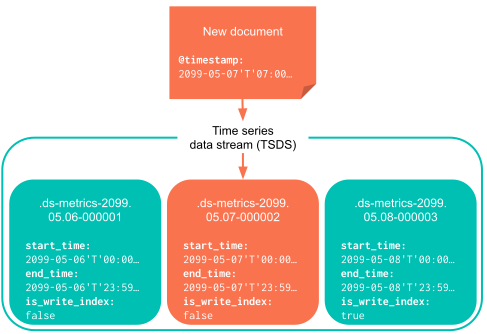
If no backing index can accept a document's `@timestamp` value, Elasticsearch rejects the document by default. Elastic Stack: Planned Elastic Cloud Serverless: Generally available When you enable past backing index creation, Elasticsearch can create missing past indices for timestamps inside the [eligible write window](#tsds-eligible-write-window) before indexing the document. For details, refer to [Backfill past timestamps](#tsds-backfill-past-timestamps).
Elasticsearch automatically configures `index.time_series.start_time` and `index.time_series.end_time` settings as part of the index creation and rollover process.
### Accepted time range for adding data
A TSDS is designed to ingest current metrics data. When the TSDS is first created, the initial backing index has the following settings:
- An `index.time_series.start_time` value set to `now - index.look_back_time`
- An `index.time_series.end_time` value set to `now + index.look_ahead_time`
Only data that falls within this range is indexed into the backing index that covers that timestamp.
The accepted time range describes the writable window for **each** backing index. It is separate from the [eligible write window](#tsds-eligible-write-window), which limits how far back you can write to the data stream as a whole.
To check the accepted time range for writing to a TSDS, use the [get data stream API](https://www.elastic.co/docs/api/doc/elasticsearch/operation/operation-indices-get-data-stream):
```json
```
Writes might still be rejected even when a timestamp fits the accepted time range of a backing index, or when past-index creation is enabled but no backing index exists yet for that timestamp. Common causes include:
- No backing index covers the document's `@timestamp` value and past-index creation is disabled (the default).
- A lifecycle action has made the target backing index read-only or removed it. Examples include:
- [Delete](https://docs-v3-preview.elastic.dev/elastic/elasticsearch/tree/main/reference/elasticsearch/index-lifecycle-actions/ilm-delete)
- [Downsample](https://docs-v3-preview.elastic.dev/elastic/elasticsearch/tree/main/reference/elasticsearch/index-lifecycle-actions/ilm-downsample)
- [Force merge](https://docs-v3-preview.elastic.dev/elastic/elasticsearch/tree/main/reference/elasticsearch/index-lifecycle-actions/ilm-forcemerge)
- [Read only](https://docs-v3-preview.elastic.dev/elastic/elasticsearch/tree/main/reference/elasticsearch/index-lifecycle-actions/ilm-readonly)
- [Searchable snapshot](https://docs-v3-preview.elastic.dev/elastic/elasticsearch/tree/main/reference/elasticsearch/index-lifecycle-actions/ilm-searchable-snapshot)
- [Shrink](https://docs-v3-preview.elastic.dev/elastic/elasticsearch/tree/main/reference/elasticsearch/index-lifecycle-actions/ilm-shrink), which might then revert the read-only status at the end of the action
- The timestamp falls outside the [eligible write window](#tsds-eligible-write-window).
Index lifecycle management will **not** proceed with executing these actions until [`index.time_series.end_time`](https://docs-v3-preview.elastic.dev/elastic/elasticsearch/tree/main/reference/elasticsearch/index-settings/time-series#index-time-series-end-time) has passed.
### Eligible write window
- Elastic Cloud Serverless: Generally available
- Elastic Stack: Planned
The eligible write window is the range of past timestamps that a TSDS accepts for writes. It extends from the present back to the first lifecycle action that makes a backing index read-only, or to the configured retention limit, whichever comes first. If neither is configured, the window extends back indefinitely.
Lifecycle actions that make backing indices read-only include [downsampling](https://docs-v3-preview.elastic.dev/elastic/docs-content/pull/7558/manage-data/data-store/data-streams/downsampling-time-series-data-stream) and searchable snapshot transitions. Documents for time periods that are already read-only are still rejected, because Elasticsearch cannot write to summarized or snapshotted indices.
The eligible write window is relative to the current time. As time passes, the window moves forward with it.
This window is distinct from the per-index accepted time range defined by `index.look_back_time` and `index.look_ahead_time`. The eligible write window governs whether a timestamp is allowed at all; the accepted time range governs which backing index receives the document.
### Backfill past timestamps
- Elastic Cloud Serverless: Generally available
- Elastic Stack: Planned
When past backing index creation is enabled, Elasticsearch can create missing past backing indices on demand during indexing. This lets you load historical metrics into an existing TSDS without manually creating backing indices.
Past-index creation applies only when all of the following are true:
- The TSDS already exists and has at least one time series backing index.
- The document's `@timestamp` is not covered by any existing backing index.
- The timestamp is inside the [eligible write window](#tsds-eligible-write-window).
- The cluster setting [`data_stream.past_tsdb_index_creation_enabled`](https://docs-v3-preview.elastic.dev/elastic/elasticsearch/tree/main/reference/elasticsearch/configuration-reference/miscellaneous-cluster-settings#time-series-data-stream) is enabled.
Timestamps outside the eligible write window or in the future are still rejected. If a [failure store](https://docs-v3-preview.elastic.dev/elastic/docs-content/pull/7558/manage-data/data-store/data-streams/failure-store) is enabled, rejected timestamp failures can be redirected there.
#### Enable past-index creation
Past-index creation is disabled by default. Enable it at the cluster level:
```json
{
"persistent": {
"data_stream.past_tsdb_index_creation_enabled": true
}
}
```
#### Configure past index intervals
Each new past backing index covers a configurable time interval. Use the [`data_streams.past_tsdb_index_interval`](https://docs-v3-preview.elastic.dev/elastic/elasticsearch/tree/main/reference/elasticsearch/configuration-reference/miscellaneous-cluster-settings#time-series-data-stream) cluster setting to control the interval. The default is `1d`, with a minimum of `1h` and a maximum of `7d`.
When the gap between existing indices is up to 1.3 times the configured interval, Elasticsearch may create a single bridging index instead of many small indices.
#### Lifecycle age for past indices
Past backing indices hold old data but are new indices. Elasticsearch sets [`index.lifecycle.origination_date`](https://docs-v3-preview.elastic.dev/elastic/elasticsearch/tree/main/reference/elasticsearch/configuration-reference/data-stream-lifecycle-settings#index-data-stream-lifecycle-origination-date) from `index.time_series.end_time` so that [data stream lifecycle](https://docs-v3-preview.elastic.dev/elastic/docs-content/pull/7558/manage-data/lifecycle/data-stream) and ILM treat the index age based on the data it contains, not when the index was created.
#### Security
Users who write documents that trigger past-index creation need the `auto_configure` index privilege on the data stream, in addition to privileges that allow indexing. Users with only the `index` privilege receive a `security_exception` when a write would create a past backing index.
#### After disabling the feature
If you disable past-index creation after past backing indices were created, writes to those existing past indices still succeed. Only the automatic creation of new past indices is disabled.
For step-by-step guidance on loading historical data, refer to [Load historical metrics into a TSDS](https://docs-v3-preview.elastic.dev/elastic/docs-content/pull/7558/manage-data/data-store/data-streams/load-historical-tsds).
### Dimension-based routing
In addition to time-based routing, time series data streams use dimension-based routing to determine which shard to route data to. Documents with the same dimensions are routed to the same shards, using one of two strategies:
Routing based on the internally managed `index.dimensions` setting.
Routing based on the [`index.routing_path`](https://docs-v3-preview.elastic.dev/elastic/elasticsearch/tree/main/reference/elasticsearch/index-settings/time-series#index-routing-path) setting (as a fallback).
The `index.dimensions`-based strategy offers better ingest performance. It uses a list of dimension paths that is automatically updated (and is not user-configurable). This strategy is not available for time series data streams with dynamic templates that set `time_series_dimension: true`.
To disable routing based on `index.dimensions`, set [`index.index_dimensions_tsid_strategy_enabled`](https://docs-v3-preview.elastic.dev/elastic/elasticsearch/tree/main/reference/elasticsearch/index-settings/time-series#index-dimensions-tsid-strategy-enabled) to `false`,
or manually set the [`index.routing_path`](https://docs-v3-preview.elastic.dev/elastic/elasticsearch/tree/main/reference/elasticsearch/index-settings/time-series#index-routing-path) to the dimensions you want to use:
```json
"settings": {
"index.mode": "time_series",
"index.routing_path": ["host", "service"]
}
```
Documents with the same dimension values are routed to the same shard, improving compression and query performance for time series data.
The `index.routing_path` setting supports wildcards (for example, `dim.*`) and can dynamically match new fields.