---
title: Configure SLOs settings
description: From your Kibana instance, navigate to the SLOs page and click Settings on the menu bar. On the SLOs Settings page, you can configure the following controls:...
url: https://docs-v3-preview.elastic.dev/elastic/docs-content/pull/8004/solutions/observability/incident-management/configure-slo-settings
products:
- Elastic Cloud Serverless
- Elastic Observability
applies_to:
- Elastic Cloud Serverless: Generally available
- Elastic Stack: Generally available since 9.4
---
# Configure SLOs settings
From your Kibana instance, navigate to the SLOs page and click **Settings** on the menu bar.
On the **SLOs Settings** page, you can configure the following controls:
You can fetch SLOs from every connected remote cluster by enabling the option **Use all remote clusters**.
To select the remote clusters from which you want to fetch SLOs, disable the option **Use all remote clusters** and open the **Select remote clusters** dropdown.
You can hide SLOs from the overview list if they haven’t been updated within the defined stale threshold.
Automatically cleanup stale SLO instances that have not been updated within the stale threshold.
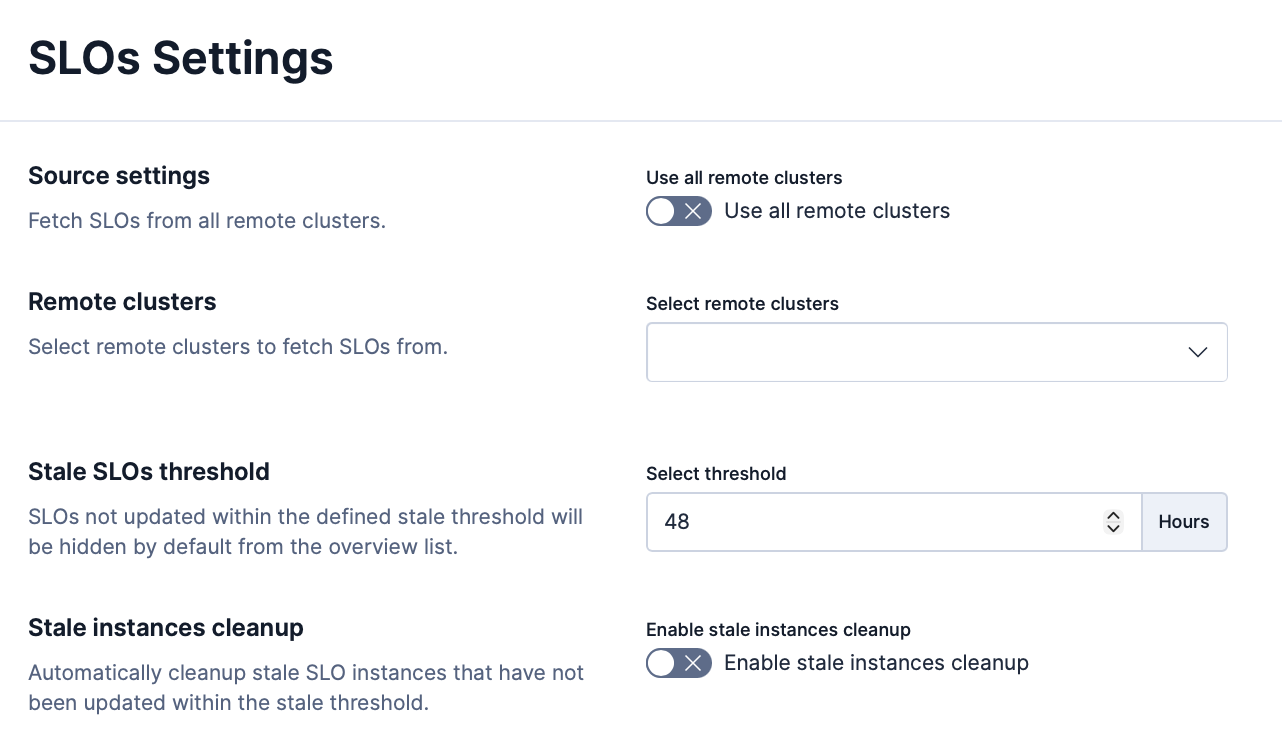
- The **SLOs Settings** page is specific to your Kibana [space](https://docs-v3-preview.elastic.dev/elastic/docs-content/pull/8004/deploy-manage/manage-spaces).
- Elastic Cloud Serverless: Preview **Source settings**, **Remote clusters**, and federated views are not available on Elastic Cloud Serverless. To monitor SLO breaches across Elasticsearch projects, create SLOs in this project and [scope them](/elastic/docs-content/pull/8004/solutions/observability/incident-management/create-an-slo#slo-cps-scope) to linked projects.
## Configure SLOs for federated views
- Elastic Cloud Serverless: Unavailable
Federated views allow you to view SLOs from remote Elasticsearch clusters alongside the local SLOs on the SLO listing page of your Kibana instance. This enables a centralized overview cluster where you can monitor SLOs across your entire fleet within the same Kibana space.
Before configuring SLOs, ensure that:
- Elasticsearch Cross-Cluster Search (CCS) is properly set up between the overview cluster and the remote clusters.
- The remote clusters are running Kibana with the SLO feature enabled and have SLOs created.
Remote SLOs appear on the [SLO overview](/elastic/docs-content/pull/8004/solutions/observability/incident-management/service-level-objectives-slos#slo-in-elastic). Open the three dots menu on a remote SLO:
Opens a new panel that displays details of the remote instance.
Opens the SLO in edit mode on the remote cluster. You are redirected to the remote Kibana instance to modify the SLO definition.
Opens the clone SLO flow on the remote cluster. You are redirected to the remote Kibana instance to create a copy of the SLO.
Opens the delete confirmation on the remote cluster. You are redirected to the remote Kibana instance to remove the SLO.
Opens burn rate rules management for this SLO on the remote cluster. You are redirected to the remote Kibana instance to view, create, or edit burn rate alert rules.
Resets the SLO's error budget or rolling window on the remote cluster. You are redirected to the remote Kibana instance to complete this action.
Adds the remote SLO as a panel to a dashboard in your local Kibana instance. The SLO continues to display data from the remote cluster.
Disabled for remote SLOs. To create burn rate or other alert rules for a remote SLO, use **Manage burn rate rules** to open the remote Kibana instance and create the rule there.