---
title: Elastic Agent Builder traces overview dashboard
description: Install and use the prebuilt Agent Builder overview dashboard to monitor agent activity, token usage, latency, and tool calls from trace data.
url: https://docs-v3-preview.elastic.dev/elastic/docs-content/pull/8094/explore-analyze/ai-features/agent-builder/agent-traces-dashboard
products:
- Elastic Cloud Serverless
- Elastic Observability
- Elastic Security
- Elasticsearch
- Kibana
applies_to:
- Elastic Cloud Serverless: Generally available
- Elastic Stack: Generally available since 9.5
---
# Elastic Agent Builder traces overview dashboard
Elastic Agent Builder ships a prebuilt overview dashboard that turns your agent trace data into ready-made operational and usage metrics. Instead of building visualizations yourself, you install one managed dashboard and see how your agents behave, including how many tokens they use, how long conversations take, which agents run most often, and where tool calls fail.
Use the dashboard to:
- Track token usage and LLM request volume across models and providers.
- Spot slow conversations and long-running agent executions.
- Find tools that fail or run slowly.
The dashboard visualizes the trace data that Elastic Agent Builder sends to your Elasticsearch deployment, giving you a view of real agent activity. First, you must [configure trace collection](https://docs-v3-preview.elastic.dev/elastic/docs-content/pull/8094/explore-analyze/ai-features/agent-builder/collect-traces). Then install the dashboard in each Kibana space where you want to view the data.
## What the dashboard shows
The overview dashboard is a single prebuilt dashboard named **[Elastic] Agent Builder Overview**. It is a managed dashboard, so it is read-only. To change or extend it, duplicate it and edit the copy, as described in Customize the dashboard.
You install the dashboard separately in each Kibana space, and each copy shows only that space's trace data.
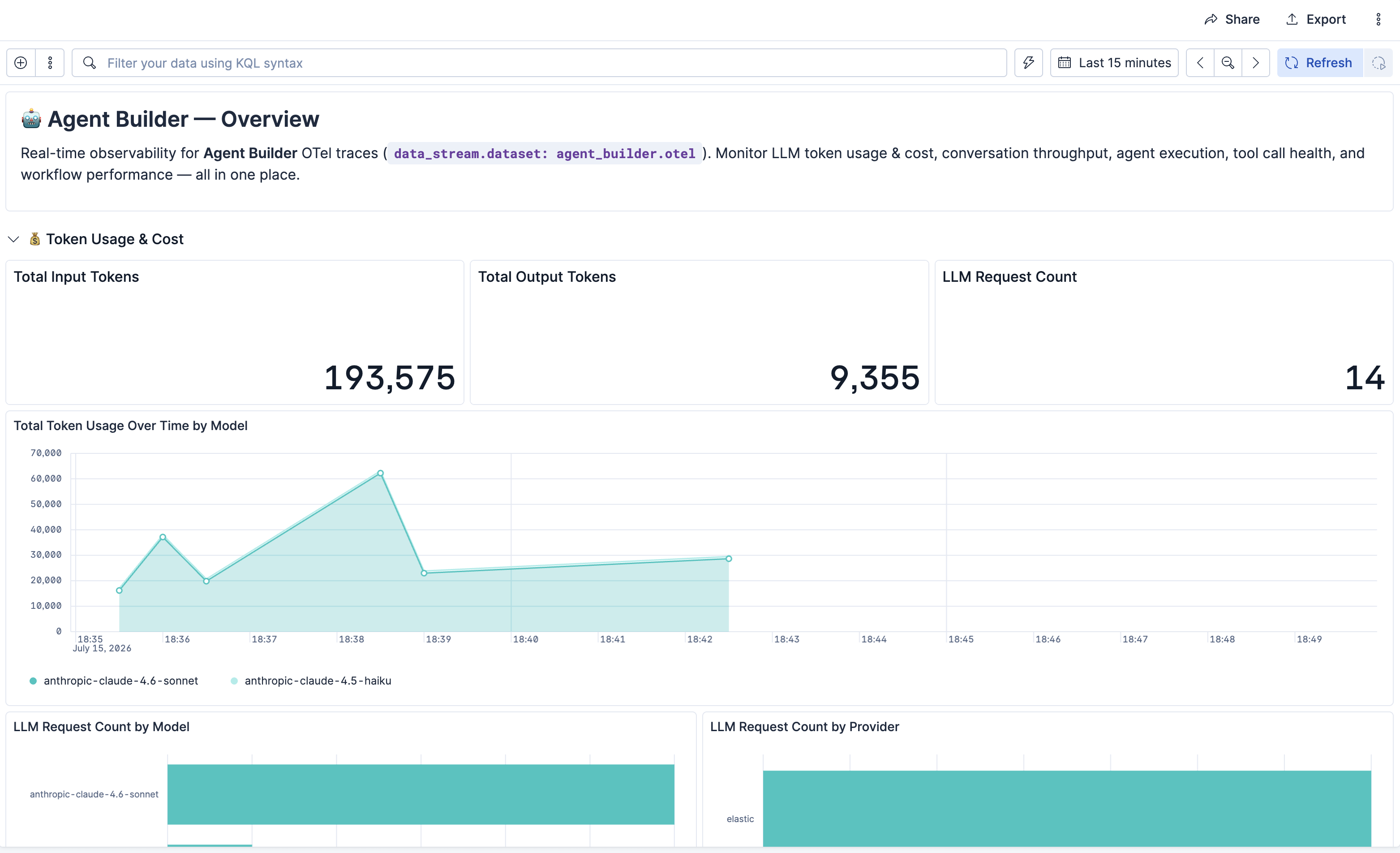
The dashboard groups its panels into four areas:
- **Token Usage & Cost**: Input and output tokens by model, and LLM request counts by model and provider.
- **Conversation Volume & Latency**: How many conversation rounds ran and how long they took, including average, 95th percentile, and maximum duration.
- **Agent Execution**: How often each agent ran and how long it took, broken down by agent.
- **Tool Call Frequency & Errors**: How often tools were called, their success and error rates, average tool duration, and the most-used tools. This section is collapsed when you install the dashboard, so expand it to see the panels.
When trace data is flowing, the dashboard looks like this:
## Before you begin
Before you install the dashboard:
- Make sure trace collection is on for the space. It is on by default, so the **Install Dashboard** button is normally available straight away. If you have just changed the setting, save it first, because the button is hidden while the change is unsaved. For details, refer to [Collect agent traces](https://docs-v3-preview.elastic.dev/elastic/docs-content/pull/8094/explore-analyze/ai-features/agent-builder/collect-traces).
- Make sure you can read the trace data, otherwise the panels have no data to show. For the required privileges, refer to [Read trace data](/elastic/docs-content/pull/8094/explore-analyze/ai-features/agent-builder/permissions#read-trace-data).
- Make sure you can manage Kibana advanced settings. Installing and uninstalling the dashboard requires this privilege.
- Install the dashboard in each Kibana space where you want it. It is not shared across spaces.
## Install the dashboard
The overview dashboard is not installed automatically. Install it once per Kibana space.
1. Go to **Stack Management** → **GenAI Settings**.
2. In the **Agent Builder Traces** section, confirm that **Collect conversation traces** is on and saved.
3. Select **Install Dashboard**.
To open the dashboard, select **View Dashboard**, or open **Dashboards** and select **[Elastic] Agent Builder Overview**.
Repeat these steps in each space where you want the dashboard.
### Reinstall or remove the dashboard
The dashboard is not restored automatically, including in a new space or after you remove it. If it is missing, open the **Agent Builder Traces** section and select **Install Dashboard** again.
To remove it, select the arrow next to **View Dashboard**, then select **Uninstall dashboard**.
## Customize the dashboard
The overview dashboard is managed, so you cannot edit it directly. To build your own version:
1. Open the dashboard.
2. Duplicate it.
3. Edit and save the copy.
Because the original is managed, Elastic can ship improvements to it without overwriting your copy.
## Span and attribute reference
The dashboard panels are [ES|QL](https://docs-v3-preview.elastic.dev/elastic/elasticsearch/tree/main/reference/query-languages/esql) queries over your trace data. To build your own visualizations in [Dashboards](https://docs-v3-preview.elastic.dev/elastic/docs-content/pull/8094/explore-analyze/dashboards), [Lens](https://docs-v3-preview.elastic.dev/elastic/docs-content/pull/8094/explore-analyze/visualize/lens), or [Discover](https://docs-v3-preview.elastic.dev/elastic/docs-content/pull/8094/explore-analyze/discover), query the trace data stream and filter by span type and attribute.
The dashboard's panels query span data from the `traces-agent_builder.otel-*` data stream, where each document is a [span](https://opentelemetry.io/docs/concepts/signals/traces/#spans) (a record of a single operation or unit of work in a trace). The dashboard identifies the kind of work a span represents from its `span.name`, and reads generative AI details from the span attributes. For the trace data stream and the read privileges, refer to [Read trace data](/elastic/docs-content/pull/8094/explore-analyze/ai-features/agent-builder/permissions#read-trace-data).
### Span types
Each document is a span. Filter on the `span.name` field to select a kind of agent activity. The dashboard matches span names by prefix.
| Agent activity | Filter |
|-------------------------------------------|-------------------------------------------------------------------------------------------|
| LLM requests, tokens, model, and provider | `span.name LIKE "chat *"` |
| Conversation rounds (volume and latency) | `span.name LIKE "invoke_agent *"` and `attributes.elastic.inference.span.kind == "CHAIN"` |
| Agent executions | `span.name LIKE "invoke_agent *"` and `attributes.elastic.inference.span.kind == "AGENT"` |
| Tool calls | `span.name LIKE "execute_tool *"`. For failures only, add `status.code == "Error"` |
### Generative AI attributes
These fields contain the details the dashboard aggregates. Generative AI attributes use the `attributes.` prefix.
| Field | Description |
|----------------------------------------------------------------------------------------------------------------------------------------|----------------------------------------------------------------------------------------------------------------------------------------------------------------------------------------------------------------------------------------------------------------------------------------------------------------------------------------------------------------------------------------------------------------------------------------------------------------------------------------------------------------------------------------------------------|
| `attributes.gen_ai.usage.input_tokens` | Input tokens sent to the model |
| `attributes.gen_ai.usage.output_tokens` | Output tokens generated by the model |
| `attributes.gen_ai.request.model` | Model name |
| `attributes.gen_ai.provider.name` | Model provider |
| `attributes.gen_ai.agent.id` | Agent identifier |
| `attributes.gen_ai.conversation.id` | Conversation identifier |
| `attributes.elastic.conversation.title` Elastic Cloud Serverless: Generally available, Elastic Stack: Planned | Conversation title. Present on the root conversation round span only, and only when **Include real tool, agent, and conversation names in traces** is on. This is an Elastic field rather than an OpenTelemetry one, so it is not covered by the generative AI semantic conventions |
| `attributes.elastic.inference.span.kind` | The kind of work a span represents:- `LLM` on `chat` spans- `TOOL` on `execute_tool` spans- `CHAIN` or `AGENT` on `invoke_agent` spans, where `CHAIN` is a conversation round and `AGENT` is an agent execution.Internal spans such as `generate_title` also use `CHAIN`, so combine this field with a `span.name` filter instead of using it on its own |
| `name` | Span name. On `execute_tool` spans it is `execute_tool `, for example `execute_tool platform.core.list_indices`. For the bare tool id, use `attributes.gen_ai.tool.name`.Names in this field are anonymized along with the attributes. While the real-names [trace privacy setting](/elastic/docs-content/pull/8094/explore-analyze/ai-features/agent-builder/collect-traces#trace-privacy-settings) is off, a custom agent or tool appears as `invoke_agent custom` or `execute_tool custom`, so filters that match a real name return nothing |
| `duration` | Span duration in nanoseconds (root field). Divide by 1,000,000,000 for seconds |
| `status.code` | Span status, for example `Error` (root field) |
| `@timestamp` | When the span started |
### User attributes
- Elastic Cloud Serverless: Generally available
- Elastic Stack: Planned
Traces record who ran each agent. These fields appear on the root conversation round span only, so join on `trace_id` to attribute nested spans to a user.
To select that span, combine a span name prefix with the span kind:
```esql
FROM traces-agent_builder.otel-*
| WHERE span.name LIKE "invoke_agent *" AND attributes.elastic.inference.span.kind == "CHAIN"
```
Both conditions are needed. The name prefix on its own also matches the nested agent execution spans, and `CHAIN` on its own also matches the internal `generate_title` span, which carries none of these fields. Anonymized names do not break the filter, because an anonymized round is still named `invoke_agent custom`.
| Field | Description | Required setting |
|------------------------|---------------------------------------------------------------------------------------------------------------------------|---------------------------------|
| `attributes.user.id` | User profile ID | **Include user data in traces** |
| `attributes.user.name` | Username | **Include user data in traces** |
| `attributes.user.hash` | Stable hash of the user ID, used for correlation when the real identity is withheld. Present only when the setting is off | None |
`attributes.user.hash` is stable for a given user across conversations, so you can break trace data down per user without recording anyone's identity. Group by `attributes.user.hash` to build per-user token or latency dashboards while leaving **Include user data in traces** off. Turn the setting on only when you need to attribute activity to a named person.
When the caller has no user profile, as is the case for some API key authentication, there is no `attributes.user.id` and therefore no `attributes.user.hash`. Those rounds are still traced, but they fall outside any per-user breakdown.
For users who sign in with Elastic Cloud SSO, as is standard on Elastic Cloud Hosted and Elastic Cloud Serverless, `attributes.user.name` holds the numeric Elastic Cloud user ID rather than a readable username. To resolve a display name, look up `attributes.user.id` with the [user profile API](https://www.elastic.co/docs/api/doc/elasticsearch/operation/operation-security-get-user-profile) and read `user.full_name` or `user.email` from the response.
To break token usage down by user, combine spans from the same trace. Token counts are recorded on the model call spans, not on the conversation round span that carries the user fields, so a query over a single span kind returns no token totals. Both span kinds share the same `trace_id` and `attributes.gen_ai.conversation.id`, so use one of those to correlate them.
### Message content attributes
The dashboard does not use these fields, but you can query them yourself. When an administrator opts in to capturing conversation content, prompts, responses, and tool call content are stored in the following attributes. Each one depends on a [trace privacy setting](/elastic/docs-content/pull/8094/explore-analyze/ai-features/agent-builder/collect-traces#trace-privacy-settings), and all of those settings are off by default.
| Field | Span | Description | Required setting(s) |
|-----------------------------------------|----------------|--------------------------------------------------------------------------------|------------------------------------------------------------------------------------------------------------------------------------------------------------------------------------|
| `attributes.gen_ai.input.messages` | `chat` | Chat history sent to the model, as a series of user, assistant, and tool turns | **Include user prompts in traces** for the user turns, **Include LLM responses in traces** for the assistant turns, and **Include tool call details in traces** for the tool turns |
| `attributes.gen_ai.output.messages` | `chat` | Model responses | **Include LLM responses in traces** |
| `attributes.gen_ai.system_instructions` | `chat` | System prompt | **Include system prompt in traces** |
| `attributes.gen_ai.tool.call.arguments` | `execute_tool` | Arguments passed to the tool | **Include tool call details in traces** |
| `attributes.gen_ai.tool.call.result` | `execute_tool` | Value the tool returned | **Include tool call details in traces** |
#### Privacy settings and missing content
Any turn that a privacy setting excludes is dropped from `attributes.gen_ai.input.messages`. When all three of the settings that govern it are off, the field is an empty array (`[]`). Filter those rows out, as the following example does.
Note that:
- The `attributes.gen_ai.tool.call.id` field on the `execute_tool` spans is not affected by the privacy settings (though it is absent when a tool call has no id).
- The **Include tool call details in traces** setting reaches further than the tool turns. When it is off, tool calls are also removed from the assistant turns that remain in both `attributes.gen_ai.input.messages` and `attributes.gen_ai.output.messages`, so an assistant turn keeps its text but not the call it made.
#### Other content attributes
Spans also contain other content-bearing attributes:
- The `chat` spans record the definitions of the tools offered to the model in `attributes.gen_ai.tool.definitions` (including each tool's description and parameter schema).
- The `execute_tool` spans record the tool's own description in `attributes.gen_ai.tool.description`.
Both depend on the real-names [trace privacy setting](/elastic/docs-content/pull/8094/explore-analyze/ai-features/agent-builder/collect-traces#trace-privacy-settings), which is off by default. Unlike tool and agent names, these two attributes are dropped entirely rather than anonymized, because they hold free-form text that cannot be selectively masked.
#### JSON payload structure
Each content field holds a JSON string rather than indexed text, following the [OpenTelemetry semantic conventions for generative AI](https://github.com/open-telemetry/semantic-conventions-genai):
- The message attributes hold an array of `{"role": ..., "parts": [...]}` objects, where each part is a `text`, `tool_call`, or `tool_call_response` item.
- `attributes.gen_ai.system_instructions` holds an array of `{"type": ..., "content": ...}` objects.
#### Handling large content fields
These content fields are `keyword` fields with `ignore_above` set to `1024`. A value longer than 1024 characters is not indexed, and ES|QL returns it as `null` even though the full value is stored in the document. System prompts, model responses, and any chat history that contains a tool result routinely pass 1024 characters, so treat ES|QL as dependable only for short values here.
**Reading full content**
To read the full content, request the document with [Elasticsearch search](https://docs-v3-preview.elastic.dev/elastic/docs-content/pull/8094/solutions/search/querying-for-search) instead of ES|QL, and ask for `_source`. The `fields` option applies the same limit and returns nothing.
**Finding affected spans**
To find the affected spans in the first place, use the `_ignored` metadata field, which lists the fields on a document that were not indexed. For these attributes, that means the value passed the length limit. It is available both on search hits and in ES|QL, as shown in [Example queries](#example-queries).
**Tool arguments and results**
Tool arguments and results are also recorded on the `execute_tool` spans, in `attributes.gen_ai.tool.call.arguments` and `attributes.gen_ai.tool.call.result`. Each of those holds one tool call rather than the whole conversation, so it is less likely to pass the limit, though a large tool result still can. Prefer them when you query tool activity with ES|QL.
### Example queries
Use these as starting points, and test them on your own data. They query one space. Replace `default` in `traces-agent_builder.otel-default` with your space id. To query across all spaces at once, use the `traces-agent_builder.otel-*` wildcard, which combines data from every space.
#### View total input and output tokens by model and provider
```esql
FROM traces-agent_builder.otel-default
| WHERE span.name LIKE "chat *"
| STATS
input_tokens = SUM(TO_LONG(attributes.gen_ai.usage.input_tokens)),
output_tokens = SUM(TO_LONG(attributes.gen_ai.usage.output_tokens))
BY model = attributes.gen_ai.request.model,
provider = attributes.gen_ai.provider.name
| SORT input_tokens DESC
```
#### Find tool calls and errors by tool
```esql
FROM traces-agent_builder.otel-default
| WHERE span.name LIKE "execute_tool *"
| STATS
calls = COUNT(*),
errors = COUNT(*) WHERE status.code == "Error"
BY tool = name
| SORT calls DESC
```
#### Retrieve recent captured user prompts
Requires **Include user prompts in traces**:
```esql
FROM traces-agent_builder.otel-default
| WHERE span.name LIKE "chat *"
| WHERE attributes.gen_ai.input.messages != "[]"
| SORT @timestamp DESC
| LIMIT 20
| KEEP @timestamp, attributes.gen_ai.input.messages
```
This returns only the messages that are short enough to be indexed. Anything over 1024 characters is `null` here and does not match the filter, so use a search request for those, as described in [Message content attributes](#message-content-attributes).
#### Find spans whose captured chat history was too long to index
```esql
FROM traces-agent_builder.otel-default METADATA _ignored
| WHERE _ignored == "attributes.gen_ai.input.messages"
| SORT @timestamp DESC
| LIMIT 20
| KEEP @timestamp, name, _ignored
```
The `_ignored` column lists every field on the span that was dropped, so you can see at a glance which content is only available through a search request.
## Related pages
- [Collect Elastic Agent Builder traces](https://docs-v3-preview.elastic.dev/elastic/docs-content/pull/8094/explore-analyze/ai-features/agent-builder/collect-traces)
- [Permissions and access control in Elastic Agent Builder](https://docs-v3-preview.elastic.dev/elastic/docs-content/pull/8094/explore-analyze/ai-features/agent-builder/permissions)
- [Monitor usage and costs for Elastic Agent Builder](https://docs-v3-preview.elastic.dev/elastic/docs-content/pull/8094/explore-analyze/ai-features/agent-builder/monitor-usage)
- [Chat with Elastic Agent Builder agents](https://docs-v3-preview.elastic.dev/elastic/docs-content/pull/8094/explore-analyze/ai-features/agent-builder/chat)
- [Elastic Agent Builder built-in skills reference](https://docs-v3-preview.elastic.dev/elastic/docs-content/pull/8094/explore-analyze/ai-features/agent-builder/builtin-skills-reference)