---
title: MITRE coverage
description: View which MITRE ATT&CK and MITRE ATLAS tactics and techniques your installed detection rules cover, and enable rules to close coverage gaps.
url: https://docs-v3-preview.elastic.dev/elastic/docs-content/pull/9065/solutions/security/detect-and-alert/mitre-attack-coverage
products:
- Elastic Cloud Serverless
- Elastic Documentation
- Elastic Security
applies_to:
- Serverless Security projects: Generally available
- Elastic Stack: Generally available
---
# MITRE coverage
Use the **MITRE coverage** page to find gaps in your detection coverage and close them. The page shows how your installed detection rules, both Elastic prebuilt and custom, cover the adversary tactics and techniques of these frameworks:
- [MITRE ATT&CK®](https://attack.mitre.org): Attacks on enterprise IT systems.
- [MITRE ATLAS™](https://atlas.mitre.org): Attacks on AI and machine learning systems, such as prompt injection. Elastic Stack: Planned Elastic Cloud Serverless: Generally available
## Open the MITRE coverage page
Find **MITRE coverage** in the navigation menu or by using the [global search field](https://docs-v3-preview.elastic.dev/elastic/docs-content/pull/9065/explore-analyze/find-and-organize/find-apps-and-objects).
To view the **MITRE coverage** page, you need at least read access to detection rules. To enable rules from the coverage grid, you also need privileges to enable and disable rules. For details, refer to [Detections privileges](/elastic/docs-content/pull/9065/solutions/security/detect-and-alert/detections-privileges#detections-privileges-manage-rules).
From 9.0-9.5, the page is named **MITRE ATT&CK® coverage**.
## Find coverage gaps by tactic and technique
The coverage grid is the main part of the **MITRE coverage** page. It arranges MITRE tactics, such as Initial Access and Persistence, as columns, and lists each tactic's techniques as cells in its column. Each column's header shows how many of the tactic's techniques have enabled rules, followed by the tactic's disabled and enabled rule counts.
In the following example, **Installed rule status** includes disabled rules, and the deployment has no enabled rules yet. Every column header shows 0 covered techniques, while the shaded cells show where enabling installed rules adds coverage.
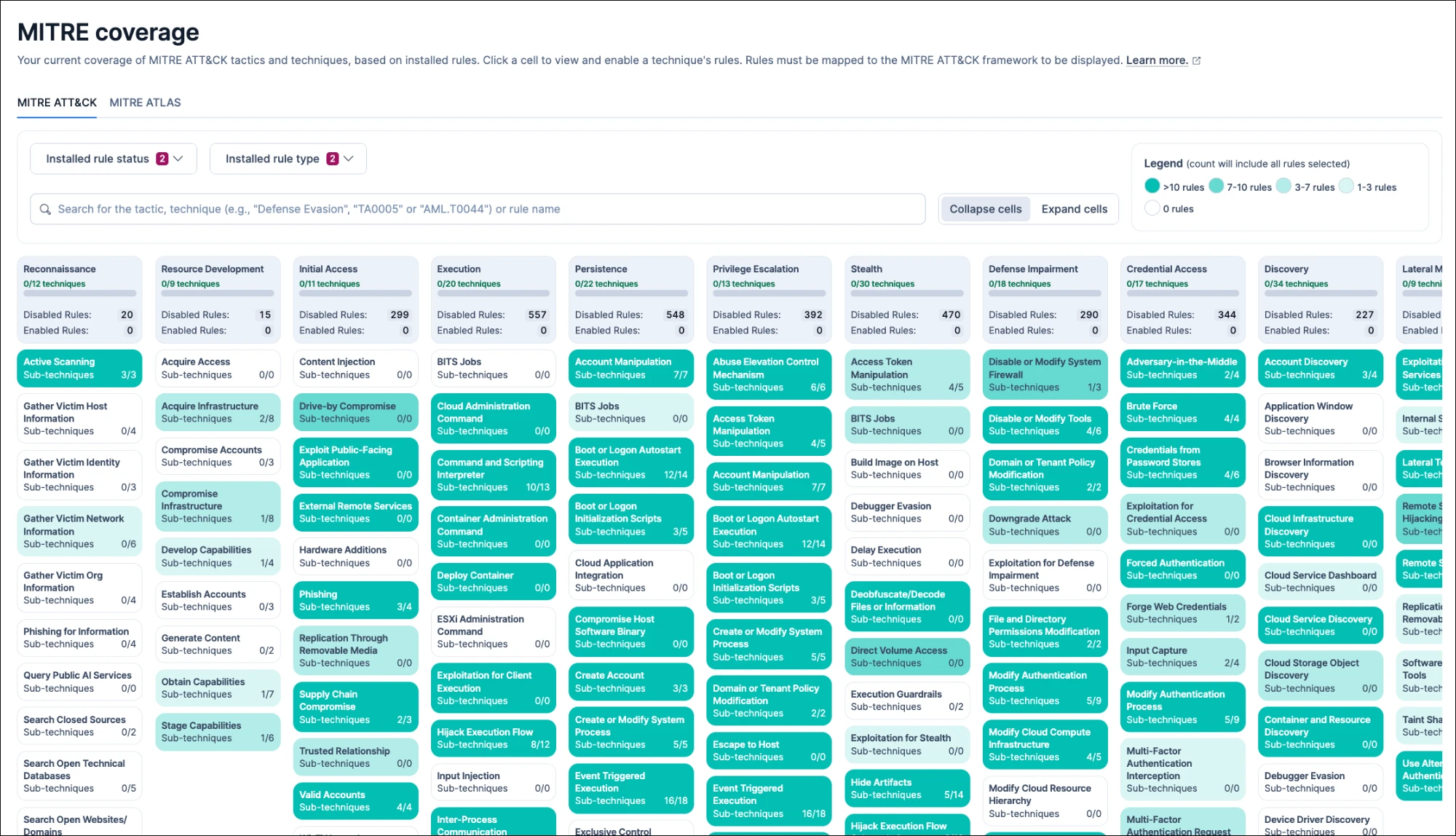
Cells are darker when a technique has more rules matching the current filters, as indicated in the **Legend** at the top. By default, the grid counts only enabled rules, so light or empty cells mark the techniques where your detection coverage is thin. To close those gaps, [enable rules](#security-rules-coverage-enable-rules) you've already installed, [install more prebuilt rules](https://docs-v3-preview.elastic.dev/elastic/docs-content/pull/9065/solutions/security/detect-and-alert/install-prebuilt-rules), or [create custom rules](https://docs-v3-preview.elastic.dev/elastic/docs-content/pull/9065/solutions/security/detect-and-alert/using-the-rule-ui) mapped to those techniques.
The grid counts only installed rules that are mapped to the framework you're viewing. If a rule you expect is missing, check that it's installed and that its MITRE mappings are set in the rule's **Advanced settings**.Elastic Stack: Generally available since 9.5 Elastic Cloud Serverless: Generally available If some rules use tactics or techniques that the supported MITRE version no longer includes, a callout about outdated mappings appears. Select **View rules** to find them, then [update their mappings](https://docs-v3-preview.elastic.dev/elastic/docs-content/pull/9065/solutions/security/detect-and-alert/remap-mitre-attack).
### View MITRE ATLAS coverage
- Elastic Cloud Serverless: Generally available
- Elastic Stack: Planned
To view the coverage grid for MITRE ATLAS [v2026.08](https://github.com/mitre-atlas/atlas-data/releases/tag/v2026.08), select the **MITRE ATLAS** tab. The grid works the same way as on the **MITRE ATT&CK** tab, with MITRE ATLAS tactics, such as AI Model Access, as columns. If a rule is mapped to both frameworks, it counts toward coverage on both tabs.
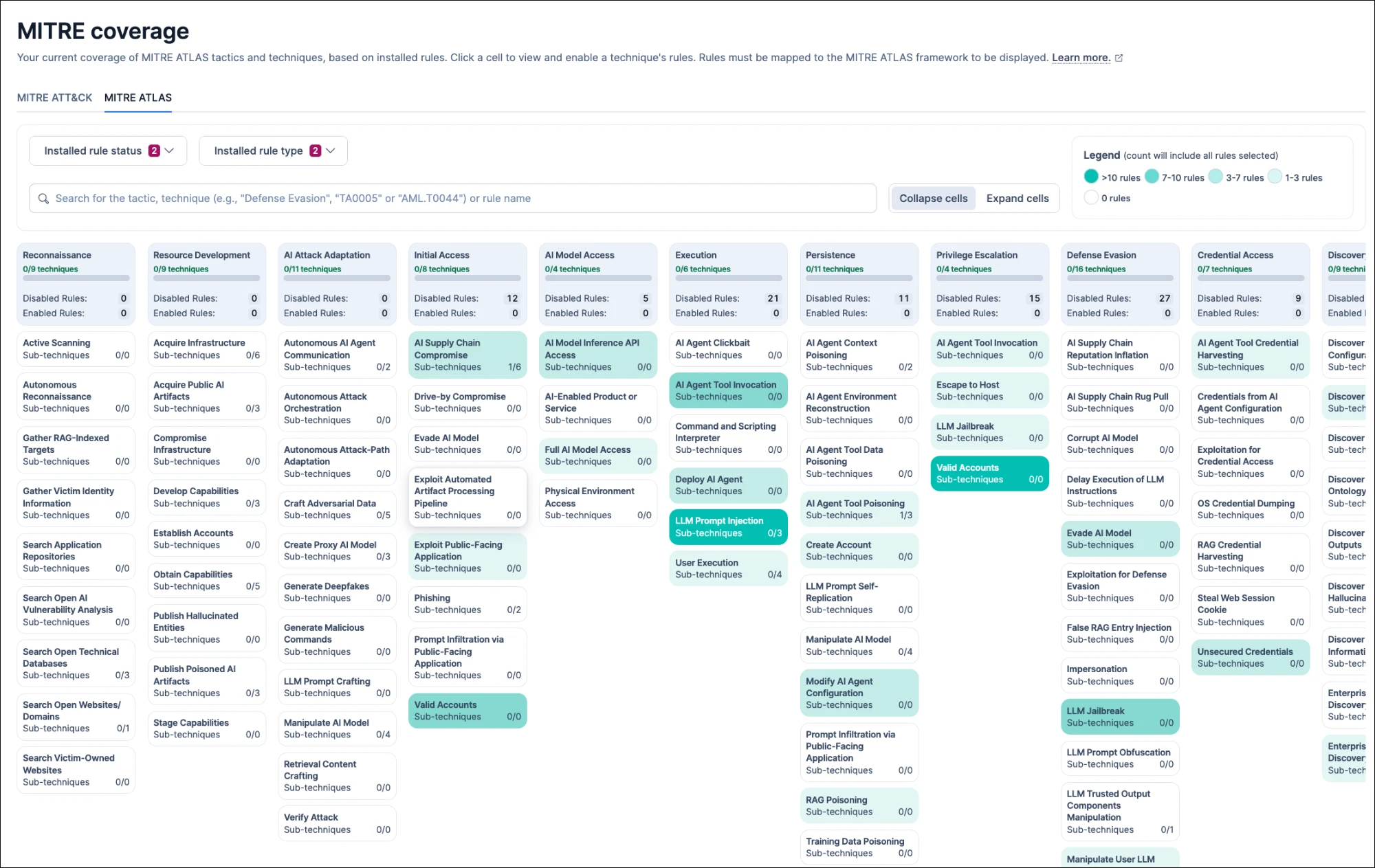
After you install them, some Elastic prebuilt rules that detect generative AI threats count toward MITRE ATLAS coverage. To map a custom rule, add MITRE ATLAS in the rule's [**Threat mappings**](/elastic/docs-content/pull/9065/solutions/security/detect-and-alert/common-rule-settings#rule-ui-advanced-params) setting.
## Filter which rules count toward coverage
Use the drop-down filters at the top of the **MITRE coverage** page to change which rules count toward coverage, depending on what you want to know.
- **Installed rule status**: Select only **Disabled rules** to find techniques where enabling rules you've already installed adds coverage. By default, only **Enabled rules** is selected, so the grid shows the coverage your enabled rules provide.
- **Installed rule type**: Select only **Custom rules** to see what your own rules cover, or only **Elastic rules** to see prebuilt coverage. By default, both are selected.
To focus the grid on specific rules, search for a rule name, or for a tactic, technique, or sub-technique by name or ID. The grid then counts only the matching rules.
For example, search for `T1059` to see only rules mapped to Command and Scripting Interpreter. Enter tactic and technique names and IDs exactly as they appear in the grid, including capitalization.
## Expand cells to show rule counts
Cells always show the technique's name and how many of its sub-techniques have rules that match the current filters. Select **Expand cells** to also see how many enabled and disabled rules each technique has, or **Collapse cells** to hide those counts.
With the default filter, which includes only **Enabled rules**, every disabled count is 0. To see disabled counts, add **Disabled rules** to **Installed rule status**.
## View rules and details for a technique
Select a technique's cell to open a popup with details about that technique. The popup lists the **Enabled rules** and **Disabled rules** that match the current filters, and you can select a rule's name to open its details page.
To read about the technique and its sub-techniques on the MITRE ATT&CK or MITRE ATLAS website, select the technique's name at the top of the popup. The documentation opens in a new browser tab.
## Enable all rules for a technique
You can quickly enable all the rules for a specific technique that you've installed but not yet enabled. If **Installed rule status** includes only **Enabled rules**, first add **Disabled rules** to the filter. Then select the technique's cell, and select **Enable all disabled**.
## Supported MITRE ATT&CK versions
Each Elastic Security version supports a specific [MITRE ATT&CK version](https://attack.mitre.org/resources/updates/), which determines the tactics and techniques the grid shows. If a tactic or technique you expect is missing or renamed, check which MITRE ATT&CK version your Elastic Security version uses.
| Elastic Security version | MITRE ATT&CK version |
|--------------------------|---------------------------------------------------------------------------|
| 9.0.0 | [v15.1](https://attack.mitre.org/resources/updates/updates-april-2024/) |
| 9.0.1-9.0.6 | [v16.1](https://attack.mitre.org/resources/updates/updates-october-2024/) |
| 9.0.7-9.0.8 | [v17.1](https://attack.mitre.org/resources/updates/updates-april-2025/) |
| 9.1.0-9.1.3 | [v16.1](https://attack.mitre.org/resources/updates/updates-october-2024/) |
| 9.1.4-9.1.9 | [v17.1](https://attack.mitre.org/resources/updates/updates-april-2025/) |
| 9.1.10 | [v18.1](https://attack.mitre.org/resources/updates/updates-october-2025/) |
| 9.2.0-9.2.3 | [v17.1](https://attack.mitre.org/resources/updates/updates-april-2025/) |
| 9.2.4-9.4.3 | [v18.1](https://attack.mitre.org/resources/updates/updates-october-2025/) |
| 9.5.x | [v19.1](https://attack.mitre.org/resources/updates/updates-april-2026/) |
| 9.6.0+ | [v19.2](https://attack.mitre.org/resources/updates/updates-august-2026/) |
| Serverless | [v19.2](https://attack.mitre.org/resources/updates/updates-august-2026/) |
MITRE ATT&CK v19 retires the Defense Evasion tactic and replaces it with Stealth and Defense Impairment. If you have custom rules mapped to MITRE ATT&CK, check [Remap detection rules to MITRE ATT&CK® v19](https://docs-v3-preview.elastic.dev/elastic/docs-content/pull/9065/solutions/security/detect-and-alert/remap-mitre-attack) to find and update mappings that changed in v19.