---
title: Create and manage custom skills
description: Learn how to create and manage custom skills in Agent Builder.
url: https://docs-v3-preview.elastic.dev/elastic/docs-content/tree/main/explore-analyze/ai-features/agent-builder/custom-skills
products:
- Elastic Cloud Serverless
- Elastic Observability
- Elastic Security
- Elasticsearch
- Kibana
applies_to:
- Elastic Cloud Serverless: Generally available
- Elastic Stack: Planned
---
# Create and manage custom skills
Custom skills let you package domain-specific knowledge and tools into reusable instruction sets that can be assigned to any [agent](https://docs-v3-preview.elastic.dev/elastic/docs-content/tree/main/explore-analyze/ai-features/agent-builder/agent-builder-agents). For an overview of how skills work, refer to [Skills in Elastic Agent Builder](https://docs-v3-preview.elastic.dev/elastic/docs-content/tree/main/explore-analyze/ai-features/agent-builder/skills).
## When to create a custom skill
Create a custom skill when you have domain-specific knowledge or procedures that are not covered by the [built-in skills](https://docs-v3-preview.elastic.dev/elastic/docs-content/tree/main/explore-analyze/ai-features/agent-builder/builtin-skills-reference). Custom skills are particularly useful when you need to:
- **Standardize a workflow**: Encode a repeatable process (such as a triage runbook or an onboarding checklist) so that every agent follows the same steps.
- **Share expertise across agents**: Write instructions once and assign them to multiple agents instead of duplicating the same guidance in each agent's system prompt.
- **Scope tools to a task**: Bundle specific tools with the instructions that explain how and when to use them, so the agent only has access to relevant tools for the task at hand.
- **Keep agent prompts clean**: Move detailed, task-specific instructions out of the system prompt and into a skill that loads only when needed.
## Create a custom skill
Follow these steps to create a custom skill and add it to your skill library. Once saved, you need to add the skill to an agent before the agent can use it.
You can create a skill from **Manage components > Skills**, or inline when adding skills to an agent from **Customize > Skills**.
For guidance on writing effective descriptions and instructions, refer to [Skill creation guidelines](https://docs-v3-preview.elastic.dev/elastic/docs-content/tree/main/explore-analyze/ai-features/agent-builder/skill-creation-guidelines).
Go to **Manage components > Skills**, then select **Create a skill**.
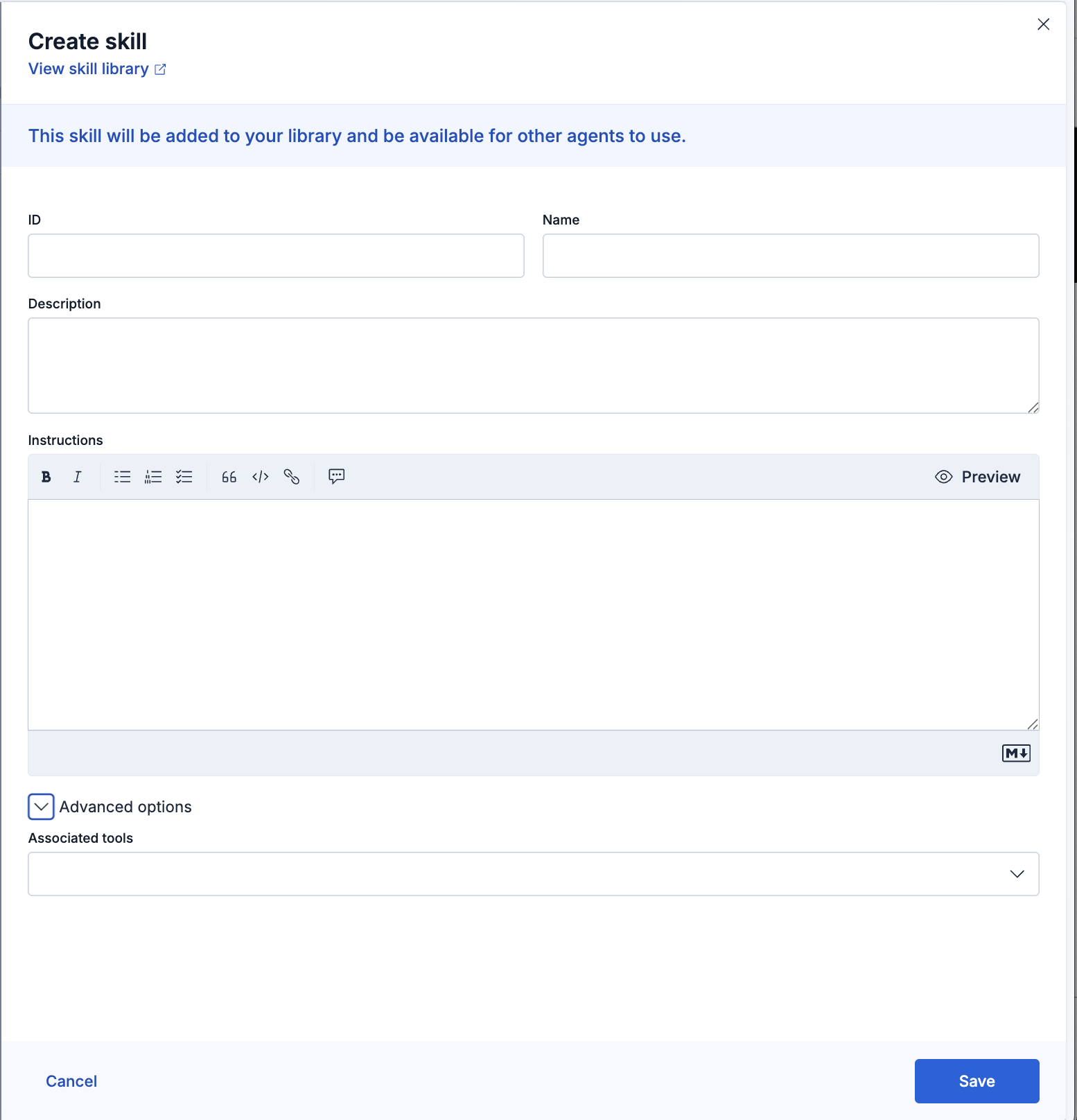
Complete the fields in the **Create skill** dialog:
- **ID**: A unique identifier for the skill.
- **Name**: A human-readable name (64-character limit).
- **Description**: A short description of when the agent should use the skill (1024-character limit). This field is always included in the agent's context, so it should be specific and semantically distinct from other skill descriptions.
- **Instructions**: The skill content in Markdown. Include trigger conditions, step-by-step instructions, examples, and edge cases. Corresponds to `content` in the API.
- **Associated tools**: The tools the skill should have access to (up to 100). Available under **Advanced options** in the UI. Corresponds to `tool_ids` in the API.
Select **Save**. The skill is added to your library and becomes available to assign to any agent.
Custom skills in your library are not available to your agents until you explicitly add them. To add a skill, go to **Customize > Skills** on the agent you want to configure and select **Add skills**. From here you can:
- **Import from skill library**: Select an existing skill from **Manage components > Skills**. After importing, make sure the skill is toggled on in the agent's skill list.
- **Create a skill**: Build a new skill and add it to this agent in one step. The skill is enabled for the agent automatically and also saved to your library.
Built-in skill availability depends on your deployment type. Refer to [Built-in skills reference](https://docs-v3-preview.elastic.dev/elastic/docs-content/tree/main/explore-analyze/ai-features/agent-builder/builtin-skills-reference) for details.
Send the agent realistic queries that should trigger the skill. Check that the agent selects the skill when expected, follows your instructions correctly, and handles the edge cases you documented. Revise the description or instructions based on what you observe.For guidance on writing effective instructions, refer to [Skill creation guidelines](https://docs-v3-preview.elastic.dev/elastic/docs-content/tree/main/explore-analyze/ai-features/agent-builder/skill-creation-guidelines).
## Skills API
You can also create and manage skills programmatically using the Kibana REST API. The API supports all the same fields as the UI, plus `referenced_content`: additional named content blocks the agent can read selectively. For request examples, refer to [Skills APIs](/elastic/docs-content/tree/main/explore-analyze/ai-features/agent-builder/kibana-api#skills-apis).
- [List skills](https://www.elastic.co/docs/api/doc/kibana/operation/operation-get-agent-builder-skills) `GET /api/agent_builder/skills`
- [Create a skill](https://www.elastic.co/docs/api/doc/kibana/operation/operation-post-agent-builder-skills) `POST /api/agent_builder/skills`
- [Get a skill by ID](https://www.elastic.co/docs/api/doc/kibana/operation/operation-get-agent-builder-skills-skillid) `GET /api/agent_builder/skills/{skillId}`
- [Update a skill](https://www.elastic.co/docs/api/doc/kibana/operation/operation-put-agent-builder-skills-skillid) `PUT /api/agent_builder/skills/{skillId}`
- [Delete a skill](https://www.elastic.co/docs/api/doc/kibana/operation/operation-delete-agent-builder-skills-skillid) `DELETE /api/agent_builder/skills/{skillId}`
## Related pages
- [Skills in Elastic Agent Builder](https://docs-v3-preview.elastic.dev/elastic/docs-content/tree/main/explore-analyze/ai-features/agent-builder/skills)
- [Built-in skills reference](https://docs-v3-preview.elastic.dev/elastic/docs-content/tree/main/explore-analyze/ai-features/agent-builder/builtin-skills-reference)
- [Skill creation guidelines](https://docs-v3-preview.elastic.dev/elastic/docs-content/tree/main/explore-analyze/ai-features/agent-builder/skill-creation-guidelines)
- [Tools in Elastic Agent Builder](https://docs-v3-preview.elastic.dev/elastic/docs-content/tree/main/explore-analyze/ai-features/agent-builder/tools)
- [Elastic Agent Builder Kibana APIs](https://docs-v3-preview.elastic.dev/elastic/docs-content/tree/main/explore-analyze/ai-features/agent-builder/kibana-api)