---
title: Connect external data sources for ES|QL Data Federation
description: Connect Elasticsearch to external storage with ES|QL Data Federation by setting up S3 data sources, configuring regions and endpoints, and authenticating access.
url: https://docs-v3-preview.elastic.dev/elastic/elasticsearch/tree/main/reference/query-languages/esql/esql-data-federation-sources
products:
- Elasticsearch
applies_to:
- Elastic Cloud Serverless: Unavailable
- Elastic Stack: Experimental in 9.5
---
# Connect external data sources for ES|QL Data Federation
A data source defines the connection to an external storage system. It stores the connection type, region, endpoint, and credentials. A data source defines how to connect, not what data to query. One data source can serve many [datasets](https://docs-v3-preview.elastic.dev/elastic/elasticsearch/tree/main/reference/query-languages/esql/esql-data-federation-datasets). When credentials rotate, you update the data source in one place without touching the datasets that reference it.
This feature is experimental. It is not intended for production use and there are no guarantees around performance, scale, or stability in this release.
## Supported data source types
The following data source types are supported:
| Type | Storage system |
|------|----------------|
| `s3` | Amazon S3 |
Other S3-compatible services have not been validated and are not supported.
## Manage data sources using the Kibana UI
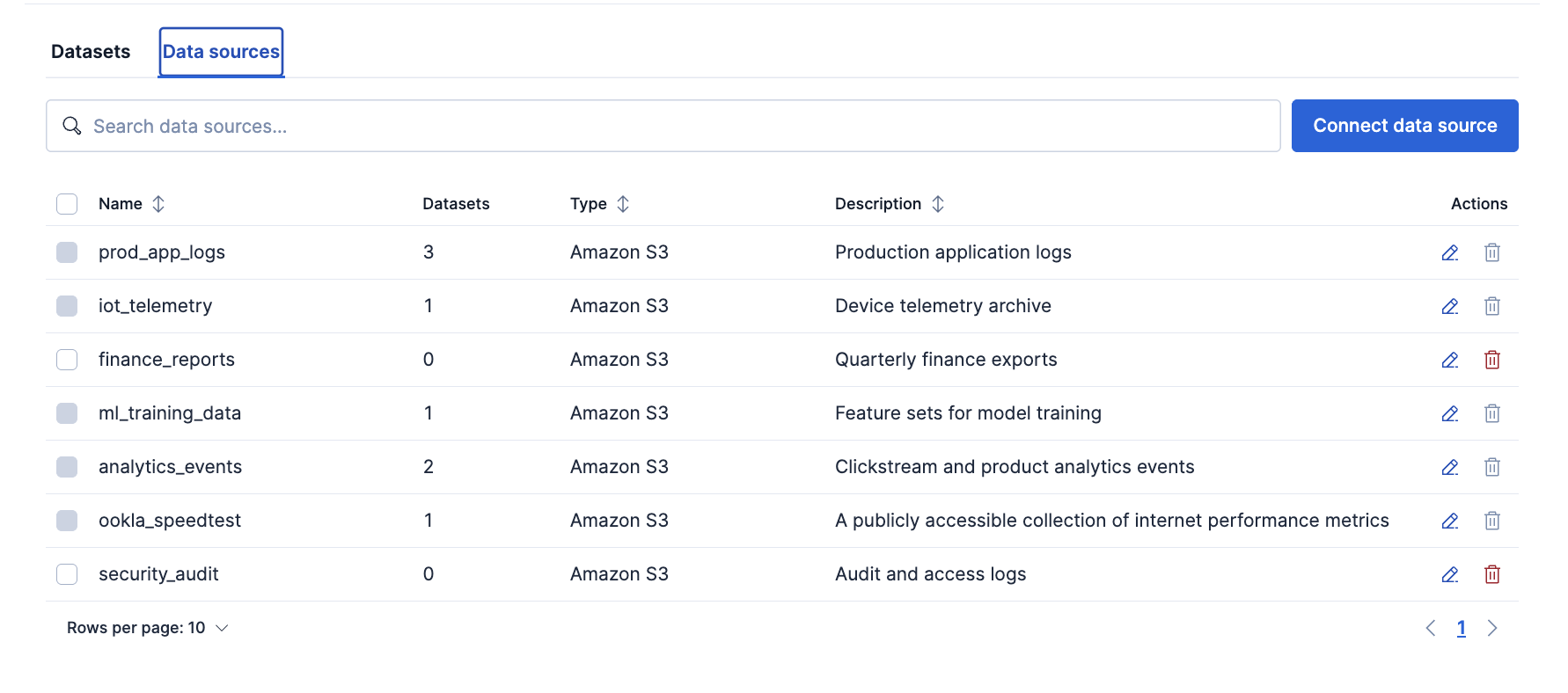
In Kibana, you connect and manage data sources from the **Data sources** tab under **Data management** > **ES|QL Data Federation**.
The **Data sources** tab lists each registered data source including:
- its type
- its description
- the number of datasets that reference it
From this tab you can search your data sources, connect a new one, and edit or delete an existing one.
### Connect a new data source
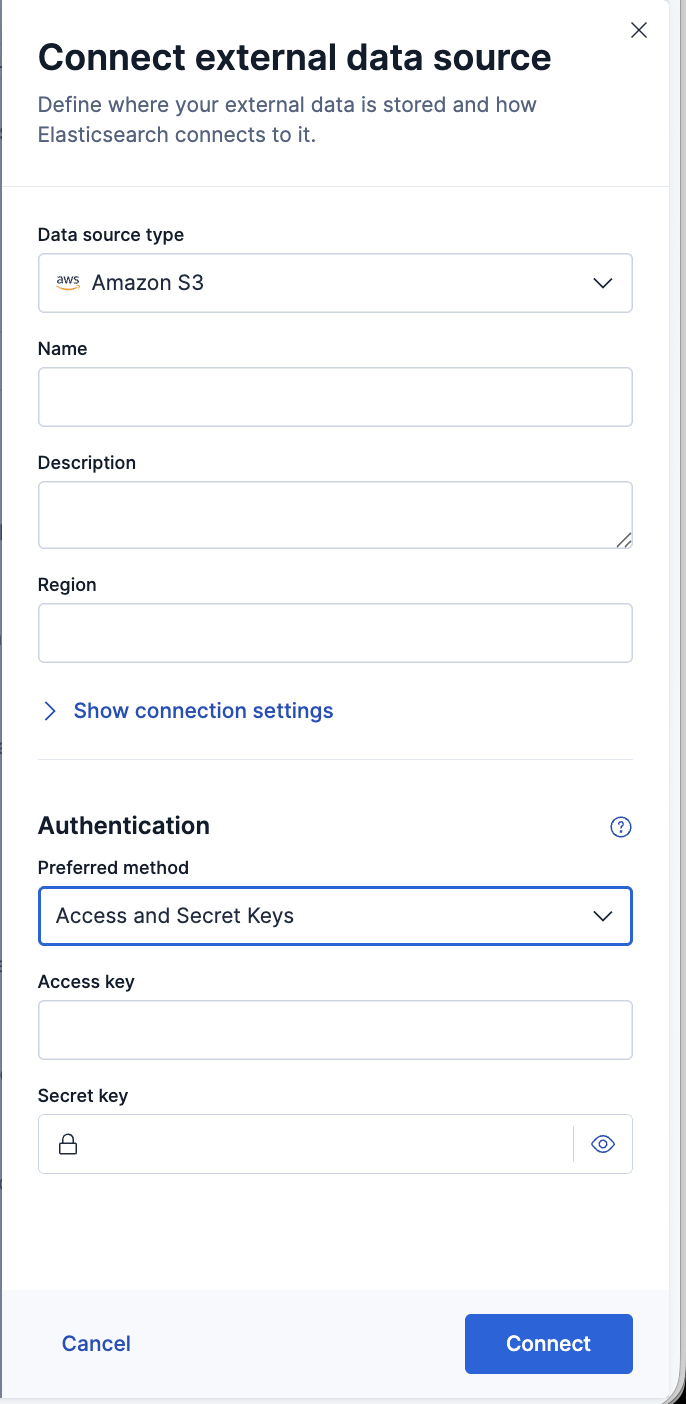
Click **Connect data source** to open a flyout where you define the connection:
- **Data source type**: the storage system to connect to, such as **Amazon S3**.
- **Name**: a unique name for the data source. Names must be lowercase and cannot begin with `-`, `_`, or `+`.
- **Description**: an optional description.
- **Region**: the cloud region where your storage is located, such as `us-east-1`.
- **Endpoint**: an optional Amazon S3 endpoint override.
- **Authentication**: select an authentication model from the dropdown, then fill in the credentials it requires.
For the full set of authentication methods and what each one requires, refer to [authentication models](#authentication). For detailed setup walkthroughs, refer to [connect with static credentials](https://docs-v3-preview.elastic.dev/elastic/elasticsearch/tree/main/reference/query-languages/esql/esql-data-federation-static-credentials) or [connect with federated identity](https://docs-v3-preview.elastic.dev/elastic/elasticsearch/tree/main/reference/query-languages/esql/esql-data-federation-federated-identity).
## Manage data sources using the API
Data sources are managed under the `/_query/data_source` endpoint. All data source operations require the cluster `manage` privilege or a `global.data_source` privilege. Refer to [manage credentials and privileges](https://docs-v3-preview.elastic.dev/elastic/elasticsearch/tree/main/reference/query-languages/esql/esql-data-federation-security) for details.
| Operation | Endpoint |
|-----------------------------------------------------|-------------------------------------|
| [Create or update](#create-or-update-a-data-source) | `PUT /_query/data_source/{name}` |
| [Get](#get-a-data-source) | `GET /_query/data_source/{name}` |
| [List all](#list-all-data-sources) | `GET /_query/data_source` |
| [Delete](#delete-a-data-source) | `DELETE /_query/data_source/{name}` |
### Create or update a data source
`PUT` creates a new data source or replaces an existing one entirely with one exception. Secrets you omit from the request are carried forward from the existing definition rather than cleared, so you can update non-secret settings without re-sending credentials.
The create request does not validate connectivity to the external system. To verify that credentials and endpoint are correct, create a dataset that references the data source and query it.
Data source names follow the same naming rules as index names: lowercase only, at most 255 bytes, and they cannot begin with `-`, `_`, or `+`, contain spaces, or contain the characters `\ / * ? " < > |`.
A cluster holds at most 100 data sources by default. In Elastic Stack deployments, if you need more than 100 data sources, then you can raise the limit using the [`esql.data_sources.max_count`](/elastic/elasticsearch/tree/main/reference/query-languages/esql/esql-data-federation-cluster-settings#object-limits) cluster setting.
```json
{
"type": "s3",
"description": "Production S3 logs bucket, us-east-1",
"settings": {
"region": "us-east-1",
"auth": "static_credentials",
"access_key": "",
"secret_key": ""
}
}
```
```bash
curl -X PUT "${ELASTICSEARCH_URL}/_query/data_source/prod_s3_logs" \
-H "Authorization: ApiKey ${API_KEY}" \
-H "Content-Type: application/json" \
-d '{
"type": "s3",
"description": "Production S3 logs bucket, us-east-1",
"settings": {
"region": "us-east-1",
"auth": "static_credentials",
"access_key": "",
"secret_key": ""
}
}'
```
For step-by-step guides on setting up each authentication model in AWS, refer to [connect with static credentials](https://docs-v3-preview.elastic.dev/elastic/elasticsearch/tree/main/reference/query-languages/esql/esql-data-federation-static-credentials) or [connect with federated identity](https://docs-v3-preview.elastic.dev/elastic/elasticsearch/tree/main/reference/query-languages/esql/esql-data-federation-federated-identity).
### Get a data source
Retrieves a data source by name. You can pass a comma-separated list of names and use `*` wildcards. A concrete name that does not exist returns a `404`; a wildcard that matches nothing returns an empty list. Credential values are replaced by `::es_redacted::` in the response.
```json
```
```bash
curl -X GET "${ELASTICSEARCH_URL}/_query/data_source/prod_s3_logs" \
-H "Authorization: ApiKey ${API_KEY}"
```
### List all data sources
Returns all registered data sources.
```json
```
```bash
curl -X GET "${ELASTICSEARCH_URL}/_query/data_source" \
-H "Authorization: ApiKey ${API_KEY}"
```
### Delete a data source
Deletes one or more data sources by name. You can pass a comma-separated list. If any named data source does not exist, the request returns a `404` and nothing is deleted.
```json
```
```bash
curl -X DELETE "${ELASTICSEARCH_URL}/_query/data_source/prod_s3_logs" \
-H "Authorization: ApiKey ${API_KEY}"
```
A data source cannot be deleted while datasets still reference it. Delete the dependent datasets first, or the request returns a `409 Conflict` error.
## Data source settings
Settings vary by data source type.
### S3
The following settings are available for `s3` data sources:
**Connection settings:**
| Setting | Required | Description |
|------------|----------|-------------------------------------------------------------------------------------------------------------------------------------------------------------------|
| `region` | No | The bucket's AWS region, for example `us-east-1`. Defaults to `us-east-1` if omitted. Set it to match the bucket's region, otherwise requests to the bucket fail. |
| `endpoint` | No | An explicit Amazon S3 endpoint override. Setting it switches requests to path-style addressing. |
A data source connects to a single region. To query buckets in more than one region, create a separate data source for each region.
**Authentication settings:**
| Setting | Required | Description |
|---------------------|--------------------------|--------------------------------------------------------------------------------------------------------------------------|
| `access_key` | No | AWS access key ID. Used with `auth: static_credentials`. |
| `secret_key` | No | AWS secret access key. Used with `auth: static_credentials`. |
| `role_arn` | Yes (federated identity) | The ARN of the IAM role Elasticsearch assumes via STS. Used with `auth: federated_identity`. |
| `jwt_audience` | No | Overrides the JWT audience claim sent to STS. Defaults to `sts.amazonaws.com`. Used with `auth: federated_identity`. |
| `role_session_name` | No | A label for the assumed-role session. Defaults to `elasticsearch-esql-datasource`. Used with `auth: federated_identity`. |
| `sts_endpoint` | No | A custom STS endpoint URL. Used with `auth: federated_identity`. |
| `sts_region` | No | The AWS region of the STS endpoint. Defaults to the bucket's region. Used with `auth: federated_identity`. |
| `auth` | Yes | Authentication mode. Set it to `anonymous`, `static_credentials`, `managed_identity`, or `federated_identity`. |
## Authentication
A data source authenticates to its store with one of the following models. The models are mutually exclusive on a data source.
| Model | `auth` value | Description |
|--------------------|----------------------|------------------------------------------------------------------------------------------------------------------------------------------------------------------------------------------------------------------------------------------------------------------------------------------------------------------------------------------------------------------------------------------------------------------------------------------------------------|
| Static credentials | `static_credentials` | A fixed access key and secret key. The common form for a service account. To set one up, refer to [connect with static credentials](https://docs-v3-preview.elastic.dev/elastic/elasticsearch/tree/main/reference/query-languages/esql/esql-data-federation-static-credentials). |
| Anonymous | `anonymous` | For public data that needs no credentials. The [quickstart](https://docs-v3-preview.elastic.dev/elastic/elasticsearch/tree/main/reference/query-languages/esql/esql-data-federation-quickstart) walks through this method. |
| Federated identity | `federated_identity` | Keyless. Elasticsearch exchanges a short-lived OIDC token for temporary AWS credentials via STS, so no static keys are stored. Available on Elastic Cloud Hosted and serverless only. Operator-gated (`esql.datasource.federated_identity.enabled`). To set it up, refer to [connect with federated identity](https://docs-v3-preview.elastic.dev/elastic/elasticsearch/tree/main/reference/query-languages/esql/esql-data-federation-federated-identity). |
| Managed identity | `managed_identity` | Keyless. Uses the Elasticsearch node's own cloud identity, for example an EC2 instance IAM role. Operator-only and API-only, and not available in serverless. Requires `esql.datasource.managed_identity.enabled`. |
Managed identity uses the cloud identity attached to each Elasticsearch node (for example, an IAM role on EC2 or a service account on GKE). Different nodes might have different identities, and the node that performs the connection is not guaranteed. You are responsible for configuring cloud IAM so that every node's identity has the required permissions on the target bucket. This model is best suited for single-cloud, single-tenant deployments where node identities are uniform.
## Next steps
- [Create datasets](https://docs-v3-preview.elastic.dev/elastic/elasticsearch/tree/main/reference/query-languages/esql/esql-data-federation-datasets) that point at specific files in your data source, and configure file formats, schema inference, and parsing settings.
- [Query your datasets](https://docs-v3-preview.elastic.dev/elastic/elasticsearch/tree/main/reference/query-languages/esql/esql-data-federation-querying) with `FROM` to learn how partition pruning, column selection, and filter pushdown reduce storage reads.
- [Manage credentials and privileges](https://docs-v3-preview.elastic.dev/elastic/elasticsearch/tree/main/reference/query-languages/esql/esql-data-federation-security) to control who can create data sources and read external data.