﻿---
title: Atlassian Cloud Integration for Elastic
description: The Atlassian Cloud integration for Elastic enables collection of organization-wide audit log events from Atlassian Cloud products including Jira, Confluence,...
url: https://docs-v3-preview.elastic.dev/elastic/integration-docs/tree/main/reference/atlassian_cloud
products:
  - Elastic integrations
applies_to:
  - Serverless Observability projects: Preview
  - Serverless Security projects: Preview
  - Elastic Stack: Preview since 9.1
---

# Atlassian Cloud Integration for Elastic
|                                                                                                                               |                                                                   |
|-------------------------------------------------------------------------------------------------------------------------------|-------------------------------------------------------------------|
| **Version**                                                                                                                   | 0.1.0 <applies-to>: Preview</applies-to> ([View all](#changelog)) |
| **Subscription level**[What's this?](https://www.elastic.co/subscriptions)                                                    | Basic                                                             |
| **Developed by**[What's this?](https://docs-v3-preview.elastic.dev/elastic/integration-docs/tree/main/reference/developed-by) | Elastic                                                           |
| **Ingestion method(s)**                                                                                                       | API                                                               |
| **Minimum Kibana version(s)**                                                                                                 | 9.1.08.19.0                                                       |

<admonition title="The Atlassian Cloud integration v0.1.0 is in technical preview">
  To use pre-release integrations, go to the **Integrations** page in Kibana, scroll down, and toggle on the _Display beta integrations_ option.
</admonition>


## Overview

The Atlassian Cloud integration for Elastic enables collection of organization-wide audit log events from [Atlassian Cloud](https://www.atlassian.com/) products including Jira, Confluence, Bitbucket, Trello, and other Atlassian Cloud applications.
This integration polls the [Atlassian Organizations REST API](https://developer.atlassian.com/cloud/admin/organization/rest/) to collect administrative and security-relevant events such as user management, authentication, product access changes, organization policy updates, app/marketplace activity, and API token lifecycle events. The audit log captures activity across all Atlassian Cloud products in an organization in a unified format.

### When should I use this integration?

Elastic provides several Atlassian integrations. Choose the one that best fits your needs:
- **Atlassian Cloud** (this integration) — Collects **organization-level** audit events from the Atlassian Organizations API. Events span all Atlassian Cloud products (Jira, Confluence, Bitbucket, Trello, and others) in a single stream. Use this integration when you need unified visibility into organization-wide administrative activity such as SSO policy changes, cross-product user provisioning, marketplace app management, and domain verification. This integration is only available for Atlassian Cloud and does not support self-hosted deployments.
- **Atlassian Jira** (`atlassian_jira`) — Collects **Jira-specific** audit events from the Jira audit API. Use this integration when you need detailed Jira administrative activity such as permission scheme changes, project configuration updates, custom field modifications, and Jira-specific user and group management. This integration supports both Atlassian Cloud and self-hosted Jira Data Center deployments.
- **Atlassian Confluence** (`atlassian_confluence`) — Collects Confluence-specific audit events. Use this for detailed Confluence administrative activity.
- **Atlassian Bitbucket** (`atlassian_bitbucket`) — Collects Bitbucket-specific audit events. Use this for detailed Bitbucket administrative activity.

These integrations are **complementary** and can be used together. For example, you might use this integration for broad organization-level security monitoring while also using the Jira integration for deeper Jira-specific audit detail. Events from each integration are stored in separate data streams, so there is no conflict when running them side by side.

### Compatibility

This integration is compatible with the Atlassian Cloud Organizations REST API v1, accessed via the `/admin/v1/orgs/{orgId}/events-stream` endpoint. Atlassian Cloud Organization admin access and an API key with the `read:events:admin` scope are required.

### How it works

The integration polls the Atlassian Organizations API on a configurable interval using cursor-based pagination. Each poll cycle retrieves new audit events since the last successful poll, parses them, and ships the documents to Elasticsearch where the ingest pipeline maps fields to ECS and enriches them with categorization, related entities, and geo information.

## What data does this integration collect?

The Atlassian Cloud integration collects organization-wide audit events of the following types:
- User management — invitations, deactivations, reactivations, removals.
- Authentication — logins, logouts, password changes, 2FA configuration.
- Product access — access grants, revocations, role changes.
- Organization policies — security policy updates, SSO configuration, domain verification.
- App / marketplace activity — app installations, uninstallations, access changes.
- API tokens — token creation and revocation.
- Group management — membership changes.
- Data security — data residency, classification policies.


### Supported use cases

This integration supports security monitoring, compliance reporting, and incident investigation across the full Atlassian Cloud organization. Common use cases include detecting suspicious authentication activity, tracking administrative changes, auditing user lifecycle events, monitoring third-party app installations, and correlating Atlassian admin activity with other security telemetry.

## What do I need to use this integration?

- An Atlassian Cloud Organization with admin access.
- An API key with the `read:events:admin` scope. See the [Atlassian API key management documentation](https://support.atlassian.com/organization-administration/docs/manage-an-organization-with-the-admin-apis/) for creation steps.
- The Organization ID (UUID) of the Atlassian Cloud organization.
- Access to a Guard Premium or Cloud Enterprise plan might be required for full visibility into user-created activities.


## How do I deploy this integration?


### Agent-based deployment

Elastic Agent must be installed. For more details, check the Elastic Agent [installation instructions](https://docs-v3-preview.elastic.dev/elastic/docs-content/tree/main/reference/fleet/install-elastic-agents). You can install only one Elastic Agent per host.
Elastic Agent is required to poll the Atlassian Organizations REST API and ship the events to Elastic, where they will be processed via the integration's ingest pipelines.

### Onboard / configure

1. In [admin.atlassian.com](https://admin.atlassian.com), select your organization.
2. Navigate to **Organization settings** → **API keys**.
3. Choose **API keys with scopes** → **Create API key**.
4. Name the key (for example, `Elastic Integration`).
5. Set an expiration (maximum of 1 year). Plan for rotation before the key expires.
6. Select the `read:events:admin` scope, then create the key.
7. Copy and save the API key value — it is shown only once.
8. Note the **Organization ID** (UUID format) from the admin URL or organization settings.
9. In Kibana, add the Atlassian Cloud integration and configure it with the API URL (`https://api.atlassian.com`), Organization ID, and API key.


### Validation

After configuration, verify that documents appear in the `logs-atlassian_cloud.audit-*` data stream within one or two polling intervals. The default polling interval is 5 minutes. Confirm that recent administrative actions (for example, a new API key creation) appear in the indexed events.

## Troubleshooting

For help with Elastic ingest tools, check [Common problems](https://www.elastic.co/docs/troubleshoot/ingest/fleet/common-problems).
Common issues:
- **401 Unauthorized**: verify the API key is current, has the `read:events:admin` scope, and was not revoked. API keys expire after at most 1 year.
- **403 Forbidden**: verify the user that created the API key has Organization admin rights and that the Organization ID is correct.
- **429 Too Many Requests**: the `/events-stream` endpoint enforces 50 requests/minute per API path and 60 requests/minute per user. Reduce polling frequency or batch size if rate limits are hit.
- **Missing events**: Atlassian Cloud audit log visibility depends on the organization's Atlassian plan. Guard Premium or Cloud Enterprise may be required for some user-created activities.


## Scaling

For more information on architectures that can be used for scaling this integration, check the [Ingest Architectures](https://www.elastic.co/docs/manage-data/ingest/ingest-reference-architectures) documentation.

## Reference


### audit

The `audit` data stream provides organization-wide audit events from Atlassian Cloud. Events cover user management, authentication, product access, organization policies, marketplace app activity, API token lifecycle, group membership changes, and data-security policy updates.

#### audit fields

<dropdown title="Exported fields">
  | Field                                          | Description                                                                                                                                                                                                                                                                                                                                                                                                                                                                                                                                                                                                                                                                                                                                                                                                                                                                                                             | Type             |
  |------------------------------------------------|-------------------------------------------------------------------------------------------------------------------------------------------------------------------------------------------------------------------------------------------------------------------------------------------------------------------------------------------------------------------------------------------------------------------------------------------------------------------------------------------------------------------------------------------------------------------------------------------------------------------------------------------------------------------------------------------------------------------------------------------------------------------------------------------------------------------------------------------------------------------------------------------------------------------------|------------------|
  | @timestamp                                     | Date/time when the event originated. This is the date/time extracted from the event, typically representing when the event was generated by the source. If the event source has no original timestamp, this value is typically populated by the first time the event was received by the pipeline. Required field for all events.                                                                                                                                                                                                                                                                                                                                                                                                                                                                                                                                                                                       | date             |
  | atlassian_cloud.audit.actor.app.attributes     | App-specific attributes.                                                                                                                                                                                                                                                                                                                                                                                                                                                                                                                                                                                                                                                                                                                                                                                                                                                                                                | flattened        |
  | atlassian_cloud.audit.actor.app.id             | App or Connect app ID, or system actor identifier (for example, confluence).                                                                                                                                                                                                                                                                                                                                                                                                                                                                                                                                                                                                                                                                                                                                                                                                                                            | keyword          |
  | atlassian_cloud.audit.actor.app.name           | Display name for app or system actors when actor is not a human user.                                                                                                                                                                                                                                                                                                                                                                                                                                                                                                                                                                                                                                                                                                                                                                                                                                                   | keyword          |
  | atlassian_cloud.audit.actor.app.type           | App type.                                                                                                                                                                                                                                                                                                                                                                                                                                                                                                                                                                                                                                                                                                                                                                                                                                                                                                               | keyword          |
  | atlassian_cloud.audit.actor.auth.auth_type     | Authentication type for the actor (for example, session, container-token).                                                                                                                                                                                                                                                                                                                                                                                                                                                                                                                                                                                                                                                                                                                                                                                                                                              | keyword          |
  | atlassian_cloud.audit.actor.auth.token_id      | Token identifier when authentication is token-based.                                                                                                                                                                                                                                                                                                                                                                                                                                                                                                                                                                                                                                                                                                                                                                                                                                                                    | keyword          |
  | atlassian_cloud.audit.actor.auth.token_label   | Human-readable label for the token.                                                                                                                                                                                                                                                                                                                                                                                                                                                                                                                                                                                                                                                                                                                                                                                                                                                                                     | keyword          |
  | atlassian_cloud.audit.actor.on_behalf_of.email | Delegated or impersonated user email.                                                                                                                                                                                                                                                                                                                                                                                                                                                                                                                                                                                                                                                                                                                                                                                                                                                                                   | keyword          |
  | atlassian_cloud.audit.actor.on_behalf_of.id    | Delegated or impersonated user ID.                                                                                                                                                                                                                                                                                                                                                                                                                                                                                                                                                                                                                                                                                                                                                                                                                                                                                      | keyword          |
  | atlassian_cloud.audit.actor.on_behalf_of.name  | Delegated or impersonated user display name.                                                                                                                                                                                                                                                                                                                                                                                                                                                                                                                                                                                                                                                                                                                                                                                                                                                                            | keyword          |
  | atlassian_cloud.audit.container.attributes     | Type-specific container attributes.                                                                                                                                                                                                                                                                                                                                                                                                                                                                                                                                                                                                                                                                                                                                                                                                                                                                                     | flattened        |
  | atlassian_cloud.audit.container.id             | Container resource ID.                                                                                                                                                                                                                                                                                                                                                                                                                                                                                                                                                                                                                                                                                                                                                                                                                                                                                                  | keyword          |
  | atlassian_cloud.audit.container.type           | Container resource type.                                                                                                                                                                                                                                                                                                                                                                                                                                                                                                                                                                                                                                                                                                                                                                                                                                                                                                | keyword          |
  | atlassian_cloud.audit.context.attributes       | Type-specific context attributes.                                                                                                                                                                                                                                                                                                                                                                                                                                                                                                                                                                                                                                                                                                                                                                                                                                                                                       | flattened        |
  | atlassian_cloud.audit.context.id               | Context resource ID.                                                                                                                                                                                                                                                                                                                                                                                                                                                                                                                                                                                                                                                                                                                                                                                                                                                                                                    | keyword          |
  | atlassian_cloud.audit.context.type             | Context resource type.                                                                                                                                                                                                                                                                                                                                                                                                                                                                                                                                                                                                                                                                                                                                                                                                                                                                                                  | keyword          |
  | atlassian_cloud.audit.location.geo             | Coarse geo label from Atlassian (for example, EU, NA).                                                                                                                                                                                                                                                                                                                                                                                                                                                                                                                                                                                                                                                                                                                                                                                                                                                                  | keyword          |
  | atlassian_cloud.audit.message.format           | Message format (for example, `simple`).                                                                                                                                                                                                                                                                                                                                                                                                                                                                                                                                                                                                                                                                                                                                                                                                                                                                                 | keyword          |
  | data_stream.dataset                            | The field can contain anything that makes sense to signify the source of the data. Examples include `nginx.access`, `prometheus`, `endpoint` etc. For data streams that otherwise fit, but that do not have dataset set we use the value "generic" for the dataset value. `event.dataset` should have the same value as `data_stream.dataset`. Beyond the Elasticsearch data stream naming criteria noted above, the `dataset` value has additional restrictions:   * Must not contain `-`   * No longer than 100 characters                                                                                                                                                                                                                                                                                                                                                                                            | constant_keyword |
  | data_stream.namespace                          | A user defined namespace. Namespaces are useful to allow grouping of data. Many users already organize their indices this way, and the data stream naming scheme now provides this best practice as a default. Many users will populate this field with `default`. If no value is used, it falls back to `default`. Beyond the Elasticsearch index naming criteria noted above, `namespace` value has the additional restrictions:   * Must not contain `-`   * No longer than 100 characters                                                                                                                                                                                                                                                                                                                                                                                                                           | constant_keyword |
  | data_stream.type                               | An overarching type for the data stream. Currently allowed values are "logs" and "metrics". We expect to also add "traces" and "synthetics" in the near future.                                                                                                                                                                                                                                                                                                                                                                                                                                                                                                                                                                                                                                                                                                                                                         | constant_keyword |
  | ecs.version                                    | ECS version this event conforms to. `ecs.version` is a required field and must exist in all events. When querying across multiple indices -- which may conform to slightly different ECS versions -- this field lets integrations adjust to the schema version of the events.                                                                                                                                                                                                                                                                                                                                                                                                                                                                                                                                                                                                                                           | keyword          |
  | event.action                                   | The action captured by the event. This describes the information in the event. It is more specific than `event.category`. Examples are `group-add`, `process-started`, `file-created`. The value is normally defined by the implementer.                                                                                                                                                                                                                                                                                                                                                                                                                                                                                                                                                                                                                                                                                | keyword          |
  | event.category                                 | This is one of four ECS Categorization Fields, and indicates the second level in the ECS category hierarchy. `event.category` represents the "big buckets" of ECS categories. For example, filtering on `event.category:process` yields all events relating to process activity. This field is closely related to `event.type`, which is used as a subcategory. This field is an array. This will allow proper categorization of some events that fall in multiple categories.                                                                                                                                                                                                                                                                                                                                                                                                                                          | keyword          |
  | event.created                                  | `event.created` contains the date/time when the event was first read by an agent, or by your pipeline. This field is distinct from `@timestamp` in that `@timestamp` typically contain the time extracted from the original event. In most situations, these two timestamps will be slightly different. The difference can be used to calculate the delay between your source generating an event, and the time when your agent first processed it. This can be used to monitor your agent's or pipeline's ability to keep up with your event source. In case the two timestamps are identical, `@timestamp` should be used.                                                                                                                                                                                                                                                                                            | date             |
  | event.dataset                                  | Name of the dataset. If an event source publishes more than one type of log or events (e.g. access log, error log), the dataset is used to specify which one the event comes from. It's recommended but not required to start the dataset name with the module name, followed by a dot, then the dataset name.                                                                                                                                                                                                                                                                                                                                                                                                                                                                                                                                                                                                          | constant_keyword |
  | event.id                                       | Unique ID to describe the event.                                                                                                                                                                                                                                                                                                                                                                                                                                                                                                                                                                                                                                                                                                                                                                                                                                                                                        | keyword          |
  | event.kind                                     | This is one of four ECS Categorization Fields, and indicates the highest level in the ECS category hierarchy. `event.kind` gives high-level information about what type of information the event contains, without being specific to the contents of the event. For example, values of this field distinguish alert events from metric events. The value of this field can be used to inform how these kinds of events should be handled. They may warrant different retention, different access control, it may also help understand whether the data is coming in at a regular interval or not.                                                                                                                                                                                                                                                                                                                       | keyword          |
  | event.module                                   | Name of the module this data is coming from. If your monitoring agent supports the concept of modules or plugins to process events of a given source (e.g. Apache logs), `event.module` should contain the name of this module.                                                                                                                                                                                                                                                                                                                                                                                                                                                                                                                                                                                                                                                                                         | constant_keyword |
  | event.original                                 | Raw text message of entire event. Used to demonstrate log integrity or where the full log message (before splitting it up in multiple parts) may be required, e.g. for reindex. This field is not indexed and doc_values are disabled. It cannot be searched, but it can be retrieved from `_source`. If users wish to override this and index this field, please see `Field data types` in the `Elasticsearch Reference`.                                                                                                                                                                                                                                                                                                                                                                                                                                                                                              | keyword          |
  | event.outcome                                  | This is one of four ECS Categorization Fields, and indicates the lowest level in the ECS category hierarchy. `event.outcome` simply denotes whether the event represents a success or a failure from the perspective of the entity that produced the event. Note that when a single transaction is described in multiple events, each event may populate different values of `event.outcome`, according to their perspective. Also note that in the case of a compound event (a single event that contains multiple logical events), this field should be populated with the value that best captures the overall success or failure from the perspective of the event producer. Further note that not all events will have an associated outcome. For example, this field is generally not populated for metric events, events with `event.type:info`, or any events for which an outcome does not make logical sense. | keyword          |
  | event.type                                     | This is one of four ECS Categorization Fields, and indicates the third level in the ECS category hierarchy. `event.type` represents a categorization "sub-bucket" that, when used along with the `event.category` field values, enables filtering events down to a level appropriate for single visualization. This field is an array. This will allow proper categorization of some events that fall in multiple event types.                                                                                                                                                                                                                                                                                                                                                                                                                                                                                          | keyword          |
  | input.type                                     | Type of filebeat input.                                                                                                                                                                                                                                                                                                                                                                                                                                                                                                                                                                                                                                                                                                                                                                                                                                                                                                 | keyword          |
  | log.offset                                     | Log offset.                                                                                                                                                                                                                                                                                                                                                                                                                                                                                                                                                                                                                                                                                                                                                                                                                                                                                                             | long             |
  | message                                        | For log events the message field contains the log message, optimized for viewing in a log viewer. For structured logs without an original message field, other fields can be concatenated to form a human-readable summary of the event. If multiple messages exist, they can be combined into one message.                                                                                                                                                                                                                                                                                                                                                                                                                                                                                                                                                                                                             | match_only_text  |
  | observer.product                               | The product name of the observer.                                                                                                                                                                                                                                                                                                                                                                                                                                                                                                                                                                                                                                                                                                                                                                                                                                                                                       | constant_keyword |
  | observer.type                                  | The type of the observer the data is coming from. There is no predefined list of observer types. Some examples are `forwarder`, `firewall`, `ids`, `ips`, `proxy`, `poller`, `sensor`, `APM server`.                                                                                                                                                                                                                                                                                                                                                                                                                                                                                                                                                                                                                                                                                                                    | constant_keyword |
  | observer.vendor                                | Vendor name of the observer.                                                                                                                                                                                                                                                                                                                                                                                                                                                                                                                                                                                                                                                                                                                                                                                                                                                                                            | constant_keyword |
  | related.ip                                     | All of the IPs seen on your event.                                                                                                                                                                                                                                                                                                                                                                                                                                                                                                                                                                                                                                                                                                                                                                                                                                                                                      | ip               |
  | related.user                                   | All the user names or other user identifiers seen on the event.                                                                                                                                                                                                                                                                                                                                                                                                                                                                                                                                                                                                                                                                                                                                                                                                                                                         | keyword          |
  | source.as.number                               | Unique number allocated to the autonomous system. The autonomous system number (ASN) uniquely identifies each network on the Internet.                                                                                                                                                                                                                                                                                                                                                                                                                                                                                                                                                                                                                                                                                                                                                                                  | long             |
  | source.as.organization.name                    | Organization name.                                                                                                                                                                                                                                                                                                                                                                                                                                                                                                                                                                                                                                                                                                                                                                                                                                                                                                      | keyword          |
  | source.as.organization.name.text               | Multi-field of `source.as.organization.name`.                                                                                                                                                                                                                                                                                                                                                                                                                                                                                                                                                                                                                                                                                                                                                                                                                                                                           | match_only_text  |
  | source.geo.city_name                           | City name.                                                                                                                                                                                                                                                                                                                                                                                                                                                                                                                                                                                                                                                                                                                                                                                                                                                                                                              | keyword          |
  | source.geo.country_name                        | Country name.                                                                                                                                                                                                                                                                                                                                                                                                                                                                                                                                                                                                                                                                                                                                                                                                                                                                                                           | keyword          |
  | source.geo.region_name                         | Region name.                                                                                                                                                                                                                                                                                                                                                                                                                                                                                                                                                                                                                                                                                                                                                                                                                                                                                                            | keyword          |
  | source.ip                                      | IP address of the source (IPv4 or IPv6).                                                                                                                                                                                                                                                                                                                                                                                                                                                                                                                                                                                                                                                                                                                                                                                                                                                                                | ip               |
  | user.email                                     | User email address.                                                                                                                                                                                                                                                                                                                                                                                                                                                                                                                                                                                                                                                                                                                                                                                                                                                                                                     | keyword          |
  | user.id                                        | Unique identifier of the user.                                                                                                                                                                                                                                                                                                                                                                                                                                                                                                                                                                                                                                                                                                                                                                                                                                                                                          | keyword          |
  | user.name                                      | Short name or login of the user.                                                                                                                                                                                                                                                                                                                                                                                                                                                                                                                                                                                                                                                                                                                                                                                                                                                                                        | keyword          |
  | user.name.text                                 | Multi-field of `user.name`.                                                                                                                                                                                                                                                                                                                                                                                                                                                                                                                                                                                                                                                                                                                                                                                                                                                                                             | match_only_text  |
</dropdown>


#### audit sample event

<dropdown title="Example">
  ```json
  {
      "@timestamp": "2026-05-19T10:00:00.000Z",
      "agent": {
          "ephemeral_id": "bdf9e313-84d2-4672-8270-4424dcb3bb62",
          "id": "09e10f3c-9872-4052-a509-932f71f26f48",
          "name": "elastic-agent-22705",
          "type": "filebeat",
          "version": "9.3.2"
      },
      "atlassian_cloud": {
          "audit": {
              "message": {
                  "format": "simple"
              }
          }
      },
      "data_stream": {
          "dataset": "atlassian_cloud.audit",
          "namespace": "23175",
          "type": "logs"
      },
      "ecs": {
          "version": "9.3.0"
      },
      "elastic_agent": {
          "id": "09e10f3c-9872-4052-a509-932f71f26f48",
          "snapshot": false,
          "version": "9.3.2"
      },
      "event": {
          "action": "user_login",
          "agent_id_status": "verified",
          "category": [
              "authentication"
          ],
          "created": "2026-05-19T10:00:01.000Z",
          "dataset": "atlassian_cloud.audit",
          "id": "a1000001-0000-4000-8000-000000000001",
          "ingested": "2026-05-20T11:03:06Z",
          "kind": "event",
          "module": "atlassian_cloud",
          "original": "{\"attributes\":{\"action\":\"user_login\",\"actor\":{\"email\":\"alice.johnson@example.com\",\"id\":\"712020:aaaaaaaa-aaaa-aaaa-aaaa-aaaaaaaaaaaa\",\"name\":\"Alice Johnson\"},\"location\":{\"city\":\"Example City\",\"countryName\":\"Example Country\",\"ip\":\"198.51.100.10\"},\"processedAt\":\"2026-05-19T10:00:01.000Z\",\"time\":\"2026-05-19T10:00:00.000Z\"},\"id\":\"a1000001-0000-4000-8000-000000000001\",\"message\":{\"content\":\"Alice Johnson logged in\",\"format\":\"simple\"},\"type\":\"events\"}",
          "outcome": "success",
          "type": [
              "info"
          ]
      },
      "input": {
          "type": "cel"
      },
      "message": "Alice Johnson logged in",
      "observer": {
          "product": "Atlassian Cloud",
          "type": "saas",
          "vendor": "Atlassian"
      },
      "related": {
          "ip": [
              "198.51.100.10"
          ],
          "user": [
              "Alice Johnson",
              "alice.johnson@example.com"
          ]
      },
      "source": {
          "geo": {
              "city_name": "Example City",
              "country_name": "Example Country"
          },
          "ip": "198.51.100.10"
      },
      "tags": [
          "preserve_original_event",
          "forwarded",
          "atlassian_cloud-audit"
      ],
      "user": {
          "email": "alice.johnson@example.com",
          "id": "712020:aaaaaaaa-aaaa-aaaa-aaaa-aaaaaaaaaaaa",
          "name": "Alice Johnson"
      }
  }
  ```
</dropdown>


### Data streams using ILM policies


### Inputs used

These inputs can be used with this integration:
<dropdown title="cel">
  ## SetupFor more details about the CEL input settings, check the [Filebeat documentation](https://www.elastic.co/guide/en/beats/filebeat/current/filebeat-input-cel.html).
  Before configuring the CEL input, make sure you have:
  - Network connectivity to the target API endpoint
  - Valid authentication credentials (API keys, tokens, or certificates as required)
  - Appropriate permissions to read from the target data source


  ### Collecting logs from CELTo configure the CEL input, you must specify the `request.url` value pointing to the API endpoint. The interval parameter controls how frequently requests are made and is the primary way to balance data freshness with API rate limits and costs. Authentication is often configured through the `request.headers` section using the appropriate method for the service.

  <note>
    To access the API service, make sure you have the necessary API credentials and that the Filebeat instance can reach the endpoint URL. Some services may require IP whitelisting or VPN access.
  </note>
</dropdown>

To collect logs via API endpoint, configure the following parameters:
- API Endpoint URL
- API credentials (tokens, keys, or username/password)
- Request interval (how often to fetch data)


### API usage

These APIs are used with this integration:
- [Atlassian Organizations REST API — Poll audit log events (`/admin/v1/orgs/{orgId}/events-stream`)](https://developer.atlassian.com/cloud/admin/organization/rest/api-group-events/#api-v1-orgs-orgid-events-stream-get)


## Screenshots

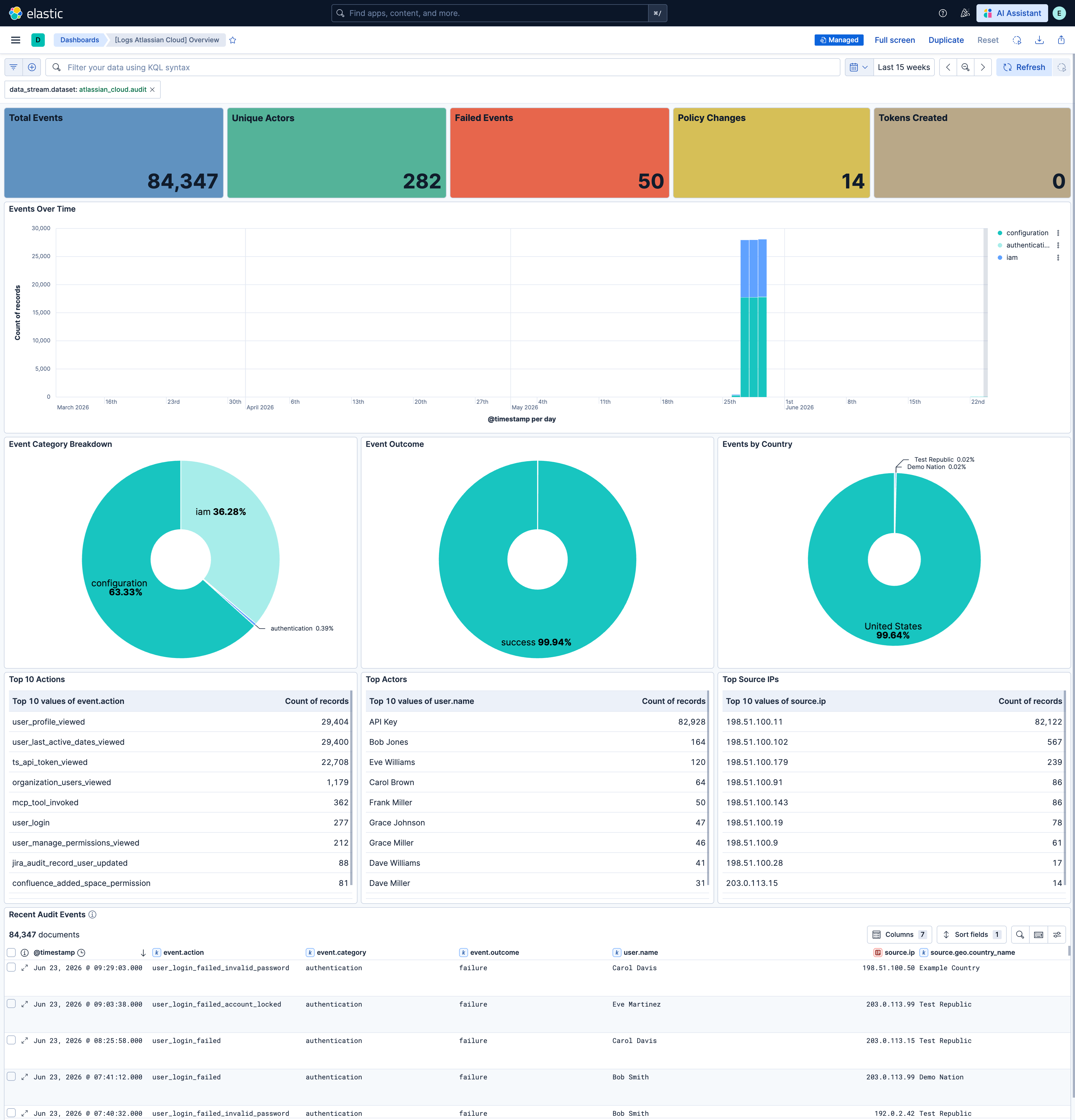
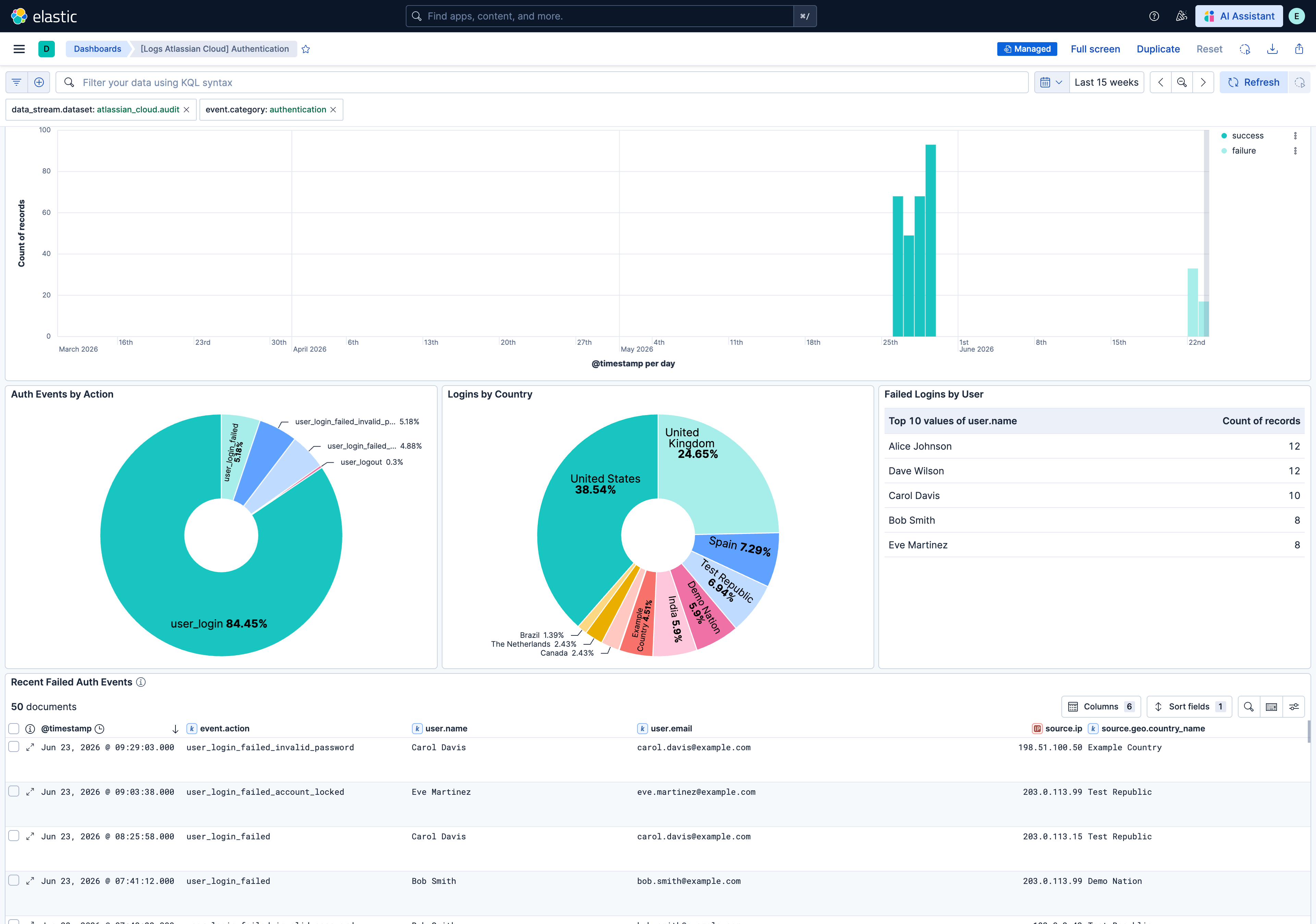
This integration includes one or more Kibana dashboards that visualizes the data collected by the integration. The screenshots below illustrate how the ingested data is displayed.
<carousel>
  ![Atlassian Cloud Authentication Events](https://epr.elastic.co/package/atlassian_cloud/0.1.0/img/screenshot1.png)

  ![Atlassian Cloud Overview](https://epr.elastic.co/package/atlassian_cloud/0.1.0/img/screenshot2.png)
</carousel>


## Changelog

<dropdown title="Changelog">
  | Version   | Details                                                                                                   | Minimum Kibana version |
  |-----------|-----------------------------------------------------------------------------------------------------------|------------------------|
  | **0.1.0** | **Enhancement** ([View pull request](https://github.com/elastic/integrations/pull/19718))Initial release. | 9.1.08.19.0            |
</dropdown>