---
title: Cassandra OpenTelemetry Assets
description: Apache Cassandra is a distributed, wide-column NoSQL database designed for high availability and linear scalability across commodity hardware. The Cassandra...
url: https://docs-v3-preview.elastic.dev/elastic/integration-docs/tree/main/reference/cassandra_otel
products:
- Elastic integrations
applies_to:
- Serverless Observability projects: Generally available
- Serverless Security projects: Generally available
- Elastic Stack: Generally available since 9.2
---
# Cassandra OpenTelemetry Assets
| | |
|-------------------------------------------------------------------------------------------------------------------------------|----------------------------------------------------------------|
| **Version** | 0.1.0 : Beta ([View all](#changelog)) |
| **Subscription level**[What's this?](https://www.elastic.co/subscriptions) | Basic |
| **Developed by**[What's this?](https://docs-v3-preview.elastic.dev/elastic/integration-docs/tree/main/reference/developed-by) | Elastic |
| **Minimum Kibana version(s)** | 9.2.1 |
To use beta integrations, go to the **Integrations** page in Kibana, scroll down, and toggle on the _Display beta integrations_ option.
Apache Cassandra is a distributed, wide-column NoSQL database designed for high availability and linear scalability across commodity hardware. The Cassandra OpenTelemetry assets provide dashboards, alert rules, and SLO templates for metrics collected using the OpenTelemetry JMX receiver with `target_system: cassandra`, covering latency, traffic, errors, compaction, and storage across your cluster.
## Compatibility
The Cassandra OpenTelemetry assets have been tested with:
- OpenTelemetry JMX Scraper from opentelemetry-java-contrib v1.54.0 with EDOT Collector v9.2.1
- OpenTelemetry JMX Scraper from opentelemetry-java-contrib v1.54.0 with OpenTelemetry Collector Contrib v0.146.0
Cassandra tested against:
- Apache Cassandra 4.1
## Requirements
You need Elasticsearch for storing and searching your data and Kibana for visualizing and managing it.
You can use our hosted Elasticsearch Service on Elastic Cloud, which is recommended, or self-manage the Elastic Stack on your own hardware.
## Setup
### Prerequisites
Cassandra exposes metrics using JMX on port 7199 by default. Ensure JMX remote access is enabled and reachable from where you run the collector. If you use the standalone [JMX Scraper](https://github.com/open-telemetry/opentelemetry-java-contrib/tree/main/jmx-scraper), run it with `OTEL_JMX_TARGET_SYSTEM=cassandra` and configure it to export using OTLP to your collector endpoint.
### Configuration
Install and configure the upstream OpenTelemetry Collector or Elastic Distribution of OpenTelemetry (EDOT) Collector to receive metrics from the JMX receiver or JMX Scraper and export them to Elasticsearch. Replace the following placeholders in the configuration:
| Placeholder | Description | Example |
|----------------------------|----------------------------------------------------|---------------------------------------------------|
| `` | Elasticsearch endpoint | `https://elasticsearch.example.com:9200` |
| `` | Elasticsearch API key for authentication | `${env:ES_API_KEY}` |
| `` | Cassandra JMX endpoint (host:port or full JMX URL) | `cassandra-host:7199` |
| `` | Path to the JMX Metric Gatherer or JMX Scraper JAR | `/opt/opentelemetry-java-contrib-jmx-metrics.jar` |
```yaml
receivers:
jmx/cassandra:
jar_path:
endpoint:
target_system: cassandra
collection_interval: 10s
processors:
resource/dataset:
attributes:
- key: data_stream.dataset
value: cassandra
action: upsert
batch:
timeout: 10s
send_batch_size: 1024
exporters:
elasticsearch/otel:
endpoint:
api_key:
mapping:
mode: otel
service:
pipelines:
metrics:
receivers: [jmx/cassandra]
processors: [resource/dataset, batch]
exporters: [elasticsearch/otel]
```
If you use the standalone JMX Scraper instead of the JMX receiver, replace the `jmx/cassandra` receiver with an `otlp` receiver and point the JMX Scraper's OTLP exporter to your collector. Ensure the scraper runs with `OTEL_JMX_TARGET_SYSTEM=cassandra`.
For multi-node clusters, run one JMX receiver or scraper instance per Cassandra node, or use a single collector with multiple JMX receiver configs, each pointing to a different node.
## Reference
### Metrics
Refer to the [JMX receiver README](https://github.com/open-telemetry/opentelemetry-collector-contrib/blob/main/receiver/jmxreceiver/README.md) and the [JMX Scraper Cassandra configuration](https://github.com/open-telemetry/opentelemetry-java-contrib/tree/main/jmx-scraper) for details on the metrics produced when `target_system` is set to `cassandra`.
## Dashboards
| Dashboard | Description |
|-------------------------------|-----------------------------------------------------------------------------------------------------------------------------------------|
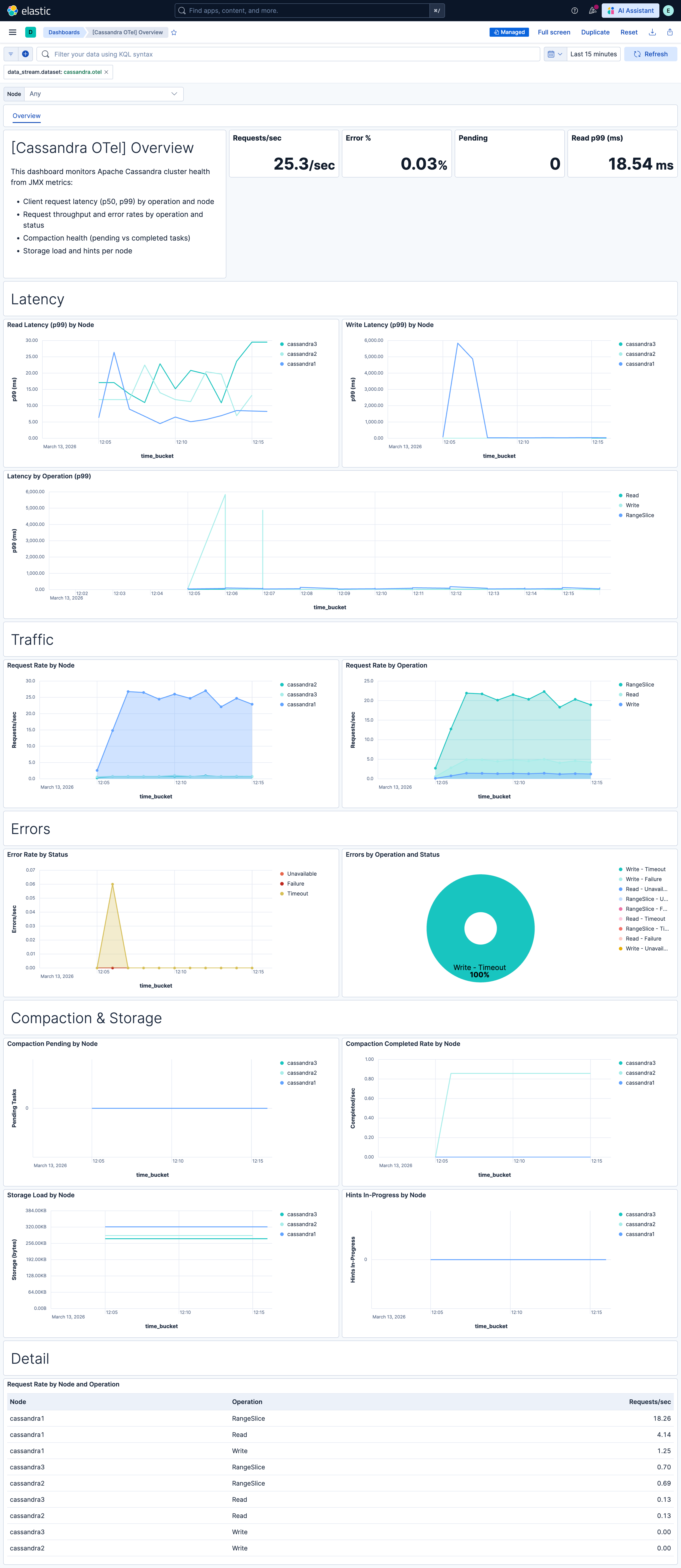
| **[Cassandra OTel] Overview** | Overview of Apache Cassandra cluster health from OTel JMX metrics: client request latency, throughput, errors, compaction, and storage. |
## Alert rules
| Alert | Trigger | Severity |
|---------------------------------------------------------------------|----------------------------------------------------------------|----------|
| **[Cassandra OTel] High read latency (p99)** | p99 read latency exceeds 100 ms on any node | High |
| **[Cassandra OTel] High write latency (p99)** | p99 write latency exceeds 50 ms on any node | High |
| **[Cassandra OTel] High range slice latency (p99)** | p99 range slice latency exceeds 500 ms on any node | High |
| **[Cassandra OTel] Request errors (Timeout, Unavailable, Failure)** | Any request errors detected (Timeout, Unavailable, or Failure) | Critical |
| **[Cassandra OTel] High error rate by node** | Error rate exceeds 5% on any node | Critical |
| **[Cassandra OTel] Compaction falling behind (pending tasks)** | Pending compaction tasks greater than zero on any node | Warning |
| **[Cassandra OTel] Hints in progress (replicas unreachable)** | Hints in progress greater than zero on any node | Warning |
## SLO templates
SLO templates require Elastic Stack version 9.4.0 or later.
| SLO | Target | Window | Description |
|-----------------------------------------------------------------|--------|----------------|--------------------------------------------------------------------------------------------|
| **[Cassandra OTel] Read latency p99 99.5% rolling 30 days** | 99.5% | 30-day rolling | p99 read latency below 50 ms for 99.5% of 1-minute intervals. |
| **[Cassandra OTel] Request success rate 99.5% rolling 30 days** | 99.5% | 30-day rolling | Success rate (total requests minus errors) at least 99.5% for 99.5% of 1-minute intervals. |
## Screenshots
This integration includes one or more Kibana dashboards that visualizes the data collected by the integration. The screenshots below illustrate how the ingested data is displayed.
## Changelog
| Version | Details | Minimum Kibana version |
|-----------|-----------------------------------------------------------------------------------------------------------------------|------------------------|
| **0.1.0** | **Enhancement** ([View pull request](https://github.com/elastic/integrations/pull/17804))Initial draft of the package | 9.2.1 |