---
title: Doppler Integration for Elastic
description: Doppler is a secrets management platform (SecretOps) that stores, syncs, and audits application secrets and configuration across environments. The Doppler...
url: https://docs-v3-preview.elastic.dev/elastic/integration-docs/tree/main/reference/doppler
products:
- Elastic integrations
applies_to:
- Serverless Observability projects: Preview
- Serverless Security projects: Preview
- Elastic Stack: Preview since 9.0
---
# Doppler Integration for Elastic
| | |
|-------------------------------------------------------------------------------------------------------------------------------|-------------------------------------------------------------------|
| **Version** | 0.1.1 : Preview ([View all](#changelog)) |
| **Subscription level**[What's this?](https://www.elastic.co/subscriptions) | Basic |
| **Developed by**[What's this?](https://docs-v3-preview.elastic.dev/elastic/integration-docs/tree/main/reference/developed-by) | Elastic |
| **Ingestion method(s)** | Webhook |
| **Minimum Kibana version(s)** | 9.0.08.16.0 |
To use pre-release integrations, go to the **Integrations** page in Kibana, scroll down, and toggle on the _Display beta integrations_ option.
## Overview
[Doppler](https://www.doppler.com/) is a secrets management platform (SecretOps) that stores, syncs, and audits application secrets and configuration across environments. The Doppler integration for Elastic collects Doppler's activity logs and secret-access events, normalizes them to the Elastic Common Schema (ECS), and ships them to Elasticsearch so security teams can monitor secret access, detect anomalous identity behavior, and investigate workplace configuration changes.
### Compatibility
This integration is compatible with Doppler's [Generic HTTPS Log Stream](https://docs.doppler.com/docs/generic-https), available on Doppler's Team and Enterprise plans. It is compatible with Elastic Stack 8.16 and later.
### How it works
Doppler delivers these events by POSTing newline-delimited JSON to a single user-configured HTTPS destination (a "Log Stream"). This integration stands up an HTTP endpoint (the Elastic Agent `http_endpoint` input) that receives those events. Incoming requests are authenticated with a static `Authorization` header, parsed, mapped to ECS, and then routed:
- **Activity** events are stored in the `doppler.activity` data stream.
- High-volume `security.secret_read` events are rerouted at ingest time to the dedicated `doppler.secret_read` data stream, so secret-access telemetry can be retained, indexed, and alerted on independently of general activity.
## What data does this integration collect?
The Doppler integration collects two families of events:
- **Activity logs** — workplace and project lifecycle events such as project/config/environment creation and deletion, secret value changes, member and group management, role changes, service-account and token lifecycle, and access grants.
- **Secret read events** (`security.secret_read`) — a record each time secrets are fetched (via the dashboard, CLI, API, or integrations), including which projects/configs/environments and secret names were accessed and the source session (IP, method, browser/OS where available).
### Supported use cases
Normalizing Doppler events to ECS in Elasticsearch makes the data searchable, visualizable, and correlatable alongside other sources. The collected fields support, for example:
- Secret-access analysis: which secrets, projects, configs, and environments were read, by whom, and from which source IP, geo, and user agent (the `doppler.secret_read.*`, `source.*`, and `user_agent.*` fields).
- Identity and configuration history: actor, target, role, token, and group activity across workplace and project events (the `user.*`, `user.target.*`, and `doppler.activity.*` fields).
- Long-term retention of an auditable record of secrets-platform activity.
## What do I need to use this integration?
- An Elastic deployment (self-managed, Elastic Cloud, or Serverless) and an Elastic Agent.
- A Doppler Team or Enterprise plan with permission to configure a workplace Log Stream.
- A network path that allows Doppler's servers to reach the Agent's HTTPS endpoint (a public ingress, load balancer, or reverse proxy terminating TLS in front of the Agent).
## How do I deploy this integration?
### Agent-based deployment
Elastic Agent must be installed. For more details, check the Elastic Agent [installation instructions](https://www.elastic.co/guide/en/fleet/current/elastic-agent-installation.html). You can install only one Elastic Agent per host.
Because Doppler requires the destination to be reachable over HTTPS from the public internet, terminate TLS either on the Agent (configure the SSL options on the input) or on a reverse proxy / load balancer placed in front of the Agent that forwards to the listener.
### Set up steps in Doppler
1. In the Doppler dashboard, open your **Workplace Settings** and go to **Logging**.
2. Add a new **Log Stream** of type **Generic HTTPS**.
3. Set the **Endpoint** to the public HTTPS URL that reaches the Agent's listener (host/port plus the path configured below, e.g. `https:///doppler`).
4. Add an **Authorization** header whose value is a long, random shared secret. Doppler sends this header as `Authorization: ` on every request; use the form `Bearer ` and configure the same value in Kibana (below).
5. Save and send a test event.
#### Vendor resources
- [Doppler Generic HTTPS Log Stream](https://docs.doppler.com/docs/generic-https)
- [Doppler Workplace Logs](https://docs.doppler.com/docs/workplace-logs)
### Set up steps in Kibana
1. In Kibana, go to **Management > Integrations**, search for **Doppler**, and select **Add Doppler**.
2. Configure the **Collect Doppler logs via webhook** input:
- **Listen Address** and **Listen Port** — the address/port the Agent binds (defaults `0.0.0.0` and port `9080`).
- **URL** — the request path Doppler posts to (e.g. `/doppler`); it must match the endpoint set in Doppler.
- **Authorization Token** — the exact value Doppler sends in the `Authorization` header, e.g. `Bearer `. The listener fixes the header name to `Authorization`; requests whose header value does not match are rejected.
- **TLS** — provide a certificate and key if the Agent terminates HTTPS directly.
3. Save and deploy the integration to the Agent policy.
No separate input exists for secret-read events; they arrive on the same listener and are routed automatically to the `doppler.secret_read` data stream.
### Validation
1. In Doppler, trigger a test event from the Log Stream configuration, or perform an action (for example, read a secret) that generates an event.
2. In Kibana, open **Discover** and select the `logs-doppler.activity-*` data view to confirm activity events are arriving, and `logs-doppler.secret_read-*` to confirm secret-read events are being routed.
3. Confirm fields such as `event.action`, `user.name`, `organization.name`, and (for secret reads) `source.geo.*` and `doppler.secret_read.secret_names` are populated.
## Troubleshooting
- No data is being collected: Confirm Doppler can reach the endpoint over HTTPS from the public internet, that the Agent is healthy, and that the listener address/port/path match the Doppler Log Stream configuration.
- All requests are rejected (401/403): Verify the Authorization Token in Kibana exactly matches the `Authorization` header value configured in Doppler, including the `Bearer ` prefix.
- Secret-read events missing from `doppler.activity`: This is expected — `security.secret_read` events are rerouted to the `doppler.secret_read` data stream.
- Missing geo enrichment: `source.geo.*` is derived from `source.ip`; private or non-routable source IPs will not resolve.
## Performance and scaling
`security.secret_read` is typically the highest-volume Doppler event type. Routing it to its own data stream lets you size shards, retention (ILM), and alerting independently from lower-volume activity events. For more information on architectures that can be used for scaling this integration, check the [Ingest Architectures](https://www.elastic.co/docs/manage-data/ingest/ingest-reference-architectures) documentation.
## Reference
### Inputs used
These inputs can be used with this integration:
## SetupFor more details about the HTTP Endpoint input settings, check the [Filebeat documentation](https://www.elastic.co/docs/reference/beats/filebeat/filebeat-input-http_endpoint).
### Collecting logs from HTTP EndpointTo collect logs via HTTP Endpoint, select **Collect logs via HTTP Endpoint** and configure the following parameters:
- Listen Address: Bind address for the HTTP listener. Use 0.0.0.0 to listen on all interfaces.
- Listen port: Bind port for the listener.
### Dashboards
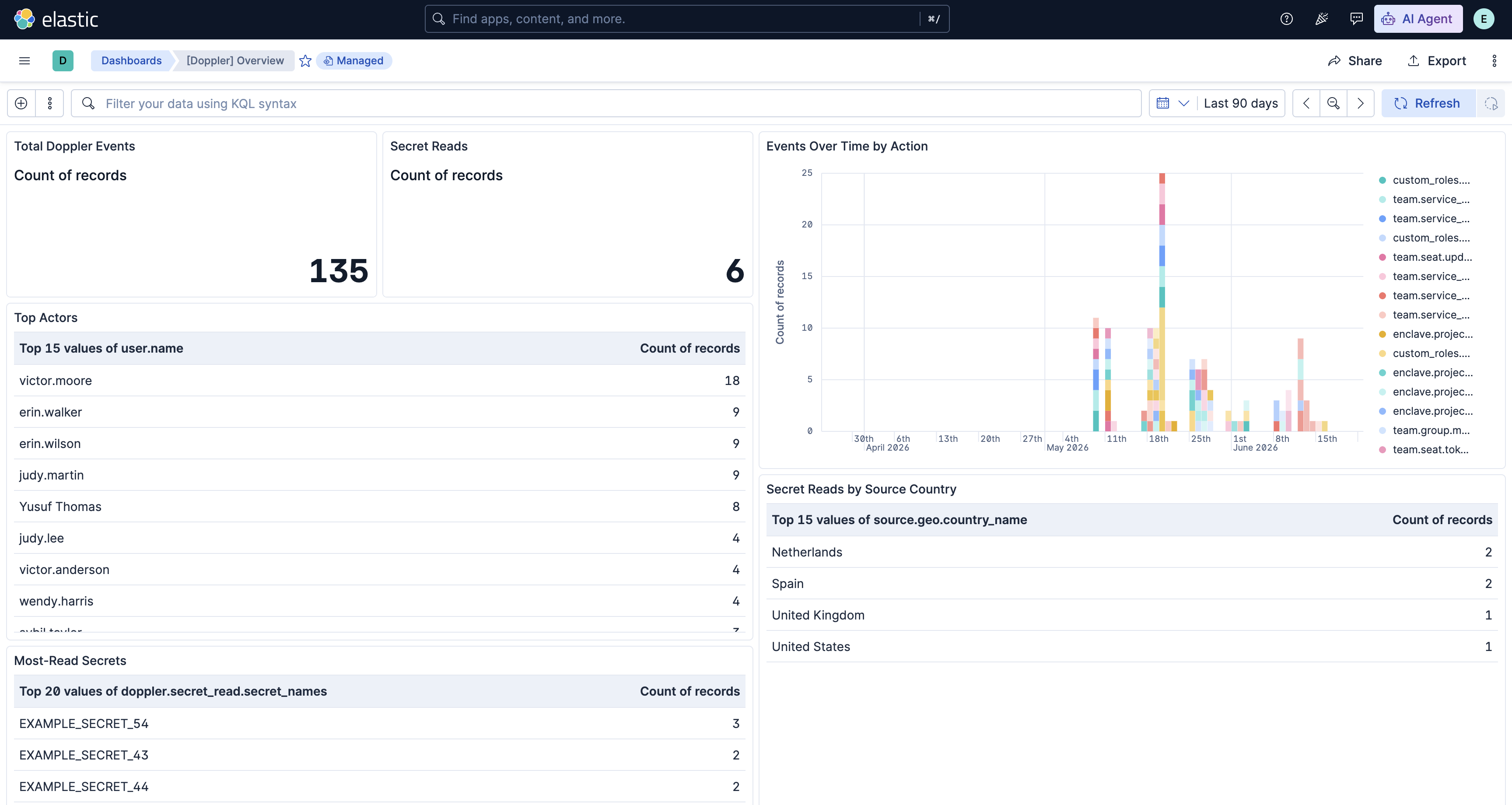
The integration ships a **Doppler Overview** dashboard that summarizes
activity and secret-access events — event volume over time, top actors and
actions, and a breakdown of secret reads by method and geography. It is tagged
**Security Solution**, so it also appears in the Security app, and can be found
in Kibana under **Dashboards** after installing the integration.
### Vendor documentation links
- [Doppler documentation](https://docs.doppler.com/)
- [Doppler Workplace Logs](https://docs.doppler.com/docs/workplace-logs)
- [Doppler Generic HTTPS Log Stream](https://docs.doppler.com/docs/generic-https)
### Data streams
#### activity
The `activity` data stream contains Doppler workplace and project activity events — project/config/environment lifecycle, secret changes, member/group management, role changes, and service-account/token lifecycle. The raw event is preserved (when enabled) in `event.original`, and Doppler-specific context is kept under `doppler.activity.*` and `doppler.actor.*`.
##### activity fields
| Field | Description | Type | |
|---------------------------------------------|--------------------------------------------------------------------------------------------------------------------------------------------------------------------------------------------------------------------------------------------------------------------------------------------|------------------------------------------------|-----------|
| @timestamp | Event timestamp. | date | |
| data_stream.dataset | Data stream dataset. | constant_keyword | |
| data_stream.namespace | Data stream namespace. | constant_keyword | |
| data_stream.type | Data stream type. | constant_keyword | |
| doppler.activity.config.name | Name of the config the activity relates to. | keyword | |
| doppler.activity.description | Human-readable description of the activity. Doppler emits this as dashboard HTML; the pipeline strips the markup to plain text for readability and search. The original HTML is preserved verbatim in `event.original` when the "Preserve original event" option is enabled. | match_only_text | |
| doppler.activity.environment.id | Identifier of the environment the activity relates to. | keyword | |
| doppler.activity.environment.name | Name of the environment the activity relates to. | keyword | |
| doppler.activity.environment.old_id | Previous environment identifier on a rename event. | keyword | |
| doppler.activity.environment.old_name | Previous environment name on a rename event. | keyword | |
| doppler.activity.log_id | Doppler activity log identifier. | keyword | |
| doppler.activity.members_added | Email addresses of members added to a group (`team.group.members.add`). Multi-valued when several members are added at once; use `MV_EXPAND` in ES | QL. | keyword |
| doppler.activity.metadata | Raw, per-event-type metadata as emitted by Doppler, retained after well-known keys are promoted to the typed `doppler.activity.\*` fields above. Useful for investigating uncommon event types; as a `flattened` field it is queryable in KQL/DSL but not in ES | QL, so prefer the typed fields for detections. | flattened |
| doppler.activity.project.id | Identifier of the project the activity relates to. | keyword | |
| doppler.activity.project.name | Name of the project the activity relates to. | keyword | |
| doppler.activity.role.name | Role granted or referenced by the activity. Populated for project access grants (`metadata.role`) and custom role creation (`custom_roles.\*`). | keyword | |
| doppler.activity.role.new | New role for a role-change activity. Covers both project role changes (`metadata.newRole`) and workplace seat role changes (`metadata.newWorkplaceRole`), so escalation detections can use one field for both. | keyword | |
| doppler.activity.role.old | Previous role for a role-change activity (project `metadata.oldRole` or workplace `metadata.oldWorkplaceRole`). | keyword | |
| doppler.activity.secrets_changed.added | Names of secrets added in a config secrets change (`enclave.project.config.secrets.update`). Multi-valued; use `MV_EXPAND` in ES | QL. | keyword |
| doppler.activity.secrets_changed.removed | Names of secrets removed in a config secrets change. Multi-valued; use `MV_EXPAND` in ES | QL. | keyword |
| doppler.activity.secrets_changed.updated | Names of secrets whose values changed in a config secrets change. Multi-valued; use `MV_EXPAND` in ES | QL. | keyword |
| doppler.activity.service_token.read_access | Whether a created config service token was granted read access. | boolean | |
| doppler.activity.service_token.write_access | Whether a created config service token was granted write access. Write-capable tokens are higher risk and a useful detection signal. | boolean | |
| doppler.activity.token.id | Identifier of the token created by a service-account token-create event. | keyword | |
| doppler.activity.token.name | Name of the token created by a token-lifecycle event (service-account token or config service token). | keyword | |
| doppler.activity.url | Link to the activity log entry in the Doppler dashboard. | keyword | |
| doppler.actor.bot_type | Bot type, when the actor is a Doppler bot. | keyword | |
| doppler.actor.kind | Principal type of the actor that performed the action: `user`, `apiToken`, `serviceAccount`, or `bot`. Preserved from the vendor payload when `doppler.user` is renamed to `doppler.actor`. Use it to distinguish human from non-human (token/service-account/bot) activity in detections. | keyword | |
| doppler.actor.token_type.id | Identifier of the API token type, when the actor is an API token. | keyword | |
| doppler.actor.token_type.name | Name of the API token type, when the actor is an API token. | keyword | |
| doppler.workplace.id | Identifier of the Doppler workplace (tenant) the event belongs to. Also copied to `organization.id` for ECS-normalized, cross-source tenant correlation. | keyword | |
| doppler.workplace.name | Name of the Doppler workplace (tenant) the event belongs to. Also copied to `organization.name`. | keyword | |
| event.dataset | Event dataset. | constant_keyword | |
| event.module | Event module. | constant_keyword | |
| input.type | Type of filebeat input. | keyword | |
##### activity sample event
```json
{
"@timestamp": "2026-05-11T20:12:43.104Z",
"agent": {
"ephemeral_id": "17a23276-8935-427e-83c7-8c0e1937e020",
"id": "581ebf4b-a2a9-43ed-afa4-6c2112ef47e8",
"name": "elastic-agent-87474",
"type": "filebeat",
"version": "9.4.2"
},
"data_stream": {
"dataset": "doppler.activity",
"namespace": "64566",
"type": "logs"
},
"doppler": {
"activity": {
"description": "Created token example-service-account-4 for service account Yusuf Thomas",
"log_id": "nzXovfNKOK837wck9ngWJjb5",
"metadata": {
"serviceAccountId": "64f61675-c2d9-4c8f-8b59-d1caf8debfb4",
"serviceAccountName": "example-service-account-3",
"serviceAccountTokenId": "b292275b-cf26-40be-85d8-0fe54f99aad3",
"serviceAccountTokenName": "example-service-account-4",
"serviceAccountUrl": "https://dashboard.doppler.com/workplace/efbd98ca78c68ffdced3/team/service_accounts/64f61675-c2d9-4c8f-8b59-d1caf8debfb4"
},
"token": {
"id": "b292275b-cf26-40be-85d8-0fe54f99aad3",
"name": "example-service-account-4"
},
"url": "https://dashboard.doppler.com/workplace/efbd98ca78c68ffdced3/logs?id=MwtgYglYXJ3uDpv4YkyjHKCG"
},
"actor": {
"kind": "user"
},
"workplace": {
"id": "efbd98ca78c68ffdced3",
"name": "Example Corp"
}
},
"ecs": {
"version": "9.4.0"
},
"elastic_agent": {
"id": "581ebf4b-a2a9-43ed-afa4-6c2112ef47e8",
"snapshot": false,
"version": "9.4.2"
},
"event": {
"action": "team.service_account.token.create",
"agent_id_status": "verified",
"category": [
"iam"
],
"dataset": "doppler.activity",
"id": "nzXovfNKOK837wck9ngWJjb5",
"ingested": "2026-06-23T05:46:38Z",
"kind": "event",
"module": "doppler",
"original": "{\"createdAt\":\"2026-05-11T20:12:43.104Z\",\"link\":\"https://dashboard.doppler.com/workplace/efbd98ca78c68ffdced3/logs?id=MwtgYglYXJ3uDpv4YkyjHKCG\",\"metadata\":{\"serviceAccountId\":\"64f61675-c2d9-4c8f-8b59-d1caf8debfb4\",\"serviceAccountName\":\"example-service-account-3\",\"serviceAccountTokenApiKeyPreview\":\"b540be76b8cf\",\"serviceAccountTokenId\":\"b292275b-cf26-40be-85d8-0fe54f99aad3\",\"serviceAccountTokenName\":\"example-service-account-4\",\"serviceAccountUrl\":\"https://dashboard.doppler.com/workplace/efbd98ca78c68ffdced3/team/service_accounts/64f61675-c2d9-4c8f-8b59-d1caf8debfb4\"},\"slug\":\"nzXovfNKOK837wck9ngWJjb5\",\"source\":\"doppler\",\"text\":\"Created token example-service-account-4 for service account Yusuf Thomas\",\"title\":\"Activity Log: nzXovfNKOK837wck9ngWJjb5\",\"type\":\"team.service_account.token.create\",\"user\":{\"email\":\"grace.moore@example.com\",\"kind\":\"user\",\"name\":\"Ivan Anderson\",\"profile_image_url\":\"https://www.gravatar.com/avatar/15c106ed034102804bb3d6924913101c?s=500&d=retro\",\"slug\":\"fcb8e8ff-0036-45c4-8a0b-6c16df16d9bd\",\"username\":\"victor.moore\"},\"workplace\":{\"id\":\"efbd98ca78c68ffdced3\",\"name\":\"Example Corp\"}}",
"outcome": "success",
"provider": "doppler",
"type": [
"creation",
"user"
]
},
"input": {
"type": "http_endpoint"
},
"observer": {
"product": "Activity Logs",
"vendor": "Doppler"
},
"organization": {
"id": "efbd98ca78c68ffdced3",
"name": "Example Corp"
},
"related": {
"user": [
"fcb8e8ff-0036-45c4-8a0b-6c16df16d9bd",
"victor.moore",
"grace.moore@example.com",
"64f61675-c2d9-4c8f-8b59-d1caf8debfb4",
"example-service-account-3"
]
},
"tags": [
"forwarded",
"preserve_original_event"
],
"url": {
"domain": "dashboard.doppler.com",
"full": "https://dashboard.doppler.com/workplace/efbd98ca78c68ffdced3/logs?id=MwtgYglYXJ3uDpv4YkyjHKCG",
"path": "/workplace/efbd98ca78c68ffdced3/logs",
"query": "id=MwtgYglYXJ3uDpv4YkyjHKCG",
"scheme": "https"
},
"user": {
"email": "grace.moore@example.com",
"full_name": "Ivan Anderson",
"id": "fcb8e8ff-0036-45c4-8a0b-6c16df16d9bd",
"name": "victor.moore",
"target": {
"id": "64f61675-c2d9-4c8f-8b59-d1caf8debfb4",
"name": "example-service-account-3"
}
}
}
```
#### secret_read
The `secret_read` data stream contains `security.secret_read` events, rerouted from the activity listener. Each event lists the secrets accessed (`doppler.secret_read.secrets` plus the convenience arrays `secret_names`, `projects`, `environments`, `configs`, and `secret_count`) and the source session, enriched with `source.geo.*`, `source.as.*`, and `user_agent.*` where available.
##### secret_read fields
| Field | Description | Type | |
|----------------------------------|------------------------------------------------------------------------------------------------------------------------------------------------------------------------------------------------------------------------------------------------------------------------------------------------------------------------------------------------------------------------------------------------------|------------------------------------|-----------|
| @timestamp | Event timestamp. | date | |
| data_stream.dataset | Data stream dataset. | constant_keyword | |
| data_stream.namespace | Data stream namespace. | constant_keyword | |
| data_stream.type | Data stream type. | constant_keyword | |
| doppler.actor.bot_type | Bot type, when the actor is a Doppler bot. | keyword | |
| doppler.actor.kind | Principal type of the actor that performed the action: `user`, `apiToken`, `serviceAccount`, or `bot`. Preserved from the vendor payload when `doppler.user` is renamed to `doppler.actor`. Use it to distinguish human from non-human (token/service-account/bot) activity in detections. | keyword | |
| doppler.actor.token_type.id | Identifier of the API token type, when the actor is an API token. | keyword | |
| doppler.actor.token_type.name | Name of the API token type, when the actor is an API token. | keyword | |
| doppler.secret_read.configs | Distinct configs whose secrets were read. Multi-valued. | keyword | |
| doppler.secret_read.environments | Distinct environments whose secrets were read. Multi-valued. | keyword | |
| doppler.secret_read.method | Access channel used to read the secrets: `API`, `CLI`, or `Dashboard`. | keyword | |
| doppler.secret_read.projects | Distinct projects whose secrets were read. Multi-valued; a high cardinality in one event indicates a cross-project read. | keyword | |
| doppler.secret_read.secret_count | Number of secrets read in this event (count of well-formed entries, including any duplicates across projects/environments). Primary field for bulk-read detections. | long | |
| doppler.secret_read.secret_names | Distinct names of the secrets that were read. Multi-valued; use `MV_EXPAND` in ES | QL to pivot on individual secrets. | keyword |
| doppler.secret_read.secrets | The expanded list of secrets that were read. Each entry has `project`, `environment`, `config`, `name`, `version`, and (for inherited values) an `inherited_from` reference of `\{project, environment, config\}`. Vendor sends abbreviated keys (`p`, `e`, `c`, `s`, `v`, `r`) which the pipeline expands. As a `flattened` field this is for investigation; prefer the sidecar arrays above for ES | QL detections. | flattened |
| doppler.workplace.id | Identifier of the Doppler workplace (tenant) the event belongs to. | keyword | |
| doppler.workplace.name | Name of the Doppler workplace (tenant) the event belongs to. | keyword | |
| event.dataset | Event dataset. | constant_keyword | |
| event.module | Event module. | constant_keyword | |
| input.type | Type of filebeat input. | keyword | |
##### secret_read sample event
```json
{
"@timestamp": "2026-06-15T00:01:16.402Z",
"agent": {
"ephemeral_id": "17a23276-8935-427e-83c7-8c0e1937e020",
"id": "581ebf4b-a2a9-43ed-afa4-6c2112ef47e8",
"name": "elastic-agent-87474",
"type": "filebeat",
"version": "9.4.2"
},
"data_stream": {
"dataset": "doppler.secret_read",
"namespace": "64566",
"type": "logs"
},
"doppler": {
"actor": {
"kind": "user"
},
"secret_read": {
"configs": [
"dev",
"prod"
],
"environments": [
"dev",
"prod"
],
"method": "API",
"projects": [
"example-project-38",
"example-project-16"
],
"secret_count": 3,
"secret_names": [
"EXAMPLE_SECRET_43",
"EXAMPLE_SECRET_44",
"EXAMPLE_SECRET_54"
],
"secrets": [
{
"environment": "dev",
"name": "EXAMPLE_SECRET_43",
"project": "example-project-38",
"config": "dev",
"version": 3
},
{
"environment": "dev",
"name": "EXAMPLE_SECRET_44",
"project": "example-project-38",
"config": "dev",
"version": 1
},
{
"environment": "prod",
"inherited_from": {
"environment": "dev",
"project": "example-project-38",
"config": "dev"
},
"name": "EXAMPLE_SECRET_54",
"project": "example-project-16",
"config": "prod",
"version": 8
}
]
},
"workplace": {
"id": "efbd98ca78c68ffdced3",
"name": "Example Corp"
}
},
"ecs": {
"version": "9.4.0"
},
"elastic_agent": {
"id": "581ebf4b-a2a9-43ed-afa4-6c2112ef47e8",
"snapshot": false,
"version": "9.4.2"
},
"event": {
"action": "security.secret_read",
"agent_id_status": "verified",
"category": [
"configuration"
],
"dataset": "doppler.secret_read",
"id": "Hs7cG13YZKz7pq6n+0HjLwBOwWE=",
"ingested": "2026-06-23T05:46:38Z",
"kind": "event",
"module": "doppler",
"original": "{\"createdAt\":\"2026-06-15T00:01:16.402Z\",\"metadata\":{\"secrets\":[{\"c\":\"dev\",\"e\":\"dev\",\"m\":\"m\",\"p\":\"example-project-38\",\"s\":\"EXAMPLE_SECRET_43\",\"v\":3},{\"c\":\"dev\",\"e\":\"dev\",\"m\":\"m\",\"p\":\"example-project-38\",\"s\":\"EXAMPLE_SECRET_44\",\"v\":1},{\"c\":\"prod\",\"e\":\"prod\",\"m\":\"m\",\"p\":\"example-project-16\",\"r\":{\"c\":\"dev\",\"e\":\"dev\",\"p\":\"example-project-38\"},\"s\":\"EXAMPLE_SECRET_54\",\"v\":8}]},\"session\":{\"browser\":null,\"ip\":\"198.51.100.1\",\"method\":\"API\",\"os\":null},\"source\":\"doppler\",\"title\":\"Secret Read\",\"type\":\"security.secret_read\",\"user\":{\"email\":\"dave.wilson@example.com\",\"kind\":\"user\",\"name\":\"Ivan Martin\",\"profile_image_url\":\"https://www.gravatar.com/avatar/cb16299dced55e7ee984433be5293d5b?s=500&d=retro\",\"slug\":\"aa4c1c7a-83b6-46be-83ae-712102c616fc\",\"username\":\"mallory.white\"},\"workplace\":{\"id\":\"efbd98ca78c68ffdced3\",\"name\":\"Example Corp\"}}",
"outcome": "success",
"provider": "doppler",
"type": [
"access"
]
},
"input": {
"type": "http_endpoint"
},
"network": {
"type": "ipv4"
},
"observer": {
"product": "Activity Logs",
"vendor": "Doppler"
},
"organization": {
"id": "efbd98ca78c68ffdced3",
"name": "Example Corp"
},
"related": {
"ip": [
"198.51.100.1"
],
"user": [
"aa4c1c7a-83b6-46be-83ae-712102c616fc",
"mallory.white",
"dave.wilson@example.com"
]
},
"source": {
"as": {
"number": 64501,
"organization": {
"name": "Documentation ASN"
}
},
"geo": {
"city_name": "Amsterdam",
"continent_name": "Europe",
"country_iso_code": "NL",
"country_name": "Netherlands",
"location": {
"lat": 52.37403995823115,
"lon": 4.889689916744828
},
"region_iso_code": "NL-NH",
"region_name": "North Holland"
},
"ip": "198.51.100.1"
},
"tags": [
"forwarded",
"preserve_original_event"
],
"user": {
"email": "dave.wilson@example.com",
"full_name": "Ivan Martin",
"id": "aa4c1c7a-83b6-46be-83ae-712102c616fc",
"name": "mallory.white"
}
}
```
## Screenshots
This integration includes one or more Kibana dashboards that visualizes the data collected by the integration. The screenshots below illustrate how the ingested data is displayed.
## Changelog
| Version | Details | Minimum Kibana version |
|-----------|----------------------------------------------------------------------------------------------------------------------------------------------|------------------------|
| **0.1.1** | **Bug fix** ([View pull request](https://github.com/elastic/integrations/pull/19960))Standardize HTTP Endpoint capitalization in README file | 9.0.08.16.0 |
| **0.1.0** | **Enhancement** ([View pull request](https://github.com/elastic/integrations/pull/19725))Initial release of the Doppler integration. | 9.0.08.16.0 |