---
title: GCP Cloud Storage OpenTelemetry Assets
description: This package contains Kibana assets for monitoring Cloud Storage buckets with Google Cloud Monitoring metrics collected by the OpenTelemetry Collector...
url: https://docs-v3-preview.elastic.dev/elastic/integration-docs/tree/main/reference/gcp_cloudstorage_otel
products:
- Elastic integrations
applies_to:
- Serverless Observability projects: Preview
- Serverless Security projects: Preview
- Elastic Stack: Planned
---
# GCP Cloud Storage OpenTelemetry Assets
| | |
|-------------------------------------------------------------------------------------------------------------------------------|-------------------------------------------------------------------|
| **Version** | 0.1.0 : Preview ([View all](#changelog)) |
| **Subscription level**[What's this?](https://www.elastic.co/subscriptions) | Basic |
| **Developed by**[What's this?](https://docs-v3-preview.elastic.dev/elastic/integration-docs/tree/main/reference/developed-by) | Elastic |
| **Minimum Kibana version(s)** | 9.6.0 |
To use pre-release integrations, go to the **Integrations** page in Kibana, scroll down, and toggle on the _Display beta integrations_ option.
This package contains Kibana assets for monitoring [Cloud Storage](https://cloud.google.com/storage) buckets with Google Cloud Monitoring metrics collected by the OpenTelemetry Collector.
The package is **content only**. It does not configure data collection. Use the **[Google Cloud Monitoring OpenTelemetry Input](https://www.elastic.co/docs/reference/integrations/googlecloudmonitor_input_otel)** package (`googlecloudmonitor_input_otel`) to collect Cloud Storage metrics into Elasticsearch.
## Requirements
You need Elasticsearch for storing and searching your data and Kibana for visualizing and managing it.
You can use our hosted Elasticsearch Service on Elastic Cloud, which is recommended, or self-manage
the Elastic Stack on your own hardware.
## Setup
Install the **[Google Cloud Monitoring OpenTelemetry Input](https://www.elastic.co/docs/reference/integrations/googlecloudmonitor_input_otel)** package (`googlecloudmonitor_input_otel`) and configure it to collect Cloud Storage Cloud Monitoring metrics. This content package provides assets that visualize data collected by that input.
When configuring the input package, set the dataset name to `gcp.cloudstorage.otel` so that data is written to the `metrics-gcp.cloudstorage.otel-default` data stream, which these dashboards query.
The dashboards visualize the following Cloud Monitoring metric types:
| Metric type | Used for |
|--------------------------------------------------------------|-----------------------------------------------------------------------------------|
| `storage.googleapis.com/api/request_count` | Request volume, error rate, and fault attribution by method and response code. |
| `storage.googleapis.com/storage/v2/total_bytes` | Stored bytes by bucket, location, and storage class. |
| `storage.googleapis.com/storage/v2/total_count` | Stored object count by bucket and storage class. |
| `storage.googleapis.com/storage/total_byte_seconds` | Storage consumption over time, used for cost attribution. |
| `storage.googleapis.com/storage/total_bytes` | Stored bytes reported by the earlier metric, kept for buckets that still emit it. |
| `storage.googleapis.com/storage/object_count` | Object count reported by the earlier metric, kept for buckets that still emit it. |
| `storage.googleapis.com/authz/acl_based_object_access_count` | Object reads authorized by ACLs rather than IAM. |
| `storage.googleapis.com/authz/acl_operations_count` | ACL operations, which indicate buckets not yet using uniform bucket-level access. |
## Dashboards
| Dashboard | Description |
|--------------------------------------------|---------------------------------------------------------------------------------------------------------------------------------------------------------------------------------------------------------------------------------------------------------------------------------|
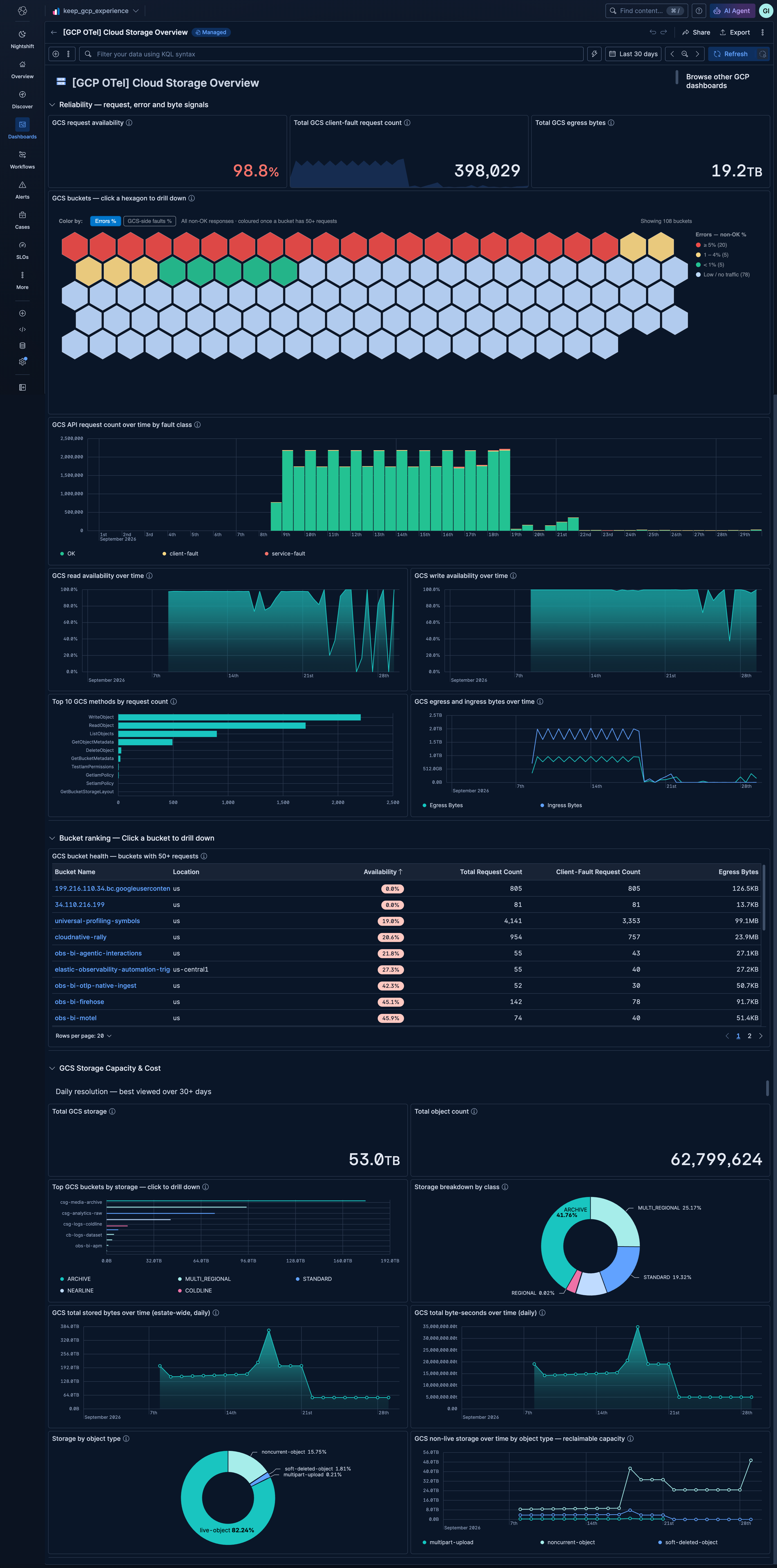
| **[GCP OTel] Cloud Storage Overview** | Estate-wide health for Cloud Storage: request volume and error rate, whether failures are client-side or Google-side, a bucket hex map for spotting the worst offenders, and stored bytes, object counts, and storage consumption broken down by storage class and object type. |
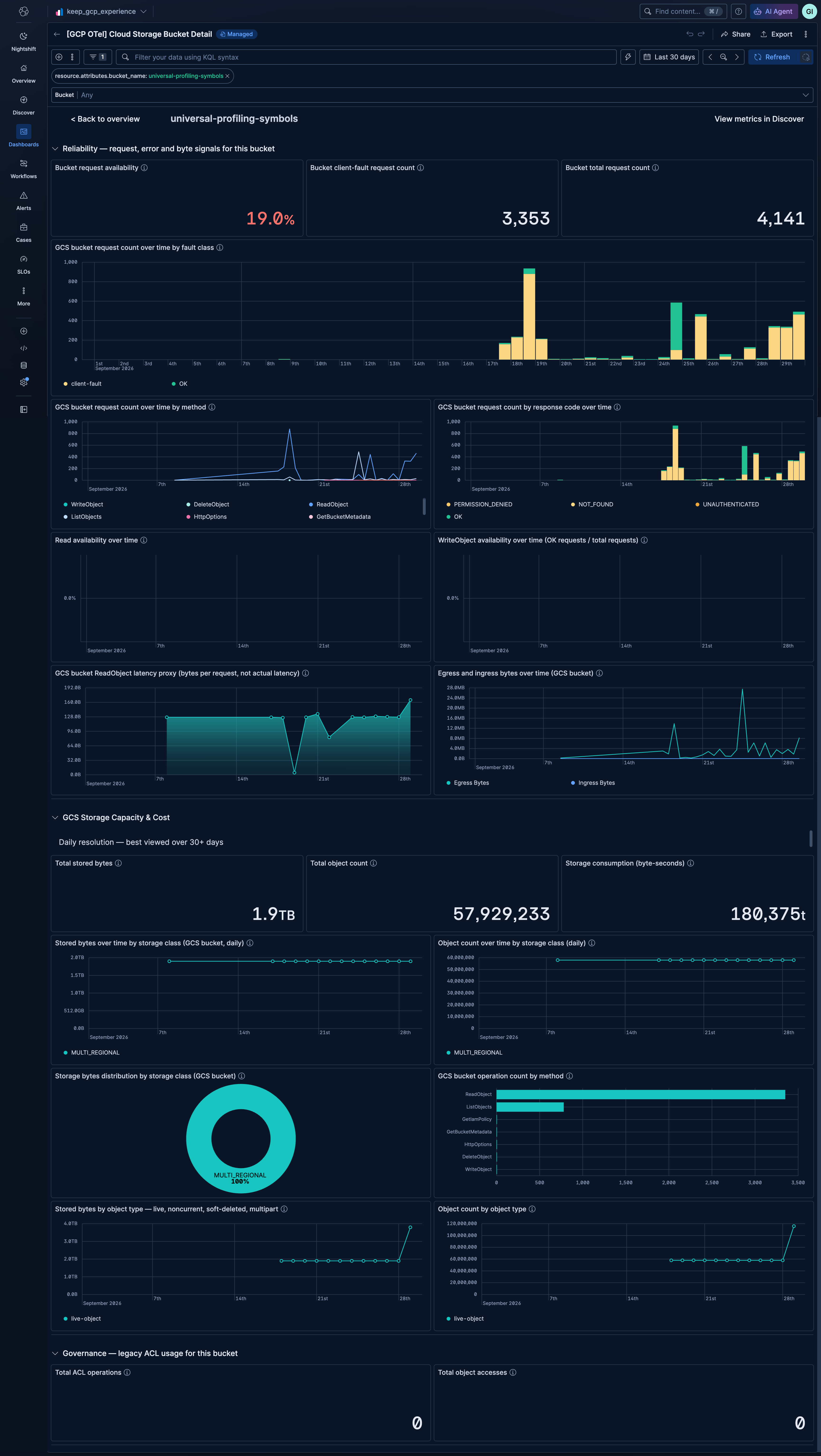
| **[GCP OTel] Cloud Storage Bucket Detail** | Per-bucket deep-dive into request volume by fault class, method, and response code, availability, stored bytes and object counts by storage class, storage consumption, and ACL-based access that indicates buckets not yet using uniform bucket-level access. |
Open **[GCP OTel] Cloud Storage Overview** and click a bucket in the bucket hex map or the bucket ranking table to drill into **[GCP OTel] Cloud Storage Bucket Detail** for that bucket.
## Screenshots
This integration includes one or more Kibana dashboards that visualizes the data collected by the integration. The screenshots below illustrate how the ingested data is displayed.
## Changelog
| Version | Details | Minimum Kibana version |
|-----------|---------------------------------------------------------------------------------------------------------------------------------------------------------------|------------------------|
| **0.1.0** | **Enhancement** ([View pull request](https://github.com/elastic/integrations/pull/21630))Initial draft of the GCP Cloud Storage OpenTelemetry Assets package. | 9.6.0 |