---
title: Workday
description: Workday is a cloud-based ERP system that manages business processes and allows organizations to use an integrated application. Workday is a coherent cloud...
url: https://docs-v3-preview.elastic.dev/elastic/integration-docs/tree/main/reference/workday
products:
- Elastic integrations
applies_to:
- Serverless Observability projects: Preview
- Serverless Security projects: Preview
- Elastic Stack: Preview since 9.0
---
# Workday
| | |
|-------------------------------------------------------------------------------------------------------------------------------|-------------------------------------------------------------------|
| **Version** | 0.2.0 : Preview ([View all](#changelog)) |
| **Subscription level**[What's this?](https://www.elastic.co/subscriptions) | Basic |
| **Developed by**[What's this?](https://docs-v3-preview.elastic.dev/elastic/integration-docs/tree/main/reference/developed-by) | Elastic |
| **Ingestion method(s)** | API |
| **Minimum Kibana version(s)** | 9.0.08.18.0 |
To use pre-release integrations, go to the **Integrations** page in Kibana, scroll down, and toggle on the _Display beta integrations_ option.
## Overview
[Workday](https://www.workday.com/en-in/homepage.html) is a cloud-based ERP system that manages business processes and allows organizations to use an integrated application. Workday is a coherent cloud ERP system for financial analysis, analytical solutions, HCM suites, and better business processes.
The Workday integration for Elastic collects `Activity Logs` via **API** and visualizes them in Kibana.
### Compatibility
The Workday integration is compatible with API version **v1**.
### How it works
This integration periodically queries the Workday API to retrieve logs.
## What data does this integration collect?
This integration collects log messages of the following type:
- `Activity`: Collects [Activity Logs](https://community.workday.com/sites/default/files/file-hosting/restapi/#privacy/v1/get-/activityLogging) logs via Workday API (endpoint: `/activityLogging`).
### Supported use cases
Integrating Workday with Elastic gives security and IT teams centralized visibility into **Workday activity logging**, so you can monitor configuration and usage changes, support audits, and investigate suspicious behavior from Kibana.
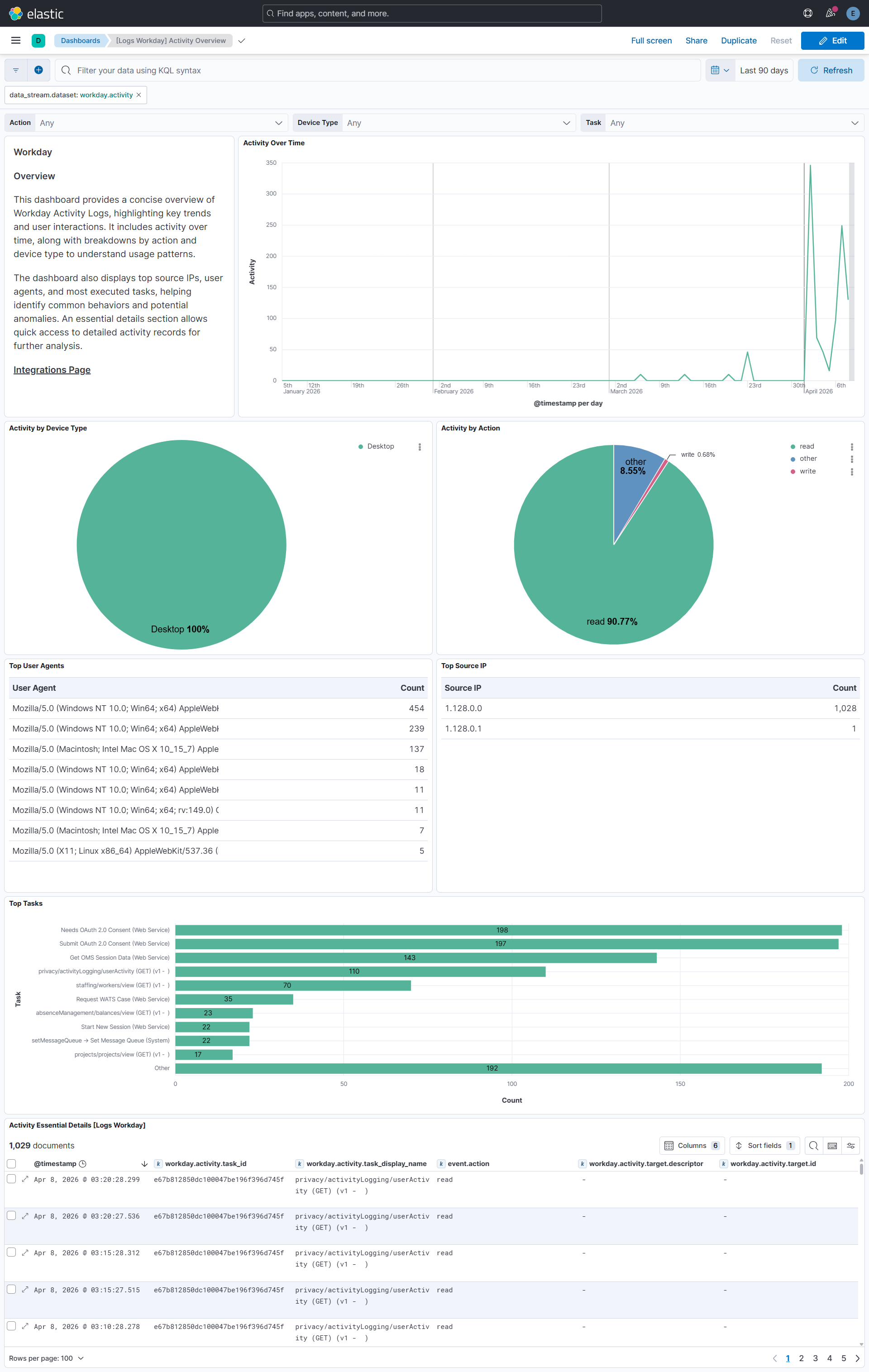
The **Activity** dashboard summarizes key patterns such as **activity volume over time** and **top actors**, helping you spot unusual spikes and focus on the users and operations that matter.
Built-in filters make it easier to narrow events by attributes such as **task**, **system account**, and **IP address**, which supports faster triage and a more consistent investigation workflow across your Workday telemetry.
## What do I need to use this integration?
### From Workday
#### Collect Workday API credentials
##### Enable User Activity Logging
1. Sign in to your Workday tenant as a Security Administrator.
2. In the Workday search bar, search for and open the Edit Tenant Setup - System task.
3. In the Security section, select the Enable User Activity Logging checkbox.
4. Click OK to save the changes.
Once enabled, Workday records all user activity in a secure tenant database. Activity logging must be enabled before any logs are available for export.
#### Create Integration System User (ISU)
1. In the Workday search bar, search for Create Integration System User.
2. Enter a User Name (for example, ISU_SIEM_Export) and a strong Password.
3. Clear the Require New Password at Next Sign In checkbox.
4. Click OK.
5. Search for Create Security Group and create an Integration System Security Group (Unconstrained).
6. Add the ISU (ISU_SIEM_Export) to this security group.
7. Search for View Domain and locate the User Activity Logging domain. Grant Get access to the ISU security group for this domain.
8. Search for Activate Pending Security Policy Changes and activate the changes.
#### Register API client for OAuth
1. In the Workday search bar, search for Register API Client for Integrations.
2. Enter a Client Name (for example, SIEM_OAuth_Client).
3. Select the Non-Expiring Refresh Tokens option.
4. Add the scope: System (or the scope required for User Activity Logging API).
5. Click OK.
6. Copy and save the following details in a secure location:
- Client ID: The API client identifier.
- Client Secret: The API client secret.
7. Search for Manage Refresh Tokens for Integrations.
8. Select the ISU account (ISU_SIEM_Export).
9. Generate a new refresh token for the API client.
10. Copy and save the Refresh Token.
#### Determine tenant URL
The API endpoint is based on your Workday tenant. The format is:
Component | Value
Token endpoint |
Activity Logging API |
Replace HOST with your Workday hostname and TENANT with your tenant name.
For additional Workday API security context, see [Generating API Keys for the Workday API](https://workday.my.site.com/customercenter/article?no=000013105&redirect=false).
## How do I deploy this integration?
This integration supports both Elastic Agentless-based and Agent-based installations.
### Agentless-based installation
Agentless integrations allow you to collect data without having to manage Elastic Agent in your cloud. They make manual agent deployment unnecessary, so you can focus on your data instead of the agent that collects it. For more information, refer to [Agentless integrations](https://www.elastic.co/guide/en/serverless/current/security-agentless-integrations.html) and the [Agentless integrations FAQ](https://www.elastic.co/guide/en/serverless/current/agentless-integration-troubleshooting.html).
Agentless deployments are only supported in Elastic Serverless and Elastic Cloud environments. This functionality is in beta and is subject to change. Beta features are not subject to the support SLA of official GA features.
### Agent-based installation
Elastic Agent must be installed. For more details, check the Elastic Agent [installation instructions](https://docs-v3-preview.elastic.dev/elastic/docs-content/tree/main/reference/fleet/install-elastic-agents). You can install only one Elastic Agent per host.
### Configure the integration
1. In the top search bar in Kibana, search for **Integrations**.
2. In the search bar, type **Workday**.
3. Select the **Workday** integration from the search results.
4. Select **Add Workday** to add the integration.
5. Enable and configure only the collection methods which you will use.
- To **Collect Workday logs via API**, you'll need to:
- Configure **Hostname**.
- Configure **Tenant**.
- Configure **Client ID**.
- Configure **Client Secret**.
- Configure **Refresh Token**.
- Adjust the integration configuration parameters if required, including the **Interval**, **Initial Interval**, **Preserve original event** etc. to enable data collection.
6. Select **Save and continue** to save the integration.
### Validation
#### Dashboard populated
1. In the top search bar in Kibana, search for **Dashboards**.
2. In the search bar, type **Workday**.
3. Select a dashboard for the dataset you are collecting, and verify the dashboard information is populated.
## Troubleshooting
For help with Elastic ingest tools, check [Common problems](https://www.elastic.co/docs/troubleshoot/ingest/fleet/common-problems).
## Performance and scaling
For more information on architectures that can be used for scaling this integration, check the [Ingest Architectures](https://www.elastic.co/docs/manage-data/ingest/ingest-reference-architectures) documentation.
## Reference
### ECS field reference
#### Activity
| Field | Description | Type |
|--------------------------------------------|------------------------------------------------------------------------------------------------------------------------------------------------------------------------------------------------------------------------------------------------------------------------------------------------------------------------------------------------------------------------------------------------------------------------------------------------------------------------------------------------------------------------------|------------------|
| @timestamp | Date/time when the event originated. This is the date/time extracted from the event, typically representing when the event was generated by the source. If the event source has no original timestamp, this value is typically populated by the first time the event was received by the pipeline. Required field for all events. | date |
| data_stream.dataset | The field can contain anything that makes sense to signify the source of the data. Examples include `nginx.access`, `prometheus`, `endpoint` etc. For data streams that otherwise fit, but that do not have dataset set we use the value "generic" for the dataset value. `event.dataset` should have the same value as `data_stream.dataset`. Beyond the Elasticsearch data stream naming criteria noted above, the `dataset` value has additional restrictions: * Must not contain `-` * No longer than 100 characters | constant_keyword |
| data_stream.namespace | A user defined namespace. Namespaces are useful to allow grouping of data. Many users already organize their indices this way, and the data stream naming scheme now provides this best practice as a default. Many users will populate this field with `default`. If no value is used, it falls back to `default`. Beyond the Elasticsearch index naming criteria noted above, `namespace` value has the additional restrictions: * Must not contain `-` * No longer than 100 characters | constant_keyword |
| data_stream.type | An overarching type for the data stream. Currently allowed values are "logs" and "metrics". We expect to also add "traces" and "synthetics" in the near future. | constant_keyword |
| event.dataset | Name of the dataset. If an event source publishes more than one type of log or events (e.g. access log, error log), the dataset is used to specify which one the event comes from. It's recommended but not required to start the dataset name with the module name, followed by a dot, then the dataset name. | constant_keyword |
| event.module | Name of the module this data is coming from. If your monitoring agent supports the concept of modules or plugins to process events of a given source (e.g. Apache logs), `event.module` should contain the name of this module. | constant_keyword |
| input.type | Type of Filebeat input. | keyword |
| observer.vendor | Vendor name of the observer. | constant_keyword |
| workday.activity.activity_action | The type of action that was executed. | keyword |
| workday.activity.session_id | The system ID for tracking signons from the user signon used to make the request. | keyword |
| workday.activity.target.descriptor | The display name of the instance. | keyword |
| workday.activity.target.href | A link to the instance. | keyword |
| workday.activity.target.id | Workday Id or Reference Id of the instance. | keyword |
| workday.activity.task_display_name | The action executed in the transaction. | keyword |
| workday.activity.task_id | The Workday ID of the task executed in the transaction. | keyword |
| workday.activity.user_activity_entry_count | Returns the User Activity Count for the inputted filter parameters. | long |
### Example event
#### Activity
```json
{
"@timestamp": "2026-04-02T12:46:18.012Z",
"agent": {
"ephemeral_id": "56b15ab2-aac3-4167-a87e-300667f9c510",
"id": "49c06832-6dd8-4eea-8c9d-702a4bcee941",
"name": "elastic-agent-15161",
"type": "filebeat",
"version": "8.18.0"
},
"data_stream": {
"dataset": "workday.activity",
"namespace": "58781",
"type": "logs"
},
"device": {
"type": "desktop"
},
"ecs": {
"version": "9.3.0"
},
"elastic_agent": {
"id": "49c06832-6dd8-4eea-8c9d-702a4bcee941",
"snapshot": false,
"version": "8.18.0"
},
"event": {
"action": "read",
"agent_id_status": "verified",
"category": [
"iam"
],
"dataset": "workday.activity",
"ingested": "2026-06-05T11:40:39Z",
"kind": "event",
"original": "{\"activityAction\":\"READ\",\"deviceType\":\"Desktop\",\"ipAddress\":\"127.0.0.1\",\"requestTime\":\"2026-04-02T12:46:18.012Z\",\"sessionId\":\"c7c6ff\",\"systemAccount\":\"wd-implementer\",\"taskDisplayName\":\"privacy/activityLogging/userActivity (GET) (v1 - )\",\"taskId\":\"e67b812850dc100047be196f396d745f\",\"userAgent\":\"Mozilla/5.0 (Windows NT 10.0; Win64; x64) AppleWebKit/537.36 (KHTML, like Gecko) Chrome/146.0.0.0 Safari/537.36\"}",
"type": [
"info"
]
},
"input": {
"type": "cel"
},
"related": {
"ip": [
"127.0.0.1"
],
"user": [
"wd-implementer"
]
},
"source": {
"ip": "127.0.0.1"
},
"tags": [
"preserve_original_event",
"forwarded",
"workday-activity"
],
"user": {
"name": "wd-implementer"
},
"user_agent": {
"device": {
"name": "Other"
},
"name": "Chrome",
"original": "Mozilla/5.0 (Windows NT 10.0; Win64; x64) AppleWebKit/537.36 (KHTML, like Gecko) Chrome/146.0.0.0 Safari/537.36",
"os": {
"full": "Windows 10",
"name": "Windows",
"version": "10"
},
"version": "146.0.0.0"
},
"workday": {
"activity": {
"activity_action": "READ",
"session_id": "c7c6ff",
"task_display_name": "privacy/activityLogging/userActivity (GET) (v1 - )",
"task_id": "e67b812850dc100047be196f396d745f"
}
}
}
```
### Inputs used
These input is used in the integration:
- [CEL](https://www.elastic.co/docs/reference/beats/filebeat/filebeat-input-cel)
### API usage
This integration uses the following Workday API:
**Activity**: [Workday Activity API documentation](https://community.workday.com/sites/default/files/file-hosting/restapi/#privacy/v1/get-/activityLogging).
## Screenshots
This integration includes one or more Kibana dashboards that visualizes the data collected by the integration. The screenshots below illustrate how the ingested data is displayed.
## Changelog
| Version | Details | Minimum Kibana version |
|-----------|-------------------------------------------------------------------------------------------------------------------------------------------------------|------------------------|
| **0.2.0** | **Bug fix** ([View pull request](https://github.com/elastic/integrations/pull/20072))Fix token refresh after 401 by adding TTL-based expiry tracking. | 9.0.08.18.0 |
| **0.1.0** | **Enhancement** ([View pull request](https://github.com/elastic/integrations/pull/19319))Add support for activity data stream. | 9.0.08.18.0 |