---
title: Webhook - Case Management connector and action
description: The Webhook - Case Management connector uses axios to send POST, PUT, and GET requests to a case management RESTful API web service. You can create connectors...
url: https://docs-v3-preview.elastic.dev/elastic/kibana/pull/280898/reference/connectors-kibana/cases-webhook-action-type
products:
- Kibana
applies_to:
- Serverless Observability projects: Generally available
- Serverless Security projects: Generally available
- Elastic Stack: Generally available
---
# Webhook - Case Management connector and action
The Webhook - Case Management connector uses [axios](https://github.com/axios/axios) to send POST, PUT, and GET requests to a case management RESTful API web service.
## Create connectors in Kibana
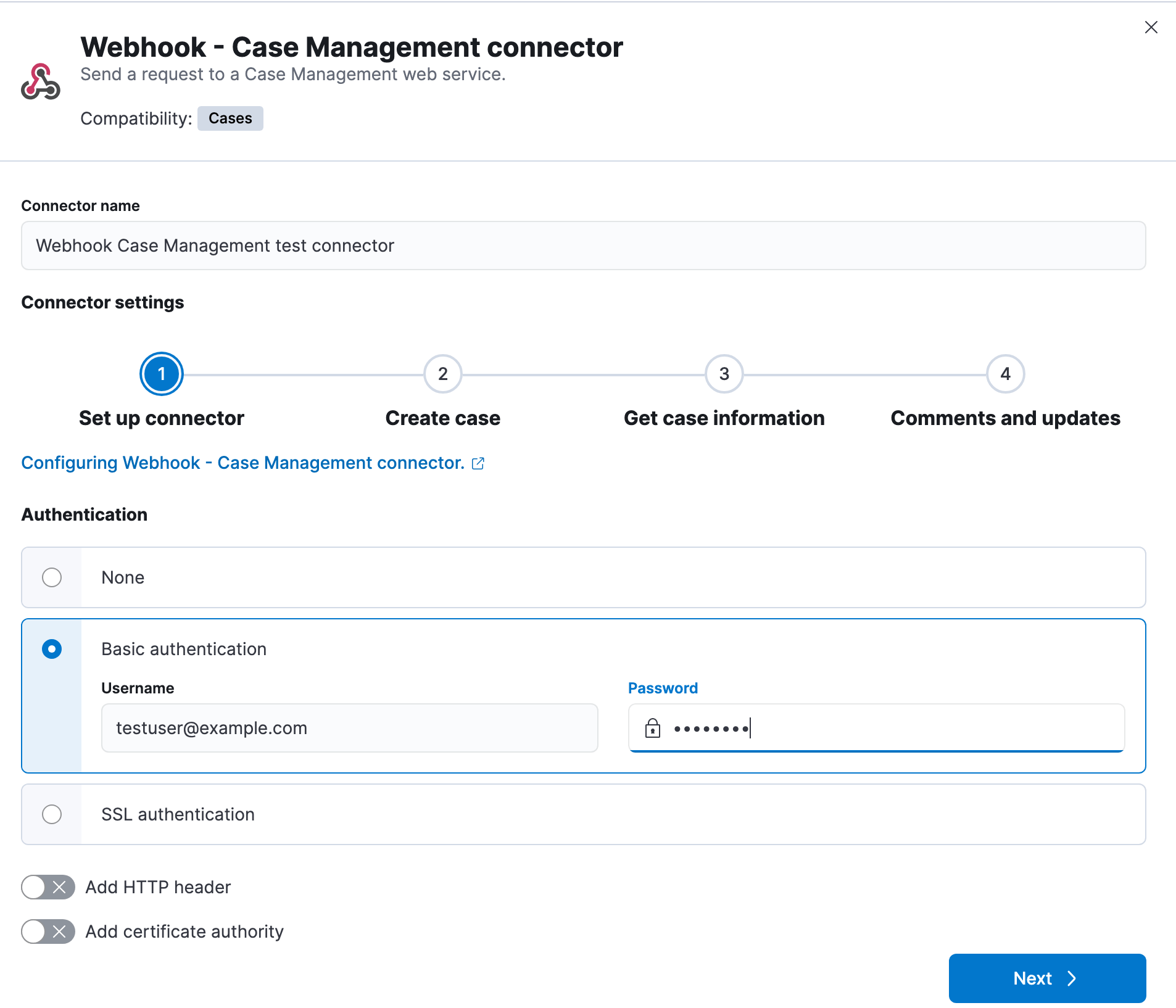
You can create connectors in **Stack Management > Connectors** or as needed when you’re creating a rule. In the first step, you must provide a name for the connector and its authentication details. For example:
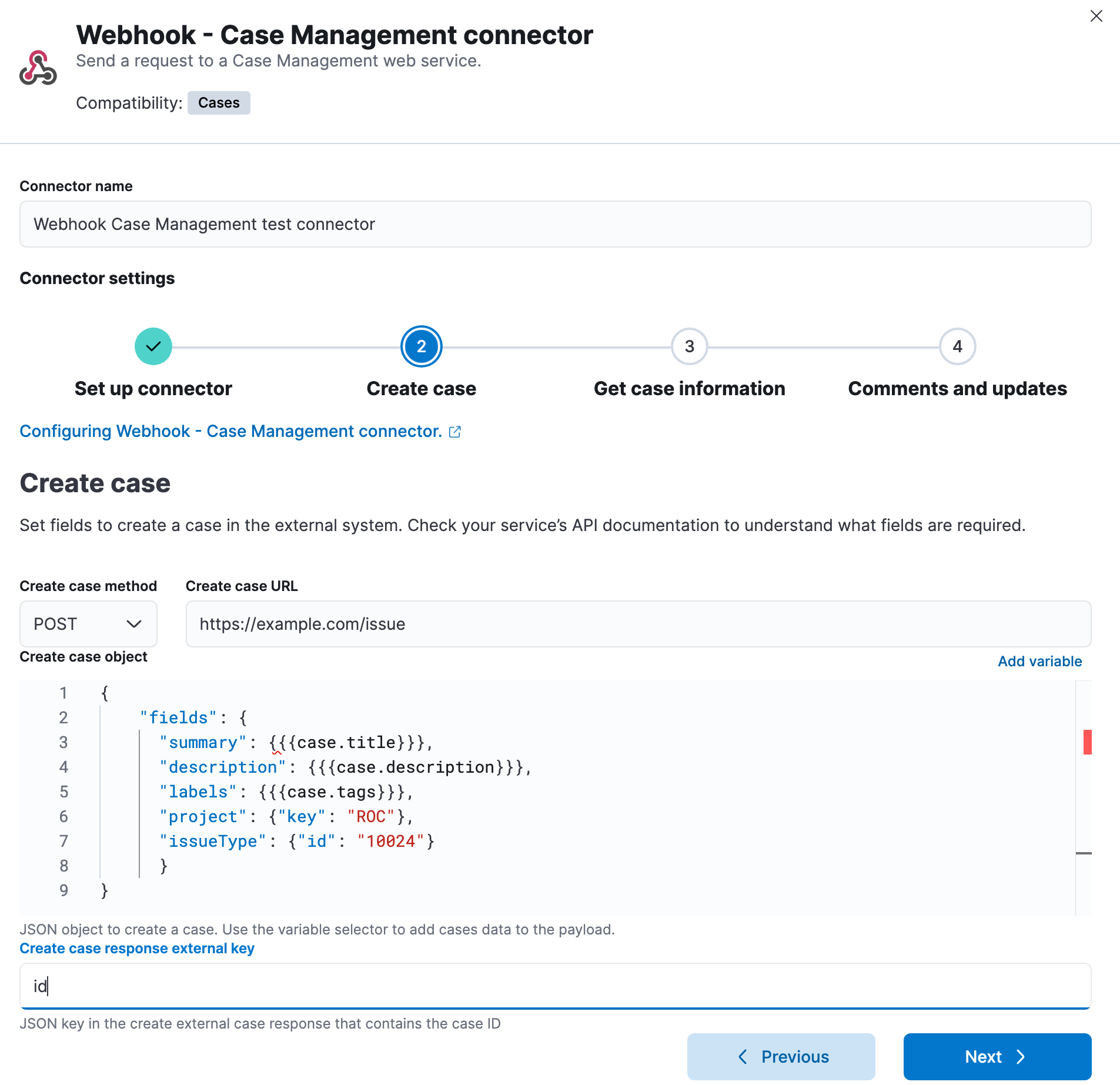
In the second step, you must provide the information necessary to create cases in the external system. For example:
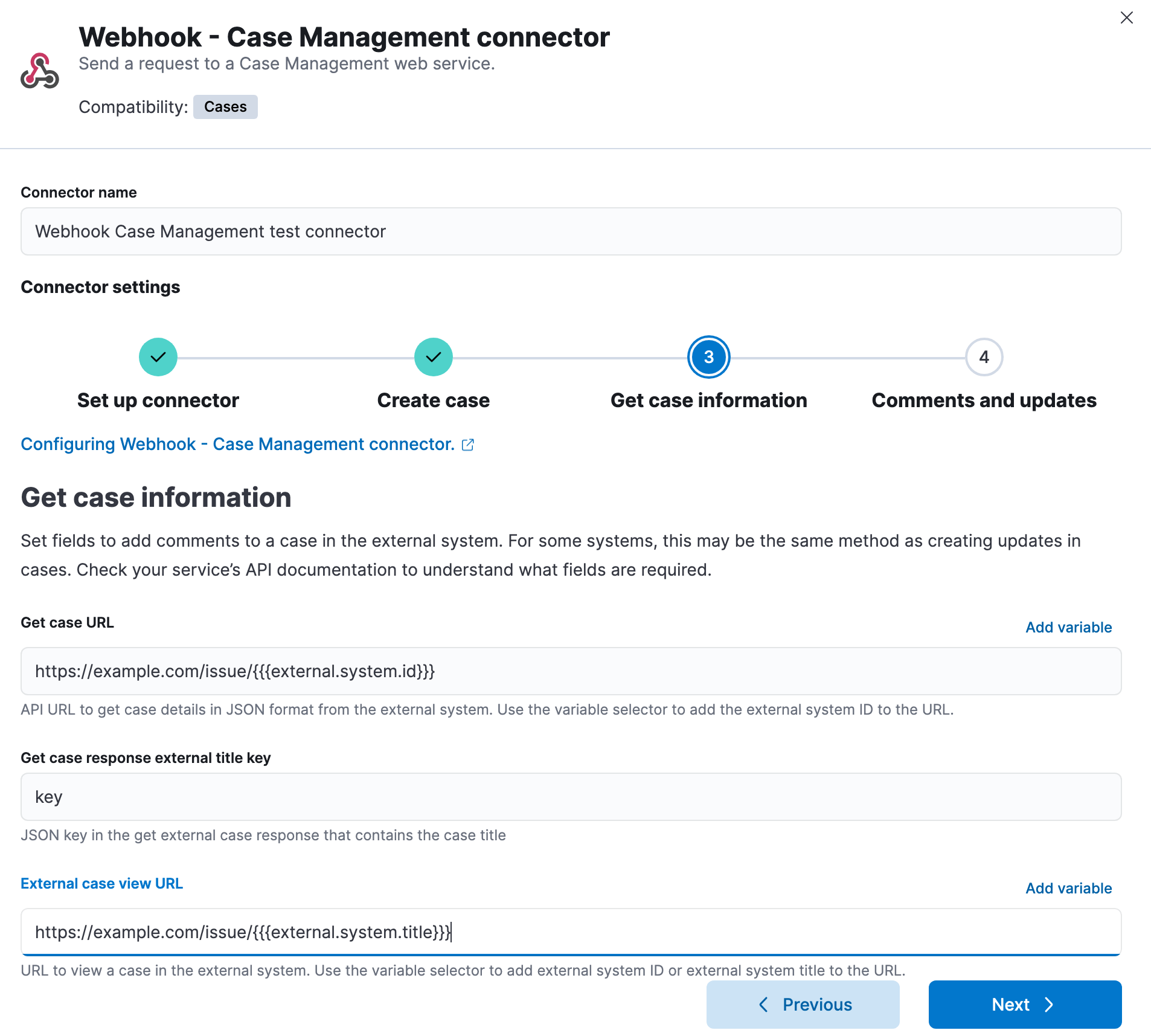
In the third step, you must provide information related to retrieving case details from the external system. For example:
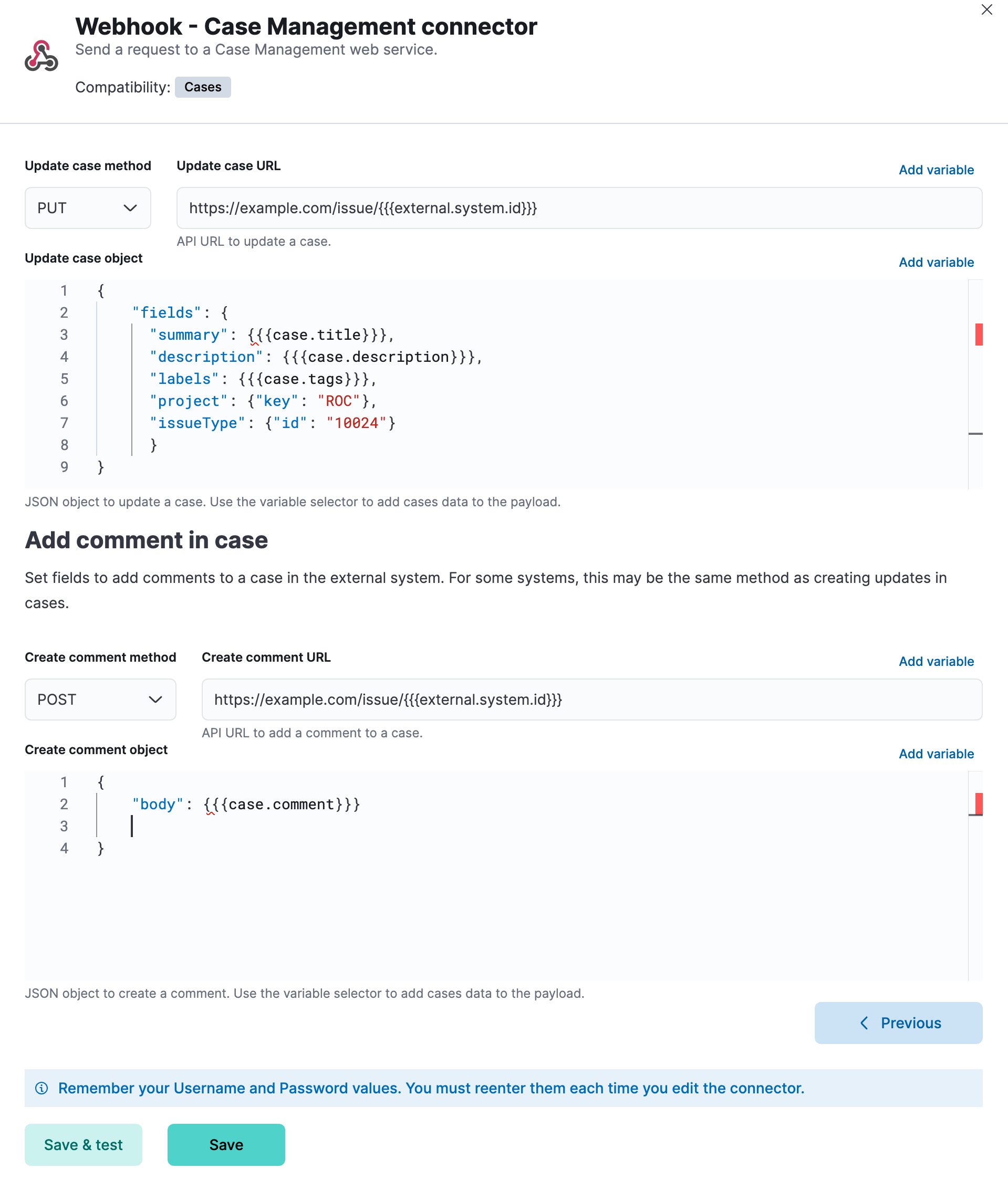
In the fourth step, you must provide information necessary to update cases in the external system. You can also optionally provide information to add comments to cases. For example:
### Connector configuration
Webhook - Case Management connectors have the following configuration properties:
The authentication type: none, basic, or SSL. If you choose basic authentication, you must provide a user name and password. If you choose SSL authentication, you must provide SSL server certificate authentication data in a CRT and key file format or a PFX file format. You can also optionally provide a passphrase if the files are password-protected.
A certificate authority (CA) that the connector can trust, for example to sign and validate server certificates. This option is available for all authentication types. You can choose from the following verification modes:
- `Full`: Validate that the certificate has an issue date within the `not_before` and `not_after` dates, chains to a trusted certificate authority, and has a hostname or IP address that matches the names within the certificate.
- `Certificate`: Validate that the certificate it is signed by a trusted authority. This option does not check the certificate hostname.
- `None`: Skip certificate validation.
The REST API HTTP request method to create a case in the third-party system: `post`(default), `put`, or `patch`.
A JSON payload sent to the create case URL to create a case. Use the variable selector to add case data to the payload. Required variables are `case.title` and `case.description`. For example:
```json
{
"fields": {
"summary": {{{case.title}}},
"description": {{{case.description}}},
"labels": {{{case.tags}}}
}
}
```
Due to Mustache template variables (the text enclosed in triple braces, for example, `{{{case.title}}}`), the JSON is not validated in this step. The JSON is validated after the Mustache variables have been placed when REST method runs. Manually ensure that the JSON is valid, disregarding the Mustache variables, so the later validation will pass.
The JSON key in the create external case response that contains the case ID.
The REST API URL to create a case in the third-party system. If you are using the [`xpack.actions.allowedHosts`](/elastic/kibana/pull/280898/reference/configuration-reference/alerting-settings#action-settings) setting, make sure the hostname is added to the allowed hosts.
The optional REST API HTTP request method to create a case comment in the third-party system: `post`, `put`(default), or `patch`.
An optional JSON payload sent to the create comment URL to create a case comment. Use the variable selector to add Kibana cases data to the payload. The required variable is `case.comment`. For example:
```json
{
"body": {{{case.comment}}}
}
```
Due to Mustache template variables (the text enclosed in triple braces, for example, `{{{case.title}}}`), the JSON is not validated in this step. The JSON is validated once the mustache variables have been placed and when REST method runs. We recommend manually ensuring that the JSON is valid, disregarding the Mustache variables, so the later validation will pass.
The optional REST API URL to create a case comment by ID in the third-party system. Use the variable selector to add the external system ID to the URL. If you are using the [`xpack.actions.allowedHosts`](/elastic/kibana/pull/280898/reference/configuration-reference/alerting-settings#action-settings) setting, make sure the hostname is added to the allowed hosts. For example:
```text
https://testing-jira.atlassian.net/rest/api/2/issue/{{{external.system.id}}}/comment
```
The URL to view the case in the external system. Use the variable selector to add the external system ID or external system title to the URL. For example:
```text
https://testing-jira.atlassian.net/browse/{{{external.system.title}}}
```
The JSON key in the get external case response that contains the case title.
The REST API URL to GET case by ID from the third-party system. Use the variable selector to add the external system ID to the URL. If you are using the [`xpack.actions.allowedHosts`](/elastic/kibana/pull/280898/reference/configuration-reference/alerting-settings#action-settings) setting, make sure the hostname is added to the allowed hosts. For example:
```text
https://testing-jira.atlassian.net/rest/api/2/issue/{{{external.system.id}}}
```
Due to Mustache template variables (the text enclosed in triple braces, for example, `{{{case.title}}}`), the JSON is not validated in this step. The JSON is validated after the Mustache variables have been placed when REST method runs. Manually ensure that the JSON is valid, disregarding the Mustache variables, so the later validation will pass.
A set of key-value pairs sent as headers with the request URLs for the create case, update case, get case, and create comment methods. For example, set `Content-Type` to the appropriate media type for your requests.
The REST API HTTP request method to update the case in the third-party system: `post`, `put`(default), or `patch`.
A JSON payload sent to the update case URL to update the case. Use the variable selector to add Kibana cases data to the payload. Required variables are `case.title` and `case.description`. For example:
```json
{
"fields": {
"summary": {{{case.title}}},
"description": {{{case.description}}},
"labels": {{{case.tags}}}
}
}
```
Due to Mustache template variables (which is the text enclosed in triple braces, for example, `{{{case.title}}}`), the JSON is not validated in this step. The JSON is validated after the Mustache variables have been placed when REST method runs. Manually ensure that the JSON is valid to avoid future validation errors; disregard Mustache variables during your review.
The REST API URL to update the case by ID in the third-party system. Use the variable selector to add the external system ID to the URL. If you are using the [`xpack.actions.allowedHosts`](/elastic/kibana/pull/280898/reference/configuration-reference/alerting-settings#action-settings) setting, make sure the hostname is added to the allowed hosts. For example:
```text
https://testing-jira.atlassian.net/rest/api/2/issue/{{{external.system.ID}}}
```
## Test connectors
You can test connectors as you’re creating or editing the connector in Kibana. For example:
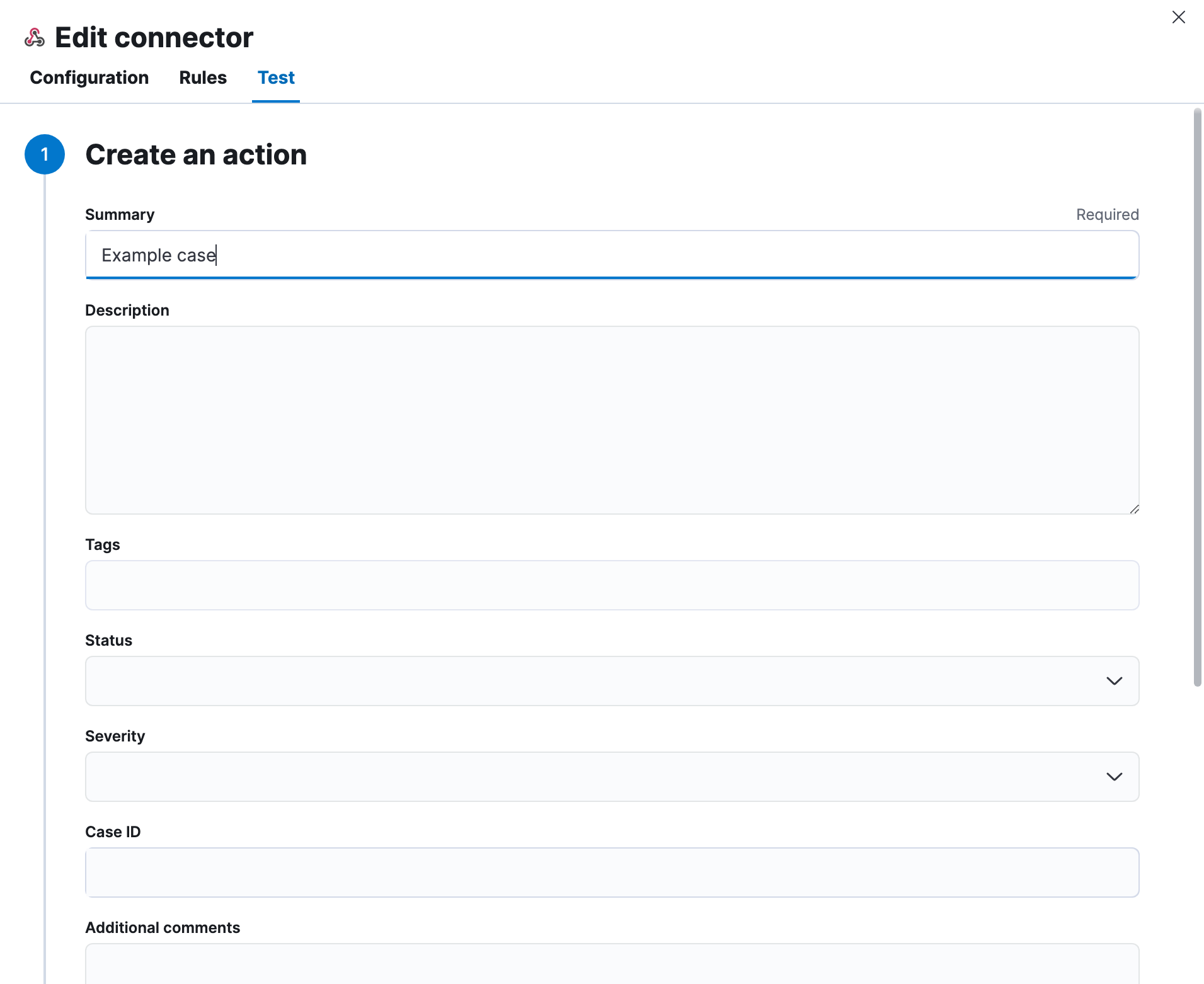
Webhook - Case Management actions have the following configuration properties:
Additional information for the client, such as how to troubleshoot the issue.
A unique case identifier.
The details about the incident.
The labels for the incident.
The severity of the case can be `critical`, `high`, `low`, or `medium`.
The status of the case can be `closed`, `in-progress` or `open`.
A brief case summary.
A list of tags that can be used to filter cases.
## Connector networking configuration
Use the [action configuration settings](/elastic/kibana/pull/280898/reference/configuration-reference/alerting-settings#action-settings) to customize connector networking configurations, such as proxies, certificates, or TLS settings. You can set configurations that apply to all your connectors or use `xpack.actions.customHostSettings` to set per-host configurations.