---
title: Observability AI Assistant connector and action
description: The Observability AI Assistant connector sends alerts to the AI Assistant, to enable adding AI-driven insights and custom actions to your workflows. To...
url: https://docs-v3-preview.elastic.dev/elastic/kibana/pull/280898/reference/connectors-kibana/obs-ai-assistant-action-type
products:
- Kibana
applies_to:
- Elastic Cloud Serverless: Preview
- Elastic Stack: Preview
---
# Observability AI Assistant connector and action
The Observability AI Assistant connector sends alerts to the AI Assistant, to enable adding AI-driven insights and custom actions to your workflows.
To learn how to interact with the assistant through this connector, refer to the [Observability AI Assistant](https://docs-v3-preview.elastic.dev/elastic/docs-content/tree/main/explore-analyze/ai-features/ai-chat-experiences/ai-assistant) documentation.
## Create connectors in Kibana
To use this connector, you must have been granted access to use the Observability AI Assistant feature. You cannot manage this connector in **Stack Management > Connectors** or by using APIs. You also cannot create an Observability AI Assistant [preconfigured connector](https://docs-v3-preview.elastic.dev/elastic/kibana/pull/280898/reference/connectors-kibana/pre-configured-connectors). It is available only when you're creating a rule in Kibana. For example:
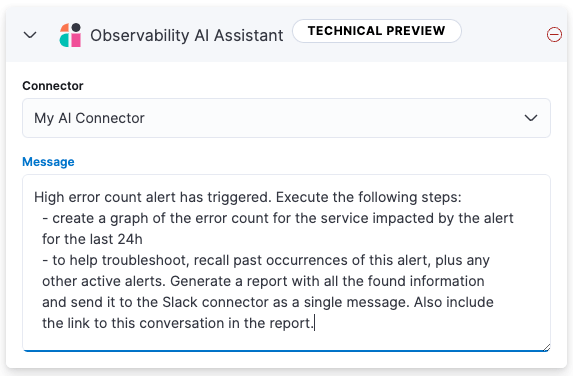
You can have only one Observability AI Assistant action in each rule.
### Connector configuration
Observability AI Assistant connectors have the following configuration properties:
The name of the connector to use to send requests to your AI provider. For more information, refer to [OpenAI](https://docs-v3-preview.elastic.dev/elastic/kibana/pull/280898/reference/connectors-kibana/openai-action-type) or [Amazon Bedrock](https://docs-v3-preview.elastic.dev/elastic/kibana/pull/280898/reference/connectors-kibana/bedrock-action-type).
A message containing the prompt to send to the Observability AI Assistant. The message can specify a set of tasks for the assistant to perform, such as creating a graph or report, and it can call an available connector to send messages to an external system, such as Slack.
Currently you can only send messages to a Slack webhook. Support for additional connectors will be added in the future.
For example, you can create a rule that sends the following prompt to the AI Assistant when an error count threshold is breached:
```text
High error count alert has triggered. Execute the following steps:
- create a graph of the error count for the service impacted by the alert
for the last 24h
- to help troubleshoot, recall past occurrences of this alert, plus any
other active alerts. Generate a report with all the found information
and send it to the Slack connector as a single message. Also include
the link to this conversation in the report.
```
## Test connectors
You cannot test or edit these connectors in Kibana or by using APIs.