---
title: Case Study - Async too early
description: Learn how we were able to improve page load by identifying and fixing an erroneous (but well intentioned) async import.
url: https://docs-v3-preview.elastic.dev/elastic/kibana/tree/main/extend/key-concepts/performance/case-studies/case-study-async-too-early
products:
- Kibana
---
# Case Study - Async too early
The following case study is derived from [kibana#179175](https://github.com/elastic/kibana/pull/179175).
## Summary
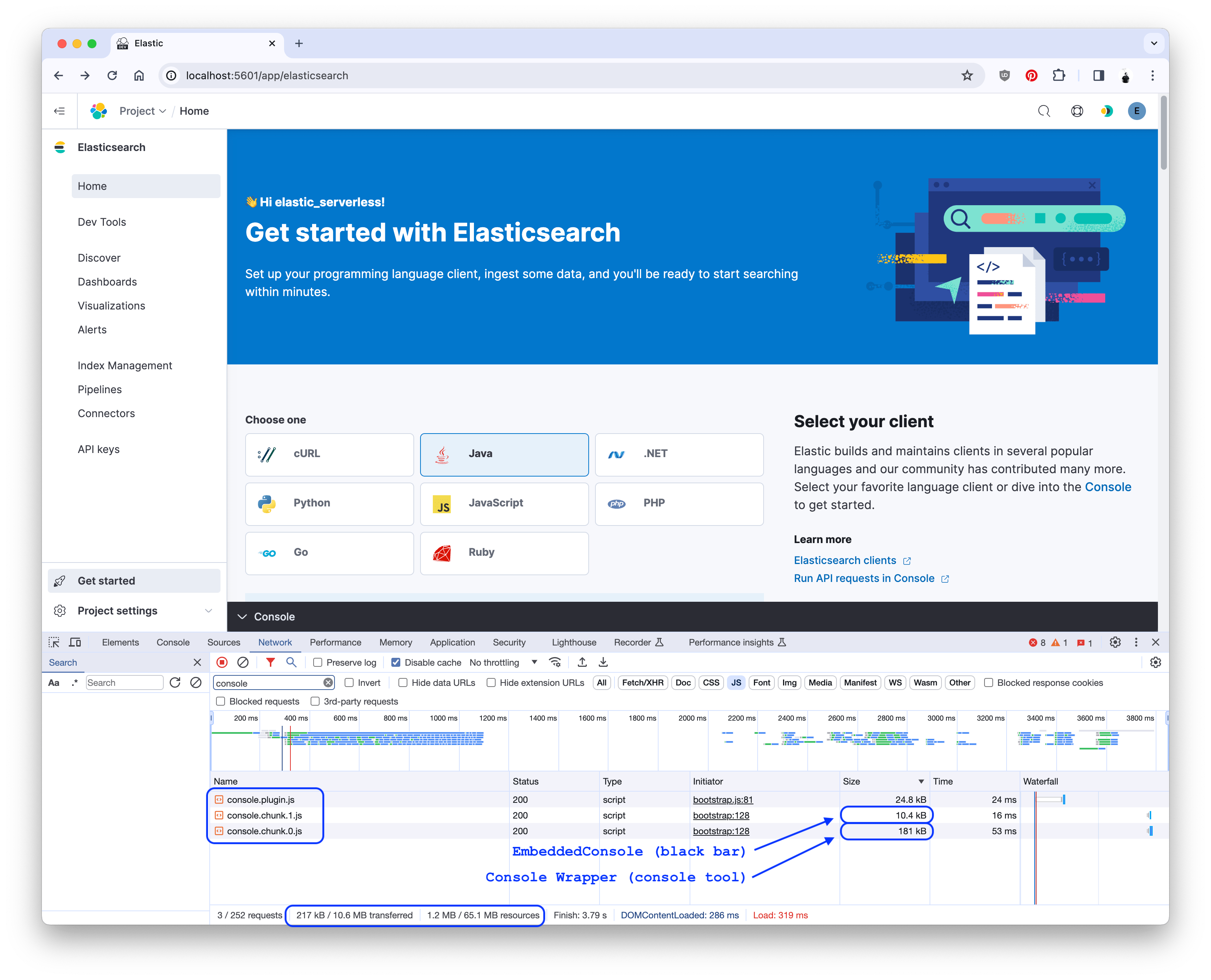
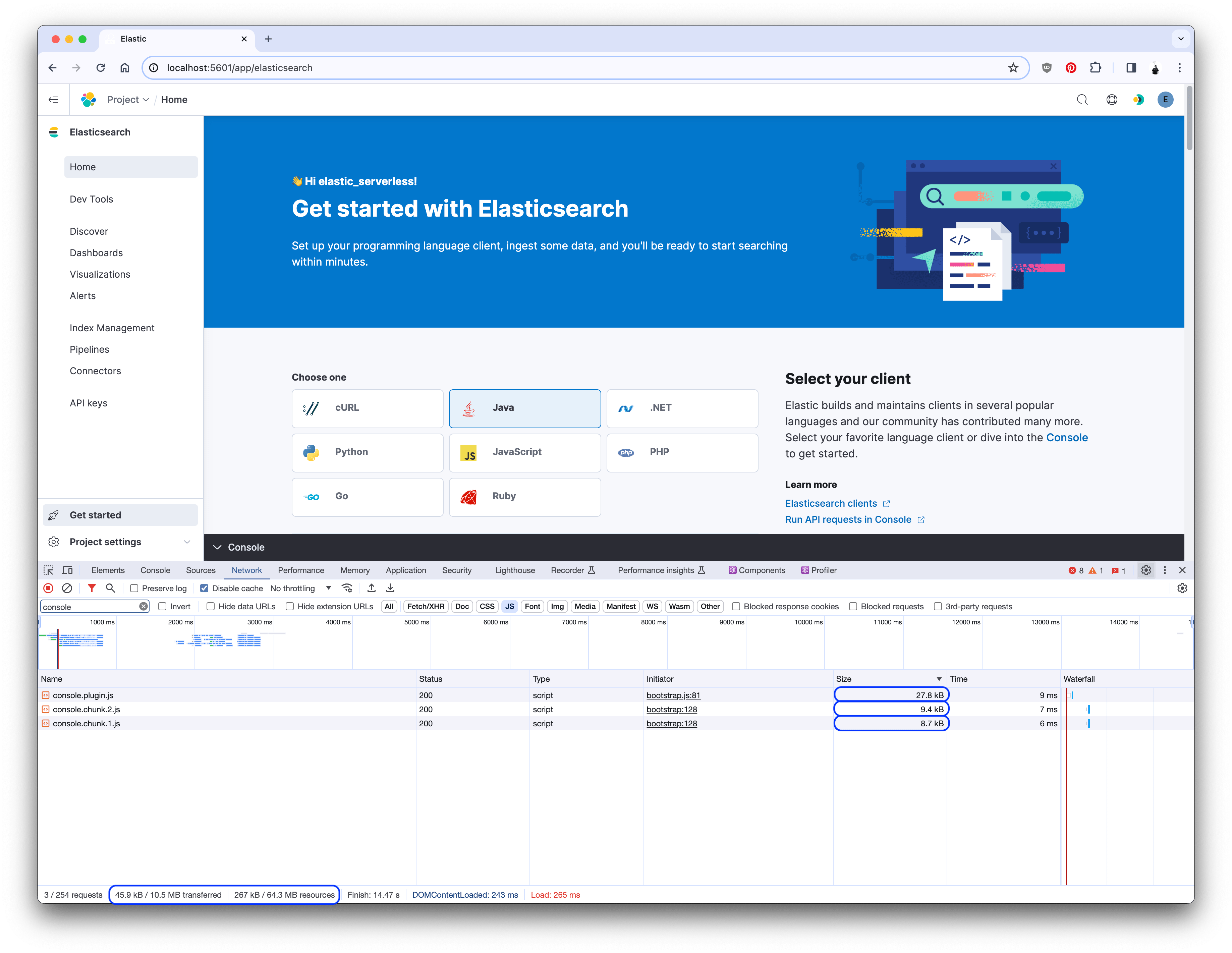
Before: **`1.2MB`** total assets and **`217k`** code.After: **`267k`** total assets and **`45.9k`** code.Savings: **78%** and **79%**.
- The `console` plugin provides an embedded console for interacting with Elasticsearch.
- The `search` plugin was utilizing the embedded console at the bottom of the page.
- Large async chunks were being fetched on each page load. One of the largest was the embedded console.
- Parts of the embedded console were asynchronously imported, but not all of it.
- By moving the async load higher in the component tree, I was able to significantly improve page load.
## Investigation
I noticed that the Serverless Search project home page was loading a significant amount of code on page load. While the plugin bundle itself was small, the asyncronous chunks-- which should only be loaded when the code is required, either by conditional need or if the user interacts with the page-- were large and being loaded all the time. The largest of these async chunks were coming from the `console` plugin.
By filtering the network tab in Chrome for `console`, I was able to see the chunks the Search home page was loading:
[](https://docs-v3-preview.elastic.dev/elastic/kibana/tree/main/extend/key-concepts/performance/case-studies/assets/async_too_early_console_chunks.png)
### What was being loaded?
The embedded console consisted of two parts, each being loaded asynchronously in React: the black bottom bar that expands upward to reveal the console, and the console itself:
[](https://docs-v3-preview.elastic.dev/elastic/kibana/tree/main/extend/key-concepts/performance/case-studies/assets/async_too_early_before.png)
The console portion was quite large-- `181k`-- and, given the conditional nature of showing that console, this was a sure sign that _a great deal of code_ was being loaded too early.
### Identifying the problem
The [`ConsoleWrapper` component](https://github.com/clintandrewhall/kibana/blob/386c29094df6f189da57b1a7c5ddc839e610e559/src/plugins/console/public/application/containers/embeddable/console_wrapper.tsx) contained the various context providers. It was imported by the [`EmbeddableConsole` component](https://github.com/clintandrewhall/kibana/blob/386c29094df6f189da57b1a7c5ddc839e610e559/src/plugins/console/public/application/containers/embeddable/embeddable_console.tsx#L31).
While the `index.tsx` file was set up to load the `EmbeddableConsole` asyncronously, [_setting up_](https://github.com/clintandrewhall/kibana/blob/386c29094df6f189da57b1a7c5ddc839e610e559/src/plugins/console/public/plugin.ts#L126-L135) the `EmbeddableConsole` in the `console` plugin required [a pure import](https://github.com/clintandrewhall/kibana/blob/386c29094df6f189da57b1a7c5ddc839e610e559/src/plugins/console/public/plugin.ts#L12) and [conditional, immediate render](https://github.com/clintandrewhall/kibana/blob/386c29094df6f189da57b1a7c5ddc839e610e559/src/plugins/console/public/plugin.ts#L125-L140). The `enterpriseSearch` plugin also [rendered it](https://github.com/clintandrewhall/kibana/blob/386c29094df6f189da57b1a7c5ddc839e610e559/x-pack/plugins/enterprise_search/public/applications/shared/layout/page_template.tsx#L124) conditionally, and immediately. This brought the `ConsoleWrapper` code-- and all of its dependencies-- into the plugin bundle.
## Fixing the issue
The primary fix for this problem was to add a dynamic import for the `ConsoleWrapper` component in the `EmbeddableConsole` component:
```
diff --git a/embeddable_console.tsx b/embeddable_console.tsx
index 6a2ab55..386c29 111111
--- a/src/plugins/console/public/application/containers/embeddable/embeddable_console.tsx
+++ b/src/plugins/console/public/application/containers/embeddable/embeddable_console.tsx
- import { ConsoleWrapper } from './console_wrapper';
@@ @@
+ const ConsoleWrapper = dynamic(async () => ({
+ default: (await import('./console_wrapper')).ConsoleWrapper,
+ }));
@@ @@
- {isConsoleOpen ? (
-
-
-
-
- ) : null}
+ {isConsoleOpen ? : null}
```
This allowed the `ConsoleWrapper` (and its dependencies) to be loaded only when the console was opened:
[](https://docs-v3-preview.elastic.dev/elastic/kibana/tree/main/extend/key-concepts/performance/case-studies/assets/async_too_early_after.png)
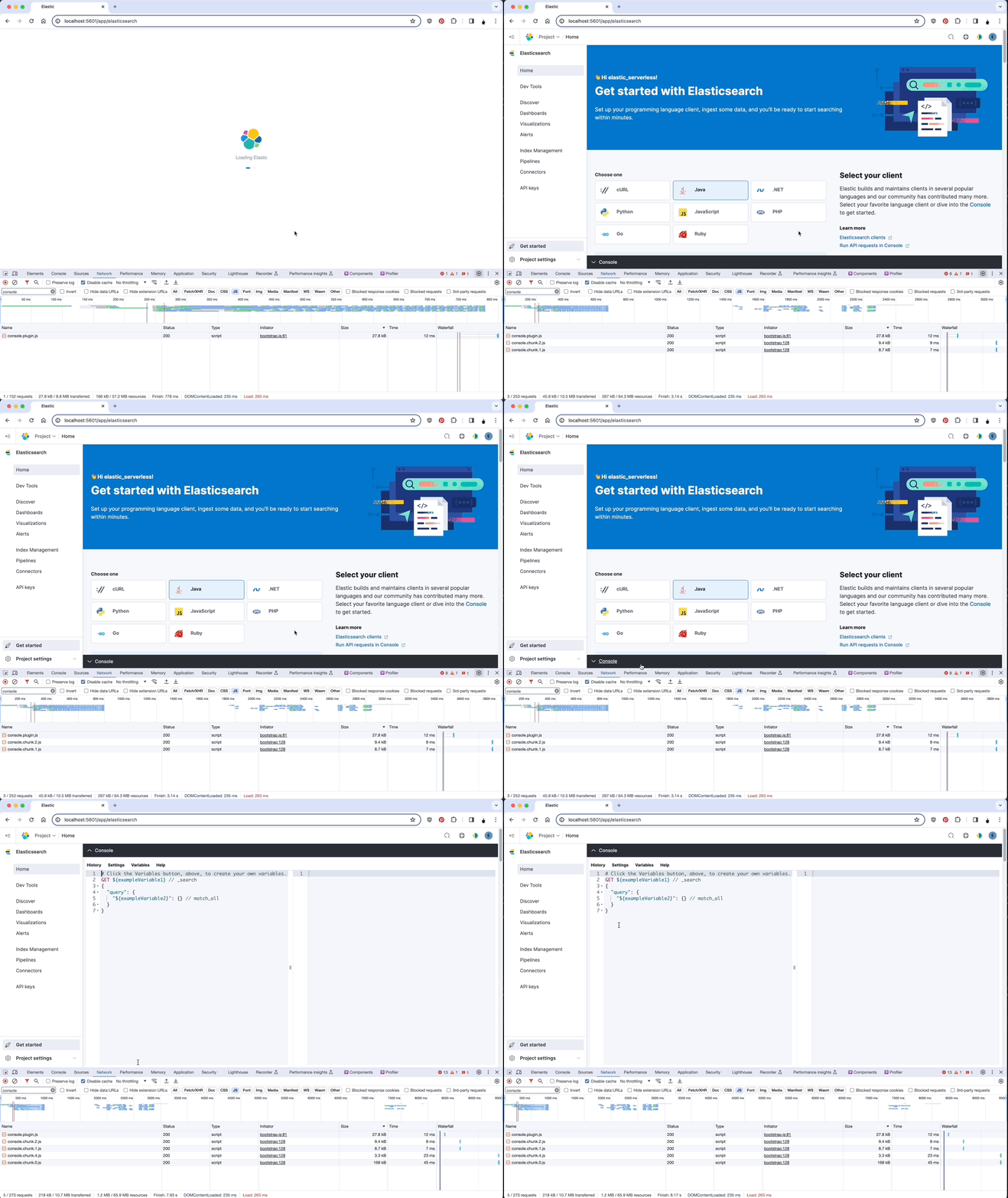
You can see effects of this change in the network tab as someone navigates:
[](https://docs-v3-preview.elastic.dev/elastic/kibana/tree/main/extend/key-concepts/performance/case-studies/assets/async_too_early_effect.gif)
### Other changes
This PR also introduces the `dynamic` method from the `@kbn/shared-us-utility` package. This method wrapper around `React.lazy` and `React.Suspense` that allows for more control over the loading of components.
## Conclusions
- Asyncronous imports are a powerful tool for reducing the size of the plugin bundle, but if an async import is initiated immediately, the benefit is lost.
- By moving the async import higher in the component tree, I was able to significantly reduce the size of the plugin bundle _and_ improve page load.
- The `EmbeddedConsole` component is a great example, as the large components should only be rendered if the panel is opened.