---
title: Central configuration for Elastic OTel SDKs
description: Reference documentation for the central configuration of Elastic OTel SDKs.
url: https://docs-v3-preview.elastic.dev/elastic/opentelemetry/pull/640/reference/central-configuration
products:
- Elastic Distribution of OpenTelemetry Collector
- Elastic Observability
- Kibana
applies_to:
- Elastic Cloud Serverless: Unavailable
- Elastic Stack: Preview since 9.1
---
# Central configuration for Elastic OTel SDKs
Manage Elastic OTel SDKs through the APM Agent Central Configuration feature in the Applications UI. Changes are automatically propagated to the deployed Elastic OTel SDKs. Refer to [APM Agent Central Configuration](https://docs-v3-preview.elastic.dev/elastic/docs-content/tree/main/solutions/observability/apm/apm-agents/central-configuration) for more information.
This feature implements the Open Agent Management Protocol (OpAMP). Refer to [Open Agent Management Protocol
](https://opentelemetry.io/docs/specs/opamp/) for more information.
## Architecture
The central configuration architecture lets you manage fleets of Elastic OTel SDKs remotely. The data flow, illustrated in this diagram, shows how configuration changes propagate from a central management point to each individual agent.
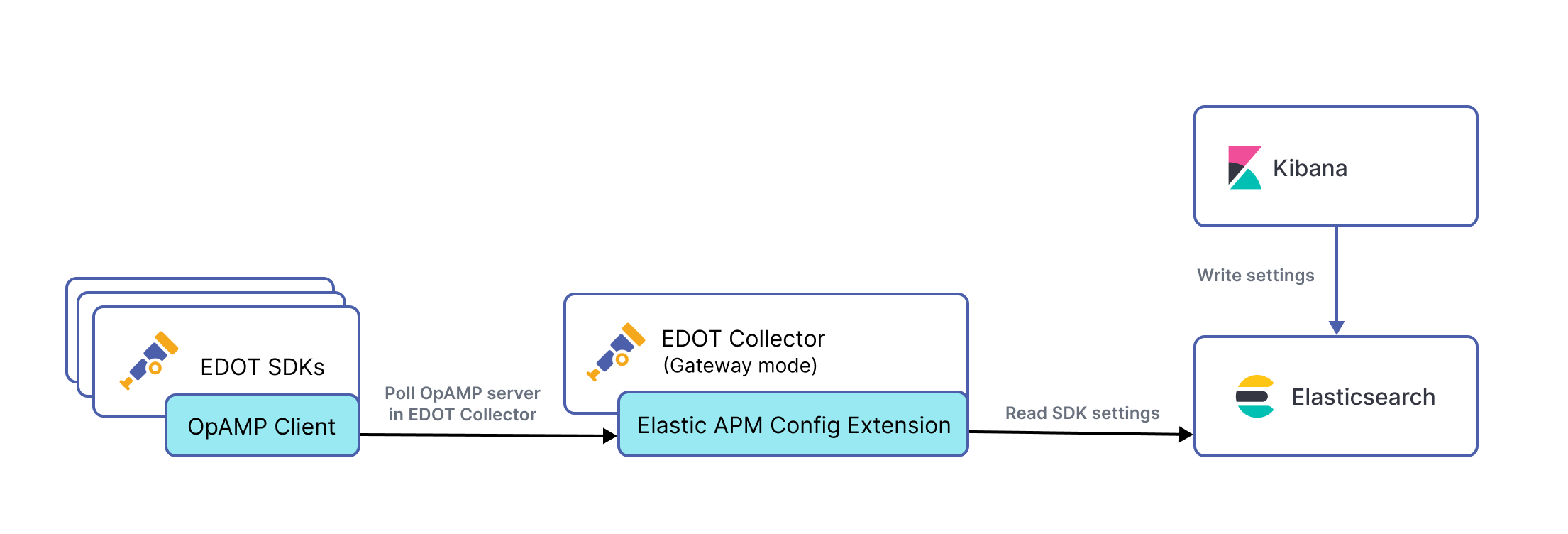
The process starts within Kibana, where administrators create and manage settings for the Elastic OTel SDKs. Once defined, settings are written to and persisted in Elasticsearch, which acts as the single source of truth. The Elastic Agent, when configured in Gateway mode, includes the Elastic APM Config Extension, which reads the SDK settings from Elasticsearch, making them available for distribution.
Each Elastic OTel SDK contains an embedded OpAMP Client. Following the Open Agent Management Protocol (OpAMP), these clients periodically poll the OpAMP server, bundled with the Collector's APM Config Extension, over HTTP. This polling action allows the SDKs to retrieve the latest configuration updates, enabling dynamic and centralized control over their behavior without requiring manual intervention or redeployment.
## Prerequisites
To use APM Agent Central Configuration for Elastic OTel SDKs, you need:
- An Elastic self-managed or Elastic Cloud deployment, version 9.1 or later.
- A standalone [Elastic Agent](https://docs-v3-preview.elastic.dev/elastic/elastic-agent/tree/main/reference/edot-collector), in either Agent or Collector mode.
- Elastic OTel SDKs instrumenting your application.
The following versions of Elastic OpenTelemetry and Elastic Stack support central configuration:
| Component | Minimum version |
|----------------------|--------------------|
| Kibana | 9.1 or later |
| Elastic Agent | 8.19, 9.1 or later |
| Elastic OTel Android | 1.2.0 or later |
| Elastic OTel iOS | 1.4.0 or later |
| Elastic OTel Java | 1.5.0 or later |
| Elastic OTel .NET | 1.4.0 or later |
| Elastic OTel Node.js | 1.2.0 or later |
| Elastic OTel PHP | 1.1.1 or later |
| Elastic OTel Python | 1.4.0 or later |
Serverless deployments are not supported.
## Activate central configuration
To activate APM Agent Central Configuration for Elastic OTel SDKs, follow these steps.
You need a valid Elasticsearch API key to authenticate to the Elasticsearch endpoint.
Create an API key with the `config_agent:read` privilege. Elastic OTel SDKs use this API key, and the Collector validates it.Use the following API request to generate the key:
```json
POST /_security/api_key
{
"name": "apmconfig-opamp-test-sdk",
"metadata": {
"application": "apm"
},
"role_descriptors": {
"apm": {
"cluster": [],
"indices": [],
"applications": [
{
"application": "apm",
"privileges": [
"config_agent:read"
],
"resources": [
"*"
]
}
],
"run_as": [],
"metadata": {}
}
}
}
```
The Elastic Agent doesn't store or embed the Elasticsearch API key.Each Elastic OTel SDK must send its own API key in the `Authorization` header (for example: `Authorization: ApiKey `).The `apikeyauth` extension only validates this API key against Elasticsearch, ensuring it includes the `config_agent:read` privilege with `resources: ["*"]`.
```json
POST /_security/api_key
{
"name": "apmconfig-opamp-test-sdk",
"metadata": {
"application": "apm"
},
"role_descriptors": {
"apm": {
"cluster": [],
"indices": [],
"applications": [
{
"application": "apm",
"privileges": [
"config_agent:read"
],
"resources": [
"*"
]
}
],
"run_as": [],
"metadata": {}
}
}
}
```
Edit the [Elastic Agent configuration](https://docs-v3-preview.elastic.dev/elastic/elastic-agent/tree/main/reference/edot-collector/config/default-config-standalone#central-configuration) to activate the central configuration feature:
```yaml
extensions:
bearertokenauth:
scheme: "APIKey"
token: ""
apmconfig:
opamp:
protocols:
http:
# Default is localhost:4320
# To specify a custom endpoint, uncomment the following line
# and set the endpoint to the custom endpoint
# endpoint: ""
source:
elasticsearch:
endpoint: ""
auth:
authenticator: bearertokenauth
service:
extensions: [bearertokenauth, apmconfig]
```
For comprehensive authentication configuration options, refer to [Authentication methods](https://docs-v3-preview.elastic.dev/elastic/elastic-agent/tree/main/reference/edot-collector/config/authentication-methods).
Restart the Elastic Agent to also restart the Collector and apply the changes.Refer to [Secure connection](https://docs-v3-preview.elastic.dev/elastic/elastic-agent/tree/main/reference/edot-collector/config/default-config-standalone#secure-connection) if you need to secure the connection between the Elastic Agent and Elastic using TLS or mutual TLS.
Activate the central configuration feature in the SDKs by setting the `ELASTIC_OTEL_OPAMP_ENDPOINT` environment variable to the URL endpoint of the `apmconfig` extension that you configured in the previous step. For example:
```sh
export ELASTIC_OTEL_OPAMP_ENDPOINT="http://localhost:4320/v1/opamp"
```
If the OpAMP server in the Collector requires authentication, set the `ELASTIC_OTEL_OPAMP_HEADERS` environment variable.
```sh
export ELASTIC_OTEL_OPAMP_HEADERS="Authorization=ApiKey an_api_key"
```
Restart the instrumented application to apply the changes.
Support for the `ELASTIC_OTEL_OPAMP_HEADERS` environment variable depends on each SDK. Refer to the configuration reference of each Elastic OTel SDK for more information.
Allow time for the Elastic OTel SDK to appear in Kibana under Agent Configuration.
1. Go to **Kibana** → **Observability** → **Applications** and select a service.
2. Select **Settings** and go to **Agent Configuration**.
Your application must produce and send telemetry data for the Elastic OTel SDK to appear in Agent Configuration. This is because central configuration requires an application name as the key, which can't be defined until the application name is associated with the Elastic OTel SDK agent after receiving telemetry.
Central configuration uses the `service.name` and `deployment.environment.name` OpenTelemetry resource attributes to target specific instances with a configuration. If no environment is specified, the central configuration feature will match `All` as the environment.
## Supported settings
For a list of settings that you can configure through APM Agent Central Configuration, refer to the configuration reference of each Elastic OTel SDK:
- [Elastic OTel Android](https://docs-v3-preview.elastic.dev/elastic/apm-agent-android/tree/main/reference/edot-android/configuration#central-configuration)
- [Elastic OTel iOS](https://docs-v3-preview.elastic.dev/elastic/apm-agent-ios/tree/main/reference/edot-ios/configuration#central-configuration-edot)
- [Elastic OTel Java](https://docs-v3-preview.elastic.dev/elastic/elastic-otel-java/tree/main/reference/edot-java/configuration#central-configuration)
- [Elastic OTel .NET](https://docs-v3-preview.elastic.dev/elastic/elastic-otel-dotnet/tree/main/reference/edot-dotnet/configuration)
- [Elastic OTel Node.js](https://docs-v3-preview.elastic.dev/elastic/elastic-otel-node/tree/main/reference/edot-node/configuration#central-configuration)
- [Elastic OTel PHP](https://docs-v3-preview.elastic.dev/elastic/elastic-otel-php/tree/main/reference/edot-php/configuration#central-configuration)
- [Elastic OTel Python](https://docs-v3-preview.elastic.dev/elastic/elastic-otel-python/tree/main/reference/edot-python/configuration#central-configuration)
## Advanced configuration
- Elastic Stack: Preview since 9.2
The **Advanced Configuration** feature allows you to define custom configuration options as key-value pairs. Settings are passed directly to your Elastic OTel SDK.
Use this feature with caution. An incorrect or incompatible setting might affect the behavior of the Elastic OTel SDK.
## Deactivate central configuration
To deactivate central configuration, remove the `ELASTIC_OTEL_OPAMP_ENDPOINT` environment variable.
Restart the instrumented application to apply the changes.