RAG
Check out this short video from the Elastic Snackable Series.
Retrieval Augmented Generation (RAG) is a technique for improving language model responses by grounding the model with additional, verifiable sources of information. It works by first retrieving relevant context from an external datastore, which is then added to the model’s context window.
RAG is a form of in-context learning, where the model learns from information provided at inference time. Compared to fine-tuning or continuous pre-training, RAG can be implemented more quickly and cheaply, and offers several advantages.
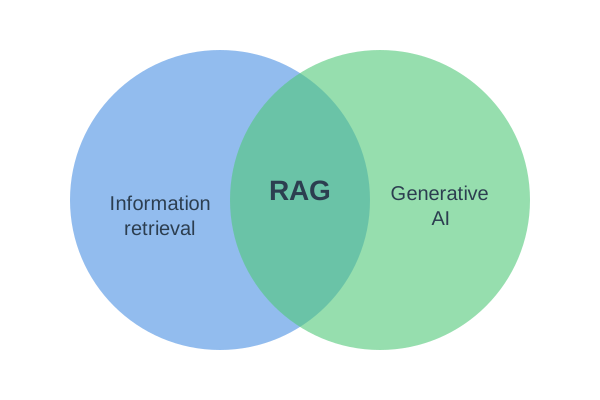
RAG sits at the intersection of information retrieval and generative AI. Elasticsearch is an excellent tool for implementing RAG, because it offers various retrieval capabilities, such as full-text search, vector search, and hybrid search, as well as other tools like filtering, aggregations, and security features.
Implementing RAG with Elasticsearch has several advantages:
- Improved context: Enables grounding the language model with additional, up-to-date, and/or private data.
- Reduced hallucination: Helps minimize factual errors by enabling models to cite authoritative sources.
- Cost efficiency: Requires less maintenance compared to fine-tuning or continuously pre-training models.
- Built-in security: Controls data access by leveraging Elasticsearch's user authorization features, such as role-based access control and field/document-level security.
- Simplified response parsing: Eliminates the need for custom parsing logic by letting the language model handle parsing Elasticsearch responses and formatting the retrieved context.
- Flexible implementation: Works with basic full-text search, and can be gradually updated to add more advanced and computationally intensive semantic search capabilities.
The following diagram illustrates a simple RAG system using Elasticsearch.
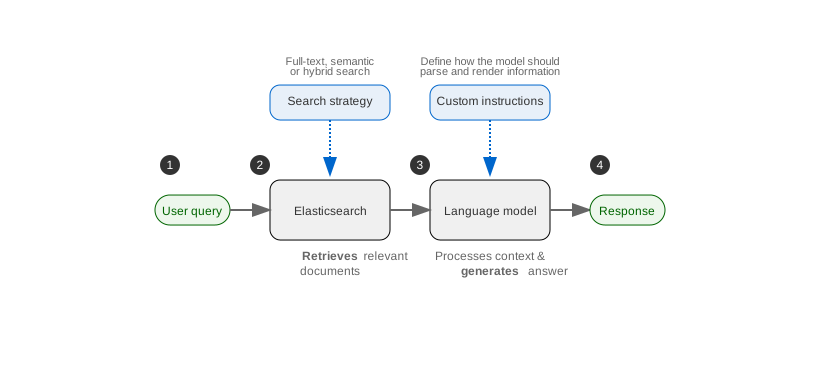
The workflow is as follows:
- The user submits a query.
- Elasticsearch retrieves relevant documents using full-text search, vector search, or hybrid search.
- The language model processes the context and generates a response, using custom instructions. Examples of custom instructions include "Cite a source" or "Provide a concise summary of the
contentfield in markdown format." - The model returns the final response to the user.
A more advanced setup might include query rewriting between steps 1 and 2. This intermediate step could use one or more additional language models with different instructions to reformulate queries for more specific and detailed responses.
You can build RAG applications with Elasticsearch by retrieving relevant context from your indices and passing it to a language model. The basic approach works across all deployment types, solutions, and project types:
- Use Elasticsearch search capabilities (full-text, vector, semantic, or hybrid search) to retrieve relevant documents
- Pass the retrieved content as context to your language model
- The language model generates a response grounded in your data
ES|QL COMPLETION command: Use the COMPLETION command to send prompts and context directly to language models within your ES|QL queries.
Agent Builder: Create AI agents that can search your Elasticsearch indices, use tools, and maintain conversational context. Agent Builder provides a complete framework for building stateful RAG applications. Learn more in the Agent Builder documentation.
Custom implementation: Retrieve documents using any Elasticsearch search approach (Query DSL, ES|QL, or retrievers), then integrate with your choice of language model provider in your applications code using their APIs or SDKs.
If you're using the Elasticsearch solution or serverless project type, these additional tools provide enable RAG workflows:
Playground: Build, test, and deploy RAG interfaces with a UI that automatically selects retrieval methods and provides full control over queries and model instructions. Download Python code to integrate with your applications. Learn more in the Playground documentation.
Learn more about building RAG systems using Elasticsearch in these blog posts: