Azure Functions
The .NET APM Agent can trace function invocations in an Azure Functions app. Two execution models are supported.
Don't know which model you're using? Isolated worker is the recommended and current model. In-process is legacy (reaching end-of-support November 10, 2026). If you're creating a new Azure Function app, use isolated worker. If you have an existing in-process app and want to add APM, you'll find instructions in the in-process section below.
| Hosting model | Package | Supported versions |
|---|---|---|
| Isolated worker | Microsoft.Azure.Functions.Worker |
≥2.0.0 <3.0.0 |
| In-process (legacy, deprecated) | Microsoft.Azure.Functions.Extensions |
≥1.1.0 <2.0.0 |
Runtime requirements: The isolated worker model requires .NET 8+. The in-process model supports .NET Framework 4.7.2+ and .NET 8+ (with FUNCTIONS_INPROC_NET8_ENABLED=1).
For the full compatibility matrix including supported installation methods, refer to Azure Functions.
You need an APM Server to send APM data to. Follow the APM Quick start if you have not set one up yet. You need your APM server URL and an APM server API key for configuring the APM agent below. (If your APM Server uses secret tokens instead, both are supported.)
You also need an Azure Function app to monitor running on .NET 8+ (for isolated worker model) or .NET Framework 4.7.2+ or .NET 8+ (for in-process model; .NET 8 requires the FUNCTIONS_INPROC_NET8_ENABLED=1 setting). If you do not have an existing one, you can follow Create your first C# function in Azure to create one.
You can also take a look at and use this Azure Functions isolated worker example app with Elastic APM already integrated.
Add the Elastic.Apm.Azure.Functions NuGet package to your Azure Functions project:
dotnet add package Elastic.Apm.Azure.Functions
Register ApmMiddleware in your Program.cs. The following example uses ConfigureFunctionsWebApplication, which is the recommended approach when using the ASP.NET Core integration (requires the Microsoft.Azure.Functions.Worker.Extensions.Http.AspNetCore package):
using Elastic.Apm.Azure.Functions;
using Microsoft.Extensions.Hosting;

var host = new HostBuilder()
  .ConfigureFunctionsWebApplication(builder =>
  {
    builder.UseMiddleware<ApmMiddleware>();
  })
  .Build();

host.Run();
If your app uses ConfigureFunctionsWorkerDefaults instead, replace the method name. The middleware registration syntax is the same.
The APM agent can be configured with environment variables.
ELASTIC_APM_SERVER_URL: <your APM server URL from the prerequisites step>
ELASTIC_APM_API_KEY: <your APM API key from the prerequisites step>
ELASTIC_APM_ENVIRONMENT: <your environment>
ELASTIC_APM_SERVICE_NAME: <your service name> (optional)
If ELASTIC_APM_SERVICE_NAME is not configured, the agent will use a fallback value.
- Local development - The discovered service name (the entry Assembly name) will be used.
- Azure - The Function App name (retrieved from the
WEBSITE_SITE_NAMEenvironment variable) will be used.
Configuring in Local development
While developing your Function locally, you can configure the agent by providing the environment variables via the local.settings.json file.
For example:
{
  "IsEncrypted": false,
  "Values": {
    "AzureWebJobsStorage": "UseDevelopmentStorage=true",
    "FUNCTIONS_WORKER_RUNTIME": "dotnet-isolated",
    "ELASTIC_APM_ENVIRONMENT": "Development",
    "ELASTIC_APM_SERVICE_NAME": "MyServiceName",
    "ELASTIC_APM_SERVER_URL": "https://your-apm-server:443",
    "ELASTIC_APM_API_KEY": "MySecureApiKeyFromApmServer=="
  }
}
Configuring in Azure
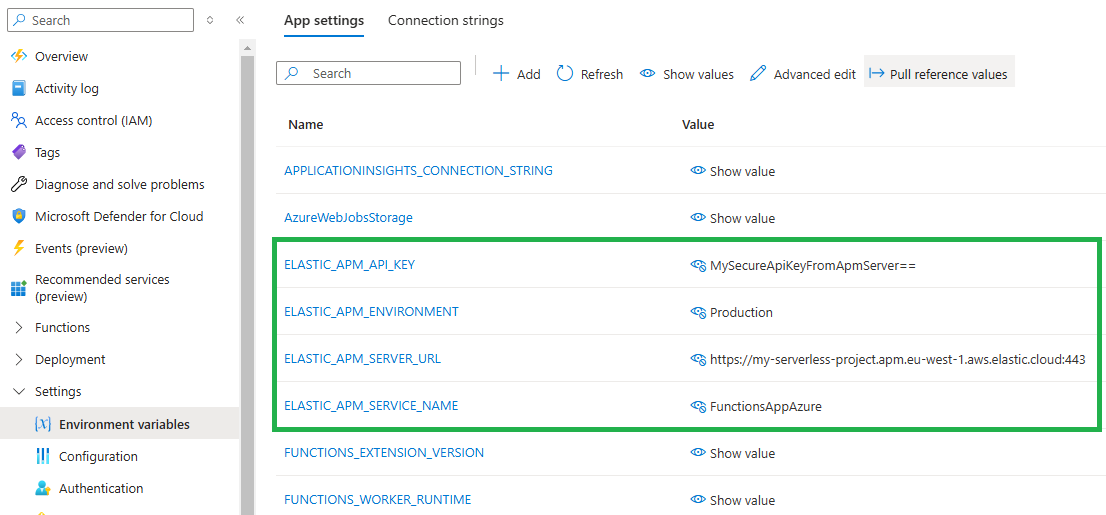
Using environment variables allows you to use application settings in the Azure Portal, enabling you to update settings without needing to re-deploy code.
Open Settings > Environment variables for your Function App in the Azure Portal and configure the ELASTIC_APM_* variables as required.
For example:
Once configured, see Verify and troubleshoot to confirm data is flowing.
The Azure Functions in-process model reaches end of support on November 10, 2026. We recommend migrating to the isolated worker model and following the isolated worker model setup instructions on this page instead.
You can also take a look at and use this Azure Functions in-process example app with Elastic APM already integrated.
Add the Elastic.Apm.Azure.Functions NuGet package to your Azure Functions project:
dotnet add package Elastic.Apm.Azure.Functions
The in-process model does not support middleware. Instead, create a startup class that inherits FunctionsStartup and call AddElasticApm() on the IFunctionsHostBuilder:
using Elastic.Apm.Azure.Functions;
using Microsoft.Azure.Functions.Extensions.DependencyInjection;

[assembly: FunctionsStartup(typeof(MyNamespace.Startup))]

namespace MyNamespace;

public class Startup : FunctionsStartup
{
    public override void Configure(IFunctionsHostBuilder builder) =>
        builder.AddElasticApm();
}
The [assembly: FunctionsStartup] attribute tells the Azure Functions runtime to invoke this class at startup. No changes to individual function classes are needed.
The APM agent is configured with environment variables:
ELASTIC_APM_SERVER_URL: <your APM server URL from the prerequisites step>
ELASTIC_APM_API_KEY: <your APM API key from the prerequisites step>
ELASTIC_APM_ENVIRONMENT: <your environment>
ELASTIC_APM_SERVICE_NAME: <your service name> (optional)
If ELASTIC_APM_SERVICE_NAME is not configured, the agent uses the same fallback values as the isolated worker model:
- Local development - The discovered service name (the entry assembly name) will be used.
- Azure - The Function App name (retrieved from the
WEBSITE_SITE_NAMEenvironment variable) will be used.
Configuring for local development
Add the ELASTIC_APM_* variables to your local.settings.json file. Note that FUNCTIONS_WORKER_RUNTIME must be set to dotnet (not dotnet-isolated). When targeting .NET 8, the FUNCTIONS_INPROC_NET8_ENABLED setting is also required to opt in to in-process support on that runtime:
{
  "IsEncrypted": false,
  "Values": {
    "AzureWebJobsStorage": "UseDevelopmentStorage=true",
    "FUNCTIONS_WORKER_RUNTIME": "dotnet",
    "FUNCTIONS_INPROC_NET8_ENABLED": "1",
    "ELASTIC_APM_ENVIRONMENT": "Development",
    "ELASTIC_APM_SERVICE_NAME": "MyServiceName",
    "ELASTIC_APM_SERVER_URL": "https://your-apm-server:443",
    "ELASTIC_APM_API_KEY": "MySecureApiKeyFromApmServer=="
  }
}
Configuring in Azure
Open Settings → Environment variables for your Function App in the Azure Portal and configure the ELASTIC_APM_* variables as required. If targeting .NET 8, also add FUNCTIONS_INPROC_NET8_ENABLED with a value of 1.
Using environment variables allows you to use application settings in the Azure Portal, enabling you to update settings without needing to re-deploy code.
Once configured, see Verify and troubleshoot to confirm data is flowing.
Verify in Kibana
After deploying your function or running it locally:
- Open Kibana and navigate to Observability → Applications → Service inventory
- Look for your service name (configured via
ELASTIC_APM_SERVICE_NAMEor the function app name) - Click on the service to see captured transactions and spans
On Consumption plans, allow 30-60 seconds for the first transaction to appear after invoking your function.
Service doesn't appear in Kibana
- Verify
ELASTIC_APM_SERVER_URLis reachable and correct - Confirm
ELASTIC_APM_API_KEYhas the required privileges on your APM Server - Check your function's application logs in the Azure Portal for APM-related errors
- Invoke the function at least once to generate a transaction
No transactions appear locally
- Ensure the APM Server URL in
local.settings.jsonis accessible (notlocalhostif running in Docker) - Verify your function was actually invoked (check the HTTP response)
- Confirm middleware is registered correctly in
Program.cs(isolated model) orStartup.cs(in-process model)
Azure Functions instrumentation currently does not collect system metrics (CPU, memory, garbage collection) in the background because of a concern with unintentionally increasing Azure Functions costs (for Consumption plans). However, all transactions, spans, and application-level data are still collected.
The in-process model only traces HTTP-triggered function invocations. Non-HTTP triggers (such as Timer, Queue, and Service Bus triggers) are not captured. If you need tracing for non-HTTP triggers, migrate to the isolated worker model and follow the isolated worker setup instructions on this page. The isolated worker model traces all trigger types.