Shard allocation awareness
You can use custom node attributes as awareness attributes to enable Elasticsearch to take your physical hardware configuration into account when allocating shards. If Elasticsearch knows which nodes are on the same physical server, in the same rack, or in the same zone, it can distribute the primary shard and its replica shards to minimize the risk of losing all shard copies in the event of a failure.
How you configure shard allocation awareness depends on your deployment type:
Self-managed: Follow the steps on this page to configure node attributes and awareness settings on each node.
Elastic Cloud Enterprise and Elastic Cloud Hosted: For Elastic Cloud Enterprise and Elastic Cloud Hosted deployments, you can't set custom node attributes, so shard allocation awareness is not available. These platforms handle availability zone awareness automatically through their deployment configuration.
Elastic Cloud on Kubernetes: You can use the information on this page to configure your own node attributes in each NodeSet and awareness settings at the Elasticsearch cluster level. Elastic Cloud on Kubernetes also provides advanced functionality and examples that combine Kubernetes pod scheduling with Elasticsearch shard allocation awareness:
- Starting with ECK 3.4, you can use the
zoneAwarenessfield on NodeSets to automatically configure zone-based shard allocation awareness. This is the recommended approach. - For earlier versions, refer to Advanced Elasticsearch node scheduling for an example of manual zone awareness configuration.
When shard allocation awareness is enabled with the cluster.routing.allocation.awareness.attributes setting, shards are only allocated to nodes that have values set for the specified awareness attributes. If you use multiple awareness attributes, Elasticsearch considers each attribute separately when allocating shards.
The number of attribute values determines how many shard copies are allocated in each location. If the number of nodes in each location is unbalanced and there are a lot of replicas, replica shards might be left unassigned.
Learn more about designing resilient clusters.
To enable shard allocation awareness:
Specify the location of each node with a custom node attribute. For example, if you want Elasticsearch to distribute shards across different racks, you might use an awareness attribute called
rack_id.You can set custom attributes in two ways:
By editing the
elasticsearch.ymlconfig file:node.attr.rack_id: rack_oneBy using the
-Ecommand-line argument when you start a node:./bin/elasticsearch -Enode.attr.rack_id=rack_one
TipFor Elastic Cloud on Kubernetes deployments, set the node attributes in the
configsection of each NodeSet.Tell Elasticsearch to take one or more awareness attributes into account when allocating shards by setting
cluster.routing.allocation.awareness.attributes. Use the cluster update settings API:PUT /_cluster/settings{ "persistent" : { "cluster.routing.allocation.awareness.attributes" : "rack_id" } }- Specify multiple attributes as a comma-separated list.
TipWhen configuring awareness manually, you are responsible for keeping the Kubernetes node scheduling and the Elasticsearch node attributes consistent. Using ECK zone awareness handles both layers automatically and is the recommended approach. For complete examples of both approaches, refer to Advanced Elasticsearch node scheduling.
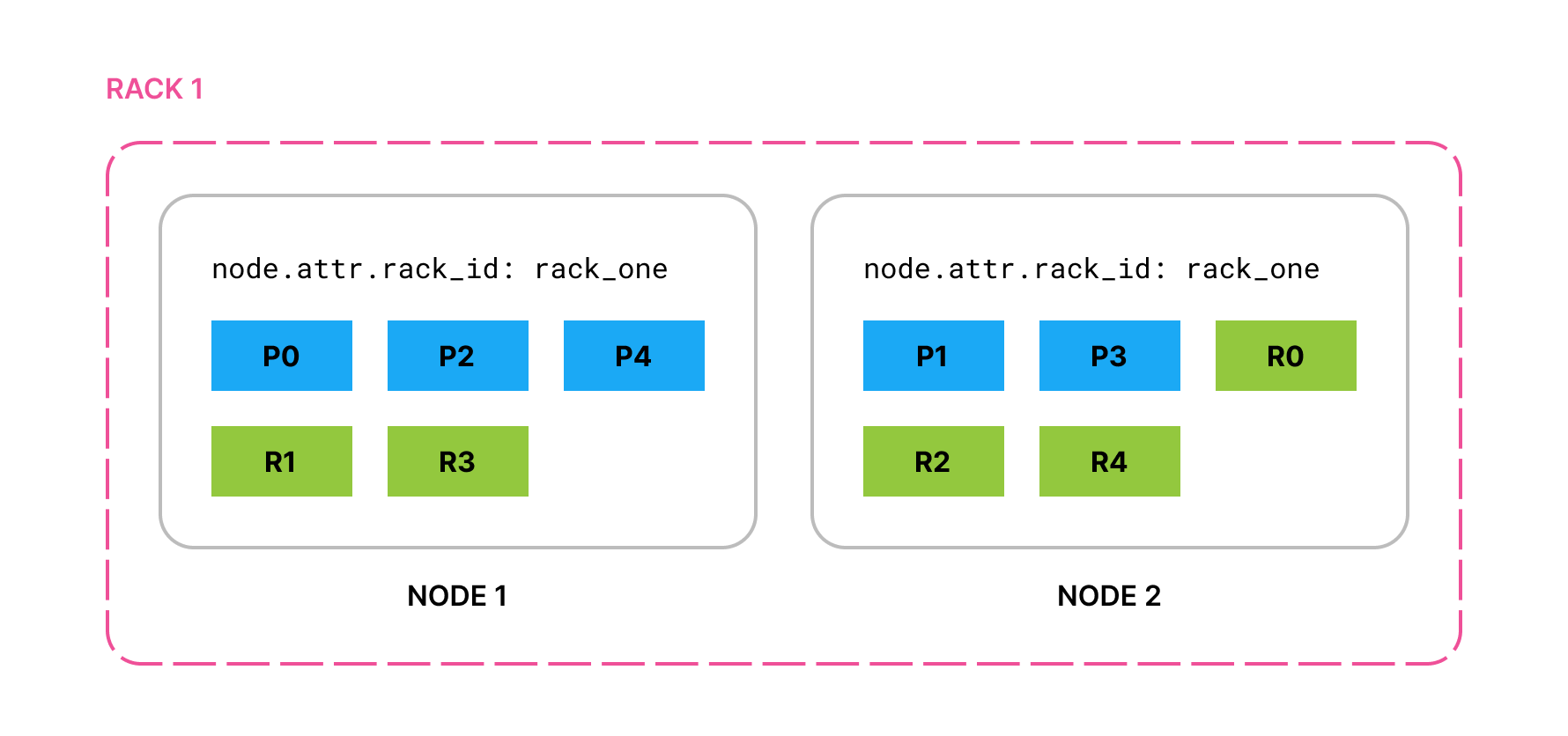
With this example configuration, if you start two nodes with node.attr.rack_id set to rack_one and create an index with 5 primary shards and 1 replica of each primary, all primaries and replicas are allocated across the two nodes. Because both nodes share the same rack, awareness cannot separate shard copies across racks yet. That separation happens when you add nodes in a second rack.
If you add two nodes with node.attr.rack_id set to rack_two, Elasticsearch moves shards to the new nodes, ensuring (if possible) that no two copies of the same shard are in the same rack.
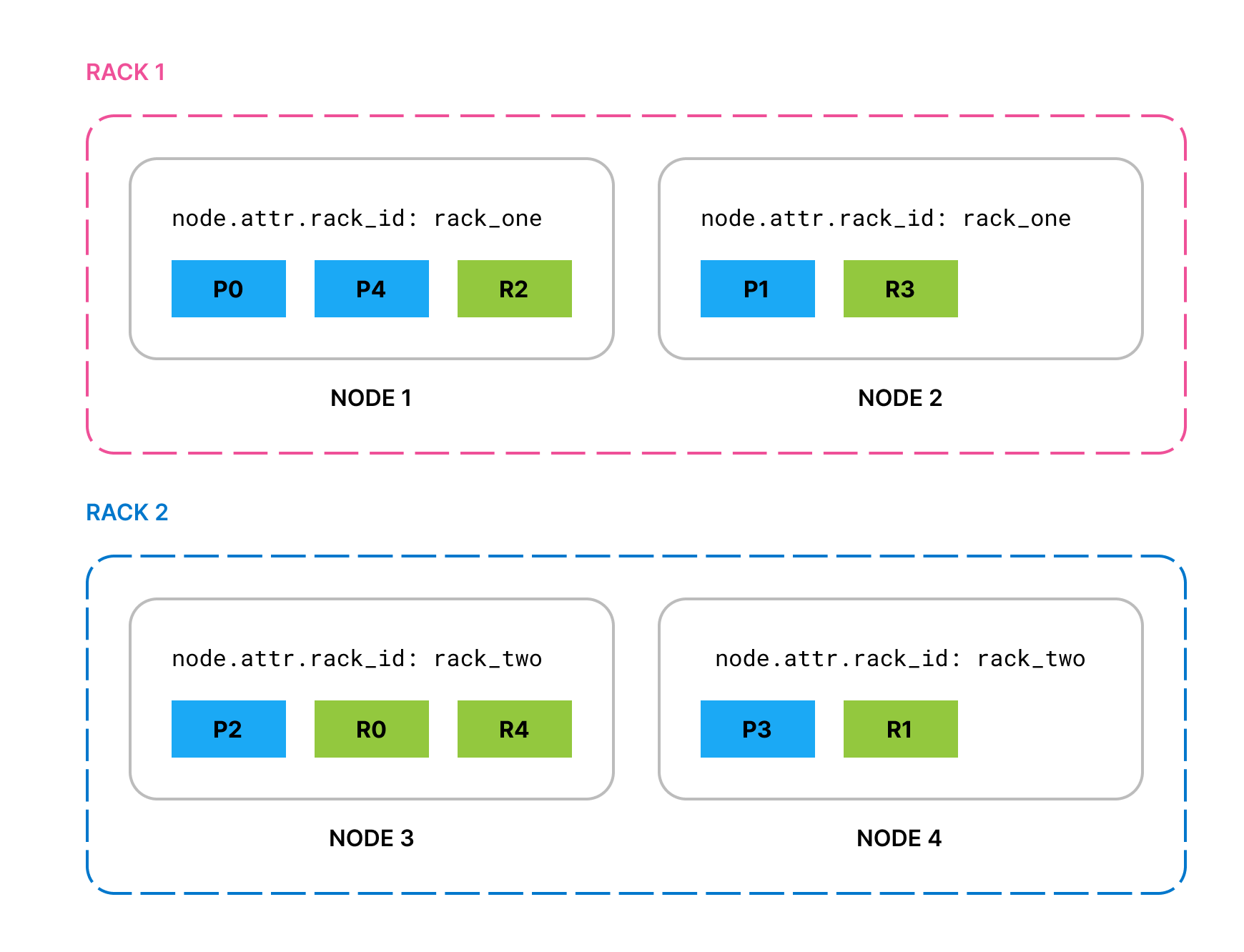
If rack_two fails and takes down both its nodes, by default Elasticsearch allocates the lost shard copies to nodes in rack_one. To prevent multiple copies of a particular shard from being allocated in the same location, you can enable forced awareness.
By default, if one location fails, Elasticsearch spreads its shards across the remaining locations. This might be undesirable if the cluster does not have sufficient resources to host all its shards when one location is missing.
To prevent the remaining locations from being overloaded in the event of a whole-location failure, specify the attribute values that should exist with the cluster.routing.allocation.awareness.force.* settings. This means that Elasticsearch prefers to leave some replicas unassigned in the event of a whole-location failure instead of overloading the nodes in the remaining locations.
For example, if you have an awareness attribute called zone and configure nodes in zone1 and zone2, you can use forced awareness to make Elasticsearch leave half of your shard copies unassigned if only one zone is available:
cluster.routing.allocation.awareness.attributes: zone
cluster.routing.allocation.awareness.force.zone.values: zone1,zone2
- Specify all possible
zoneattribute values.
With this example configuration, if you have two nodes with node.attr.zone set to zone1 and an index with number_of_replicas set to 1, Elasticsearch allocates all the primary shards but none of the replicas. It assigns the replica shards once nodes with a different value for node.attr.zone join the cluster. In contrast, if you do not configure forced awareness, Elasticsearch allocates all primaries and replicas to the two nodes even though they are in the same zone.