Connect external data sources for ES|QL Data Federation
A data source defines the connection to an external storage system. It stores the connection type, endpoint, and credentials. A data source defines how to connect, not what data to query. One data source can serve many datasets. When credentials rotate, you update the data source in one place without touching the datasets that reference it.
This feature is experimental. It is not intended for production use and there are no guarantees around performance, scale, or stability in this release.
The following data source types are supported:
| Type | Storage system |
|---|---|
s3 |
Amazon S3 |
Other S3-compatible services have not been validated and are not supported.
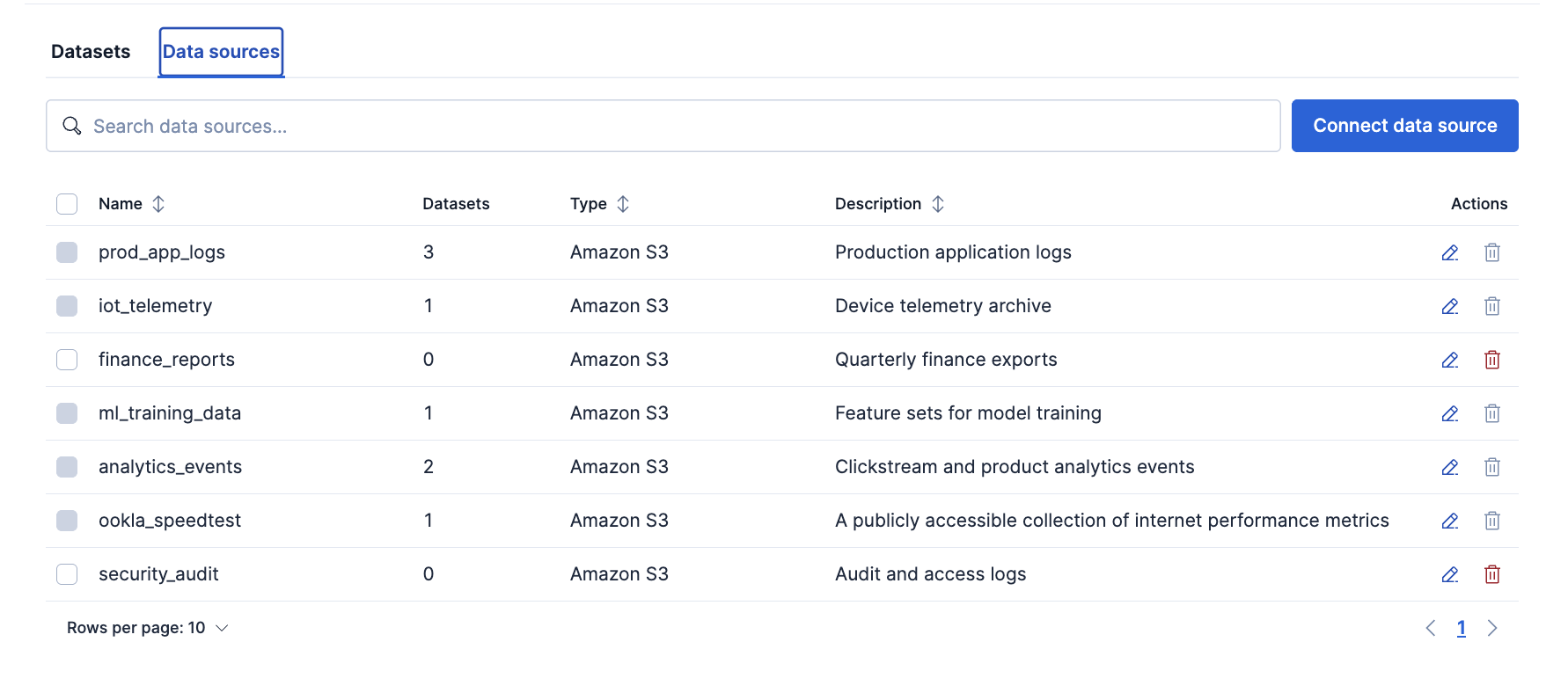
In Kibana, you connect and manage data sources from the Data sources tab under Data management > ES|QL Data Federation.
The Data sources tab lists each registered data source including:
- its type
- its description
- the number of datasets that reference it
From this tab you can search your data sources, connect a new one, and edit or delete an existing one.
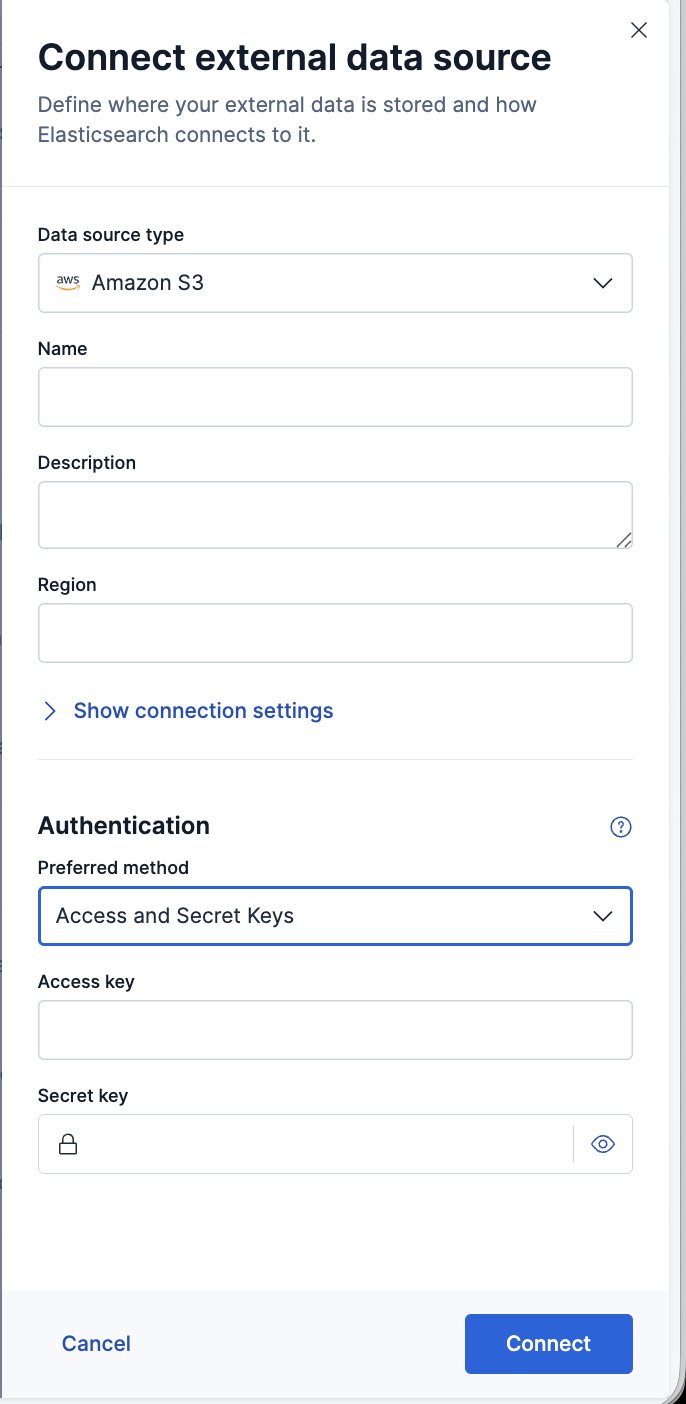
Click Connect data source to open a flyout where you define the connection:
- Data source type: the storage system to connect to, such as Amazon S3.
- Name: a unique name for the data source. Names must be lowercase and cannot begin with
-,_, or+. - Description: an optional description (up to 1,000 characters).
- Endpoint: an optional Amazon S3 endpoint override, given as an absolute
httpsURL naming a supported AWS S3 endpoint. Leave it empty to have the endpoint resolved from the region. - Authentication: select an authentication model from the dropdown, then fill in the credentials it requires.
For the full set of authentication methods and what each one requires, refer to authentication models. For detailed setup walkthroughs, refer to connect with static credentials or connect with federated identity.
Show the Connect data source flyout
Data sources are managed under the /_query/data_source endpoint. All data source operations require the cluster manage privilege or a global.data_source privilege. Refer to manage credentials and privileges for details.
| Operation | Endpoint | API reference |
|---|---|---|
| Create or update | PUT /_query/data_source/{name} |
Create or update an ES|QL data source |
| Get | GET /_query/data_source/{name} |
Get ES|QL data sources |
| List all | GET /_query/data_source |
Get ES|QL data sources |
| Delete | DELETE /_query/data_source/{name} |
Delete ES|QL data sources |
| Test connection | POST /_query/data_source/_test |
Test an ES|QL data source connection |
PUT creates a new data source or replaces an existing one entirely with one exception. Secrets you omit from the request are carried forward from the existing definition rather than cleared, so you can update non-secret settings without re-sending credentials.
The create request does not validate connectivity to the external system. To verify that credentials and endpoint are correct before saving, use the test connection endpoint.
Data source names follow the same naming rules as index names: lowercase only, at most 255 bytes, and they cannot begin with -, _, or +, contain spaces, or contain the characters \ / * ? " < > |.
A cluster holds at most 100 data sources by default. In Elastic Stack deployments, if you need more than 100 data sources, then you can raise the limit using the esql.data_sources.max_count cluster setting.
The optional description can be at most 1,000 characters long.
				PUT /_query/data_source/prod_s3_logs
					{
  "type": "s3",
  "description": "Production S3 logs bucket",
  "settings": {
    "auth": "static_credentials",
    "access_key": "<AWS_ACCESS_KEY_ID>",
    "secret_key": "<AWS_SECRET_ACCESS_KEY>"
  }
}
curl -X PUT "${ELASTICSEARCH_URL}/_query/data_source/prod_s3_logs" \
  -H "Authorization: ApiKey ${API_KEY}" \
  -H "Content-Type: application/json" \
  -d '{
  "type": "s3",
  "description": "Production S3 logs bucket",
  "settings": {
    "auth": "static_credentials",
    "access_key": "<AWS_ACCESS_KEY_ID>",
    "secret_key": "<AWS_SECRET_ACCESS_KEY>"
  }
}'
For step-by-step guides on setting up each authentication model in AWS, refer to connect with static credentials or connect with federated identity.
Retrieves a data source by name. You can pass a comma-separated list of names and use * wildcards. A concrete name that does not exist returns a 404; a wildcard that matches nothing returns an empty list. Credential values are replaced by ::es_redacted:: in the response.
GET /_query/data_source/prod_s3_logs
curl -X GET "${ELASTICSEARCH_URL}/_query/data_source/prod_s3_logs" \
  -H "Authorization: ApiKey ${API_KEY}"
Returns all registered data sources.
GET /_query/data_source
curl -X GET "${ELASTICSEARCH_URL}/_query/data_source" \
  -H "Authorization: ApiKey ${API_KEY}"
Deletes one or more data sources by name. You can pass a comma-separated list. If any named data source does not exist, the request returns a 404 and nothing is deleted.
DELETE /_query/data_source/prod_s3_logs
curl -X DELETE "${ELASTICSEARCH_URL}/_query/data_source/prod_s3_logs" \
  -H "Authorization: ApiKey ${API_KEY}"
A data source cannot be deleted while datasets still reference it. Delete the dependent datasets first, or the request returns a 409 Conflict error.
Use POST /_query/data_source/_test to verify that a configuration can reach its backend before saving it. The data source does not need to exist in cluster state — the endpoint accepts the same type and settings fields as the PUT request.
The response contains a status field with one of three values:
| Status | Meaning |
|---|---|
success |
The probe ran on every eligible node and the backend is reachable with the given credentials. |
failure |
The probe ran but the backend was unreachable or rejected the credentials. An error field contains a human-readable reason. |
untestable |
The configuration cannot be verified at the data source level. An optional message field, when present, explains why. Common reasons: the backend type has no connectivity probe; credentials are scoped to a container or bucket rather than the account; authentication uses anonymous or managed-identity access that requires a dataset path to resolve the endpoint; or no eligible node could complete the probe. The configuration may still be correct — create a dataset and run a query to validate access. |
The probe runs on every eligible node in parallel, with a 30-second timeout per node. If any node cannot complete the probe, the result is untestable rather than success.
				POST /_query/data_source/_test
					{
  "type": "s3",
  "settings": {
    "auth": "static_credentials",
    "access_key": "<AWS_ACCESS_KEY_ID>",
    "secret_key": "<AWS_SECRET_ACCESS_KEY>"
  }
}
curl -X POST "${ELASTICSEARCH_URL}/_query/data_source/_test" \
  -H "Authorization: ApiKey ${API_KEY}" \
  -H "Content-Type: application/json" \
  -d '{
  "type": "s3",
  "settings": {
    "auth": "static_credentials",
    "access_key": "<AWS_ACCESS_KEY_ID>",
    "secret_key": "<AWS_SECRET_ACCESS_KEY>"
  }
}'
Example responses:
{ "status": "success" }
{ "status": "failure", "error": "The AWS Access Key Id you provided does not exist in our records." }
{ "status": "untestable", "message": "Anonymous access targets public buckets; create a dataset to validate read access." }
An unknown type value returns a 400 Bad Request rather than a failure status, because the type is not registered — it is a client error, not a connectivity problem.
Settings vary by data source type.
The following settings are available for s3 data sources:
Connection settings:
| Setting | Required | Description |
|---|---|---|
endpoint |
No | Optional Amazon S3 endpoint override. Must be an absolute https URL naming a supported AWS S3 endpoint, for example https://s3.us-east-1.amazonaws.com. Omit to resolve the endpoint from the region, which is the recommended configuration. See S3 endpoint requirements.
|
addressing_style
|
No | URL addressing style. auto (default) uses path-style when endpoint is set and SDK-default otherwise. path always uses path-style. virtual_hosted lets the SDK decide (bare-IP endpoints fall back to path-style). Because auto resolves to path-style whenever endpoint is set, set virtual_hosted if reads through a VPC interface endpoint fail with an addressing error. |
Accepted endpoint forms. The first three are accepted in every AWS partition; the global form exists only in the commercial partition:
- Regional:
https://s3.us-east-1.amazonaws.com - Historical:
https://s3-us-west-2.amazonaws.com - VPC interface:
https://bucket.vpce-0a1b2c3d.s3.us-east-1.vpce.amazonaws.com - Global:
https://s3.amazonaws.com
A regional endpoint must name a region that the Elasticsearch version you are running knows about. A region added by AWS after that release is rejected until you upgrade, or until a node permits its host with the setting described below.
https://s3.amazonaws.com has no region. When you set endpoint, the SDK stops following cross-region redirects, so this global endpoint only reaches us-east-1 buckets; other regions get an error. Omit endpoint to let the SDK resolve the correct regional endpoint from the dataset's region setting.
Every other AWS endpoint family is rejected, including FIPS endpoints, dual-stack endpoints, transfer acceleration, access points, object lambda, Outposts, the account-level control plane, the legacy s3-external-1 alias, and S3 Express. A bucket-qualified endpoint such as https://mybucket.s3.us-east-1.amazonaws.com is also rejected: name the regional endpoint and let the bucket come from the dataset. So are plain http, a value without a scheme, and a host the URL syntax does not allow, such as an underscore or a non-numeric port.
A node can permit additional hosts with the esql.external.allowed_endpoint_hosts node setting, a list of host:port patterns in elasticsearch.yml that defaults to empty. A host it names is also accepted over plain http for endpoint; sts_endpoint always requires https.
A data source created before these endpoint restrictions were introduced keeps working for queries, but updating it requires an endpoint that passes the validation described above.
The region setting on a data source is deprecated and has no effect. Set region on each dataset instead, or omit it to let Elasticsearch detect the region automatically. When no endpoint is set, the SDK redirects transparently. When one is set, Elasticsearch issues a HeadBucket probe on the first request and caches the discovered region for the lifetime of the data source.
Authentication settings:
| Setting | Required | Description |
|---|---|---|
access_key |
No | AWS access key ID. Used with auth: static_credentials. |
secret_key |
No | AWS secret access key. Used with auth: static_credentials. |
role_arn |
Yes (federated identity) | The ARN of the IAM role Elasticsearch assumes via STS. Used with auth: federated_identity. |
jwt_audience |
No | Overrides the JWT audience claim sent to STS. Defaults to sts.amazonaws.com. Used with auth: federated_identity. |
role_session_name |
No | A label for the assumed-role session. Defaults to elasticsearch-esql-datasource. Used with auth: federated_identity. |
sts_endpoint |
No | STS endpoint override for auth: federated_identity, for example https://sts.us-east-1.amazonaws.com. Validated against the same S3 endpoint requirements as endpoint, but for STS hosts, and always over https. Any host permitted via esql.external.allowed_endpoint_hosts receives the node's OIDC token; only add hosts on trusted network paths.
|
sts_region |
No | The AWS region of the STS endpoint. Defaults to the dataset's region setting, or us-east-1 if the dataset has no explicit region. Used with auth: federated_identity. |
auth |
Yes | Authentication mode. Set it to anonymous, static_credentials, managed_identity, or federated_identity. |
A data source authenticates to its store with one of the following models. The models are mutually exclusive on a data source.
| Model | auth value |
Description |
|---|---|---|
| Static credentials | static_credentials |
A fixed access key and secret key. The common form for a service account. To set one up, refer to connect with static credentials. |
| Anonymous | anonymous |
For public data that needs no credentials. The quickstart walks through this method. |
| Federated identity | federated_identity |
Keyless. Elasticsearch exchanges a short-lived OIDC token for temporary AWS credentials via STS, so no static keys are stored. Available on Elastic Cloud Hosted and serverless only. Operator-gated (esql.datasource.federated_identity.enabled
esql.external.federated_identity.enabled
|
| Managed identity | managed_identity |
Keyless. Uses the Elasticsearch node's own cloud identity, for example an EC2 instance IAM role. Operator-only and API-only, and not available in serverless. Requires esql.datasource.managed_identity.enabled
esql.external.managed_identity.enabled
|
Managed identity uses the cloud identity attached to each Elasticsearch node (for example, an IAM role on EC2 or a service account on GKE). Different nodes might have different identities, and the node that performs the connection is not guaranteed. You are responsible for configuring cloud IAM so that every node's identity has the required permissions on the target bucket. This model is best suited for single-cloud, single-tenant deployments where node identities are uniform.
- Create datasets that point at specific files in your data source, and configure file formats, schema inference, and parsing settings.
- Query your datasets with
FROMto learn how partition pruning, column selection, and filter pushdown reduce storage reads. - Manage credentials and privileges to control who can create data sources and read external data.