 docs-builder
Applies to
Starting with Elastic Stack 9.0, ECE 4.0, and ECK 3.0, documentation follows a cumulative approach: instead of creating separate pages for each product and release, we update a single page with product- and version-specific details over time.
To support this, source files use a tagging system to indicate:
- Which Elastic products and deployment models the content applies to.
- When a feature changes state relative to the base version.
This is what the applies_to metadata is for. It can be used at the page,
section, or inline level to specify applicability with precision.
For detailed guidance, refer to Write cumulative documentation.
The applies_to metadata supports an exhaustive list of keys.
When you write or edit documentation, only specify the keys that apply to that content. Each key accepts values with the following syntax:
<key>: <lifecycle> [version], <lifecycle> [version], ...
Where:
- The lifecycle is mandatory.
- The version is optional.
Versions can be specified using several formats to indicate different applicability scenarios:
| Description | Syntax | Example | Badge Display |
|---|---|---|---|
| Greater than or equal to (default) | x.x+ x.x x.x.x+ x.x.x |
ga 9.1 or ga 9.1+ |
9.1+ |
| Range (inclusive) | x.x-y.y x.x.x-y.y.y |
preview 9.0-9.2 |
9.0-9.2 or 9.0+* |
| Exact version | =x.x =x.x.x |
beta =9.1 |
9.1 |
* Range display depends on release status of the second version.
Important notes:
- Versions are always displayed as Major.Minor (e.g.,
9.1) in badges, regardless of whether you specify patch versions in the source. - Each version statement corresponds to the latest patch of the specified minor version (e.g.,
9.1represents 9.1.0, 9.1.1, 9.1.6, etc.). - When critical patch-level differences exist, use plain text descriptions alongside the badge rather than specifying patch versions.
The build process enforces the following validation rules:
- One version per lifecycle: Each lifecycle (GA, Preview, Beta, etc.) can only have one version declaration.
- ✅
stack: ga 9.2+, beta 9.0-9.1 - ❌
stack: ga 9.2, ga 9.3
- ✅
- One "greater than" per key: Only one lifecycle per product key can use the
+(greater than or equal to) syntax.- ✅
stack: ga 9.2+, beta 9.0-9.1 - ❌
stack: ga 9.2+, beta 9.0+
- ✅
- Valid range order: In ranges, the first version must be less than or equal to the second version.
- ✅
stack: preview 9.0-9.2 - ❌
stack: preview 9.2-9.0
- ✅
- No version overlaps: Versions for the same key cannot overlap (ranges are inclusive).
- ✅
stack: ga 9.2+, beta 9.0-9.1 - ❌
stack: ga 9.2+, beta 9.0-9.2
- ✅
Page level annotations are added in the YAML frontmatter, starting with the applies_to key and following the key-value reference. For example:
---
applies_to:
  stack: ga
  deployment:
    ece: ga
---
For more examples, refer to Page annotation examples.
All documentation pages must include an applies_to tag in the YAML frontmatter.
A header can be followed by an {applies_to} directive which contextualizes the applicability of the section further.
Section-level {applies_to} directives require triple backticks because their content is literal. Refer to Directives > Exception: Literal blocks for more information.
```{applies_to}
stack: ga 9.1
```
To play even better with Markdown editors the following is also supported:
```yaml {applies_to}
stack: ga 9.1
```
This allows the YAML inside the {applies_to} directive to be fully highlighted.
For more examples, refer to Section annotation examples.
Section-level {applies_to} directives must be preceded by a heading directly.
You can add inline applies annotations to any line using the following syntax:
This can live inline {applies_to}`section: <life-cycle> [version]`
A specialized {preview} role exists to quickly mark something as a technical preview. It takes a required version number
as an argument.
Property {preview}`<version>`
:   definition body
For more examples, refer to Inline annotation examples.
Several components have built-in support for applies_to and allow to surface version information in an optimized way:
- applies-switch, a component similar to tabs but with specific support to show version badges as tab titles
- admonitions
- dropdowns
Refer to these component pages to learn about the required applies_to syntax.
Use the following key-value reference to find the appropriate key and value for your applicability statements.
applies_to accepts the following keys in this structure.
serverless: Applies to Elastic Cloud Serverless.security: Applies to Serverless security projects.elasticsearch: Applies to Serverless search projects.observability: Applies to Serverless observability projects.
stack: Applies to the Elastic Stack including any Elastic Stack components.deployment: Applies to some deployment type(s).ece: Applies to Elastic Cloud Enterprise deployments.eck: Applies to Elastic Cloud on Kubernetes deployments.self: Applies to self-managed deployments.ess: Applies to Elastic Cloud Hosted deployments.
product: Applies to a specific product that uses a unique versioning scheme (for example, notstack,ece,eck).apm_agent_dotnet: Applies to the Elastic APM .NET agent.apm_agent_go: Applies to the Elastic APM Go agent.apm_agent_java: Applies to the Elastic APM Java agent.apm_agent_node: Applies to the Elastic APM Node.js agent.apm_agent_php: Applies to the Elastic APM PHP agent.apm_agent_python: Applies to the Elastic APM Python agent.apm_agent_ruby: Applies to the Elastic APM Ruby agent.apm_agent_rum: Applies to the APM RUM JavaScript agent.curator: Applies to Elasticsearch Curator (Curator).ecctl: Applies to Elastic cloud control (ECCTL).edot_android: Applies to the Elastic Distribution of OpenTelemetry Android (EDOT Android).edot_cf_aws: Applies to the Elastic Distribution of OpenTelemetry Cloud Forwarder (EDOT Cloud Forwarder).edot_cf_azure: Applies to the Elastic Distribution of OpenTelemetry Cloud Forwarder (EDOT Cloud Forwarder).edot_cf_gcp: Applies to the Elastic Distribution of OpenTelemetry Cloud Forwarder (EDOT Cloud Forwarder).edot_collector: Applies to the Elastic Distribution of OpenTelemetry Collector (EDOT Collector).edot_dotnet: Applies to the Elastic Distribution of OpenTelemetry .NET (EDOT .NET).edot_ios: Applies to the Elastic Distribution of OpenTelemetry iOS (EDOT iOS).edot_java: Applies to the Elastic Distribution of OpenTelemetry Java (EDOT Java).edot_node: Applies to the Elastic Distribution of OpenTelemetry Node.js (EDOT Node.js).edot_php: Applies to the Elastic Distribution of OpenTelemetry PHP (EDOT PHP).edot_python: Applies to the Elastic Distribution of OpenTelemetry Python (EDOT Python).
The product key and its subkeys are used to indicate feature availability and applicability. The similarly named products frontmatter field is used to drive elastic.co search filters.
applies_to accepts the following lifecycle states:
previewbetagadeprecatedremovedunavailable
applies_to accepts the following version formats:
You can use version specifiers to precisely control how versions are interpreted:
| Specifier | Syntax | Description | Example |
|---|---|---|---|
| Greater than or equal (default) | x.x x.x+ x.x.x x.x.x+ |
Feature available from this version onwards | ga 9.2+ or ga 9.2 |
| Range (inclusive) | x.x-y.y x.x.x-y.y.y |
Feature available only in this version range | beta 9.0-9.1 |
| Exact version | =x.x =x.x.x |
Feature available only in this specific version | preview =9.0 |
Regardless of the version format used in the source file, the version number is always rendered in the Major.Minor format in badges.
The + suffix is optional for greater-than-or-equal syntax. Both ga 9.2 and ga 9.2+ have the same meaning.
# Greater than or equal (feature available from 9.2 onwards)
stack: ga 9.2
stack: ga 9.2+

# Range (feature was in beta from 9.0 to 9.1, then became GA)
stack: ga 9.2+, beta 9.0-9.1

# Exact version (feature was in preview only in 9.0)
stack: ga 9.1+, preview =9.0
When you specify multiple lifecycles with simple versions (without explicit specifiers), the system automatically infers the version ranges:
Input:
stack: preview 9.0, alpha 9.1, beta 9.2, ga 9.4
Interpreted as:
stack: preview =9.0, alpha =9.1, beta 9.2-9.3, ga 9.4+
The inference rules are:
- Consecutive versions: If a lifecycle is immediately followed by another in the next minor version, it's treated as an exact version (
=x.x). - Non-consecutive versions: If there's a gap between one lifecycle's version and the next lifecycle's version, it becomes a range from the start version to one version before the next lifecycle.
- Last lifecycle: The highest versioned lifecycle is always treated as greater-than-or-equal (
x.x+).
This makes it easy to document features that evolve through multiple lifecycle stages. For example, a feature that goes through preview → beta → GA can be written simply as:
stack: preview 9.0, beta 9.1, ga 9.3
Which is automatically interpreted as:
stack: preview =9.0, beta 9.1-9.2, ga 9.3+
Automatic Version Sorting: When you specify multiple versions for the same product, the build system automatically sorts them in descending order (highest version first) regardless of the order you write them in the source file. For example, stack: ga 9.1, beta 9.0, preview 8.18 will be displayed with the highest priority lifecycle and version first. Items without versions are sorted last.
The following table demonstrates the various version syntax options and their rendered output:
| Source Syntax | Description | Badge Display | Notes |
|---|---|---|---|
stack: ga 9.1 |
Greater than or equal to 9.1 | Stack│9.1+ |
Default behavior, equivalent to 9.1+ |
stack: ga 9.1+ |
Explicit greater than or equal to | Stack│9.1+ |
Explicit + syntax |
stack: preview 9.0-9.2 |
Range from 9.0 to 9.2 (inclusive) | Stack│Preview 9.0-9.2 |
Shows range if 9.2.0 is released |
stack: preview 9.0-9.3 |
Range where end is unreleased | Stack│Preview 9.0+ |
Shows + if 9.3.0 is not released |
stack: beta =9.1 |
Exact version 9.1 only | Stack│Beta 9.1 |
No + symbol for exact versions |
stack: ga 9.2+, beta 9.0-9.1 |
Multiple lifecycles | Stack│9.2+ |
Only highest priority lifecycle shown |
stack: ga 9.3, beta 9.1+ |
Unreleased GA with Preview | Stack│Beta 9.1+ |
Shows Beta when GA unreleased with 2+ lifecycles |
serverless: ga |
No version (base 99999) | Serverless |
No version badge for unversioned products |
deployment:<br/> ece: ga 9.0+ |
Nested deployment syntax | ECE│9.0+ |
Deployment products shown separately |
Versioned products require a version tag to be used with the lifecycle tag:
applies_to:
  stack: preview 9.1, ga 9.4
  deployment:
    ece: deprecated 9.2, removed 9.8
Unversioned products use lifecycle tags without a version:
applies_to:
  serverless:
    elasticsearch: beta
    observability: removed
Unversioned products
Unversioned products don't follow a fixed versioning scheme and are released a lot more often than versioned products. All users are using the same version of this product.
When a change is released in
ga, it doesn’t need any specific tagging.When a change is introduced as preview or beta, use
previeworbetaas value for the corresponding key within theapplies_to:--- applies_to: serverless: preview ---When a change introduces a deprecation, use deprecated as value for the corresponding key within the
applies_to:--- applies_to: deployment: ess: deprecated ---When a change removes a feature, remove the content.
Exception: If the content also applies to another context (for example a feature is removed in both Kibana 9.x and Serverless), then it must be kept for any user reading the page that may be using a version of Kibana prior to the removal.
For example:
---
applies_to:
  stack: deprecated 9.1, removed 9.4
  serverless: removed
---
Versioned products
When a change is released in
ga, users need to know which version the feature became available in:--- applies_to: stack: ga 9.3 ---This means the feature is available from version 9.3 onwards (equivalent to
ga 9.3+).When a change is introduced as preview or beta, use
previeworbetaas value for the corresponding key within theapplies_to:--- applies_to: stack: beta 9.1 ---When a feature is available only in a specific version range, use the range syntax:
---
applies_to:
  stack: beta 9.0-9.1, ga 9.2
---
This means the feature was in beta from 9.0 to 9.1, then became GA in 9.2+.
When a feature was in a specific lifecycle for exactly one version, use the exact syntax:
---
applies_to:
  stack: preview =9.0, ga 9.1
---
This means the feature was in preview only in 9.0, then became GA in 9.1+.
When a change introduces a deprecation, use
deprecatedas value for the corresponding key within theapplies_to:--- applies_to: deployment: ece: deprecated 4.2 ---When a change removes a feature, any user reading the page that may be using a version of Kibana prior to the removal must be aware that the feature is still available to them. For that reason, we do not remove the content, and instead mark the feature as removed:
---
applies_to:
  stack: deprecated 9.1, removed 9.4
---
With the implicit version inference, this is interpreted as
deprecated 9.1-9.3, removed 9.4+.
Identify multiple states for the same content
applies_to keys accept comma-separated values to specify lifecycle states for multiple product versions.
When you specify multiple lifecycles with simple versions, the system automatically infers whether each version represents an exact version, a range, or an open-ended range. Refer to Implicit version inference for details.
A feature is added in 9.0 as tech preview and becomes GA in 9.1:
applies_to:
  stack: preview 9.0, ga 9.1
The preview is automatically interpreted as
=9.0(exact), and GA as9.1+(open-ended).A feature goes through multiple stages before becoming GA:
applies_to:
  stack: preview 9.0, beta 9.1, ga 9.3
Interpreted as:
preview =9.0,beta 9.1-9.2,ga 9.3+A feature is unavailable for one version, beta for another, preview for a range, then GA:
applies_to:
  stack: unavailable 9.0, beta 9.1, preview 9.2, ga 9.4
Interpreted as:
unavailable =9.0,beta =9.1,preview 9.2-9.3,ga 9.4+A feature is deprecated in ECE 4.0 and is removed in 4.8. At the same time, it has already been removed in Elastic Cloud Hosted:
applies_to:
  deployment:
    ece: deprecated 4.0, removed 4.8
    ess: removed
The deprecated lifecycle is interpreted as
4.0-4.7(range until removal).Use explicit specifiers when you need precise control:
applies_to:
  # Explicit exact version
  stack: preview =9.0, ga 9.1+

  # Explicit range
  stack: beta 9.0-9.1, ga 9.2+
Document is primarily about using or interacting with Elastic Stack components or the Serverless UI
---
applies_to:
  stack: ga
  serverless: ga
---
Document is primarily about orchestrating, deploying or configuring an installation
---
applies_to:
  serverless: ga
  deployment:
    ess: ga
    ece: ga
    eck: ga
---
Document is primarily about a product following its own versioning schema
---
applies_to:
  edot_ios: ga
---
Applicable to Stack and Serverless, minus a section
---
applies_to:
stack: ga
serverless: ga
---

# Spaces

[...]

#### Configure a space-level landing page [space-landing-page]
```{applies_to}
serverless: unavailable
```
Applicable to all deployment types, but some paragraphs are specific to other deployment types
#### Cloud organization level security [cloud-organization-level]
```{applies_to}
serverless: ga
deployment:
  ess: ga
```

[...]

#### Orchestrator level security [orchestrator-level]
```{applies_to}
deployment:
  ece: ga
```

[...]
Basic example
Spaces let you organize your content and users according to your needs.
- Each space has its own saved objects.
- Serverless Each space has its own navigation, called solution view.
**Spaces** let you organize your content and users according to your needs.

- Each space has its own saved objects.
- {applies_to}`serverless: unavailable` Each space has its own navigation, called solution view.
Product-specific applicability with version information
This example shows how to use directly a key from the second level of the applies_to data structure, like edot_python:.
- EDOT Python
- APM Agent Java
- {applies_to}`edot_python: preview 1.7.0`
- {applies_to}`apm_agent_java: beta 1.0.0`
Multiple products and states in a single inline statement
- Serverless Stack
- EDOT Python APM Agent Java
- Stack ECK
- {applies_to}`serverless: ga` {applies_to}`stack: ga 9.1.0`
- {applies_to}`edot_python: preview =1.7.0, ga 1.8.0` {applies_to}`apm_agent_java: beta =1.0.0, ga 1.2.0`
- {applies_to}`stack: ga 9.0` {applies_to}`eck: ga 3.0`
The functionality is available in the same lifecycle in multiple versions
- Stack Stack
- {applies_to}`stack: ga 9.1.2` {applies_to}`stack: ga 9.0.6`
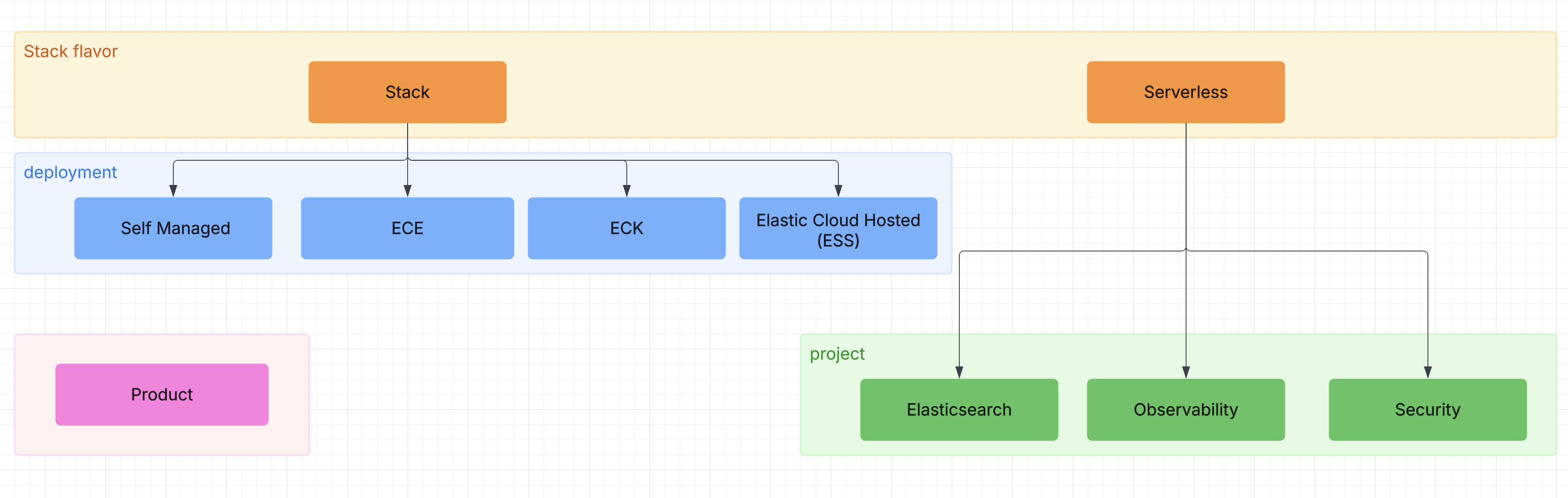
The previous model is projected to the following structured YAML.
Applies to model
---
applies_to:
  stack:
  deployment:
    eck:
    ess:
    ece:
    self:
  serverless:
    security:
    elasticsearch:
    observability:
  product:
    ecctl:
    curator:
    apm_agent_dotnet:
    apm_agent_go:
    apm_agent_java:
    apm_agent_node:
    apm_agent_php:
    apm_agent_python:
    apm_agent_ruby:
    apm_agent_rum:
    edot_collector:
    edot_ios:
    edot_android:
    edot_dotnet:
    edot_java:
    edot_node:
    edot_php:
    edot_python:
    edot_cf_aws:
    edot_cf_azure:
---
New version syntax examples
The following examples demonstrate the new version syntax capabilities:
Greater than or equal to:
-
Stack
(implicit
+) -
Stack
(explicit
+) - Stack
Ranges:
- Stack (range display when both released)
-
Stack
(converts to
+if end unreleased)
Exact versions:
-
Stack
(no
+symbol) - Stack
Multiple lifecycles:
- Stack (shows highest priority)
Block examples
Serverless Elasticsearch Serverless Observability Serverless Security Stack EDOT .NET EDOT Node.js EDOT Python APM Agent .NET APM Agent Java
In text
Lorem ipsum dolor sit amet, consectetur adipiscing elit. Maecenas ut libero diam. Mauris sed eleifend erat, sit amet auctor odio. Donec ac placerat nunc. Stack Aenean scelerisque viverra lectus nec dignissim. Vestibulum ut felis nec massa auctor placerat. Maecenas vel dictum.
- Serverless Elasticsearch Lorem ipsum dolor sit amet, consectetur adipiscing elit. Maecenas ut libero diam. Mauris sed eleifend erat, sit amet auctor odio. Donec ac placerat nunc.
- Serverless Observability Lorem ipsum dolor sit amet, consectetur adipiscing elit. Maecenas ut libero diam.
- Serverless Security Lorem ipsum dolor sit amet, consectetur adipiscing elit. Maecenas ut libero diam. Mauris sed eleifend erat, sit amet auctor odio. Donec ac placerat nunc. Aenean scelerisque viverra lectus nec dignissim.
Stack
applies_to |
result |
|---|---|
{applies_to}`stack: ` |
Stack |
{applies_to}`stack: preview` |
Stack |
{applies_to}`stack: preview 8.18` |
Stack |
{applies_to}`stack: preview 9.0` |
Stack |
{applies_to}`stack: preview 9.1` |
Stack |
{applies_to}`stack: preview 99.0` |
Stack |
{applies_to}`stack: ga` |
Stack |
{applies_to}`stack: ga 8.18` |
Stack |
{applies_to}`stack: ga 9.0` |
Stack |
{applies_to}`stack: ga 9.1` |
Stack |
{applies_to}`stack: ga 99.0` |
Stack |
{applies_to}`stack: beta` |
Stack |
{applies_to}`stack: beta 8.18` |
Stack |
{applies_to}`stack: beta 9.0` |
Stack |
{applies_to}`stack: beta 9.1` |
Stack |
{applies_to}`stack: beta 99.0` |
Stack |
{applies_to}`stack: deprecated` |
Stack |
{applies_to}`stack: deprecated 8.18` |
Stack |
{applies_to}`stack: deprecated 9.0` |
Stack |
{applies_to}`stack: deprecated 9.1` |
Stack |
{applies_to}`stack: deprecated 99.0` |
Stack |
{applies_to}`stack: removed` |
Stack |
{applies_to}`stack: removed 8.18` |
Stack |
{applies_to}`stack: removed 9.0` |
Stack |
{applies_to}`stack: removed 9.1` |
Stack |
{applies_to}`stack: removed 99.0` |
Stack |
Serverless
applies_to |
result |
|---|---|
{applies_to}`serverless: ` |
Serverless |
{applies_to}`serverless: preview` |
Serverless |
{applies_to}`serverless: ga` |
Serverless |
{applies_to}`serverless: beta` |
Serverless |
{applies_to}`serverless: deprecated` |
Serverless |
{applies_to}`serverless: removed` |
Serverless |
applies_to badges are displayed in a consistent order regardless of how they appear in your source files. This ensures users always see badges in a predictable hierarchy:
- Stack - Elastic Stack
- Serverless - Elastic Cloud Serverless offerings
- Deployment - Deployment options (ECH, ECK, ECE, Self-Managed)
- ProductApplicability - Specialized tools and agents (ECCTL, Curator, EDOT, APM Agents)
- Product (generic) - Generic product applicability
Within the ProductApplicability category, EDOT and APM Agent items are sorted alphabetically for better scanning.
Inline applies annotations are rendered in the order they appear in the source file.