How to set up docs previews
This guide will help you set up docs previews for your GitHub repository.
Reusable workflows live in elastic/docs-actions. Pin them to @v1 so the docs team can ship updates independently of elastic/docs-builder. Reference repos: elastic/elastic-otel-rum-js, elastic/ecs-logging-nodejs.
The integration uses three workflows:
docs-build.yml— Required checks: validate and build docs in an unprivileged context (pull_request,push,merge_group).docs-deploy.yml— Runs afterdocs-buildcompletes (workflow_run). Handles preview deployment, PR comments, and org checks; never checks out untrusted code before gating.docs-preview-cleanup.yml— Removes preview artifacts when a PR is closed (pull_request_target).
This follows GitHub’s recommended two-phase approach for fork PRs: the build workflow uses pull_request (not pull_request_target) for the main validation path.
This workflow runs on pull requests, pushes to your default branch (and optionally release branches), and merge queue events. The reusable workflow builds the documentation and uploads artifacts for the deploy phase.
If the path-pattern input does not match any changes in the PR, the workflow can skip the heavy build while still reporting a successful status check, so you can keep docs-build as a required check. The default path pattern is docs/** (see optional inputs).
---
name: docs-build

on:
  pull_request:
    types: [opened, synchronize, reopened]
  push:
    branches:
      - main
  merge_group: ~

permissions:
  contents: read
  pull-requests: read

jobs:
  build:
    uses: elastic/docs-actions/.github/workflows/docs-build.yml@v1
- Adjust to your default branch (
main,master, etc.). - Reusable workflow:
elastic/docs-actions/.github/workflows/docs-build.yml
This workflow runs when docs-build finishes. It downloads artifacts, deploys previews, manages GitHub deployments, and may post or update PR comments. It does not use pull_request_target on the PR head for the same event as the build; it is triggered via workflow_run after the build workflow completes.
---
name: docs-deploy

on:
  workflow_run:
    workflows: [docs-build]
    types: [completed]

permissions:
  contents: read
  deployments: write
  id-token: write
  pull-requests: write
  actions: read

jobs:
  deploy:
    uses: elastic/docs-actions/.github/workflows/docs-deploy.yml@v1
- Reusable workflow:
elastic/docs-actions/.github/workflows/docs-deploy.yml
This workflow runs when a PR is closed (merged or not). It deletes preview content from the preview environment.
Using pull_request_target here is intentional. As in GitHub’s guidance, this workflow should not check out the PR head for arbitrary code execution with elevated secrets. The reusable cleanup workflow follows that model.
---
name: docs-preview-cleanup

on:
  pull_request_target:
    types:
      - closed

jobs:
  cleanup:
    uses: elastic/docs-actions/.github/workflows/docs-preview-cleanup.yml@v1
    permissions:
      contents: none
      id-token: write
      deployments: write
- Reusable workflow:
elastic/docs-actions/.github/workflows/docs-preview-cleanup.yml - No permission to read repository contents from the workflow token as provided here; adjust only if your org policy requires a different matrix.
Contributors opening PRs from forks still get build validation from docs-build. Preview deploy for fork PRs may depend on membership checks in the deploy workflow. That logic is implemented in docs-actions (for example, elastic/docs-actions#85 — org membership is verified via the GitHub API; contributors do not need to change Elastic org visibility on their public profile for that check).
Pass with: on the uses: line when you need non-default behavior (for example documentation outside docs/, tagged branching, or Vale). Inputs are defined on each reusable workflow’s workflow_call interface — see the files under .github/workflows/ in docs-actions.
Common cases:
path-pattern— Glob for which paths count as doc changes (defaultdocs/**). If you set it on docs-build, use the same values on docs-deploy so both phases agree.use-release-branches— Set totrueon both build and deploy when you use semver release branches (for example8.11) and need link-index / build behavior on pushes that do not touchdocs/**. See CI configuration in Content sources.
Example fragment (only the job — combine with triggers and permissions from the tabs above):
jobs:
  build:
    uses: elastic/docs-actions/.github/workflows/docs-build.yml@v1
    with:
      path-pattern: docs/**
      use-release-branches: true
To keep docs in a deployable state, enable required status checks for the docs-build workflow. The check name is typically docs-build / build (workflow name + job id).
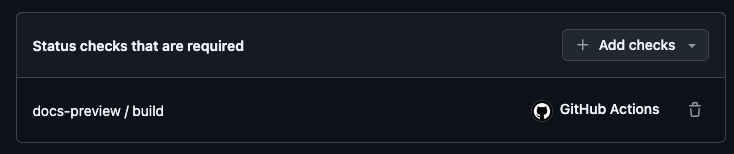
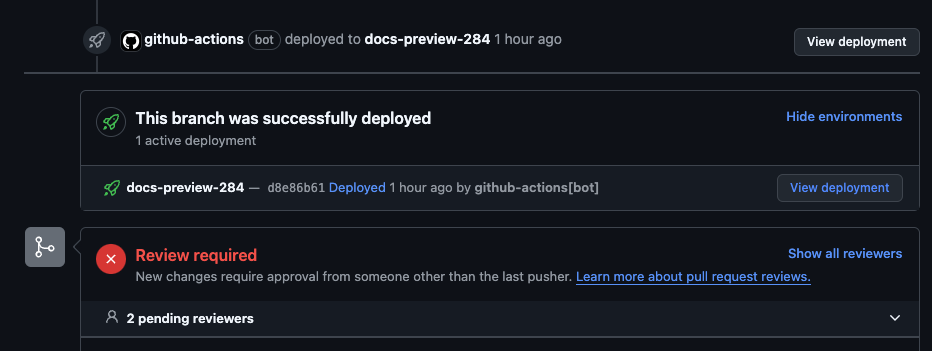
After docs-build succeeds, docs-deploy runs and can create or update a deployment in the GitHub UI for the PR.
If you previously required docs-preview / build or preview-build, update branch protection to require docs-build / docs-build / build instead.