Controlling access at the document and field level
Serverless Stack
You can control access to data within a data stream or index by adding field and document level security permissions to a role.
Field level security restricts the fields that users have read access to. In particular, it restricts which fields can be accessed from document-based read APIs.
Document level security restricts the documents that users have read access to. In particular, it restricts which documents can be accessed from document-based read APIs.
Document and field level security is currently meant to operate with read-only privileged accounts. Users with document and field level security enabled for a data stream or index should not perform write operations.
A role can define both field and document level permissions on a per-index basis. A role that doesn’t specify field-level permissions grants access to ALL fields. Similarly, a role that doesn’t specify document level permissions grants access to ALL documents in the index.
On this page, you'll learn how to implement document level security and field level security.
You'll also learn the following:
- How multiple roles with document and field level security interact.
- Considerations for using document and field level security when searching across clusters using cross-cluster API keys.
You can use an API to manage roles:
- In an Elastic Stack deployment, use the security API.
- In Elastic Cloud Serverless, use the security API.
The examples on this page include API requests and equivalent Kibana steps where applicable.
In Elastic Cloud Serverless, you can manage document and field level security using the Elastic Cloud console or the API. Learn more about Serverless custom roles.
In Elastic Cloud on Kubernetes and self-managed deployments, you can also manage custom roles using local files. Although this option is not described on this page, document-level security is still managed using queries, and you can use the queries on this page as a guideline.
You can use a query to specify the documents that each role can access. The document query is associated with a particular data stream, index, or wildcard (*) pattern and operates in conjunction with the privileges specified for the data streams and indices.
The specified document query:
- Expects the same format as if it was defined in the search request
- Supports templating a role query that can access the details of the currently authenticated user
- Accepts queries written as either string values or nested JSON
- Supports the majority of the Elasticsearch Query DSL, with some limitations for field and document level security
Omitting the query parameter entirely disables document level security for the respective indices permission entry.
The following role definition grants read access only to documents that belong to the click category within all the events-* data streams and indices:
				POST /_security/role/click_role
					{
  "indices": [
    {
      "names": [ "events-*" ],
      "privileges": [ "read" ],
      "query": "{\"match\": {\"category\": \"click\"}}"
    }
  ]
}
You can write this same query using nested JSON syntax:
				POST _security/role/click_role
					{
  "indices": [
    {
      "names": [ "events-*" ],
      "privileges": [ "read" ],
      "query": {
        "match": {
          "category": "click"
        }
      }
    }
  ]
}
The following role grants read access only to the documents whose department_id equals 12:
				POST /_security/role/dept_role
					{
  "indices": [
    {
      "names": [ "*" ],
      "privileges": [ "read" ],
      "query": {
        "term": { "department_id": 12 }
      }
    }
  ]
}
To configure document-level security (DLS), you create a custom role where you define the documents that this role grants access to, using the QueryDSL syntax:
In Kibana, go to the Custom Roles page using the navigation menu or the global search field.
Select Create role.
Give your custom role a meaningful name and description.
In the Index privileges area, specify the data stream pattern and the privilege you want to grant. For example, enter
events-*andread.Enable the Grant read privileges to specific documents toggle and add your query using the QueryDSL syntax.
For example, to allow read access only to documents that belong to the click category within all the
events-*data streams, enter the following query:{ "match": { "category": “click” } }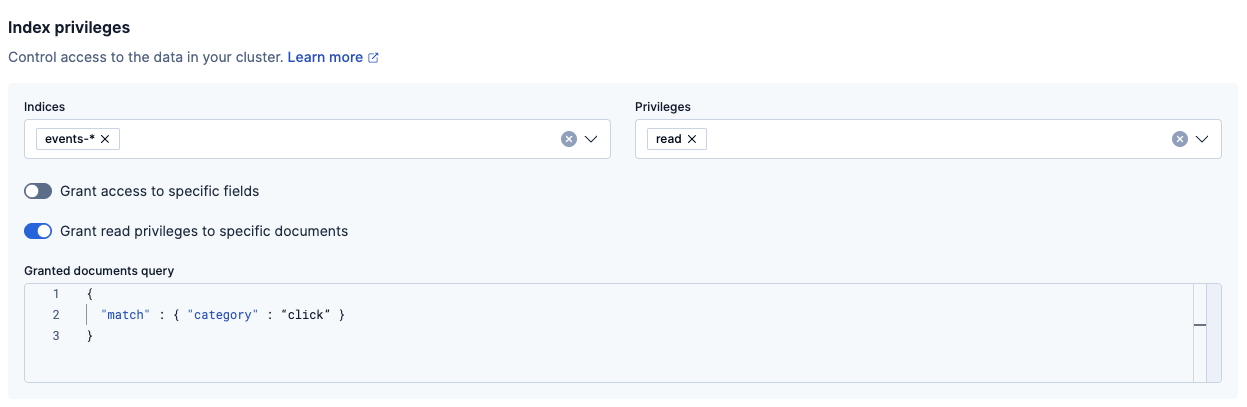
To allow read access only to the documents whose
department_idequals 12, enter the following query:{ "term": { "department_id": 12 } }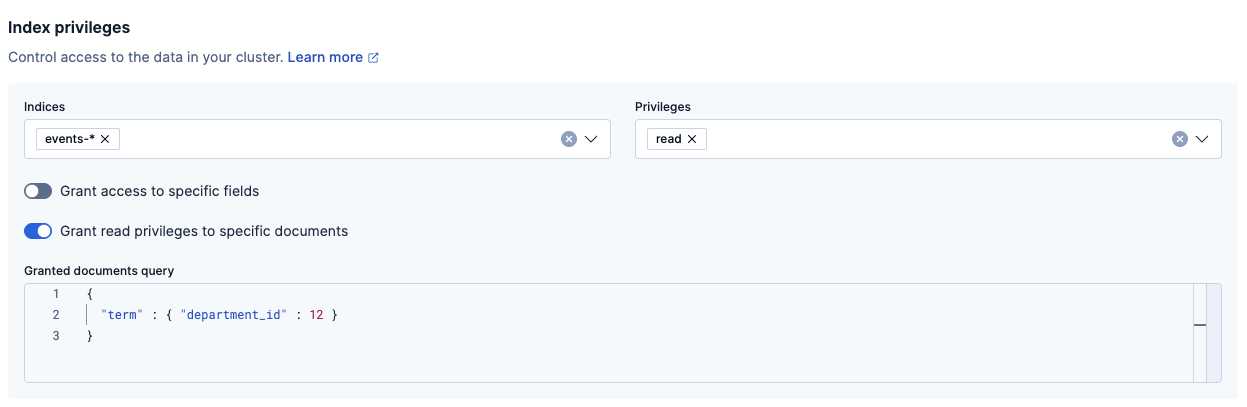
Optional: To grant this role access to Kibana spaces for feature access and visibility, click Assign to this space. Specify the level of access required and click Assign role.
Select Create role to save your custom role.
When you create a role, you can specify a query that defines the document level security permissions. You can optionally use Mustache templates in the role query to insert the username of the current authenticated user into the role. Like other places in Elasticsearch that support templating or scripting, you can specify inline, stored, or file-based templates and define custom parameters. You access the details for the current authenticated user through the _user parameter.
For example, the following role query uses a template to insert the username of the current authenticated user.
				POST /_security/role/example1
					{
  "indices" : [
    {
      "names": [ "my-index-000001" ],
      "privileges": [ "read" ],
      "query": {
        "template": {
          "source": {
            "term": { "acl.username": "{{_user.username}}" }
          }
        }
      }
    }
  ]
}
When creating a new role or editing an existing role in Kibana, enable the Grant read privileges to specific documents toggle.
To use a template to insert the username of the current authenticated user, add the following query in the Granted documents query field:
{
  "template": {
    "source": {
      "term": { "acl.username": "{{_user.username}}" }
    }
  }
}
You can access the following information through the _user variable:
| Property | Description |
|---|---|
_user.username |
The username of the current authenticated user. |
_user.full_name |
If specified, the full name of the current authenticated user. |
_user.email |
If specified, the email of the current authenticated user. |
_user.roles |
If associated, a list of the role names of the current authenticated user. |
_user.metadata |
If specified, a hash holding custom metadata of the current authenticated user. |
You can also access custom user metadata. For example, if you maintain a group_id in your user metadata, you can apply document level security based on the group.id field in your documents:
				POST /_security/role/example2
					{
  "indices": [
    {
      "names": [ "my-index-000001" ],
      "privileges": [ "read" ],
      "query": {
        "template": {
          "source": {
            "term": { "group.id": "{{_user.metadata.group_id}}" }
          }
        }
      }
    }
  ]
}
Add the following query in the Granted documents query field:
{
  "template": {
    "source": {
      "term": { "group.id": "{{_user.metadata.group_id}}" }
    }
  }
}
If your metadata field contains an object or array, you can access it using the {{#toJson}}parameter{{/toJson}} function.
				POST /_security/role/example3
					{
  "indices": [
    {
      "names": [ "my-index-000001" ],
      "privileges": [ "read" ],
      "query": {
        "template": {
          "source": "{ \"terms\": { \"group.statuses\": {{#toJson}}_user.metadata.statuses{{/toJson}} }}"
        }
      }
    }
  ]
}
Add the following query in the Granted documents query field:
{
  "template": {
    "source": {
      "terms": { "group.statuses": {{#toJson}}_user.metadata.statuses{{/toJson}} }
    }
  }
}
To guarantee that a user reads only their own documents, it makes sense to set up document level security. In this scenario, each document must have the username or role name associated with it, so that this information can be used by the role query for document level security. This is a situation where the set security user processor ingest processor can help.
Document level security doesn’t apply to write APIs. You must use unique ids for each user that uses the same data stream or index, otherwise they might overwrite other users' documents. The ingest processor just adds properties for the current authenticated user to the documents that are being indexed.
The set security user processor attaches user-related details (such as username, roles, email, full_name and metadata ) from the current authenticated user to the current document by pre-processing the ingest. When you index data with an ingest pipeline, user details are automatically attached to the document. If the authenticating credential is an API key, the API key id, name and metadata (if it exists and is non-empty) are also attached to the document.
For more information, see Ingest pipelines and Set security user.
To enable field level security, specify the fields that each role can access as part of the indices permissions in a role definition. Field level security is thus bound to a well-defined set of data streams or indices (and potentially a set of documents).
The following role definition grants read access only to the category, @timestamp, and message fields in all the events-* data streams and indices.
				POST /_security/role/test_role1
					{
  "indices": [
    {
      "names": [ "events-*" ],
      "privileges": [ "read" ],
      "field_security": {
        "grant": [ "category", "@timestamp", "message" ]
      }
    }
  ]
}
To configure field-level security (FLS), you create a custom role where you define the specific fields that this role grants or denies access to:
In Kibana, go to the Custom Roles page using the navigation menu or the global search field.
Select Create role.
Give your custom role a meaningful name and description.
In the Index privileges area, specify the data stream pattern and the privilege you want to grant. For example, enter
events-*andread.Enable the Grant access to specific fields toggle.
To grant access to specific fields within each document in all the
events-*data streams, add the fields to the Granted fields list. For example, you can addcategory,@timestamp, andmessageas individual fields, or you can specify a field expression such asevent_*that grants read access to all the fields that start with anevent_prefix.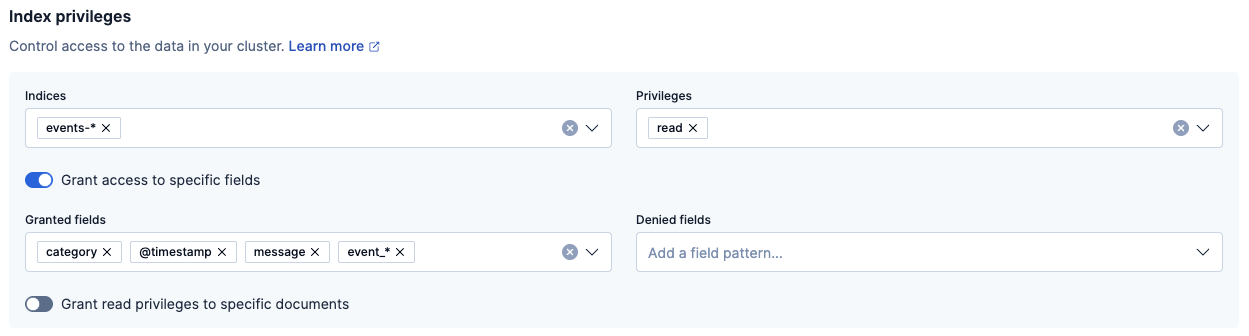
To deny access to specific fields within each document, add the fields to the Denied fields list. For example, you can add the
customer.handlefield.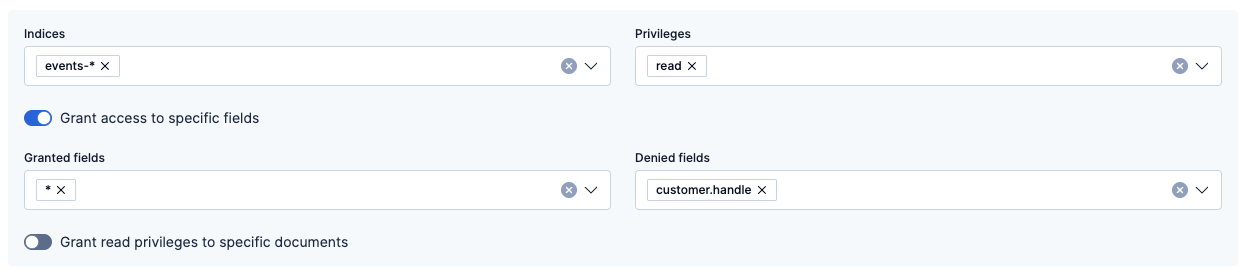
Optional: To grant this role access to Kibana spaces for feature access and visibility, click Assign to this space. Specify the level of access required and click Assign role.
Select Create role to save your custom role.
Access to the following metadata fields is always allowed: _id, _type, _parent, _routing, _timestamp, _ttl, _size and _index. If you specify an empty list of fields, only these metadata fields are accessible.
Omitting the fields entry entirely disables field level security.
You can also specify field expressions. For example, the following example grants read access to all fields that start with an event_ prefix:
				POST /_security/role/test_role2
					{
  "indices" : [
    {
      "names": [ "*" ],
      "privileges": [ "read" ],
      "field_security": {
        "grant": [ "event_*" ]
      }
    }
  ]
}
Specify the event_* field expression in the Granted fields list.
Use the dot notations to refer to nested fields in more complex documents. For example, assuming the following document:
{
  "customer": {
    "handle": "Jim",
    "email": "jim@mycompany.com",
    "phone": "555-555-5555"
  }
}
The following role definition enables read access only to the customer.handle field:
				POST /_security/role/test_role3
					{
  "indices": [
    {
      "names": [ "*" ],
      "privileges": [ "read" ],
      "field_security": {
        "grant": [ "customer.handle" ]
      }
    }
  ]
}
Specify the customer.handle field in the Granted fields list.
You can also use wildcards. For example, use customer.* to enable read access to the customer data:
				POST /_security/role/test_role4
					{
  "indices": [
    {
      "names": [ "*" ],
      "privileges": [ "read" ],
      "field_security": {
        "grant": [ "customer.*" ]
      }
    }
  ]
}
Specify the customer.* field in the Granted fields list.
You can deny permission to access the customer.handle field, while allowing access to all other fields (*) with the following syntax:
				POST /_security/role/test_role5
					{
  "indices": [
    {
      "names": [ "*" ],
      "privileges": [ "read" ],
      "field_security": {
        "grant": [ "*"],
        "except": [ "customer.handle" ]
      }
    }
  ]
}
Specify the * wildcard in the Granted fields list and customer.handle in the Denied fields list.
The following rules apply:
- The absence of
field_securityin a role is equivalent to*access. - If permission has been granted explicitly to some fields, you can specify denied fields. The denied fields must be a subset of the fields to which permissions were granted.
- Defining denied and granted fields implies access to all granted fields except those which match the pattern in the denied fields.
For more granular access, you can allow access to all customer.* fields (which is a subset of * all possible fields) except customer.handle:
				POST /_security/role/test_role6
					{
  "indices": [
    {
      "names": [ "*" ],
      "privileges": [ "read" ],
      "field_security": {
        "except": [ "customer.handle" ],
        "grant": [ "customer.*" ]
      }
    }
  ]
}
In this example, users can read all fields with the customer. prefix, except for the customer.handle field.
Specify the customer.* field in the Granted fields list and customer.handle in the Denied fields list.
In this example, users can read all fields with the customer. prefix, except for the customer.handle field.
When you specify an empty array for grant (for example, "grant" : []) in your API request, no access is granted to any fields.
When a user has several roles that specify field level permissions, the resulting field level permissions per data stream or index are the union of the individual role permissions. For example, if these two roles are merged:
				POST /_security/role/test_role7
					{
  "indices": [
    {
      "names": [ "*" ],
      "privileges": [ "read" ],
      "field_security": {
        "grant": [ "a.*" ],
        "except": [ "a.b*" ]
      }
    }
  ]
}
				POST /_security/role/test_role8
					{
  "indices": [
    {
      "names": [ "*" ],
      "privileges": [ "read" ],
      "field_security": {
        "grant": [ "a.b*" ],
        "except": [ "a.b.c*" ]
      }
    }
  ]
}
- For the
test_role7role, specify thea.*field in the Granted fields list anda.b*in the Denied fields list. - For the
test_role8role, specify thea.b*field in the Granted fields list anda.b.c*in the Denied fields list.
The resulting permission amounts to granted access to all a.* fields except the a.b.c* fields.
{
  // role 1 + role 2
  ...
  "indices": [
    {
      "names": [ "*" ],
      "privileges": [ "read" ],
      "field_security": {
        "grant": [ "a.*" ],
        "except": [ "a.b.c*" ]
      }
    }
  ]
}
Field-level security should not be set on alias fields. To secure a concrete field, its field name must be used directly.
A user can have many roles and each role can define different permissions on the same data stream or index. When assigning users multiple roles, be careful that you don’t inadvertently grant wider access than intended.
Document level security takes into account each role held by the user and combines each document level security query for a given data stream or index with an "OR". This means that only one of the role queries must match for a document to be returned. For example, if a role grants access to an index without document level security and another grants access with document level security, document level security is not applied; the user with both roles has access to all of the documents in the index.
Field level security takes into account each role the user has and combines all of the fields listed into a single set for each data stream or index. For example, if a role grants access to an index without field level security and another grants access with field level security, field level security is not applied for that index; the user with both roles has access to all of the fields in the index.
For example, let’s say role_a grants access to only the address field of the documents in index1; it doesn’t specify any document restrictions. Conversely, role_b limits access to a subset of the documents in index1; it doesn’t specify any field restrictions. If you assign a user both roles, role_a gives the user access to all documents and role_b gives the user access to all fields.
If you need to restrict access to both documents and fields, consider splitting documents by index instead.
Serverless
Cross-cluster API keys can be used to authenticate requests to a remote cluster. The search parameter defines permissions for cross-cluster search. The replication parameter defines permissions for cross-cluster replication.
replication does not support any field or document level security. search supports field and document level security.
For reasons similar to those described in Multiple roles with document and field level security, you can’t create a single cross-cluster API key with both the search and replication parameters if the search parameter has document or field level security defined.
If you need to use both of these parameters, and you need to define document or field level security for the search parameter, create two separate cross-cluster API keys, one using the search parameter, and one using the replication parameter. You will also need to set up two different remote connections to the same cluster, with each named connection using the appropriate cross-cluster API key.
Field and document security is subject to the following limitations:
When a user’s role enables document level security for a data stream or index:
Document level security doesn’t affect global index statistics that relevancy scoring uses. This means that scores are computed without taking the role query into account. Documents that don’t match the role query are never returned.
The
has_childandhas_parentqueries aren’t supported as query parameters in the role definition. Thehas_childandhas_parentqueries can be used in the search API with document level security enabled.Date math expressions cannot contain
nowin range queries with date fields.Any query that makes remote calls to fetch query data isn’t supported, including the following queries:
termsquery with terms lookupgeo_shapequery with indexed shapespercolatequery
If suggesters are specified and document level security is enabled, the specified suggesters are ignored.
A search request cannot be profiled if document level security is enabled.
The terms enum API does not return terms if document level security is enabled.
The
multi_matchquery does not support specifying fields using wildcards.
While document-level security prevents users from viewing restricted documents, it’s still possible to write search requests that return aggregate information about the entire index. A user whose access is restricted to specific documents in an index could still learn about field names and terms that only exist in inaccessible documents, and count how many inaccessible documents contain a given term.
When a user’s role enables document or field level security for a data stream or index:
The user cannot perform write operations:
- The update API isn’t supported.
- Update requests included in bulk requests aren’t supported.
The user cannot perform operations that effectively make contents accessible under another name, including actions from the following APIs:
The request cache is disabled for search requests if either of the following are true:
- The role query that defines document level security is templated using a stored script.
- The target indices are a mix of local and remote indices.