Elastic Docs Utilities
The Elastic Docs Utilities extension for Visual Studio Code and compatible IDEs provides autocompletion for Elastic Docs' Markdown, along with other features for authoring Elastic documentation.
To install the extension:
- Open the Visual Studio Marketplace or the Extensions view in your editor.
- Search for
Elastic Docs Utilities. - Select Install to add the extension to your editor.
The extension is also available for editors that support the Open VSX Registry, like Cursor.
You can use the extension in the following ways:
- Working locally in the Visual Studio Code desktop application.
- Working in the browser in Visual Studio Code web editors.
Elastic Docs Utilities provides the following features for authoring Elastic documentation.
The extension adds syntax highlighting for directives, parameters, roles, substitution variables, and mutation operators that works alongside standard Markdown highlighting.
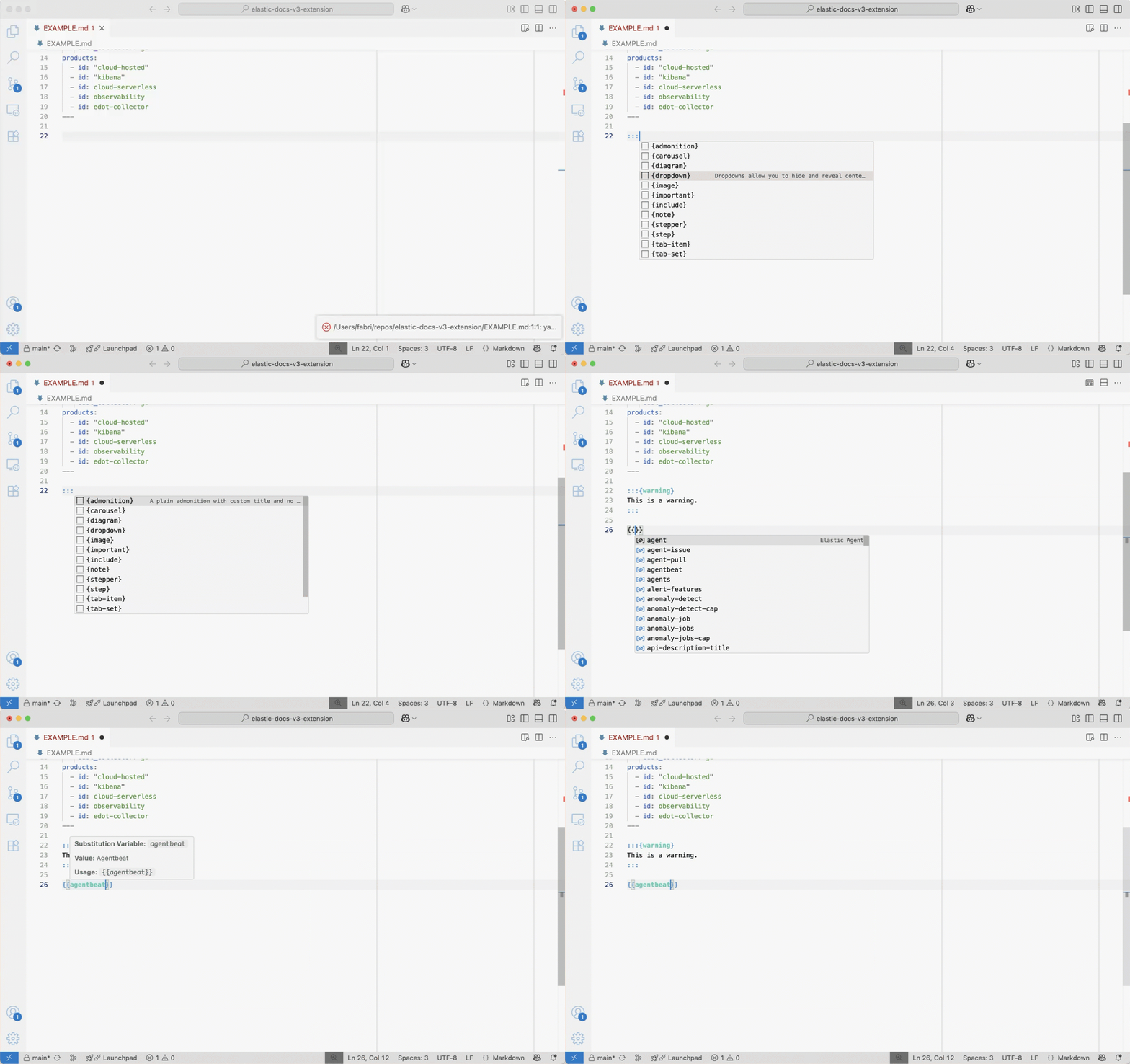
The extension autocompletes standard and inline directives as you type. When you add frontmatter to your documents, it suggests valid field names and values.
The extension also provides autocompletion for inline roles like {icon}, {kbd}, {applies_to}, and {subs}. Type {{ to see substitution variables from your docset.yml files and document frontmatter, and type | after any variable to view available mutation operators for text and version transformations.
The extension validates your frontmatter fields against the schema and provides real-time syntax validation for directives, showing red underlines and hover cards when it detects errors. It also warns you when you're using literal values that should be replaced with substitution variables, helping maintain consistency across your documentation.
When the extension activates, it checks whether docs-builder is installed and up to date. If docs-builder is not installed, a warning popup links to the installation documentation. If an update is available, the extension offers to install the latest version directly from the integrated terminal.
You can also check for updates manually by running Elastic Docs: Check for docs-builder Updates from the command palette.
The extension checks whether the locally installed Elastic Vale style guide is up to date by comparing it against the latest release on GitHub. If a later version is available, a notification offers to update the rules automatically by running the appropriate install script for your operating system.
You can also check for updates manually by running Elastic Docs: Check for Vale Style Guide Updates from the command palette. Refer to the Vale style checker page for more information about the style rules and how to install Vale locally.
Hover over existing {{variable}} references to see their full values and mutation transformations. When variables use mutation operators, you can view step-by-step transformation results in the preview.
The extension supports autocompletion for substitution variables defined in docset.yml files and document frontmatter (sub: field). These variables can be used throughout your Markdown files with the {{variable}} syntax.
The extension automatically detects when you're using literal values that can be replaced with substitution variables. For example, the extension shows a warning when you type "APM" directly in your content, suggesting you use {{product.apm}} instead.
When the extension detects a literal value that should be replaced, you can:
- Click the lightbulb icon that appears.
- Use the Quick Fix menu (Ctrl+. or Cmd+. on macOS)
- Hover over the warning and click Quick Fix.
The extension automatically replaces the literal text with the correct substitution variable syntax. This helps maintain consistency across your documentation and makes it easier to update product names and other values globally.
The Elastic Docs Utilities extension is open source. You can report issues, submit pull requests, and collaborate on the elastic-docs-vscode GitHub repository.