GenAI Search - High Availability
This reference architecture illustrates a production-grade, highly available GenAI search solution built on Elasticsearch. It shows the physical deployment model, logical integration points, and key best practices for implementing a retrieval layer that grounds generative AI responses.
Elasticsearch can combine lexical search, dense vector search, sparse vector search, temporal and geospatial filtering, and hybrid ranking techniques. These capabilities form the foundation for Retrieval Augmented Generation (RAG), agentic workflows, and AI-assisted applications.
The GenAI search – high availability architecture is intended for organizations that:
- Require high-performance, low-latency information retrieval across large and diverse datasets, supporting natural language processing workloads and returning highly relevant results at scale.
- Need lexical, vector, semantic, temporal, or hybrid search.
- Need multimodal retrieval, including text, code, images, video, and geospatial data.
- Employ generative AI applications such as assistants, agents, and agentic workflows using Retrieval Augmented Generation (RAG) and/or the Model Context Protocol (MCP), where grounding generative models in the most relevant documents is essential.
- Integrate with foundation models (such as Azure OpenAI, Anthropic, and Amazon Bedrock) and apply re-ranking techniques to optimize relevance.
- Depend on advanced search features such as faceting, filtering, highlighting, personalization, and metadata-aware retrieval.
- Operate in secure or multi-tenant environments where document and field level security and tenant-aware index design ensure compliance without sacrificing performance.
- Use Elasticsearch as a short- and long-term memory system for LLM agents, enabling session recall, personalization, and optimized token usage through techniques like time-decayed scoring or
constant_keywordpartitioning. - Power observability copilots and SOC assistants that summarize alerts, logs, and metrics in plain language, correlate across incidents, and accelerate root cause analysis with semantically grounded responses.
- Integrate with common large language model (LLM) development frameworks, including LlamaIndex, LangChain, and LangSmith.
Elasticsearch supports multiple vector search execution models and optimizations, allowing this architecture to balance recall, latency, and cost based on workload requirements.
- Better Binary Quantization (BBQ) is Elastic’s quantization technology that dramatically reduces vector memory footprint while preserving high recall, enabling large-scale in-memory vector search at lower cost.
- DiskBBQ extends BBQ by efficiently paging vector data from disk, providing predictable performance even when the full vector working set does not fit in memory and enabling cost-efficient scaling for very large datasets.
- HNSW is used where maximum recall and lowest tail latency are required and sufficient memory is available to keep vector indexes resident in RAM.
- ACORN further optimizes filtered vector search by reducing unnecessary graph traversals, making it especially effective for high-selectivity queries common in security, observability, and multi-tenant environments.
Together, these approaches allow the architecture to be tuned precisely for different latency, recall, update, and cost constraints without changing the overall system design.
The following architecture describes a multi-availability-zone deployment designed for continuous availability, fault tolerance, and predictable performance under sustained query and ingestion load. It applies to both time-series and non-time-series use cases and supports a broad set of GenAI patterns including assistants, autonomous agents, observability copilots for SREs, and SOC analysis platforms.
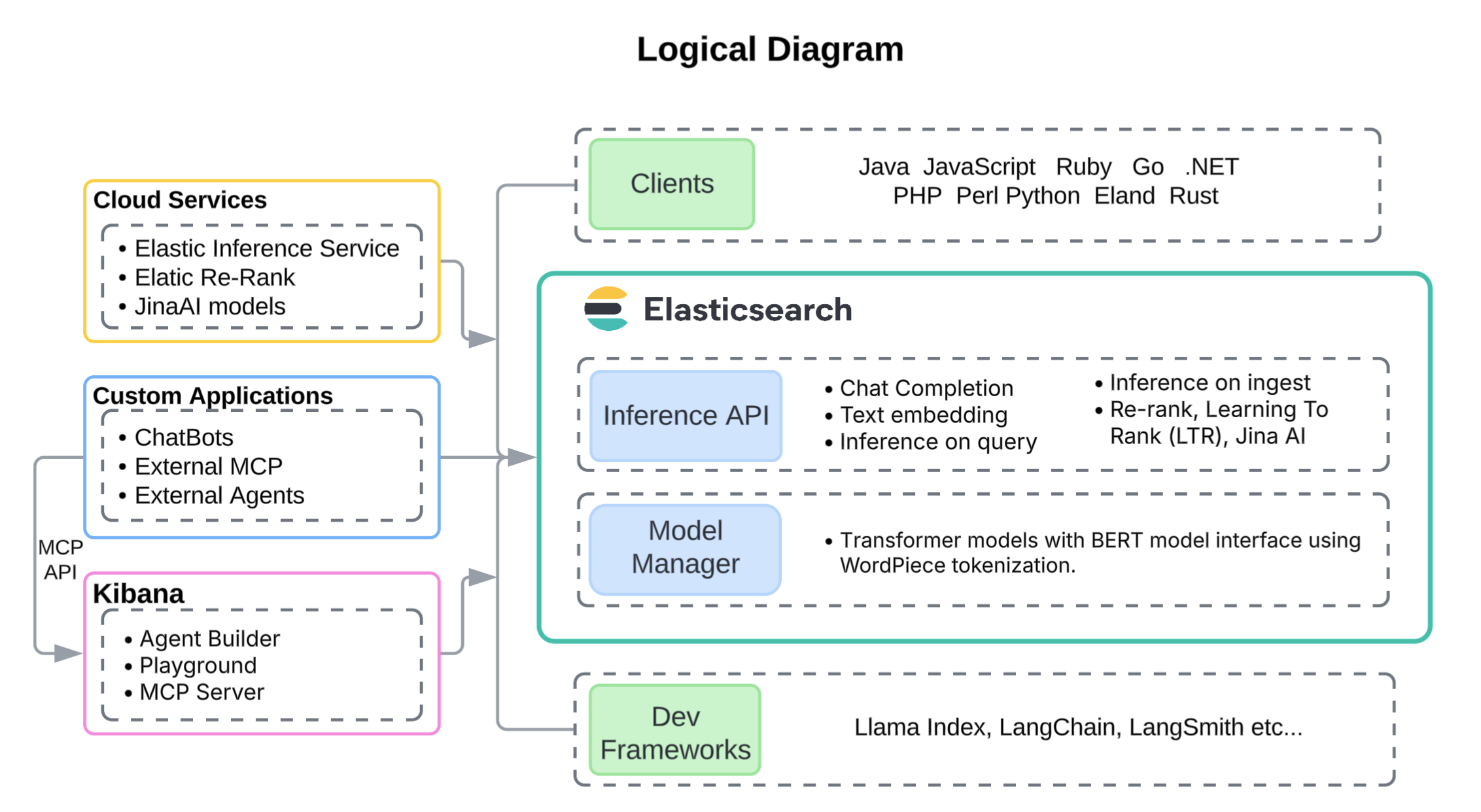
This architecture employs a single uniform hot/content data tier, as most search and generative AI workloads require very low latency across the full corpus, regardless of data age. However, disk-based vector storage methods such as DiskBBQ (Elastic’s advanced evolution of IVF) offer a memory-efficient alternative to HNSW that can support larger datasets, such as IoT telemetry and financial transaction logs, on lower-cost tiers.
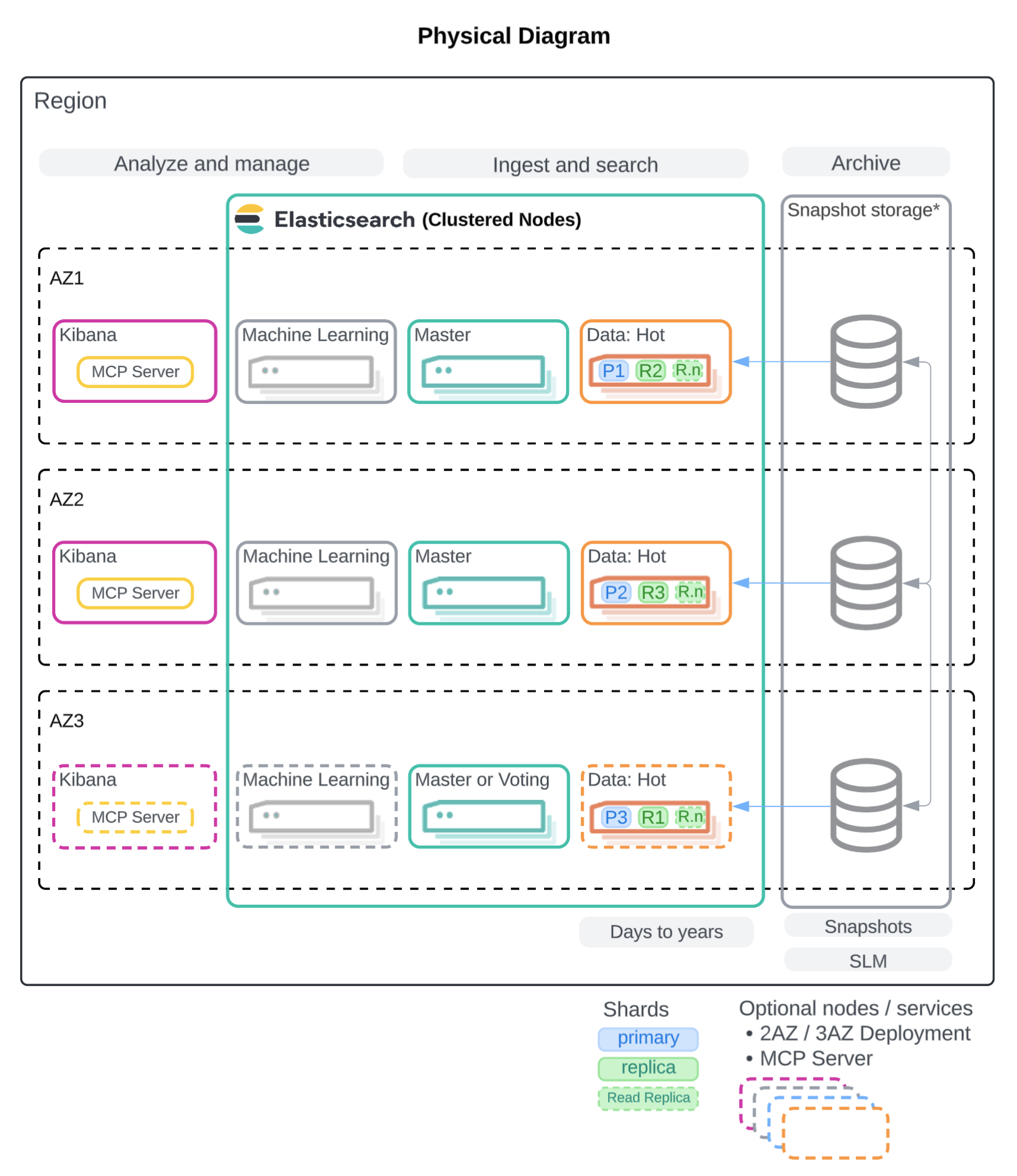
The physical deployment architecture for GenAI applications is built around a resilient Elasticsearch cluster deployed across three availability zones (AZ). For production-grade deployments, two AZs are the minimum, with three AZs strongly recommended to maximize high availability and fault tolerance. In Elastic Cloud, shards are automatically distributed across zones, ensuring that primaries and replicas never reside in the same AZ.
In self-managed deployments, shard allocation awareness and forced awareness should be configured to achieve the same resiliency. Kibana instances are deployed in each AZ to not become a single point of failure. And, in some use cases, it should be fronted by a load balancer. For example, Elastic MCP server is a foundational component of Agent Builder. It enables agentic workflows through API using natural language to query Elasticsearch. As a result, high volume programmatic access is likely required and should be balanced across multiple nodes.
All data nodes host both primary and replica shards, with replicas contributing both to redundancy and to query throughput. High-performance SSD-backed storage is recommended, along with memory-rich nodes to support vector indexes, hybrid lexical and vector search, and high concurrent load. Machine learning nodes are also distributed across zones to support optional embedding generation using self-hosted models such as Elastic’s Jina text embedding models.
In addition, the Elastic Inference Service (EIS) is provided as part of Elastic Cloud, which uses GPUs for high speed vector embedding generation. Finally, snapshots are stored externally for disaster recovery, with Snapshot Lifecycle Management (SLM) handling automation.
The following specifications are recommended for clusters that are self-deployed on-prem or self-deployed in a cloud provider. With Elastic Cloud Hosted, you can deploy clusters in AWS, Azure, or Google Cloud. Available hardware types and configurations vary across providers, but each offers instance families that meet the performance needs of search and generative AI applications. For details, refer to our documentation on Elastic Cloud Hosted hardware for AWS, Azure, and GCP.
In the following table, the "Physical" column provides approximate per-node guidance when self-deploying Elasticsearch in your own data center, based on equivalent CPU, RAM, and storage profiles.
Elastic has performance-tested hardware profiles across the major cloud providers to identify the optimal balance for each node type. Significantly deviating from these tested ratios may appear to reduce costs, but typically leads to degraded performance, query latency spikes, or search scalability.
Dedicated ML nodes are needed when inference is performed within the cluster, such as running ELSER, [Elastic Jina AI Models] (explore-analyze/machine-learning/nlp/ml-nlp-jina.md), or custom transformer models locally. These nodes should be provisioned with sufficient memory to load models into RAM. When inference is offloaded to an LLM or embedding model external to the cluster (for example, Elastic Inference Service, Azure OpenAI, Anthropic, or Bedrock), dedicated ML nodes are not required.
For GenAI search workloads in Elastic Cloud Hosted, use Vector Search Optimized profiles as the primary reference, and consider CPU Optimized profiles for workloads with higher CPU and disk requirements.
| Type | AWS | Azure | GCP | Physical |
|---|---|---|---|---|
| hot/content | r6gd, c8gd |
lsv3, fsv2 |
N2d, N2 |
16-32 vCPU, 64-256 GB RAM, 0.5-6 TB NVMe SSD |
| ml | m5dn |
fsv2 |
N2 |
16-32 vCPU, 64+ GB RAM, 256 GB+ SSD |
| master | c8gd |
fsv2 |
N2 |
4 vCPU, 16 GB RAM, 256 GB SSD |
| kibana | c8gd |
fsv2 |
N2 |
8-16 vCPU, 8-16 GB RAM, 256 GB SSD |
These recommendations provide a practical baseline, but available instance families evolve over time as newer provider hardware becomes available. For additional guidance on selecting Elastic Cloud hardware profiles for specific workloads, refer to:
- Selecting the right configuration for you on AWS
- Selecting the right configuration for you on Azure
- Selecting the right configuration for you on GCP
For the full list of currently available instance configurations, refer to:
Approximate nearest-neighbor (ANN) algorithms are dominated by latency-bound memory access patterns, meaning performance is typically limited by data in memory rather than raw vector computation. As a result, all vector distance computations occur in off-heap RAM and CPU. To make large-scale in-memory vector search feasible, Elasticsearch supports many quantization techniques for up to a 32x reduction in vector footprint in RAM, and defaults to HNSW with Better Binary Quantization (BBQ). BBQ is Elastic’s memory-efficient approach for maximizing recall with a low vector memory footprint.
To increase off-heap memory available for vector search, you have the following options:
- Increase RAM per node to expand the off-heap working set.
- Slightly reduce the JVM heap size per node to free additional off-heap memory. If you choose this approach, benchmark (for example with Elastic Rally) to confirm the smaller heap remains sufficient under peak workload.
When vector quantization is enabled, Elasticsearch stores both the original float32 vectors and their quantized representations on disk. Retaining the float32 vectors preserves flexibility for re-ranking, re-indexing, and future model changes. Only the quantized vectors are loaded into memory for search.
- Use HNSW when you are optimizing for 99%+ recall and absolute lowest tail latency, and you can afford the RAM/off-heap footprint (and you’re not constantly updating the index).
- Use DiskBBQ when you’re cost/memory sensitive, your recall target is more like around 95% and you want performance that doesn’t drop when the working set no longer fits RAM.
- Use BBQ flat (BBQ without HNSW) when filters reduce comparisons to < ~100k vectors; typically lowest operational complexity.
- To learn about sizing formulas refer to Ensure data nodes have enough memory. Use the formulas to calculate the disk needs.
- For HNSW, the amount of RAM configured must match the amount required by the vector index storage.
- For DiskBBQ, you can provision as little as 5% of disk storage as RAM, as DiskBBQ swaps to disk effectively. However, query performance improves significantly when more RAM is provisioned for vector search, especially for large volumes of data.
- If you'll be generating embeddings on Elastic ML nodes, capacity can be autoscaled using Elastic Cloud Hosted (ECH) or Elastic Cloud on Kubernetes on-prem.
- Elastic provides world class vector models from Jina AI that can be used for NLP embeddings, and a re-ranker that can be either self-hosted on ML nodes or used through Elastic Inference Service.
- Embeddings can also be generated with Elastic’s inference API from many external model providers, or from internally or externally hosted foundation models.
- Recall: General guidance is to start with defaults → measure → increase num_candidates (oversample) → optionally add a re-ranker.
- Runtime: Refer to Tune approximate kNN search to understand all the vector search performance optimizations to ensure high speed search.
Updating dense or sparse vector data can be more resource-intensive than updating keyword-based fields, since embeddings often need to be regenerated. For applications with frequent document updates, plan for additional indexing throughput and consider whether embeddings should be pre-computed, updated asynchronously, or generated on demand.
- Over-fetch on both retrieval paths. Increase size, use RRF with a larger
rank_window_size, and raisenum_candidateson kNN so ANN does not miss critical neighbors. Then trim results to find the best recall vs. latency balance. - Keep
minimum_should_matchloose, and rely on proper analyzers and multi-fields (text, .keyword, shingles/ngrams). Hybrid search cannot recover documents BM25 never retrieves. - The easiest framework for executing hybrid search on Elastic is retrievers or ES|QL FORK and FUSE.
Three availability zones is ideal, but at least two availability zones are recommended to ensure resiliency. This helps guarantee that there will be data nodes available in the event of an AZ failure. Elastic Cloud automatically distributes replicas across zones, while self-managed clusters should use shard allocation awareness to achieve the same.
Proper shard management is foundational to maintaining performance at scale. This includes ensuring an even distribution of shards across nodes, choosing an appropriate shard size, and managing shard counts as the cluster grows. For detailed guidance, refer to Size your shards.
- Recommendations for time series data can be found in the Hot/Frozen architecture.
- Size shards intentionally: estimate total index size and choose primaries that land in the ~10–50 GB, <200M docs range. This is the natural shard count for a catalog; don’t add shards unless search metrics demand it.
- Plan scale at creation: catalogs don’t roll over, so set shard math up front. If growth is possible, configure routing shards so the index can be split later by clean multiples (read-only + extra IO/disk required).
- Scale with replicas, not primaries: increase replicas first to improve search throughput and availability. Replicas increase concurrency by spreading queries across shard copies; fan-out is still driven by primary shard count.
Regular backups are essential when indexing business-critical or auditable data. Snapshots provide recoverability in case of data corruption or accidental deletion. For production workloads, configure automated snapshots through Snapshot Lifecycle Management (SLM) and integrate them with Index Lifecycle Management (ILM) policies.
- If deploying outside of Elastic Cloud, ensure Kibana is configured for high availability to avoid a single point of failure. Deploying Kibana across multiple availability zones also improves resiliency for management and user access.
- Ensure monitoring data is collected from Kibana nodes if the MCP server is used. This allows for proper capacity planning if usage is extensive.
- For self-deployed clusters, use a proxy in front of multiple Kibana nodes to avoid a single point of failure. Elastic Cloud Hosted provides a single connection endpoint that is backed by a highly available proxy layer.
This architecture uses a single, uniform hot/content data tier, which is recommended for most search and generative AI workloads. Keeping all data on a single tier simplifies operations and helps ensure consistent query latency, especially for vector and hybrid search.
Elasticsearch also supports multi-tier architectures that place data on different tiers based on access patterns and retention requirements. In some scenarios, disk-based vector storage methods such as DiskBBQ (Elastic’s advanced evolution of IVF) provide a memory-efficient alternative to HNSW. This approach can support larger datasets, such as IoT telemetry or financial transaction logs, while allowing vector data to be stored efficiently on lower-cost storage tiers.
For guidance on designing multi-tier architectures and selecting appropriate data tiers for your workload, refer to the Elasticsearch documentation on data tiers and the Hot/Frozen reference architecture. If you need help estimating capacity or choosing a configuration for your scenario, you can also contact us.