Nodes view in AutoOps
The Nodes view provides a thorough look into essential metrics for all monitored nodes. With this view, you can gain deeper insight into your cluster's health on a per-node basis and observe each metric over extended periods of time.
To get to the Nodes view, go to AutoOps in your deployment or cluster and select Nodes from the side navigation.
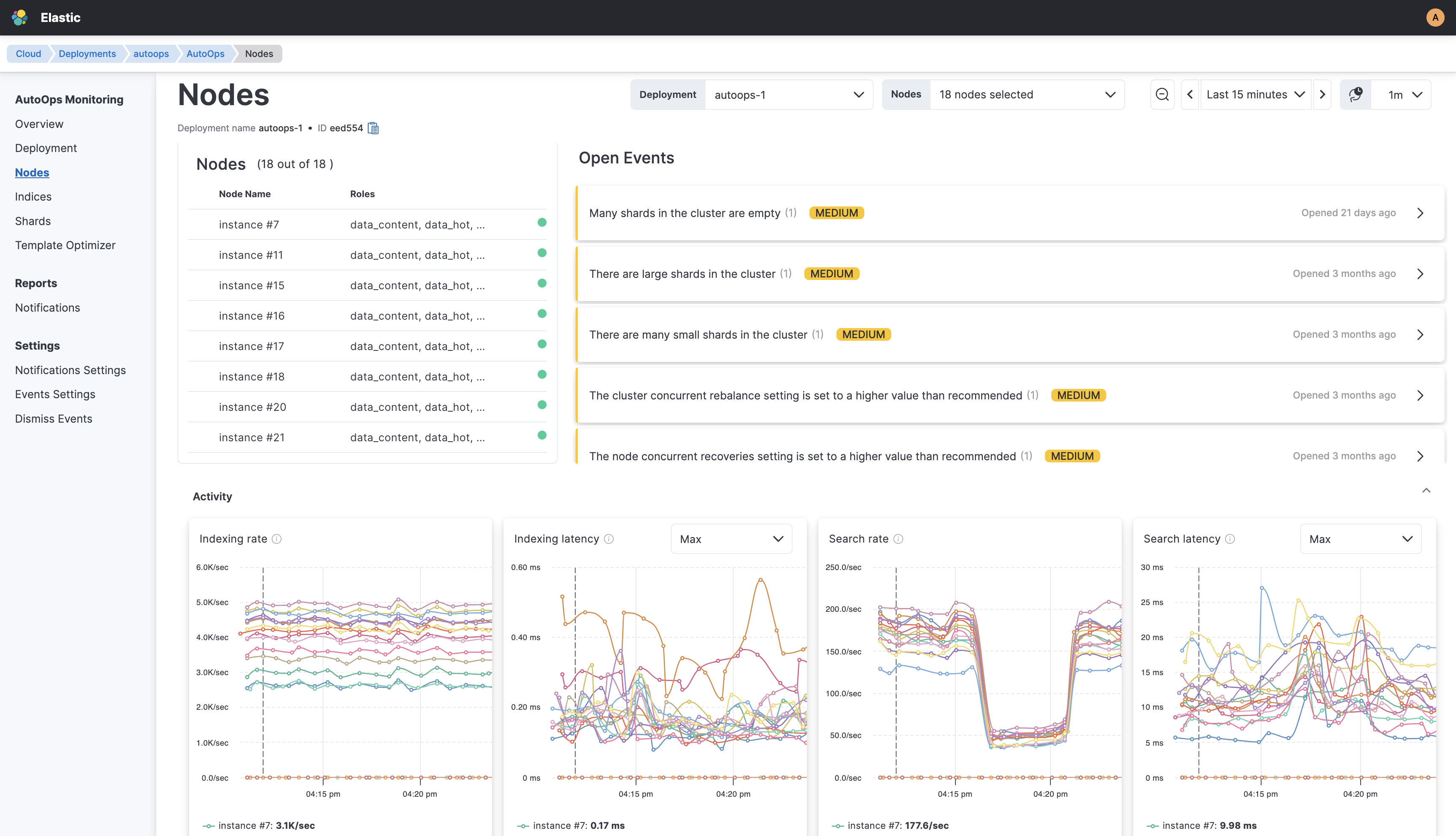
The Nodes view shows the following panels.
The Nodes table lists all the nodes used by the Elasticsearch cluster, along with their name, role, and status. The elected master node is marked with a star.
The Open Events panel lists open events sorted by severity and time. When the conditions that triggered the event no longer exist, the event is automatically set to close and appear in the Events History panel. Closing an event does not necessarily indicate that the customer resolved the issue, but rather that AutoOps no longer detects it.
The following table lists all the other panels in the Nodes view that drill down into specific monitoring areas, along with the names and descriptions of metrics they present.
| Area | Metric name | Metric description |
|---|---|---|
| Activity | Indexing rate | Number of documents being indexed per second on all primary and replica shards hosted on the node. |
| Indexing latency | Average latency for indexing documents, which is the time it takes to index documents divided by the number that were indexed in all primary and replica shards hosted on the node. | |
| Search rate | Number of search requests being executed per second on all shards hosted on the node. | |
| Search latency | Average latency for searching, which is the time it takes to execute searches divided by the number of searches submitted to the node. | |
| Host and Process | Load | Load average over the last five minutes depicting how many tasks have been waiting for CPU, or are blocked on I/O. Comparing the load value to the number of CPU cores on the node helps to understand whether the system has spare capacity (load < # cores), is saturated (load = # cores), or is overloaded (load > # cores). |
| CPU | Percentage of the CPU usage for the Elasticsearch process running on the node. | |
| Heap used in bytes | Total JVM heap memory used by the Elasticsearch process running on the node. | |
| GC | Average time spent doing GC on the node in milliseconds. | |
| Thread pools | Write | Number of single-document index/delete/update, ingest processors, and bulk operations in the queue, as well as the total number of completed and rejected operations in that pool. |
| Search | Number of search, count, and fetch operations in the queue, as well as the total number of completed and rejected operations in that pool. | |
| Management | Number of cluster management operations in the queue, as well as the total number of completed and rejected operations in that pool. | |
| Snapshot | Number of snapshot and restore operations in the queue, as well as the total number of completed and rejected operations in that pool. | |
| Data | Disk usage | Amount of used disk storage on the node. |
| Shards count | Total number of primary and replica shards allocated to the node. | |
| Segment count | Total number of segments (i.e., the Lucene low-level inverted indices composing an Elasticsearch index) hosted on the node. | |
| Documents count | Number of documents hosted on the node. | |
| HTTP | HTTP current open | Current number of HTTP connections opened on the node. |
| HTTP connections open rate | Number of HTTP connections opened per second. | |
| Circuit breakers | Parent Used | The parent circuit breaker tracks the overall heap memory that is necessary for all circuit breakers, and prevents Elasticsearch from exceeding a pre-configured threshold. |
| Field Data used | The field data circuit breaker tracks the necessary heap memory for holding field data and global ordinals (e.g., both used to perform aggregations) and prevents Elasticsearch from exceeding a pre-configured threshold. | |
| Request used | The request circuit breaker tracks the necessary heap memory for holding per-request data structures (e.g., memory used for calculating aggregations during a request) and prevents Elasticsearch from exceeding a pre-configured threshold. | |
| Parent tripped | Total number of times the parent circuit breaker has reached the pre-configured threshold and prevented an out-of-memory error. | |
| Field data tripped | Total number of times the field data breaker has reached the pre-configured threshold and prevented an out-of-memory error. | |
| Request tripped | Total number of times the request circuit breaker has reached the pre-configured threshold and prevented an out-of-memory error. | |
| Network | Network rx bytes | Size of network packets received by the node during internal cluster communication. |
| Network rx count | Total number of network packets received by the node during internal cluster communication. | |
| Network tx bytes | Size of network packets transmitted by the node during internal cluster communication. | |
| Network tx count | Total number of network packets transmitted by the node during internal cluster communication. | |
| Disk | Disk read bytes | The total number of bytes read across all storage devices used by Elasticsearch. |
| Disk read IOPS | The total number of read operations performed every second across all storage devices used by Elasticsearch. | |
| Disk write bytes | The total number of bytes written across all storage devices used by Elasticsearch. | |
| Disk write IOPS | The total number of write operations performed every second across all storage devices used by Elasticsearch. | |
| Activity-Additional | Merge rate | Number of merge operations being executed per second on all shards hosted on the node. |
| Merge latency | Average latency for merging, which is the time it takes to execute merges divided by the number of merge operations submitted to the node. | |
| Indexing failed | Number of failed indexing operations on the node. |