Region and hosting
This page lists the AWS and GCP regions where Elastic Inference Service (EIS) is available and explains how inference requests are routed.
AWS:
us-east-1(N. Virginia, US)eu-central-1(Frankfurt, Germany)eu-west-1(Ireland)
GCP:
asia-southeast1(Singapore)europe-west1(Belgium)us-east4(N. Virginia, US)us-east5(Columbus, US)
All inference requests sent through EIS are routed to the nearest region, regardless of where your Elasticsearch deployment or Serverless project is hosted.
Depending on the model being used, request processing may involve Elastic inference infrastructure and, in some cases, trusted third-party model providers. For example, ELSER and Jina requests are processed entirely within Elastic inference infrastructure. Other models, such as large language models or third-party embedding models, may involve additional processing by their respective model providers, which can operate in different cloud platforms or regions.
Region preferences let administrators restrict where EIS processes inference requests. Use them when your organization needs inference to stay within approved geographies for compliance or data residency.
You can express preferences in one of two ways:
- Geographies: Broader geographic areas, shown as options such as North America — All available regions.
- Regions: Specific cloud service provider regions, for example US East (N. Virginia) - AWS.
The picker lists only the geographies and regions currently available for your deployment. It can show fewer options than the full EIS hosting list on this page.
You must choose either geographies or regions. The two modes are mutually exclusive.
When no region policy is configured, EIS uses the default nearest-region routing described on this page.
After you save a region policy:
EIS routes inference requests only to locations that match your allowed geographies or regions.
EIS does not silently fall back to a disallowed region during outages or capacity events.
Models that aren't available in any of your allowed locations become unavailable for use. In model details, check the Regions field to see where each model can run.
If a request targets a model that isn't available in your allowed locations, inference fails with a
403error that includes:Requested model is not available in the allowed inference regionsIf you try to save a policy that would deny access to inference endpoints that are already in use by ingest pipelines or indices, Elasticsearch rejects the change with a conflict error.
To open Elastic inference, you typically need the Inference Endpoints: all and Advanced Settings: read Kibana privileges.
To load and save region preferences, you also need the manage_inference Elasticsearch cluster privilege.
Go to the Elastic inference page by using the navigation menu or the global search field.
Select Manage regions.
In the Manage region preferences dialog, review the callout that some models aren't available in every region.
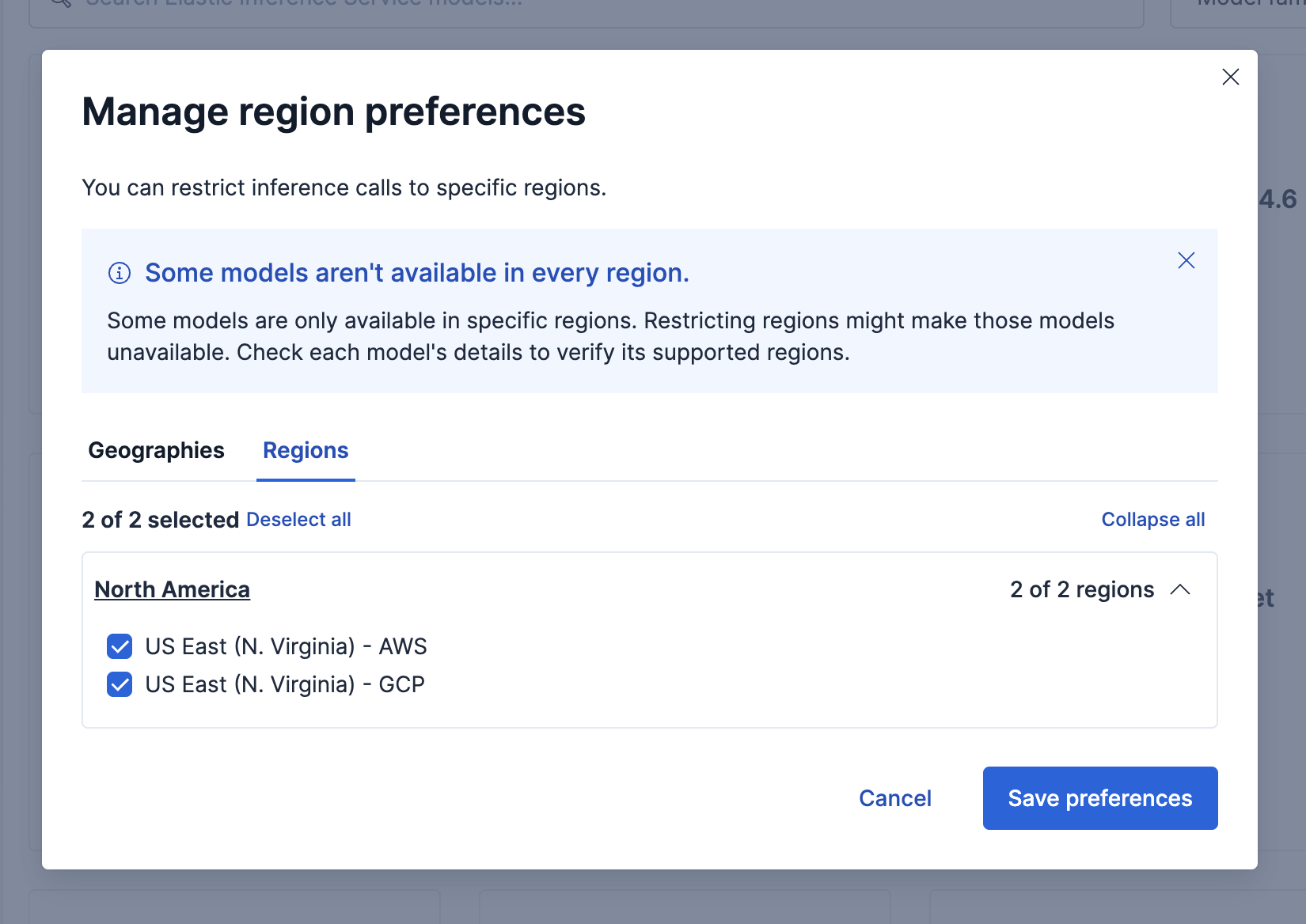
Choose a mode:
- Geographies: Select one or more geographic areas.
- Regions: Expand a geography and select one or more cloud provider regions.
Before you save, open any models you rely on and check Regions in the model details. If a model isn't available in your allowed locations, it becomes unavailable after you save.
Select Save preferences.
In the confirmation dialog, review your pending allowed geographies or regions. Changing the region policy affects all Elastic Inference Service endpoints across all spaces.
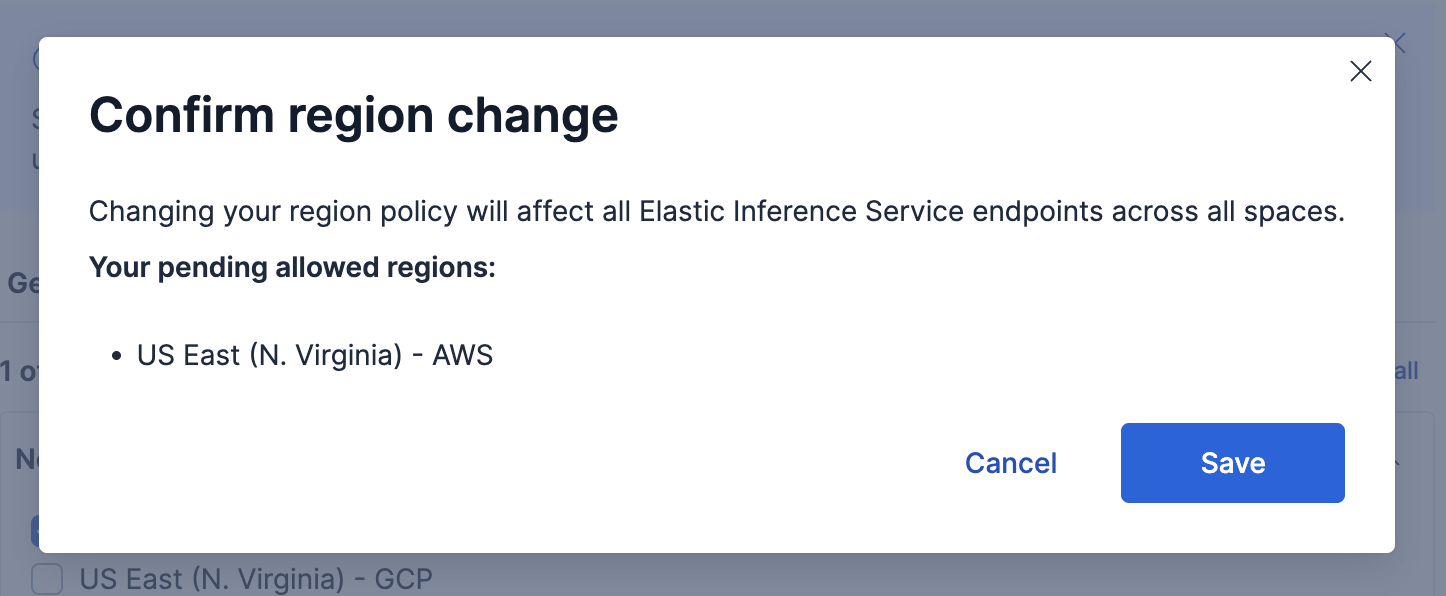
Select Save.
When the update succeeds, Kibana shows the Region preferences saved message. If the policy would deny access to in-use inference endpoints, Kibana blocks the update and shows Region policy update blocked.
You can also manage the region policy with the Elasticsearch Inference APIs.
These APIs require the manage_inference cluster privilege to create, update, or delete a policy, and monitor_inference to retrieve it.
To allow specific geographies:
				PUT _inference/_region_policy
					{
  "region_policy": {
    "allowed_geos": ["us", "eu"]
  }
}
Supported geography codes include us, eu, and apac.
To allow specific cloud provider regions:
				PUT _inference/_region_policy
					{
  "region_policy": {
    "allowed_regions": [
      { "csp": "aws", "region": "us-east-1" },
      { "csp": "gcp", "region": "europe-west1" }
    ]
  }
}
If the new policy would deny access to inference endpoints that are currently referenced by ingest pipelines or indices, the request fails with a conflict (409) error similar to:
Cannot put the region policy because it would deny access to the following in-use inference endpoints: <endpoint-ids>. Ensure that these inference endpoints are not in use, or use force to ignore this warning and proceed anyway.
Resolve the conflict by removing those endpoint references first, or use the force parameter on the create or update inference region policy API if you intentionally want to apply the policy anyway.
To retrieve the current policy:
GET _inference/_region_policy
If no policy is configured, the response is a 404 error with the reason No region policy is configured for this deployment.
To remove the policy and restore default nearest-region routing:
DELETE _inference/_region_policy
For full request and response details, refer to the create or update inference region policy, get inference region policy, and delete inference region policy APIs.