Search with Elasticsearch
Elasticsearch is a search database: one place to store and search documents, vectors, logs, and metrics. You can search them with full-text, semantic, and hybrid techniques. Search capabilities are available across all Elastic deployments, solutions, and project types.
This overview explains what you can build with Elasticsearch and how the pieces fit together. It also provides resources to help you learn more and get started with your own data.
Not every capability described on this page is available in every deployment or Serverless project type. For broader comparisons, refer to Detailed deployment comparison and Compare Elastic Cloud Hosted and Serverless. For exact availability, refer to the documentation for the specific feature.
Elasticsearch powers applications, AI systems, and agents that need fast, relevant results over large amounts of data. Common use cases include:
- Retrieval Augmented Generation (RAG): Retrieve relevant context from your own data to ground responses from large language models.
- Agentic retrieval: Give AI agents access to your data so they can find the context they need to act.
- Question answering systems: Return answers based on what a query means, not only on the words it contains.
- Website and documentation search: Help visitors find the right page with typo tolerance, synonyms, and relevance tuning.
- Ecommerce product catalogs: Combine text relevance with filters, facets, and business signals such as price or popularity.
- Content recommendation systems: Surface similar items by meaning, using vector similarity.
- Multimodal search: Search across images, video, or audio using a text description, or use an image as the query itself.
- Geospatial search applications: Find results by location and distance.
- Analytics dashboards and data exploration: Filter, sort, and aggregate the same data that you search.
- Observability and security: Search and analyze logs, events, metrics, and other operational data.
Elasticsearch stores data as JSON documents in indices. Each field in a document is indexed according to its type, so one index can support several ways of retrieving the same data:
- Text fields support full-text search, with analysis, relevance scoring, and synonyms.
- Vector fields store embeddings generated by machine learning models, and support semantic similarity search. Vectors live in the same search database as your other fields, so you can use Elasticsearch as a vector database without adding a separate system.
- Structured fields such as numbers, dates, keywords, and geo points support exact-match filters, sorting, and aggregations.
Event and time series data, such as application logs and infrastructure metrics, is stored and searched in the same search database as your documents and vectors, so you can analyze operational data alongside the rest of your data.
Because these capabilities share one data store, you don't need a separate system for each retrieval method. You can add a retrieval method later without moving your data. Features such as Better Binary Quantization (BBQ) for vectors help you retain more data using less storage.
For logs, the logsdb index mode also helps reduce storage.
The following flow shows how data moves through a search application built on Elasticsearch. It describes the stages, not the steps you must follow in order.
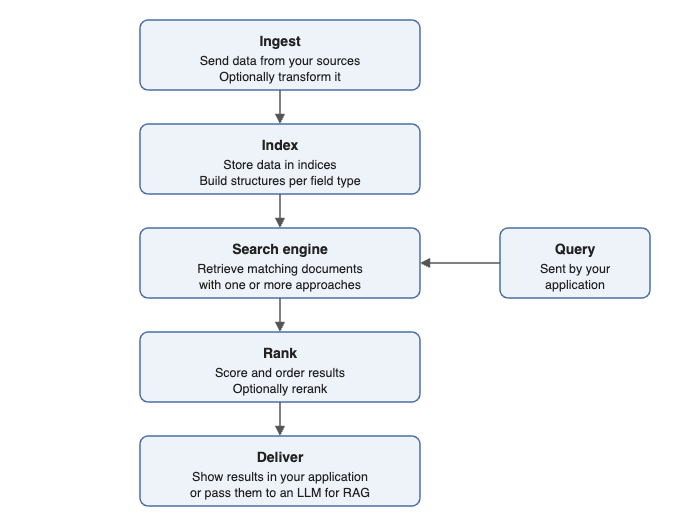
- Ingest: You send data from your sources to Elasticsearch, where it is stored in indices. You can transform it on the way in, for example by generating vector embeddings.
- Index: Elasticsearch builds data structures for each field type to support efficient searches. For search performance guidance, refer to Tune Elasticsearch for search speed.
- Search: Your application sends a query. Elasticsearch retrieves matching documents using one or more search approaches.
- Rank: Results are scored and ordered by relevance. You can refine the order with reranking techniques.
- Deliver: Your application displays the results, or passes them to a large language model as context for RAG.
These concepts provide the foundation for understanding how Elasticsearch stores data and supports different search approaches.
- The Elasticsearch data store: How Elasticsearch stores data as documents in indices and how mappings define fields.
- Search approaches: How full-text, vector, semantic, and hybrid search compare, and which fits your goals.
- Distributed architecture: How nodes, shards, primaries, and replicas work together to scale and protect your data.
- Vector search: How vector embeddings and semantic search work, and how Elasticsearch functions as a vector database.
- Quickstart: Vector and full-text search: Index sample data and run your first search.
- Set up Elasticsearch: Choose where it runs and connect to it.