Release a bug fix for supporting older package version
Sometimes, when we drop the support for an earlier version of the stack and later on find out needing to add a bug fix to some old package version, we have to make some manual changes to release the bug fix to users. For example: in this PR (AWS package version 1.23.4), support for Kibana version 7.x was dropped and bumped the AWS package version from 1.19.5 to 1.20.0. But we found a bug in the EC2 dashboard that needs to be fixed with Kibana version 7.x, so instead of adding a new AWS package version 1.23.5, we need to fix it between 1.19.5 and 1.20.0. This means creating a new version (for example, 1.19.6) based on 1.19.5.
Overview of the process:
- Find the git commit that introduced the target package version.
- Open a PR adding a new entry to
.backports.yml— CI validates and dry-runs the branch creation, and the branch is created automatically on merge. - Create a PR with the bug fix against that backport branch.
- Update the changelog in
mainto include the new version.
Detailed steps:
Find the git commit for the target package version
In the example above, the commit to be fixed is the one right before this PR updating package
aws:Using the web:
Look for the merge commit of the PR
- https://github.com/elastic/integrations/commit/aa63e1f6a61d2a017e1f88af2735db129cc68e0c
- It can be found as one of the last messages in the PR

- And then show the previous commits for that changeset inside the package folder (e.g.
packages/aws): - https://github.com/elastic/integrations/commits/aa63e1f6a61d2a017e1f88af2735db129cc68e0c/packages/aws/
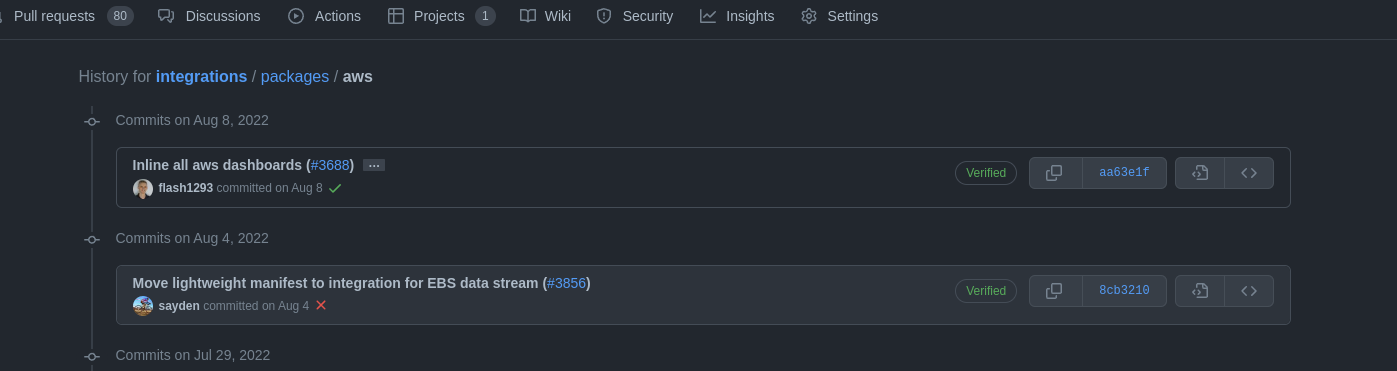
Using the command line:
Using the helper script
dev/scripts/get_release_commit.sh, which finds the commit directly from the package name and version:Syntax:
./dev/scripts/get_release_commit.sh -p <package_name> -v <version>Example:
$ ./dev/scripts/get_release_commit.sh -p aws -v 1.19.5
8cb321075afb9b77ea965e1373a03a603d9c9796
Alternatively, using
git log:Syntax:
git log --grep "#<pr_id>" -- packages/<package_name>
git log -n 1 <merge_commit>^ -- packages/<package_name>
Example:
$ git log --grep "#3688" -- packages/aws
commit aa63e1f6a61d2a017e1f88af2735db129cc68e0c
Author: Joe Reuter <xx@email.de>
Date:   Mon Aug 8 17:14:55 2022 +0200

    Inline all aws dashboards (#3688)

    * inline all aws dashboards

    * format

    * apply the right format

    * inline again

    * format
$ git log -n 1 aa63e1f6a61d2a017e1f88af2735db129cc68e0c^ -- packages/aws
commit 8cb321075afb9b77ea965e1373a03a603d9c9796
Author: Mario Castro <xx@gmail.com>
Date:   Thu Aug 4 16:52:06 2022 +0200

    Move lightweight manifest to integration for EBS data stream (#3856)
Add a new entry to
.backports.ymland open a PRThe backport branch is created automatically when a new entry is merged into
.backports.yml.Recommended: use the
AddBackportEntrymage targetThis target resolves the base commit automatically (combining steps 1 and 2) and inserts the entry in the correct position in the file:
mage AddBackportEntry <package_name> <base_version>Example:
$ mage AddBackportEntry aws 1.19.5
Added: branch=backport-aws-1.19 base_commit=8cb321075afb9b77ea965e1373a03a603d9c9796
Alternatively: add the entry manually
Open a PR adding the entry for the branch you need:
- package: <package_name>
  branch: backport-<package_name>-<major>.<minor>
  base_version: "<version>"
  base_commit: "<commit_from_step_1>"
  maintained_until: null
  archived: false
  remove_other_packages: true
Example for the
awspackage at version1.19.5:- package: aws branch: backport-aws-1.19 base_version: "1.19.5" base_commit: "8cb321075afb9b77ea965e1373a03a603d9c9796" maintained_until: null archived: false remove_other_packages: trueFields:
package— package name as defined in thenamefield ofmanifest.ymlbranch— name of the backport branch to create, following the formatbackport-<package_name>-<major>.<minor>base_version— the package version to branch from (e.g.1.19.5,1.0.0-beta1)base_commit— the commit SHA found in the previous stepmaintained_until—nullfor a new active branch. Set to aYYYY-MM-DDdate when the branch has a known end-of-life: the branch is automatically excluded from the checklist and branch creation once that date passes (strictly before today in UTC). Prefer this overarchived: truewhen the end-of-life date is known in advance.archived—falsefor a new active branch. Set totrueto immediately exclude the branch from the checklist and branch creation, with no fixed end-of-life date. Archiving does not delete the branch — packages can still be published from it; archiving only removes it from automated tooling.remove_other_packages— required.true: when the branch is created, all packages other than the target are removed frompackages/.false: all packages are kept. Set totruefor the standard case — it keeps the branch lean and avoids running tests for unrelated packages on every PR.
Once the PR is opened, CI automatically:
- Validates the new entry schema (
check-backports-inventory) - Runs a dry run of the branch creation, which verifies that the package is published, the commit exists, the commit publishes the expected version, and the branch does not already exist — without pushing anything
The PR requires review from the
elastic/ecosystemteam (they are the CODEOWNERS of.backports.yml). Once merged tomain, the branchbackport-<package_name>-<major>.<minor>is created and pushed automatically. A comment is posted on the merged PR confirming success or failure of the branch creation.By default, the backport branch is created with only the target package in the
packages/directory — all other packages are removed. This keeps the branch lean and avoids running tests for unrelated packages on every PR opened against it.Create a PR for the bug fix
Recommended: use
backport_apply.shbackport_apply.shhandles the entire process: cherry-picking the commit, bumping the patch version, writing the changelog entry, syncing package owners, and opening a PR.dev/scripts/backport_apply.sh \ --sha <merge_commit_sha> \ --package <package_name> \ --target <branch_or_version> \ --open-prRequired arguments:
Argument Description --shaMerge commit SHA on mainto cherry-pick (minimum 8 characters; from step 1).--packagePackage name as it appears in manifest.yml.--targetVersion series (e.g. 6.14) or full branch name (e.g.backport-aws-6.14); the branch name is derived automatically from the version series.Common optional flags:
Flag Description --open-prCreate a GitHub PR after pushing the working branch. --dry-runCommit locally and skip push and PR creation; use to review the result before opening a PR. What the script does, in order:
- Fetches the backport branch and creates a local working branch (
auto-backport/<pkg>-<version>-<sha8>). - Cherry-picks
<sha>, auto-resolving version-only conflicts inmanifest.yml; restoreschangelog.ymlto HEAD (it is regenerated in the next step). - Bumps the patch version in
manifest.ymland inserts a newchangelog.ymlentry (with a placeholder link that is fixed after the PR is opened). - Syncs package owners from
mainas a separate commit — see Package owner synchronization. - Pushes the working branch and opens a PR against the backport branch (with
--open-pr). - Replaces the placeholder link in
changelog.ymlwith the real backport PR URL and pushes a secondFix changelog link to backport PRcommit.
If the cherry-pick conflicts on files beyond a version-line difference in
manifest.yml, the script reports the conflicting files and cleans up. In this case, apply the fix manually (see the alternative path below).Coming soon: once the auto-backport workflow lands, checking a branch checkbox in the backport checklist comment will trigger the same process automatically on merge — no manual invocation of
backport_apply.shneeded. The script remains useful for ad-hoc backports and retries.Alternative: manual cherry-pick
Create a new branch in your own remote (do not use a name starting with
backport-), apply the bug fix, bump the patch version inmanifest.yml, and add achangelog.ymlentry. Open a PR targeting the backport branch.Once this PR is merged, the new version of the package is published automatically. Wait for it to appear in the Elastic Package Registry before proceeding to the next step.
For subsequent fixes to the same version, no new branch is needed — open a new PR against the same backport branch.
- Fetches the backport branch and creates a local working branch (
Update changelog in main
This step is handled automatically. When a backport PR is merged, the
sync-backport-changelog.ymlworkflow fires and opens a PR againstmainthat adds the new changelog entry for the backport version. The sync PR is created with two labels:backport:sync-changelog— identifies it as an automated sync PR.changelog-link-check:skip— skips the changelog link validation (the entry's link points to the backport PR, not the sync PR itself).
After the workflow runs, a comment is posted on the merged backport PR linking to the sync PR or reporting a failure. No manual action is needed.
Backport branches are created from historical commits, so their manifest.yml owner field and .github/CODEOWNERS entries may be stale from the start and can drift further as packages change hands on main. Because GitHub resolves PR reviewers from the CODEOWNERS on the PR's base branch, a stale backport branch notifies the wrong team.
Two mechanisms keep owners in sync.
When backport_apply.sh (or mage applyBackport) creates a backport PR, it automatically syncs the package's owners from main as a separate commit on top of the cherry-pick:
- What is synced: the
owner.githubfield inmanifest.yml, the package's own.github/CODEOWNERSline, and any sub-path entries nested under the package (data streams,kibana/directory, and other subdirectory overrides). - Commit message:
Sync <package> package owners from main - No-op: if the owners already match
main, the commit is skipped silently. - Warn-and-continue: if
maincannot be fetched, or the package no longer exists onmain, a warning is printed and the apply continues without syncing. The backport PR is still opened; the CI check below surfaces any remaining mismatch.
A Buildkite step runs on every pull request targeting a backport-* branch (triggered when packages/** or .github/CODEOWNERS changes) and posts a comment on the PR with one of three outcomes:
- ✅ In sync —
Package owners are in sync with main.No action needed. - Mismatch —
Package owners are out of sync with main:followed by a list of packages and the team(s) they should now be owned by. Updatemanifest.yml(owner.github) and.github/CODEOWNERSfor each listed package to match the teams shown. - Check failed —
The backport owner check failed to runwith a link to the build log. This is usually a transient network error fetchingmain; re-run the build.
The step is currently soft_fail: true — a mismatch posts a warning comment but does not block merge.
When you open or update a pull request targeting main, the post-backport-checklist.yml workflow automatically posts a comment listing the active backport branches for every package touched by that PR. The comment is updated on every push — any manual edits are overwritten. It only appears when at least one package in the PR's diff has active backport branches in .backports.yml.
Example comment:
## Backport branches

> [!IMPORTANT]
> Only branches for packages touched by this PR's current diff are shown.
> This comment is updated automatically on each push — manual edits will be overwritten.

Active backport branches for the packages touched by this PR:

**aws**
- `backport-aws-1.19` (maintained until 2027-06-30)
- `backport-aws-6.x`

---

> [!TIP]
> If a branch above is no longer required, set `archived: true` in its entry in `.backports.yml` to stop it appearing here.
> If the branch has a known end-of-life date, prefer `maintained_until: "YYYY-MM-DD"` — it will be excluded automatically once that date passes.
The comment is currently informational only — no checkboxes are rendered and no automation is triggered by it. If you do not intend to backport, you can safely ignore it.
Suppressing a branch from the checklist:
To stop a branch appearing in the checklist, update its entry in .backports.yml:
archived: true— excludes the branch immediately, with no fixed end-of-life date.maintained_until: "YYYY-MM-DD"— excludes the branch automatically once that date passes; preferred when the end-of-life date is known.
Archiving a branch does not delete it. Packages can still be published from an archived branch; archiving only removes the branch from the checklist and branch creation.
Missing
elastic-package stack shellinitin backport branch:Example of the error:
Error: could not create kibana client: undefined environment variable: ELASTIC_PACKAGE_KIBANA_HOST. If you have started the Elastic stack using the elastic-package tool, please load stack environment variables using 'eval "$(elastic-package stack shellinit)"' or set their values manuallySolution: add elastic-package stack shellinit command in
.buildkite/scripts/common.sh.eval "$(elastic-package stack shellinit)"
License file not found in backport branch:
Example of the error:
Error: checking package failed: building package failed: copying license text file: failure while looking for license "licenses/Elastic-2.0.txt" in repository: failed to find repository license: stat /opt/buildkite-agent/builds/bk-agent-prod-gcp-1703092724145948143/elastic/integrations/licenses/Elastic-2.0.txt: no such file or directorySolution: Remove line defining
ELASTIC_PACKAGE_REPOSITORY_LICENSEenvironment variable.