Elastic Cloud Managed OTLP Endpoint (mOTLP)
The Elastic Cloud Managed OTLP Endpoint allows you to send OpenTelemetry data directly to Elastic Cloud using the OTLP protocol.
The endpoint adds a resilient ingestion layer that works seamlessly with serverless autoscaling and removes pressure from Elastic Cloud Hosted clusters.
The Elastic Cloud Managed OTLP Endpoint endpoint is not available for Elastic self-managed, ECE, or ECK clusters. To send OTLP data to any of these cluster types, deploy and expose an OTLP-compatible endpoint using the EDOT Collector as a gateway.
To use the Elastic Cloud Elastic Cloud Managed OTLP Endpoint you need the following:
- An Elastic Cloud Serverless project or an Elastic Cloud Hosted (ECH) deployment.
- An OTLP-compliant shipper capable of forwarding logs, metrics, or traces in OTLP format. This can include:
- OpenTelemetry Collector (EDOT, Contrib, or other distributions)
- OpenTelemetry SDKs (EDOT, upstream, or other distributions)
- EDOT Cloud Forwarder
- Any other forwarder that supports the OTLP protocol.
You don't need APM Server when ingesting data through the Managed OTLP Endpoint. The APM integration (.apm endpoint) is a legacy ingest path that only supports traces and translates OTLP telemetry to ECS, whereas Elastic Cloud Managed OTLP Endpoint natively ingests OTLP data.
To send data to Elastic through the Elastic Cloud Managed OTLP Endpoint, follow the Send data to the Elastic Cloud Managed OTLP Endpoint quickstart.
To retrieve your Elastic Cloud Managed OTLP Endpoint endpoint address and API key, follow these steps:
- In Elastic Cloud, create an Observability project or open an existing one.
- Go to Add data, select Applications and then select OpenTelemetry.
- Copy the endpoint and authentication headers values.
Alternatively, you can retrieve the endpoint from the Manage project page and create an API key manually from the API keys page.
- In Elastic Cloud, create an Elastic Cloud Hosted deployment or open an existing one.
- Go to Add data, select Applications and then select OpenTelemetry.
- Copy the endpoint and authentication headers values.
To configure OpenTelemetry SDKs to send data directly to the Elastic Cloud Managed OTLP Endpoint, set the OTEL_EXPORTER_OTLP_ENDPOINT and OTEL_EXPORTER_OTLP_HEADERS environment variable.
For example:
export OTEL_EXPORTER_OTLP_ENDPOINT="https://<motlp-endpoint>"
export OTEL_EXPORTER_OTLP_HEADERS="Authorization=ApiKey <key>"
You can route logs to dedicated datasets by setting the data_stream.dataset attribute to the log record. This attribute is used to route the log to the corresponding dataset.
For example, if you want to route the EDOT Cloud Forwarder logs to custom datasets, you can add the following attributes to the log records:
processors:
  transform:
    log_statements:
      - set(log.attributes["data_stream.dataset"], "aws.cloudtrail") where log.attributes["aws.cloudtrail.event_id"] != nil
You can also set the OTEL_RESOURCE_ATTRIBUTES environment variable to set the data_stream.dataset attribute for all logs. For example:
export OTEL_RESOURCE_ATTRIBUTES="data_stream.dataset=app.orders"
This diagram shows data ingest using Elastic Distribution of OpenTelemetry and the Elastic Cloud Managed OTLP Endpoint:
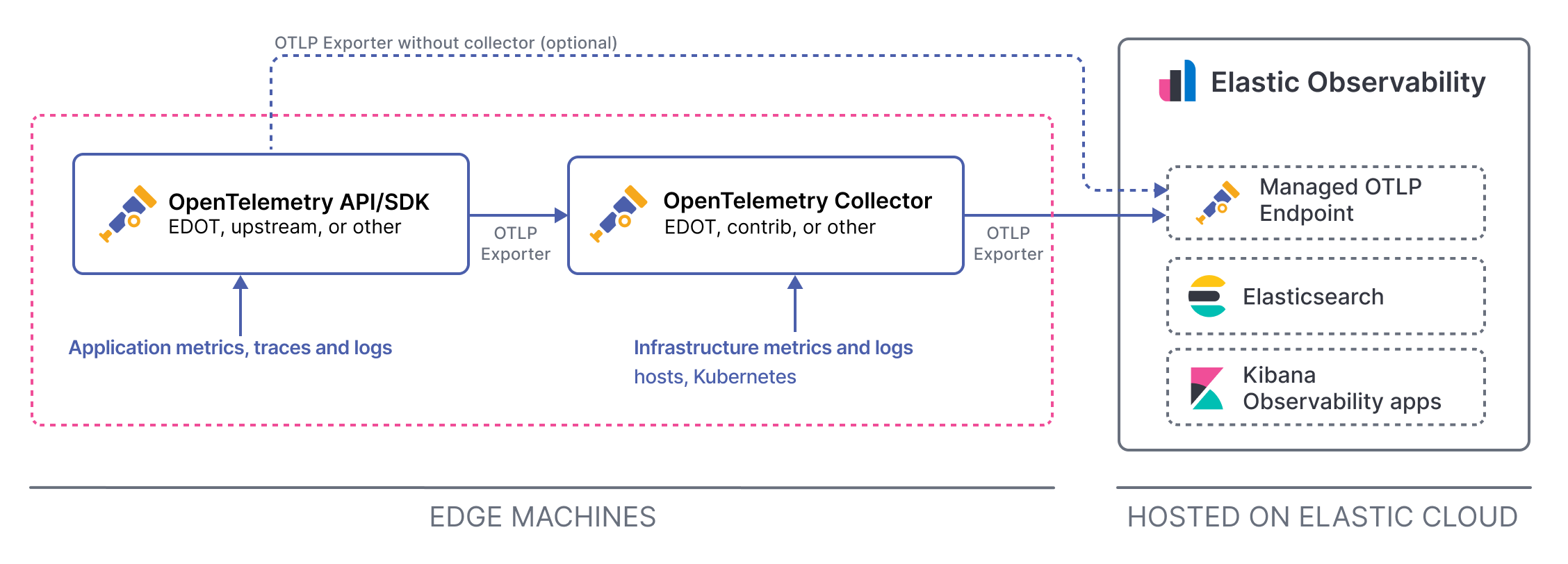
Telemetry is stored in Elastic in OTLP format, preserving resource attributes and original semantic conventions. If no specific dataset or namespace is provided, the data streams are: traces-generic.otel-default, metrics-generic.otel-default, and logs-generic.otel-default.
For a detailed comparison of how OTel data streams differ from classic Elastic APM data streams, refer to OTel data streams compared to classic APM.
The Elastic Cloud Managed OTLP Endpoint endpoint is designed to be highly available and resilient. However, there are some scenarios where data might be lost or not sent completely. The Failure store is a mechanism that allows you to recover from these scenarios.
The Failure store is always enabled for Elastic Cloud Managed OTLP Endpoint data streams. This prevents ingest pipeline exceptions and conflicts with data stream mappings. Failed documents are stored in a separate index. You can view the failed documents from the Data Set Quality page. Refer to Data set quality.
The following limitations apply when using the Elastic Cloud Managed OTLP Endpoint:
- Universal Profiling is not available.
- Only supports histograms with delta temporality. Cumulative histograms are dropped.
- Latency distributions based on histogram values have limited precision due to the fixed boundaries of explicit bucket histograms.
- Traffic filters are not yet available on both ECH and Serverless.
- Tail-based sampling (TBS) is not available. The Elastic Cloud Managed OTLP Endpoint does not provide centralized hosted sampling. If you need tail-based sampling, configure it on the edge using the Tail Sampling Processor in your EDOT or OpenTelemetry Collector before sending data to the endpoint.
For more information on billing, refer to Elastic Cloud pricing.