Time-bound indices and dimension-based routing
Unlike regular data streams that write only to the most recent backing index, time series data stream (TSDS) are backed by a set of time-bound indices, each covering a contiguous, non-overlapping time range.
Elasticsearch enforces that the @timestamp for each ingested document falls within the time range of exactly one backing index.
Each TSDS backing index has a range of @timestamp values that it accepts, which are tracked in index settings.
When the TSDS is created, the first backing index has the following range:
- Its
index.time_series.start_time, which is the earliest accepted timestamp (inclusive), is set tonowminus theindex.look_back_time. - Its
index.time_series.end_time, which is the latest accepted timestamp (exclusive), is set tonowplusindex.look_ahead_time.
Thereafter, Elasticsearch automatically configures the settings for backing indices as part of the index creation and rollover process.
Each new backing index starts at the previous index's end_time and extends further ahead using look_ahead_time.
When you add a document to the TSDS, Elasticsearch routes it to the appropriate backing index based on its @timestamp value.
This means a TSDS can write to multiple backing indices simultaneously, not only the most recent one.
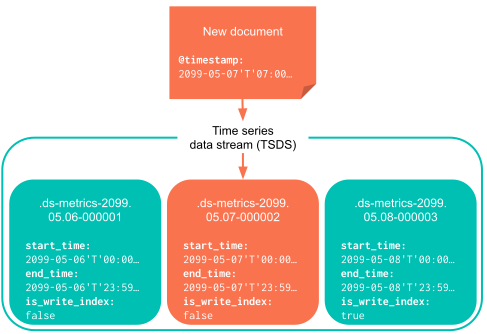
Late-arriving data can still be indexed into an older backing index, as long as that index exists, remains writable, and its accepted time range includes the timestamp. To inspect the accepted time ranges of TSDS backing indices, use the get data stream API:
GET _data_stream/my-tsds
By default, if no existing backing index can accept a document's @timestamp, Elasticsearch rejects the document.
Elasticsearch does not create missing past backing indices unless you turn on past index creation.
Writes might still be rejected even when a timestamp fits the accepted time range of a backing index. The following actions can affect the writable time range, either because they make a backing index read-only or remove it:
- Delete
- Downsample
- Force merge
- Read only
- Searchable snapshot
- Shrink, which might revert the read-only status at the end of the action
Index lifecycle management will not proceed with running these actions until index.time_series.end_time has passed.
In addition to accepted time ranges for each backing index, a time series data stream has an eligible write window. It is the period of time that extends from the present back to whichever comes first:
- the first lifecycle action that makes a backing index read-only (such as downsampling or a searchable snapshot transition), or
- the data stream retention limit (configured in a data stream lifecycle, for example)
Elasticsearch can
automatically create missing past backing indices for an existing time series data stream while indexing documents that fall within the eligible write window. To enable this, set the data_stream.past_tsdb_index_creation_enabled cluster setting to true.
Timestamps outside the eligible write window or in the future are still rejected. If a failure store is enabled, rejected timestamp failures can be redirected there.
Past backing indices hold old data but are new indices.
Elasticsearch sets index.lifecycle.origination_date from index.time_series.end_time so that data stream lifecycle and ILM treat the index age based on the data it contains, not when the index was created.
Each new past backing index covers a configurable time interval.
Use the data_streams.past_tsdb_index_interval cluster setting to control the interval.
When the gap between existing indices is up to 1.3 times the configured interval, Elasticsearch might create a single bridging index instead of many small indices.
For guidance on loading historical data, refer to Load historical data into a TSDS.
In addition to time-based routing, time series data streams use dimension-based routing to determine which shard to route data to. Documents with the same dimensions are routed to the same shards, using one of two strategies:
- Index dimensions
- Routing based on the internally managed
index.dimensionssetting. - Routing path
- Routing based on the
index.routing_pathsetting (as a fallback).
The index.dimensions-based strategy offers better ingest performance. It uses a list of dimension paths that is automatically updated (and is not user-configurable). This strategy is not available for time series data streams with dynamic templates that set time_series_dimension: true.
To disable routing based on index.dimensions, set index.index_dimensions_tsid_strategy_enabled to false,
or manually set the index.routing_path to the dimensions you want to use:
					"settings": {
  "index.mode": "time_series",
  "index.routing_path": ["host", "service"]
}
Documents with the same dimension values are routed to the same shard, improving compression and query performance for time series data.
The index.routing_path setting supports wildcards (for example, dim.*) and can dynamically match new fields.