Find connection details
To connect a client application or a third-party tool to Elasticsearch, you need two things: the Elasticsearch endpoint URL, and credentials that authenticate the request. For secure connections, use an API key.
To create an API key, you need the manage_api_key or the manage_own_api_key cluster privilege.
Your endpoint is in the Connection details panel in Kibana.
- Open Kibana for your deployment or project.
- From the Help menu , select Connection details.
- Copy the Elasticsearch endpoint from the Endpoints tab.
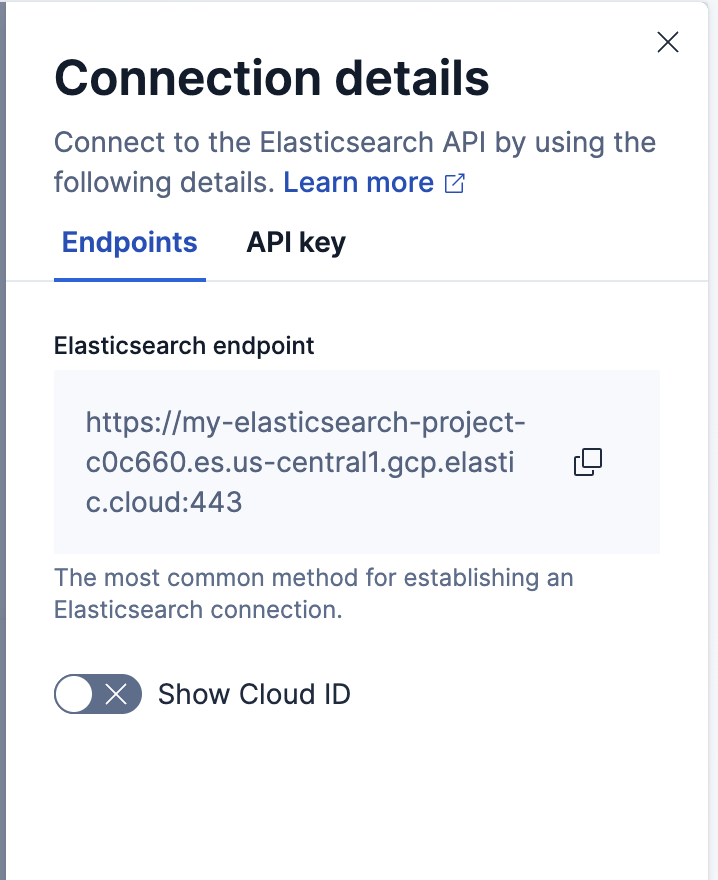
- When the space uses the Elasticsearch solution view, the Getting started page shows the endpoint directly.
-
You can also open Connection details from the project selector in the header.
Your endpoint takes the form <scheme>://<host>:<port>. Each part comes from your cluster's HTTP settings:
- Scheme:
httpswhen TLS is enabled on the HTTP layer, andhttpwhen it isn't. Automatic security setup enables TLS on a new archive or package installation. - Host: The address clients use to reach the node, set by
http.hostornetwork.host. - Port: The HTTP port, set by
http.port. It defaults to the range9200-9300, and a node binds to the first free port in that range.
For example, a single-node cluster from the local development quickstart runs without TLS on the default port, so its endpoint is http://localhost:9200.
If clients reach your cluster through a load balancer, reverse proxy, or ingress, use that address rather than the node address.
The Elastic Cloud on Kubernetes operator creates a ClusterIP service named <cluster-name>-es-http on port 9200, with TLS enabled by default.
From inside the Kubernetes cluster, your endpoint is https://<cluster-name>-es-http:9200 in the same namespace, or https://<cluster-name>-es-http.<namespace>.svc:9200 from another namespace. List your services to confirm the name:
kubectl get svc
To reach the cluster from outside, expose the service and use its external address. Refer to Access the endpoint for both cases, including how to retrieve the certificate authority (CA) certificate.
Beats and Logstash can use a Cloud ID instead of the endpoint URL. All other clients and tools use the endpoint.
- Open Kibana for your deployment or project.
- From the Help menu , select Connection details.
- Turn on Show Cloud ID, then copy the value.
To skip Kibana, select Manage in the Elastic Cloud console and copy the Cloud ID from the deployment page.
- Open Kibana for your deployment or project.
- From the Help menu , select Connection details.
- Select the API key tab.
- In the API key name field, enter a name, then select Create API key.
- Select an API key format: Encoded for Elasticsearch REST API requests, or Beats or Logstash to configure those products.
- Copy the key. It isn't available after you close the panel.
Keys created here expire in 90 days and carry your own privileges. To set an expiration or restrict privileges, select Manage API keys and create the key there instead.
- Go to the API keys management page, using the global search field to find it.
- Select Create API key.
- Enter a name, then select Create API key.
- Copy the key. It isn't available after you leave the page.
Keys created here don't expire unless you add an expiration date.
For key types, privileges, and expiration options, refer to Elastic API keys.
Verify your endpoint and API key with a request to the Elasticsearch root endpoint.
In a terminal, assign your endpoint and encoded API key to environment variables:
export ES_URL="https://a1b2c3d4e5f6.us-central1.gcp.cloud.es.io:443"
export API_KEY="ZFZRbF9Jb0JDMEoxaVhoR2pSa3Q6dExwdmJSaldRTHFXWEp4TFFlR19Hdw=="
Send the request:
curl "${ES_URL}" -H "Authorization: ApiKey ${API_KEY}"
A successful response returns your cluster details:
{
  "name" : "instance-0000000000",
  "cluster_name" : "my-deployment",
  "cluster_uuid" : "ws0IbTBUQfigmYAVMztkZQ",
  "version" : { ... },
  "tagline" : "You Know, for Search"
}
If your cluster uses a self-signed certificate, pass your CA certificate with curl --cacert. Refer to Automatic security setup for the certificate location.
- Connect a client library in your language of choice.
- Ingest data into your cluster or project.
- Build search queries against your data.