Model configuration in Elastic Agent Builder
Elastic Agent Builder uses large language models (LLMs) to power agent reasoning and decision-making.
For model performance for Observability and Elastic Security, refer to Configure access to LLMs. The Recommended models section focuses on Elastic Agent Builder.
For Elastic Cloud Serverless projects and Elastic Cloud Hosted deployments, Elastic Agent Builder uses Elastic Managed LLMs running on the Elastic Inference Service (EIS). This managed service requires zero setup.
You can get started with zero setup using Elastic Managed LLMs. These are built-in LLMs running on the Elastic Inference Service (EIS). This managed service requires no additional API key management.
Learn more about Elastic Managed LLMs and pricing.
These deployments do not include a preconfigured model. To use Elastic Agent Builder, you have two options:
- Connect to the Elastic Inference Service (EIS) using Cloud Connect (recommended)
- Configure your own model using an inference endpoint, or a Generative AI connector
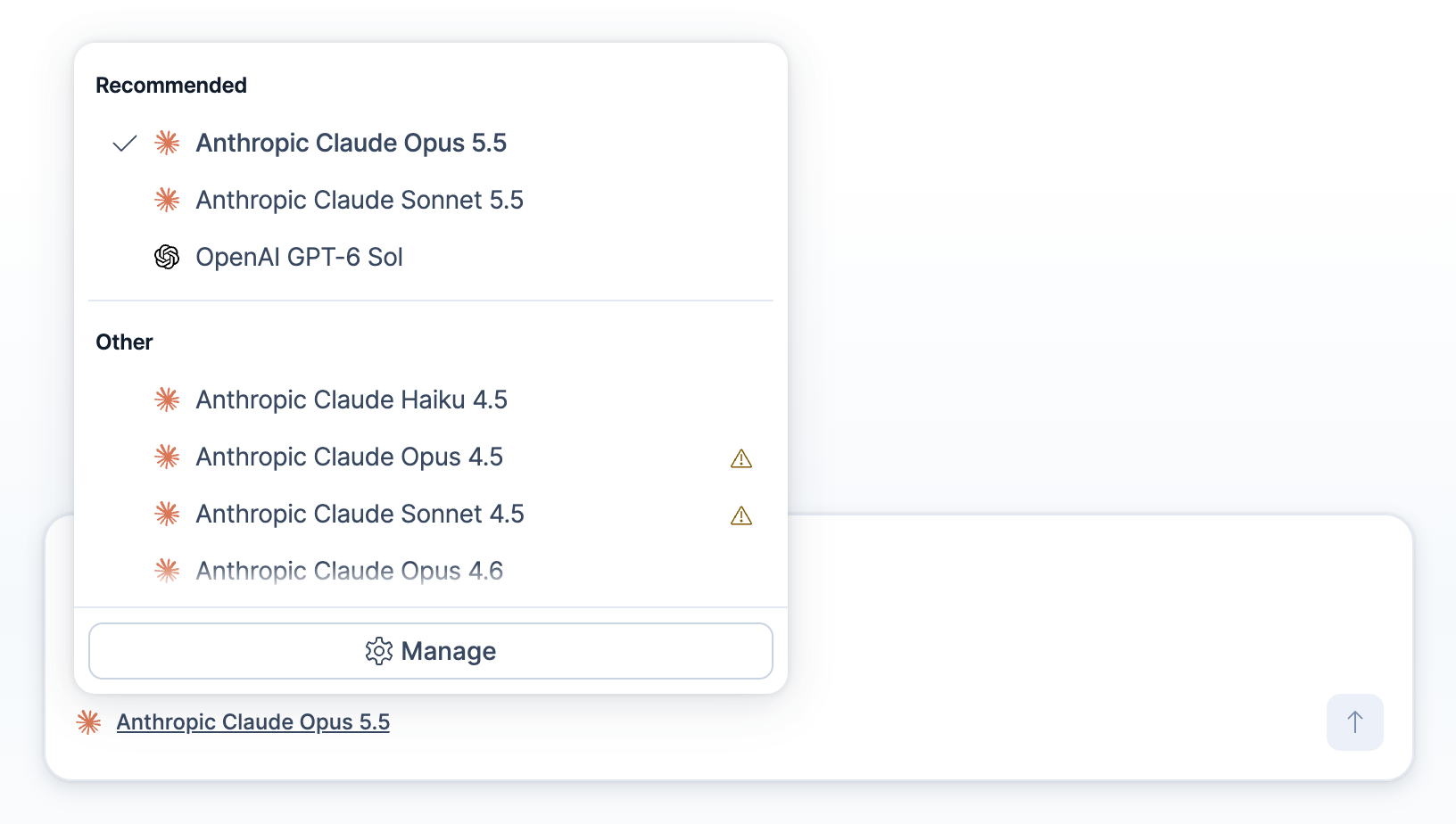
Use the model selector in the chat interface to switch between available models. The selector displays all configured models, including preconfigured models (on Elastic Cloud Hosted and Elastic Cloud Serverless) and any custom inference endpoints or connectors you set up.
- Recommended: the models Elastic Agent Builder recommends by default. Refer to Models recommended by default.
- Other: the other preconfigured models.
- Custom: your own inference endpoints and connectors.
To learn more, refer to select a different model.
The following screenshot shows the model selector in Elastic Cloud Serverless. The recommended models depend on your version.
When you call an agent through the Converse API, you can override the model used for that request. Pass one of the following in the request body:
inference_id: the ID of an inference endpoint. Use this parameter for new integrations.connector_id: the ID of a connector. Generative AI connectors are deprecated.
Both parameters route the request to the same underlying model and are mutually exclusive. If you send both, the request fails with a 400 error. If you omit both, the request uses the default model for Elastic Agent Builder, as set on the Feature Settings page.
reasoning_level to set how much reasoning the model does for that request. It accepts the same values as the reasoning-level workflow step field.
For an example request, refer to Route a request to a specific model.
To change which model is used by default:
- Search for Model Management / Feature Settings in the global search field.
- From the Global model menu, select your preferred model.
- Select Save settings.
To change which model is used by default:
- Search for Model Management / Feature Settings in the global search field.
- From the Default model menu, select your preferred model.
- Select Save settings.
To change which model is used by default:
- Search for GenAI Settings in the global search field.
- From the Default AI Connector menu, select your preferred connector.
- Save your changes.
For more information about these settings, refer to Manage access to AI features.
To give you faster responses at a lower token cost, Elastic Agent Builder automatically routes some low-effort, latency-sensitive operations to a fast model instead of your default model. A fast model is a smaller, high-throughput model that returns results more quickly than a frontier reasoning model.
This routing is automatic and cannot be turned off. You do not need to configure anything to benefit from it. Your default model still handles agent reasoning, tool selection, and response synthesis.
Elastic Agent Builder uses the fast model for well-scoped tasks that do not need deep reasoning, such as:
- ES|QL query generation
- Conversation title generation
- The
agentBuilder:experimentalFeaturesadvanced setting is turned on. - A fast model is available that's different from the model the conversation uses.
Otherwise, the agent receives its full list of skills.
The fast model is preconfigured through Elastic Managed LLMs on the Elastic Inference Service (EIS), with no setup. For the built-in order, refer to Choose the fast model.
There is no preconfigured fast model. To get one, connect to EIS through Cloud Connect. Without that connection, fast model routing uses your default model, as described in Fallback behavior.
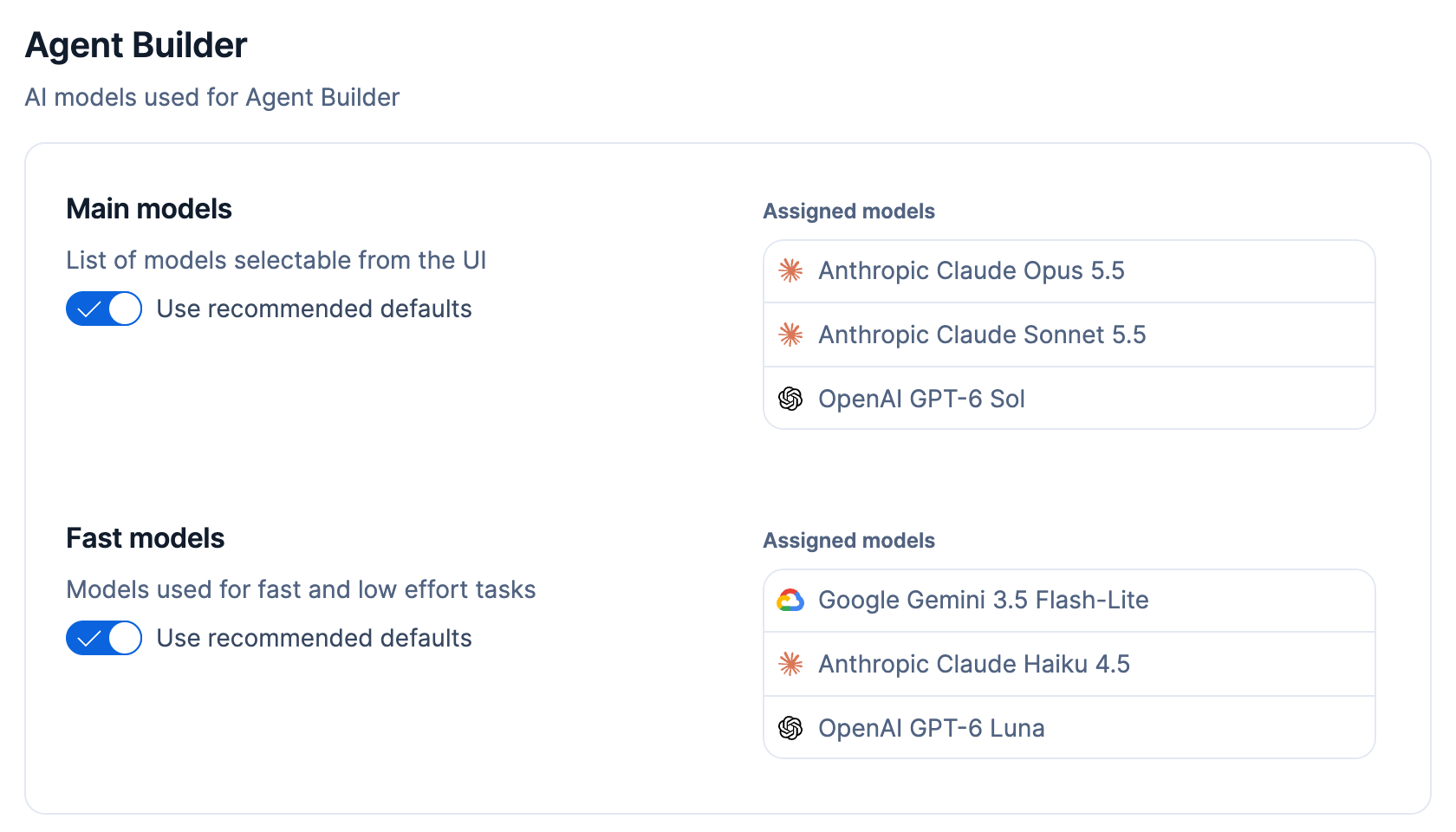
Elastic Agent Builder uses the first model in the fast list. The built-in order depends on your version:
- Claude Haiku 4.5
- Gemini 3.0 Flash
- Gemini 3.5 Flash-Lite
- Claude Haiku 4.5
- Gemini 3.5 Flash-Lite
- Claude Haiku 4.5
- GPT-6 Luna
The following screenshot shows the Main models and Fast models lists on 9.7 and Elastic Cloud Serverless, with Use recommended defaults turned on for both.
How you change the fast model list depends on your version:
To prefer a specific model:
- Open Feature Settings and go to Agent Builder.
- Under Fast models, turn off Use recommended defaults.
- Confirm by selecting Turn off recommended defaults.
- Put the preferred model first.
- Select Save settings.
The built-in order is used while Use recommended defaults is on for Fast models. If you turn off Use recommended defaults, change the Fast models list, and select Save settings, fast routing uses your default model.
If no fast model is available, Elastic Agent Builder uses your default model instead. Fast model routing is an optimization, so a missing fast model reduces the latency benefit but does not cause errors.
On Stack 9.2 and 9.3, tool calls with Gemini 3.x models are not supported on a Google Vertex AI endpoint added in External inference. To troubleshoot this error, refer to Gemini 3 tool calls fail on a Google Vertex AI inference endpoint.
You can configure additional models for Elastic Agent Builder in the following ways:
Configure an inference endpoint for your model provider. The endpoint must support the chat_completion task type.
Choose based on how the model is hosted:
- Elastic-managed models: Add an endpoint in Elastic inference.
- Third-party providers (such as OpenAI, Anthropic, or Amazon Bedrock): Add an endpoint in External inference.
If you prefer not to use the UI, you can also create endpoints with the inference APIs. See Create models programmatically.
Generative AI connectors are deprecated and will be removed in a future release. To connect a model provider, add an inference endpoint instead.
Availability of connectors depends on your deployment and version:
-
You can no longer create connectors in the Kibana UI, but you can still create them through the API. Existing connectors continue to work, and the Connectors page hides them by default. To show them, refer to Connectors. -
Connectors are still available, but deprecated.
To use additional models that aren't preconfigured, create a connector for your model provider.
Find connectors under Alerts and Insights / Connectors in the global search bar.
Select Create connector and select your model provider.
Configure the connector with your API credentials and preferred model.
Expand Additional settings and select
chat_completionas the task type.The following screenshot shows the Additional settings section with
chat_completionselected as the task type.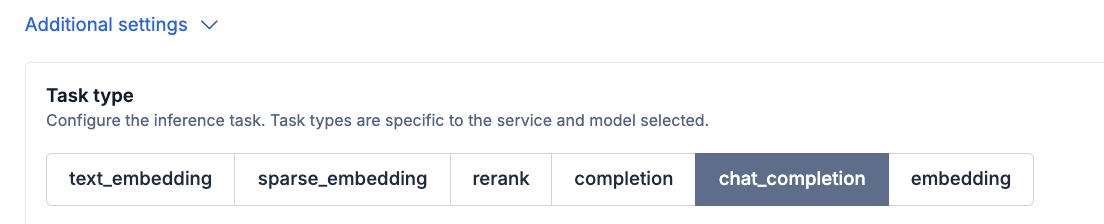
For detailed instructions on creating connectors, refer to Connectors.
To learn about preconfigured connectors, refer to preconfigured connectors.
You can create either an inference endpoint or a connector through the API:
- Create an inference endpoint with the inference APIs.
- Create a connector with the Connectors API. Works on all deployments.
You can connect a locally hosted LLM to Elastic. This requires your local LLM to be compatible with the OpenAI API format.
Add an inference endpoint that uses the openai service and points at your local LLM. For an example request, refer to Using OpenAI compatible models with the Inference API.
Earlier versions used the OpenAI connector for this. That connector is deprecated. For setup instructions, refer to the OpenAI connector documentation.
Elastic Agent Builder requires models with strong reasoning and tool-calling capabilities. State-of-the-art models perform significantly better than smaller or older models.
Agent Builder relies on advanced LLM capabilities including:
- Function calling: Models must accurately select appropriate tools and construct valid parameters from natural language requests.
- Multi-step reasoning: Agents need to plan, execute, and adapt based on tool results across multiple iterations.
- Structured output: Models must produce properly formatted responses that the agent framework can parse.
While Elastic Agent Builder can be configured to use LLMs from many different vendors, not all LLMs are robust enough for reliable agent workflows.
The following models are known to work well with Elastic Agent Builder. These categories represent a spectrum from maximum reasoning capability to maximum throughput. Choose based on your latency, cost, and complexity requirements.
| Category | Model examples | Use cases | Trade-offs |
|---|---|---|---|
| Extended reasoning | - Gemini 3.1 Pro - Claude Opus 4.6 - Claude Opus 5 - Claude Opus 5.5 |
Open-ended exploration, multi-step planning, complex analysis, and ES|QL-heavy dashboard generation | Higher latency and cost. Best for latency-insensitive, batch, async, or dashboard workflows that need fewer corrections. |
| Balanced performance | - GPT-5.2 - Claude Sonnet 4.6 - Claude Sonnet 5 - Claude Sonnet 5.5 - GPT-5.6 Sol - GPT-6 Sol |
General-purpose agents requiring reliable tool orchestration and data retrieval and synthesis | Moderate cost. Suitable for real-time and interactive use. For ES|QL-heavy dashboard generation, use an extended reasoning model. |
| High throughput | - Claude Haiku 4.5 - Gemini 3.0 Flash - Gemini 3.5 Flash-Lite - GPT-6 Luna |
Latency-sensitive pipelines and high-concurrency scenarios with well-scoped tasks | Lower reasoning depth. Ideal for high-volume workloads with well-defined tasks. |
Elastic Agent Builder automatically routes some low-effort tasks to a high-throughput model. Refer to Fast model routing.
For agents working with large documents or conversation histories, consider models with extended context windows. For example, Claude Sonnet 4.6 and Gemini 3.1 Pro support up to 1M tokens. Check your model provider's documentation for specific context limits.
For dashboards and visualizations, choose an extended reasoning model when the workflow depends on complex ES|QL generation. Testing with earlier models showed that Claude Opus 4.6 generates more reliable dashboard ES|QL than Claude Sonnet 4.6.
Claude Sonnet 4.6 and Claude Opus 4.6 are the default main models only on 9.5.0 to 9.5.2. Later versions default to newer models. Refer to Models recommended by default.
Elastic Agent Builder recommends a set of main models by default. They appear in Main models on the Feature Settings page and under Recommended in the model selector. This list can differ from the models in the Recommended models table, which are known to work well but aren't all recommended by default.
The default main models depend on your version:
- Claude Sonnet 4.6
- Claude Opus 4.6
- GPT-5.2
- Claude Sonnet 5
- Claude Opus 5
- GPT-5.6 Sol
- Claude Opus 5.5
- Claude Sonnet 5.5
- GPT-6 Sol
Smaller or less capable models may produce errors like:
Error: Invalid function call syntax
Error executing agent: No tool calls found in the response.
Although any chat-completion-compatible model can technically be configured, use state-of-the-art models for reliable agent performance.
Smaller or "mini" model variants are not recommended for Elastic Agent Builder as they lack the necessary capabilities for reliable agent workflows.