Join data from multiple indices with LOOKUP JOIN
The ES|QL LOOKUP JOIN processing command combines data from your ES|QL query results table with matching records from a specified lookup index. It adds fields from the lookup index as new columns to your results table based on matching values in the join field.
Teams often have data scattered across multiple indices – like logs, IPs, user IDs, hosts, employees etc. Without a direct way to enrich or correlate each event with reference data, root-cause analysis, security checks, and operational insights become time-consuming.
For example, you can use LOOKUP JOIN to:
- Retrieve environment or ownership details for each host to correlate your metrics data.
- Quickly see if any source IPs match known malicious addresses.
- Tag logs with the owning team or escalation info for faster triage and incident response.
LOOKUP JOIN is similar to ENRICH in the fact that they both help you join data together. You should use LOOKUP JOIN when:
- Your enrichment data changes frequently
- You want to avoid index-time processing
- You want SQL-like behavior, so that multiple matches result in multiple rows
- You need to match on any field in a lookup index
- You use document or field level security
- You want to restrict users to use only specific lookup indices
- You do not need to match using ranges or spatial relations
Refer to LOOKUP JOIN for the detailed syntax reference.
The LOOKUP JOIN command adds fields from the lookup index as new columns to your results table based on matching values in the join field.
The command requires two parameters:
- The name of the lookup index (which must have the
lookupindex.mode setting) - The join condition. Can be one of the following:
- A single field name
- A comma-separated list of field names
- An expression with one or more join conditions linked by
AND. - An expression that includes Full Text Functions and other Lucene pushable functions applied to fields from the lookup index
LOOKUP JOIN <lookup_index> ON <field_name>
LOOKUP JOIN <lookup_index> ON <field_name1>, <field_name2>, <field_name3>
LOOKUP JOIN <lookup_index> ON <left_field1> >= <lookup_field1> AND <left_field2> == <lookup_field2>
LOOKUP JOIN <lookup_index> ON MATCH(lookup_field, "search term") AND <left_field> == <lookup_field>
- Join on a single field
- Join on multiple fields
- Join on expression
- Join with Full Text Functions
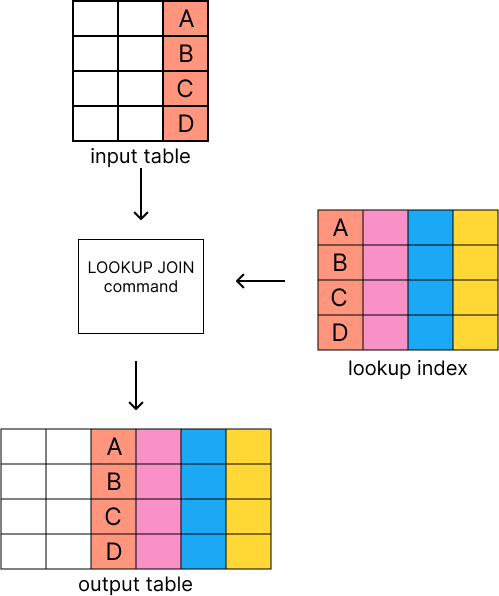
If you're familiar with SQL, LOOKUP JOIN has left-join behavior. This means that if no rows match in the lookup index, the incoming row is retained and nulls are added. If many rows in the lookup index match, LOOKUP JOIN adds one row per match.
Remote lookup joins are supported in cross-cluster queries.
By default, ES|QL resolves the lookup index on every cluster in the query and each cluster joins against its own local index with that name. This follows the same pattern as remote mode Enrich.
If the lookup index is missing from one or more remote clusters, use coordinator mode.
FROM log-cluster-*:logs-* | LOOKUP JOIN hosts ON source.ip
LOOKUP JOIN is also supported in cross-project search (CPS).
By default, ES|QL resolves the lookup index on every project in the query and each project joins against its own local index with that name. In this case, the lookup index must exist on every project being queried.
If the lookup index is missing from one or more linked projects, use coordinator mode.
In cross-cluster or cross-project queries, you can prefix the index name with _coordinator: to run the lookup on the local cluster or origin project instead of on each remote cluster or linked project.
Use this when the lookup index is missing from one or more remote clusters or linked projects in the query, or when you need LOOKUP JOIN after pipeline-breaking commands such as STATS, LIMIT, or SORT.
FROM *:data | LOOKUP JOIN _coordinator:lookup-index ON field
The lookup runs against the local lookup index on the coordinating node rather than against lookup index copies on each remote cluster. The join runs on the coordinating node and reads the lookup index from the local cluster or origin project only.
Source rows from remote clusters or linked projects are still queried, then joined against that single lookup index.
Note the following constraints specific to coordinator mode:
- On Elastic Stack deployments, the remote cluster name
_coordinatoris reserved. If a remote cluster is registered under that name, coordinator mode cannot be used. The query fails with a validation error until the remote cluster is renamed. - After a coordinator
LOOKUP JOIN, remote operations are not supported in the same query. Specifically, aLOOKUP JOIN(without the_coordinator:prefix) andENRICH _remote:cannot appear later in the pipeline.
You can run this example for yourself if you'd like to see how it works, by setting up the indices and adding sample data.
Expand for setup instructions
Set up indices
First let's create two indices with mappings: threat_list and firewall_logs.
				PUT threat_list
					{
  "settings": {
    "index.mode": "lookup"
  },
  "mappings": {
    "properties": {
      "source.ip": { "type": "ip" },
      "threat_level": { "type": "keyword" },
      "threat_type": { "type": "keyword" },
      "last_updated": { "type": "date" }
    }
  }
}
- The lookup index must use this mode
				PUT firewall_logs
					{
  "mappings": {
    "properties": {
      "timestamp": { "type": "date" },
      "source.ip": { "type": "ip" },
      "destination.ip": { "type": "ip" },
      "action": { "type": "keyword" },
      "bytes_transferred": { "type": "long" }
    }
  }
}
Add sample data
Next, let's add some sample data to both indices. The threat_list index contains known malicious IPs, while the firewall_logs index contains logs of network traffic.
				POST threat_list/_bulk
					{"index":{}}
{"source.ip":"203.0.113.5","threat_level":"high","threat_type":"C2_SERVER","last_updated":"2025-04-22"}
{"index":{}}
{"source.ip":"198.51.100.2","threat_level":"medium","threat_type":"SCANNER","last_updated":"2025-04-23"}
				POST firewall_logs/_bulk
					{"index":{}}
{"timestamp":"2025-04-23T10:00:01Z","source.ip":"192.0.2.1","destination.ip":"10.0.0.100","action":"allow","bytes_transferred":1024}
{"index":{}}
{"timestamp":"2025-04-23T10:00:05Z","source.ip":"203.0.113.5","destination.ip":"10.0.0.55","action":"allow","bytes_transferred":2048}
{"index":{}}
{"timestamp":"2025-04-23T10:00:08Z","source.ip":"198.51.100.2","destination.ip":"10.0.0.200","action":"block","bytes_transferred":0}
{"index":{}}
{"timestamp":"2025-04-23T10:00:15Z","source.ip":"203.0.113.5","destination.ip":"10.0.0.44","action":"allow","bytes_transferred":4096}
{"index":{}}
{"timestamp":"2025-04-23T10:00:30Z","source.ip":"192.0.2.1","destination.ip":"10.0.0.100","action":"allow","bytes_transferred":512}
FROM firewall_logs
| LOOKUP JOIN threat_list ON source.ip
| WHERE threat_level IS NOT NULL
| SORT timestamp
| KEEP source.ip, action, threat_type, threat_level
| LIMIT 10
- The source index
- The lookup index and join field
- Filter for rows non-null threat levels
- LOOKUP JOIN does not guarantee output order, so you must explicitly sort the results if needed
- Keep only relevant fields
- Limit the output to 10 rows
A successful query will output a table. In this example, you can see that the source.ip field from the firewall_logs index is matched with the source.ip field in the threat_list index, and the corresponding threat_level and threat_type fields are added to the output.
| source.ip | action | threat_type | threat_level |
|---|---|---|---|
| 203.0.113.5 | allow | C2_SERVER | high |
| 198.51.100.2 | block | SCANNER | medium |
| 203.0.113.5 | allow | C2_SERVER | high |
Refer to the examples section of the LOOKUP JOIN command reference for more examples.
Indices used for lookups must be configured with the lookup index mode.
Join keys must have compatible data types between the source and lookup indices. Types within the same compatibility group can be joined together:
| Compatibility group | Types | Notes |
|---|---|---|
| Numeric family | byte, short, integer, long, half_float, float, scaled_float, double |
All compatible |
| Keyword family | keyword, text.keyword |
Text fields only as join key on left-hand side and must have .keyword subfield |
| Date (Exact) | date |
Must match exactly |
| Date Nanos (Exact) | date_nanos |
Must match exactly |
| Boolean | boolean |
Must match exactly |
To obtain a join key with a compatible type, use a conversion function if needed.
In addition to the ES|QL unsupported field types, LOOKUP JOIN does not support:
VERSIONUNSIGNED_LONG- Spatial types like
GEO_POINT,GEO_SHAPE - Temporal intervals like
DURATION,PERIOD
For a complete list of all types supported in LOOKUP JOIN, refer to the LOOKUP JOIN supported types table.
This section covers important details about LOOKUP JOIN that impact query behavior and results. Review these details to ensure your queries work as expected and to troubleshoot unexpected results.
When fields from the lookup index match existing column names, the new columns override the existing ones.
Before the LOOKUP JOIN command, preserve columns by either:
- Using
RENAMEto assign non-conflicting names - Using
EVALto create new columns with different names
The output rows produced by LOOKUP JOIN can be in any order and may not
respect preceding SORTs. To guarantee a certain ordering, place a SORT after
any LOOKUP JOINs.
The following are the current limitations with LOOKUP JOIN:
- Indices in
lookupmode are always single-sharded. - Cross cluster search is unsupported in versions prior to
9.2.0. Both source and lookup indices must be local for these versions. - Currently, only matching on equality is supported.
- In Stack versions
9.0-9.1,LOOKUP JOINcan only use a single match field and a single index. Wildcards are not supported.- Aliases, datemath, and datastreams are supported, as long as the index pattern matches a single concrete index
.
- Aliases, datemath, and datastreams are supported, as long as the index pattern matches a single concrete index
- The name of the match field in
LOOKUP JOIN lu_idx ON match_fieldmust match an existing field in the query. This may requireRENAMEs orEVALs to achieve. - The query will circuit break if there are too many matching documents in the lookup index, or if the documents are too large. More precisely,
LOOKUP JOINworks in batches of, normally, about 10,000 rows; a large amount of heap space is needed if the matching documents from the lookup index for a batch are multiple megabytes or larger. This is roughly the same as forENRICH. - Cross-cluster or cross-project
LOOKUP JOINcannot be used after a command that runs on the querying cluster. This includes all pipeline-breaking commands —STATS,INLINE STATS,SORT,LIMIT,TS_INFO, andMETRICS_INFOamong them — and any command that only ever runs on the querying cluster, such asCHANGE_POINT,FORK,FUSE,RERANK,COMPLETION,MMR, and coordinator-sideENRICH. Use the_coordinator:prefix to avoid this restriction.