Overview in AutoOps
The Overview page offers an at-a-glance look at the health of all your deployments and clusters that are linked to the same Elastic organization.
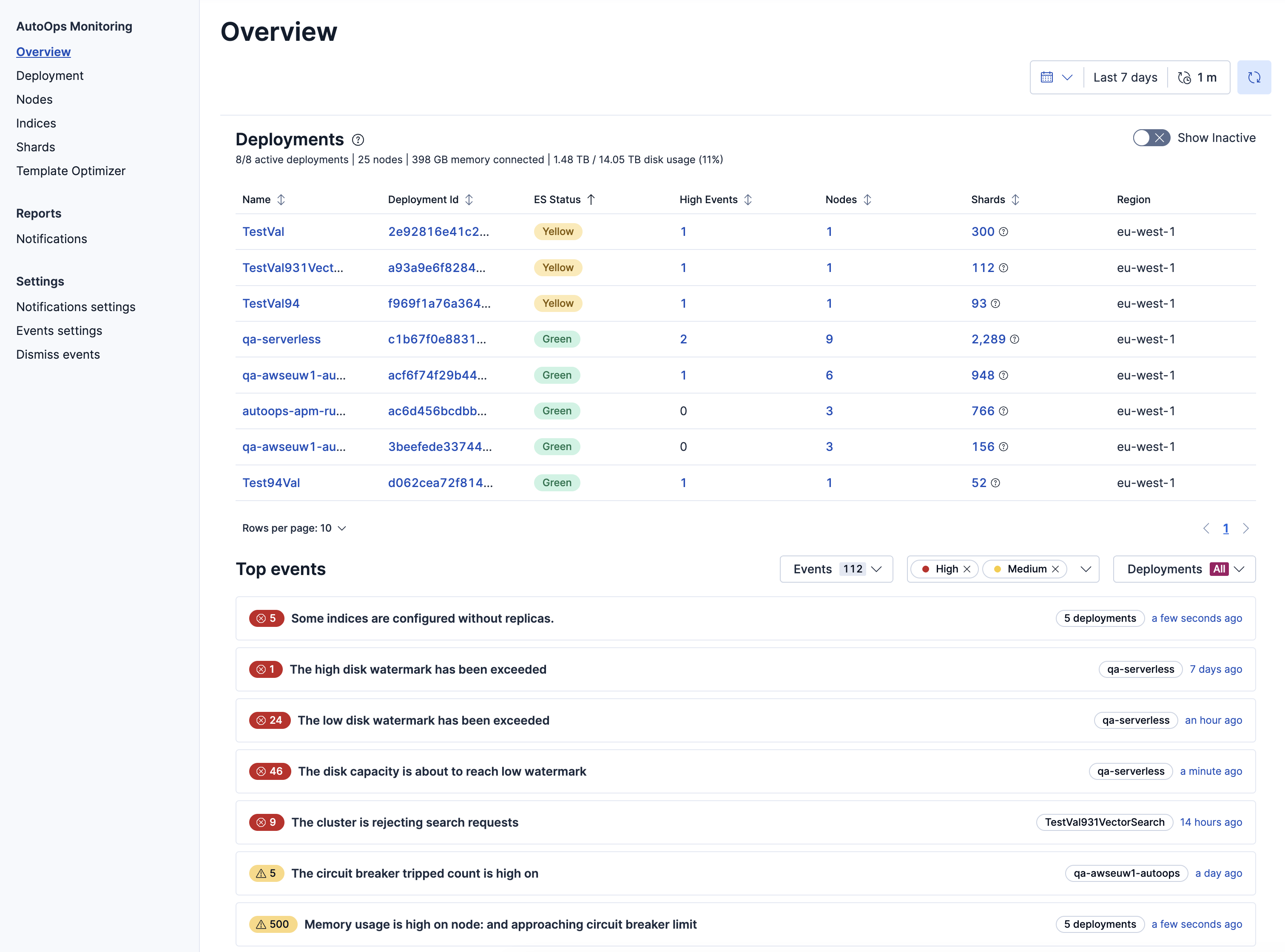
This view displays quick metrics about active deployments and nodes, cluster status, and top events. You can also navigate to a specific deployment or cluster for more details.
The Overview page lists only those deployments and clusters in your Elastic organization that run in a region where AutoOps is available.
To get to the Overview page, go to AutoOps in your deployment or cluster and select Overview from the side navigation.
The Overview page shows the following information.
Under the Deployments header, you can view the number of active deployments, nodes, and a summary of memory and disk usage across your organization.
The Deployments table lists all active and inactive deployments monitored by AutoOps, along with real-time updates of Elasticsearch status, the number of open critical events, and the number of nodes and shards in each deployment. Select a deployment for a more detailed view of its events, resource usage, and performance.
The Top Events list provides a quick overview of the top open events across all deployments and connected clusters that AutoOps is monitoring. You can filter the list by specific events, severity, and deployment or cluster.
The default view lists the top 10 most important events, sorted by severity. Each event ribbon indicates the number of occurrences across all deployments or clusters and a timestamp of when the event last occurred, which you can click to find additional details.