Voice and tone
In technical documentation, voice represents the personality of the product. Its main traits. These are constant. Tone represents the various ways we can use that voice to address users.
Use the Vale linter to check for style issues while writing documentation. Vale automatically flags common style guide violations, so you can catch and fix issues before publishing.
We articulate our voice around a few main principles.
Being conversational without exaggerating or forcing our traits makes our products more human and easier to interact with daily. We address users directly.
| ✔️ We are... | ❌ But not... | How? |
|---|---|---|
| Human, plainspoken | Academic or too casual | Be conversational, yet professional. Write close to how you'd talk. |
| Empathetic, caring | Cutesy | Write what matters to users. Consider the impact of your content on user experience. |
| Inclusive, open | Exclusive | Write for all audiences. Don't use terms that might discriminate or offend. |
| User-focused | User-obsessed | Use you and yours by default, but not when the user doesn't directly own what's described. |
With timely, succinct, and impactful content, we can make our users' jobs easier and help them be more efficient.
| ✔️ We are... | ❌ But not... | How? |
|---|---|---|
| Informative | Overly wordy | Ensure all content is relevant, serves a purpose, and is not just decoration. |
| Transparent | Disorganized | Provide the right details at the right time—not too soon, not too late. Be accurate. |
| Succinct | Vague | Shorten the content to something meaningful and scannable, without sacrificing clarity. |
Through our content, we empower users to do more and to dive into their next actions. We help them achieve their potential and trust them to forge their best path forward.
| ✔️ We are... | ❌ But not... | How? |
|---|---|---|
| Inspiring | Arrogant | Use words that motivate users and help them to exceed their limits. |
| Confident | Pretentious, controlling | Be definite and trustworthy. Delete unnecessary wording. Don't oversell. |
| Forward-looking | Hand-holding, prescriptive | Help users connect the dots and see the big picture, while giving them the choice. |
Our products and solutions are very technical, data-oriented, and they're used globally by people from different cultures and personalities. These considerations, amongst others, limit the spectrum of tones we use to some extent, but not entirely.
During the users' journey with Elastic, there are times for excitement and discovery, but also times for help, support, and empathy.
Our tone scale
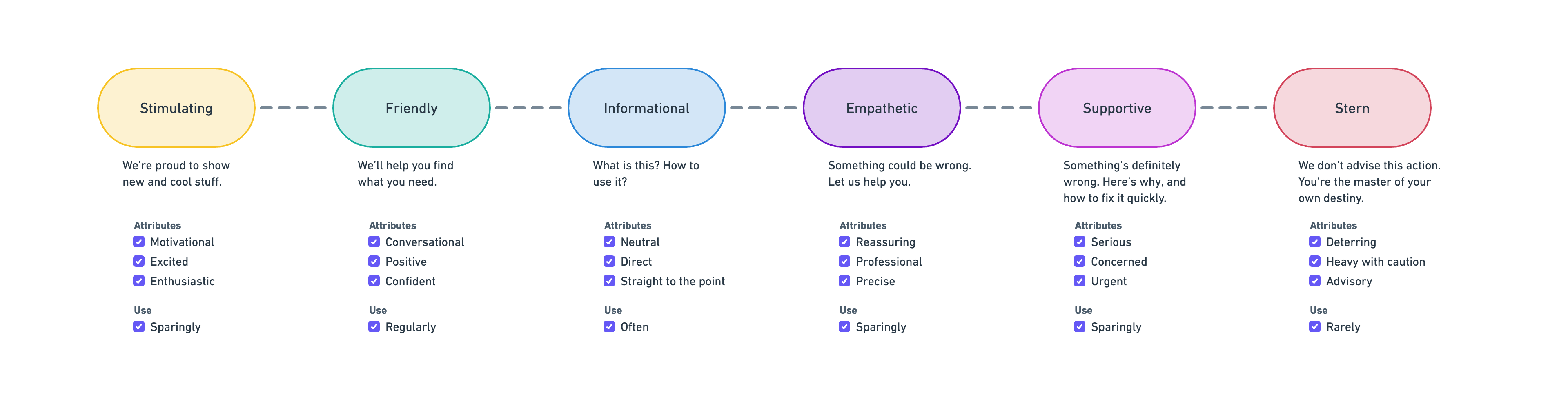
We're proud to show new and cool stuff. Be:
- Motivational
- Excited
- Enthusiastic
When using this tone, you may:
- Use exclamation marks, but sparingly.
- Help the user understand how the feature benefits them or helps them to achieve their goals.
- Use visuals to support your text, like GIFs or videos.
Although it can be very visible because of the way it's written, the stimulating tone is used quite rarely overall.
We use it when we want to show new things to users, especially in:
- Getting started guides
- Release highlights
Let's start exploring what's happening in your environment. After installing Elastic Defend, you'll see the following page.
Attack discovery is a new AI-powered tool that identifies potential attacks and maps connections between alerts to the MITRE ATT&CK® matrix, helping you to fight alert fatigue and reduce your mean time to respond.
Take your investigation to a deeper level! Use Elastic Observability to unify your logs, metrics, uptime, and application performance data.
All's fine, we'll help you find your way. Be:
- Calm
- Positive
- Confident
When using this tone, you may:
- Use slightly more casual terminology.
- Explain what's missing or what's happening.
- Provide actions or clearly state when no action is needed.
The friendly tone is used sparingly overall.
We use it when trying to orient users in performing their next action or learning different things they could do, especially in:
- Quick starts
- Tutorials
Got everything working as you want it? Roll out your agent policies to other hosts by deploying Elastic Agents across your infrastructure!
Want Elastic to do the heavy lifting? Use machine learning to detect anomalies.
E=MC². Be:
- Direct
- Straight to the point
- Neutral
When using this tone:
- Use a minimum of words.
- Write for scanning and help users quickly locate what matters to them.
- Use action verbs to:
- Label selection controls
- Describe what settings do or what to do with a setting
- Use clear nouns for menus and form field names.
The informational tone is the most used one. It's everywhere in the docs, and sometimes seems so normal that we forget about it. Yet, it's very important!
We use it for naming and describing things:
- Reference content
- Concepts
- How-tos
- Event logs
- Troubleshooting
Mapping is the process of defining how a document, and the fields it contains, are stored and indexed. Each document is a collection of fields, which each have their own data type. When mapping your data, you create a mapping definition, which contains a list of fields that are pertinent to the document. A mapping definition also includes metadata fields, like the _source field, which customize how a document's associated metadata is handled.
An Elastic Cloud deployment offers you all of the features of the Elastic Stack as a hosted service. To test drive your first deployment, sign up for a free Elastic Cloud trial:
- Go to our Elastic Cloud Trial page.
- Enter your email address and a password.
- After you've logged in, you can create a deployment. Give your deployment a name and select Create deployment.
If you receive the following rule failure: "Bulk Indexing of signals failed: [parent] Data too large", this indicates that the alerts payload was too large to process. This can be caused by bad indicator data, a misconfigured rule, or too many event matches. Review your indicator data or rule query. If nothing obvious is misconfigured, try executing the rule against a subset of the original data and continue diagnosis.
Something might be wrong or unexpected and requires attention. Let us help you. Be:
- Reassuring
- Professional
- Precise
When using this tone, you may:
- Be more action-oriented than usual to offer direct paths to users.
The empathetic tone is used sparingly overall and usually becomes visible in forms that draw the user's attention.
We use it when notifying users of things that are not immediately critical but still require attention, especially in:
- Warnings and cautions
- Upgrade and deprecation notices
The kNN search API is deprecated in favor of the new knn option inside the search API. The knn option is now the recommended way of running ANN search.
The indicator index query of the prebuilt rule is misconfigured and will prevent the rule from generating alerts. To resolve this, duplicate the rule and update its settings:
- Go to the Rules table (Detect → Rules).
- Locate the Threat Intel Filebeat Module (v8.x) Indicator Match prebuilt rule.
- Click the rule to view the rule details.
- Click the actions menu, then click Duplicate rule.
Something is definitely wrong. Here's why, and how to fix it. Be:
- Serious
- Concerned
- Urgent
When using this tone, you may:
- Focus on what went wrong. Don't be apologetic.
- Help users learn how something happened, how to prevent it, how to fix it.
- Provide clear actions, or clearly state if there's no action needed.
The supportive tone is used sparingly. It usually becomes visible in forms that draw the user's attention, for example, through callouts or notifications.
We use it when the immediate attention of the user is required, especially in:
- Errors
- Licensing or billing-related content
- Vulnerability and remediation content
NOTE: To suspend a process on a host running Elastic Defend, you must have the Process Operations privilege and at least an Enterprise license to perform this action.
You might find the Failed to migrate user action alerts error message in your Kibana migration logs when upgrading to Elastic Stack version 8.0.0. This error is incorrectly logged when migrating cases and is safe to ignore.
We don't advise this action and there might be significant implications. Be:
- Deterring
- Heavy with caution
- Advisory
When using this tone, you may:
- Use stronger words that highlight possible negative effects.
- Format the content in a way that make the risks stand out.
The stern tone is rarely used. Reserve it for very specific cases, and for advanced or administrative features.
We use it when insisting on the high risks an action could pose, especially in:
- Danger type of warnings
The following changes in Elasticsearch 8.0 might affect your applications and prevent them from operating normally. Before upgrading to 8.0, review these changes and take the described steps to mitigate the impact.
We strongly recommend performing the following steps on a non-production deployment first to address any potential issues before upgrading your production deployments. If you're using a cross-cluster search environment, upgrade your remote deployments first.
Concise, clear sentences not only save space, but are easy to understand. Use simple words with precise meanings, and remove words that don't add substance. Long and convoluted sentences take longer to parse and are more difficult to comprehend. This may especially affect our readers who are non-native English speakers, or neurodivergent. At the same time, keep Elastic's friendly, casual tone in mind and use your best judgment so you don't sound too stoic or unfriendly.
To see if your sentence is too long, one tip is to check the number of conjunctions it has. If your sentence has more than two conjunctions, consider dividing it into two:
and, then, but, however, even either, or, neither, nor,
that, as, after, before, since, when, where, if
Another tip is to use the simple present form of a verb whenever possible. Don't overuse gerunds, especially when they're not needed. For example:
| Avoid | Use instead |
|---|---|
| When you are enabling a cluster... | When you enable a cluster... |
Finally, find any words that are redundant or aren't contributing anything, and delete them. Here are a few examples:
| Avoid | Use instead |
|---|---|
| in order to | to |
| in the event that | if |
| usage, utilize, make use of | use |
| inform, let know | tell |
| in addition | also |
| that have | with |
| at a later date | later |
| due to the fact | because |
| provides the opportunity | allows, enables you to |
| there are a number of | there are several |
Many English words can be used both as nouns and as verbs. We can have a login or we can log in. We can produce an insult or we can insult the produce.
Sometimes, the spelling changes between the noun and verb form. For instance, it's much better to save a life than to live in a safe.
A few words that show up in our documentation frequently are backup, login, setup, and startup. All of these are nouns. When used as verbs, they need to be individual words: back up, log in, set up, start up.
So, you can back up a backup, set up a setup, or start up your very own startup.
In most cases, saying "please" is unnecessary in documentation. This doesn't mean we're not polite. We don't ask our users for favors, we instruct them on how to use our products.
| Avoid | Use instead |
|---|---|
| Please click Save before continuing to the next step. | Click Save before continuing to the next step. |
Many English words have more than one meaning, so whenever possible, choose words that have one clear meaning.
| Avoid | Use instead |
|---|---|
| Since | Because |
| The minute you | When you |
| Watch the following clip | Watch the following tutorial |
| Don't fall into the habit | We recommend, we encourage |
Voice is either active or passive. Keep it active whenever you can.
In active voice, the subject of the sentence performs the action. In passive voice, the subject is the receiver of the action.
However, if the sentence written in active voice sounds too awkward, you can use passive voice.
| Avoid | Use instead |
|---|---|
| The settings can be configured using the actions menu. | You can configure settings using the actions menu. |
Consistency ensures that we present information clearly and logically. It allows our readers to easily follow the content without any confusion or misunderstanding, so we don't disrupt the readability of our docs. Using consistent terminology and formatting helps readers understand concepts and instructions more effectively. Consistency is also important in maintaining a unified, professional brand and company image.