Salesforce Integration
| Version | 1.10.0 (View all) |
| Subscription level What's this? |
Basic |
| Developed by What's this? |
Elastic |
| Ingestion method(s) | API |
| Minimum Kibana version(s) | 9.0.0 8.16.0 |
The Salesforce integration enables you to monitor your Salesforce instance. Salesforce is a customer relationship management (CRM) platform that supports businesses in managing marketing, sales, commerce, service, and IT teams from a unified platform accessible from anywhere.
You can use the Salesforce integration for:
Operational insights: Gain valuable insights into your organization's login and logout activities and other operational events.
Data visualization: Create detailed visualizations to monitor, measure, and analyze usage trends and key data, helping you derive actionable business insights.
Proactive alerts: Set up alerts to minimize Mean Time to Detection (MTTD) and Mean Time to Resolution (MTTR) by referencing relevant logs during troubleshooting.
Elastic Agent uses the Salesforce input to query the EventLogFile API and Real-Time Event Monitoring objects via SOQL over the REST API. Login, Logout, and AuraRequest data streams can collect from either EventLogFile or the corresponding real-time object (LoginEvent, LogoutEvent, AuraRequestEventLog). The Apex data stream reads EventLogFile records, and the SetupAuditTrail data stream queries the SetupAuditTrail object. OAuth 2.0 authentication is provided through a Salesforce Connected App using either the JWT bearer flow or the Username-Password flow. Collection is interval-based, uses cursors to avoid duplicates, and supports backfilling with an initial time window.
login: Collects information related to users who log in to Salesforce.logout: Collects information related to users who log out from Salesforce.apex: Collects information about various Apex events such as Callout, Execution, REST API, SOAP API, Trigger, and so on.setupaudittrail: Collects information related to changes users made in the organization's setup area for the last 180 days.aura_request: Collects server-side Aura framework requests made by the Salesforce Lightning Experience UI.
The Salesforce integration collects the following events using the Salesforce REST API:
- Login EventLogFile
- Login Platform Events
- Logout EventLogFile
- Logout Platform Events
- Apex EventLogFile
- SetupAuditTrail Object
- Aura Request EventLogFile
- AuraRequestEventLog Object
This integration has been tested against the Salesforce Winter '26 (v65.0). The minimum supported version is v46.0.
To determine your Salesforce instance version, use one of the following methods:
Salesforce Classic
On the
Hometab in Salesforce Classic, you can find a link in the top right corner that indicates the current release version of your Salesforce instance, for exampleSummer '24 for Developers.Use the Salesforce instance URL
Use your Salesforce instance URL in the following format:
<instance URL>/services/data(for example,https://na9.salesforce.com/services/data). In this example,https://na9.salesforce.comis the instance URL.Requesting the URL returns an XML response listing all available versions:
<Version>
    <label>Spring '25</label>
    <url>/services/data/v63.0</url>
    <version>63.0</version>
</Version>
<Version>
    <label>Summer '25</label>
    <url>/services/data/v64.0</url>
    <version>64.0</version>
</Version>
<Version>
    <label>Winter '26</label>
    <url>/services/data/v65.0</url>
    <version>65.0</version>
</Version>
The last entry in the list indicates the current version of your Salesforce instance. In this example, the current version is Winter '26 (v65.0).
The Salesforce integration collects the following data streams:
login: Collects information related to users who log in to Salesforce.logout: Collects information related to users who log out from Salesforce.apex: Collects information about various Apex events such asApexCallout,ApexExecution,ApexRestApi,ApexSoap,ApexTrigger, andExternalCustomApexCallout.setupaudittrail: Collects information related to changes users made in the organization's setup area for the last 180 days.aura_request: Collects server-side Aura framework requests made by the Salesforce Lightning Experience UI, which is effectively the record and component level access log for the modern Salesforce UI.
The Salesforce integration collects the following events using the Salesforce REST API:
- For
login— Login EventLogFile and Login Platform Events - For
logout— Logout EventLogFile and Logout Platform Events - For
apex— Apex EventLogFile - For
setupaudittrail— SetupAuditTrail Object - For
aura_request— Aura Request EventLogFile and the AuraRequestEventLog Object
You need Elasticsearch to store and search your data and Kibana to visualize and manage it. You can use our hosted Elasticsearch Service on Elastic Cloud, which is recommended, or self-manage the Elastic Stack on your hardware.
Make sure API Enabled permission is selected for the user profile in your Salesforce instance:
- Go to
Setup>Quick Findand typeUsers. - Select
Usersfrom the left navigation tree. - In the
Full Namecolumn, select the name associated with the user account used for data collection. - Search for the
API Enabledpermission on the profile page. If it’s not present, search underSystem Permissionsand check if theAPI Enabledprivilege is selected. If not, enable it for data collection.
- Go to
Make sure that collecting data using Real-Time Event Monitoring API is enabled:
- Go to
Setup>Quick Findand typeEvent Manager. - Select
Event Managerfrom the left navigation tree. - To monitor an event, for example, Login Event, or Logout Event, click the dropdown arrow and select
Enable Storage. - Check if you have the required permissions:
View Real-Time Event Monitoring Data.
- Go to
Real-Time Event Monitoring may require additional licensing. Check your subscription level with your Salesforce account representative.
For the
aura_requestdata stream, additional requirements apply:- The data stream is disabled by default because of its volume and licensing requirements. Enable it explicitly in the integration policy.
- The
AuraRequestevent type is not part of the EventLogFile subset that Salesforce includes at no extra cost (Apex Unexpected Exception,API Total Usage,CORS Violation Record,CSP Violation,Hostname Redirects,Insecure External Assets,Login, andLogout), so it requires Salesforce Shield or the Event Monitoring add-on. Developer Edition orgs get all event types with one day of retention, and Developer and Trial orgs must opt in to event log file generation. - Collecting from the
AuraRequestEventLogobject requires API version 61.0 or later, and theView Event Log Object Datauser permission (or theEvent Monitoring Userpermission set) on the integration user. TheView All Datapermission that also grants access toEventLogFiledoes not grant access to event log objects. - Event log objects such as
AuraRequestEventLogare available in Enterprise, Performance, and Unlimited editions with Salesforce Shield or the Event Monitoring add-on. They are available only on Hyperforce instances and are unavailable in Government Cloud, soEventLogFileis the only option in those orgs. - Choose the collection method based on the latency and retention you need.
EventLogFileruns three to six hours behind on the hourly interval (longer when Salesforce is under load) and arrives the next day on the daily interval, and file retention is one day without the Event Monitoring add-on or up to one year with it, as configured inEvent Monitoring Settings. TheAuraRequestEventLogobject becomes queryable 25 to 45 minutes after an event, but retains only 30 days of data and limits each query to a 15 day window, so keep the initial interval at or below360hwhen using it.
For step-by-step instructions on how to set up an integration, see Getting started.
- Install Elastic Agent and enroll it in Fleet.
- In Fleet, add the Salesforce integration and enable the data streams you need:
apex,aura_request,login,logout, orsetupaudittrail. - Enter your Salesforce instance URL and API version.
- Choose an authentication method:
- JWT bearer flow: set Client ID, Username, Private key path (PEM), and JWT audience URL.
- Username‑Password flow: set Client ID, Client Secret, Username, Password (+ security token if required), and Token URL (base domain).
- For
login,logout, andaura_request, choose which sources to collect:- EventLogFile (batch logs)
- Real-time objects (
LoginEvent,LogoutEvent,AuraRequestEventLog)
- Optional tuning:
- Set an initial interval to backfill historical data.
- Adjust the collection interval per source.
- Optionally filter EventLogFile by log file interval (for example, hourly).
- In Advanced options, adjust the request timeout if Salesforce responses are slow.
To configure the Salesforce integration, you need the following information:
- Salesforce instance URL
- Authentication methods: choose one of the following and gather the required values:
- JWT bearer flow: Client ID, Username, JWT audience URL, Private key path (PEM)
- Username-Password flow: Client ID, Client Secret, Username, Password (+ security token if required), Token URL (base domain)
- API version
Choose one of the following OAuth 2.0 flows when configuring authentication:
- Use a Salesforce Connected App with an X.509 certificate for JWT: you upload the certificate to Salesforce; the private key never goes to Salesforce and must exist only on the Elastic Agent hosts.
- The private key file must be PEM-encoded, in PKCS#1 (
-----BEGIN RSA PRIVATE KEY-----) or PKCS#8 (-----BEGIN PRIVATE KEY-----) form, and must match the certificate on the Connected App. - Copy or deploy the key to a secure path on every agent that runs the integration policy, and set the integration's Private key path (PEM) to the absolute path on that host (the path is resolved where the agent runs, not in Kibana or Elasticsearch). Restrict file permissions so only the Elastic Agent user or service account can read the key.
- Required settings include: Client ID, Username, JWT audience URL, and the private key path. In the integration settings, enable
Enable JWT Authentication.
- Uses a Connected App with client secret and a named integration user.
- Required settings include: Client ID, Client Secret, Username, Password (append security token if required), and the Token URL (or your custom domain).
- Suitable for quick setup.
Leave Enable JWT Authentication disabled to use the Username-Password flow.
This is the URL of your Salesforce organization.
Salesforce Classic: Given the example URL https://na9.salesforce.com/home/home.jsp, the Salesforce Instance URL is extracted as https://na9.salesforce.com.
Salesforce Lightning: The instance URL is available under your user name in the
View Profiletab. Use the correct instance URL in case of Salesforce Lightning because it uses *.lightning.force.com but the instance URL is *.salesforce.com.
Create a Salesforce Connected App (supports both JWT Bearer and Username-Password flows):
- Log in to Salesforce (Lightning UI).
- From
Setup, inQuick FindenterExternal Client Appsand selectSettings. Turn onAllow creation of connected apps. To create a connected app, selectNew Connected App. - Fill
Basic Information:Connected App Name,API Name,Contact Email. - In
API (Enable OAuth Settings), checkEnable OAuth Settings. Callback URL:- Web apps: your app callback (for example,
https://yourapp.example.com/callback). - Not used by the JWT or Username-Password flows, but Salesforce requires a value; you can enter your instance URL.
- Web apps: your app callback (for example,
- Select OAuth scopes:
Manage user data via APIs (api)Perform requests at any time (refresh_token, offline_access)- (Optional)
Full access (full)
- Click
Save. It can take up to 10 minutes for the Connected App to propagate. - After saving, open
Manage Consumer Detailsto obtainConsumer KeyandConsumer Secret.
JWT Bearer flow (optional, recommended method):
Use this flow with Salesforce integration v0.15.0 or later on any deployment where Elastic Agent runs (self-managed stack, Elastic Cloud Hosted, Elastic Cloud Enterprise, Elastic Cloud on Kubernetes, or Serverless).
Prepare the JWT client certificate and key. Generate a private key in PEM format (PKCS#1 or PKCS#8) along with a corresponding X.509 certificate. The certificate is uploaded to the Connected App, while the private key is used by your client to sign JWT assertions. Refer to the Salesforce documentation for an example of creating the key and certificate.
Upload the certificate to the Connected App. In
Use digital signatures(underAPI (Enable OAuth Settings)), upload the X.509 certificate used for JWT. Do not upload the private key to Salesforce.Note the JWT audience URL to use (typically
https://login.salesforce.comorhttps://test.salesforce.comfor a sandbox).Store the private key on each Elastic Agent host. Place the
.pemfile in a secure directory the agent can read. Examples: Linux:/etc/elastic-agent/keys/; Windows:C:\Program Files\Elastic\Agent\keys\. Use restrictive permissions so the file is readable only by the Elastic Agent user or service account. If multiple agents run this integration, each host needs the key (or an equivalent way to place it at the configured path).Configure the integration. In Fleet, enable
Enable JWT Authenticationand setClient ID,Username,JWT audience URL, and Private key path (PEM) to the absolute path of the private key on the agent host—for example,/etc/elastic-agent/keys/salesforce_jwt_private.pem. In some UIs this field appears asJWT Authentication Client Key Path.Verify. Confirm the Elastic Agent can read the private key and that the path in the integration settings is correct.
Username-Password flow (alternative):
- Use the
Connected App'sConsumer KeyandConsumer Secret. - In Elastic, set
Username,Password(append security token if required),Client ID,Client Secret, andToken URL(instance base domain;/services/oauth2/tokenis appended internally).
For security reasons, Salesforce blocks the OAuth 2.0 Username-Password flow by default in recent releases. Prefer the JWT bearer flow. If you must use the Username-Password flow, in OAuth and OpenID Connect Settings, select Allow OAuth Username-Password Flows. For more information, see the Salesforce release note: Username-Password OAuth flow blocked by default.
For official steps, see Salesforce docs: Create a Connected App (Basics), OAuth 2.0 JWT Bearer Flow, and OAuth 2.0 Username-Password Flow
The email address or username associated with your Salesforce account used for authentication.
The password used to authenticate the user with your Salesforce instance.
When using a Salesforce instance with a security token, append the token directly to your password without spaces or special characters. For example, if your password is password and your security token is 12345, enter: password12345.
The Salesforce integration uses the token URL to obtain authentication tokens for API access. Important: The integration internally appends /services/oauth2/token to the URL you provide, so you should enter only the base URL.
- For most Salesforce instances, enter:
https://login.salesforce.com - For Salesforce sandbox environments, enter:
https://test.salesforce.com - For custom Salesforce domains, enter your custom domain base URL. For example, if your custom domain is
mycompany.my.salesforce.com, enter:https://mycompany.my.salesforce.com
In most cases, the Token URL is the same as the Salesforce instance URL.
Salesforce Lightning users must use a URL with the *.salesforce.com domain (the same as the instance URL) instead of *.lightning.force.com because the Salesforce API does not work with *.lightning.force.com.
To find the API version:
- Go to
Setup>Quick Find>Apex Classes. - Click
New. - Click the
Version Settingstab. - Refer to the
Versiondropdown for the API Version number.
Alternatively, you can use the Salesforce instance API version as described in the "Compatibility" section.
Once the Salesforce integration is successfully configured, follow these steps to validate the setup:
- Navigate to the
Assetstab in the Salesforce Integration. You will find a list of available dashboards related to your configured data streams. - Select the dashboard relevant to your data stream (for example, login, logout, apex, setupaudittrail, aura_request).
- Verify that the dashboard is populated with the expected data.
If the dashboard displays the data correctly, your integration is successfully validated.
This integration ships curated Kibana dashboards for each data stream. After data starts flowing, open the Salesforce integration and go to the Assets tab to launch:
- Apex dashboard
- AuraRequest dashboard
- Login dashboard
- Logout dashboard
- SetupAuditTrail dashboard
With version 0.15.0, we've significantly enhanced the Salesforce integration, introducing major changes in data collection mechanisms, authentication, and data streams. Due to these changes, we recommend using Salesforce integration v0.15.0 or above and uninstalling previous versions.
- Unified data collection: The integration now uses a single Filebeat input (Salesforce input) for data collection from EventLogFile and Real-time Event Monitoring APIs.
- JWT authentication: Introduced JWT authentication mechanism.
- Expanded configuration options: Added
initial_intervaland other options to fine-tune data collection, including historical data retrieval. - Change in data-collection mechanism: Replaced Streaming API (cometd) with Real-time Event Monitoring APIs.
- Performance optimization: Significantly reduced CPU and memory usage during data collection.
- Enhanced dashboards: Improved visualizations.
- Data stream consolidation: Reduced from 6 to 4 data streams —
apex,login,logout, andsetupaudittrail. - Field mapping updates: Modified mappings for multiple fields.
- Additional changes: Several other adjustments have been made to improve the overall performance and functionality of the integration.
This section provides solutions to common issues you might encounter while using the Salesforce integration.
If you experience delays in the response from the Salesforce server in the apex, aura_request, login, logout, or setupaudittrail data streams, you might encounter a similar error:
Error running EventLogFile collection: error reading log file body: context deadline exceeded (Client.Timeout or context cancellation while reading body)
This is most common in the apex and aura_request data streams, where individual EventLogFile downloads can be large.
Solution: Consider increasing the Request timeout setting in the Advanced options section for the affected data stream (it defaults to 30s, or 180s for aura_request). For example, set it to 120s.
If you encounter data ingestion errors, you might get the following error message:
400 Bad Request
Solution: Make sure that the API Enabled permission is granted to the profile associated with the username used for the integration. For more information, check the What do I need to use this integration? section.
If the error persists, follow these steps:
- Navigate to
Setup>Quick Find>App Manager. - Locate the app and click the corresponding arrow to view available actions.
- Click
View. - Obtain the client key and secret by clicking on
Manage Consumer Detailsin the API section. - Click
Manageto edit the policies. - Click
Edit Policiesand chooseRelax IP restrictionsfrom the dropdown menu for IP Relaxation.
CLIENT_ID=""
CLIENT_SECRET=""
USERNAME=""
PASSWORD=""
SECURITY_TOKEN=""
TOKEN_URL="https://<your-instance>.my.salesforce.com/services/oauth2/token"

curl -v -X POST "${TOKEN_URL}" \
     -d "grant_type=password" \
     -d "client_id=${CLIENT_ID}" \
     -d "client_secret=${CLIENT_SECRET}" \
     -d "username=${USERNAME}" \
     -d "password=${PASSWORD}${SECURITY_TOKEN}"
- Replace with your client ID
- Replace with your client secret
- Replace with your Salesforce username
- Replace with your Salesforce password
- Replace with your Salesforce security token (if applicable). Else, leave it blank.
- Replace with your Salesforce instance URL
The script has been tested on Unix-based systems (macOS, Linux). If you use a different operating system, you might need to adjust the command accordingly.
This command is useful for debugging and troubleshooting OAuth 2.0 authentication with Salesforce Connected Apps. It is recommended to use a tool like curl for testing OAuth 2.0 authentication before setting up the full Salesforce integration. This approach allows you to verify the authentication process and identify any potential issues early when setting up the full Salesforce integration. If the request is successful, the response will contain an access token that can be used to authenticate subsequent requests to the Salesforce API. If the request fails, the response will contain an error message indicating the reason for the failure.
- Collection intervals: Longer intervals reduce API usage and agent load; shorter intervals increase freshness at the cost of API calls and resource usage.
- Backfill: Use the initial interval to safely ingest historical data. Large backfills may consume significant Salesforce API quotas; consider staging by data stream.
- Login/Logout sources: EventLogFile is efficient for batched reporting; Platform Events provide lower-latency signals but may have throughput and retention limits in your org.
- AuraRequest volume: the
aura_requestdata stream records every server-side Aura request, so it is by far the highest volume data stream in this integration. A single user loading one Lightning page can generate dozens of events. Size your storage accordingly, and consider enabling only one of the two collection methods rather than both, since they surface the same events. - Timeouts: Increase the request timeout in Advanced options if Salesforce responses are slow or large result sets are expected.
- Salesforce input: https://www.elastic.co/guide/en/beats/filebeat/current/filebeat-input-salesforce.html
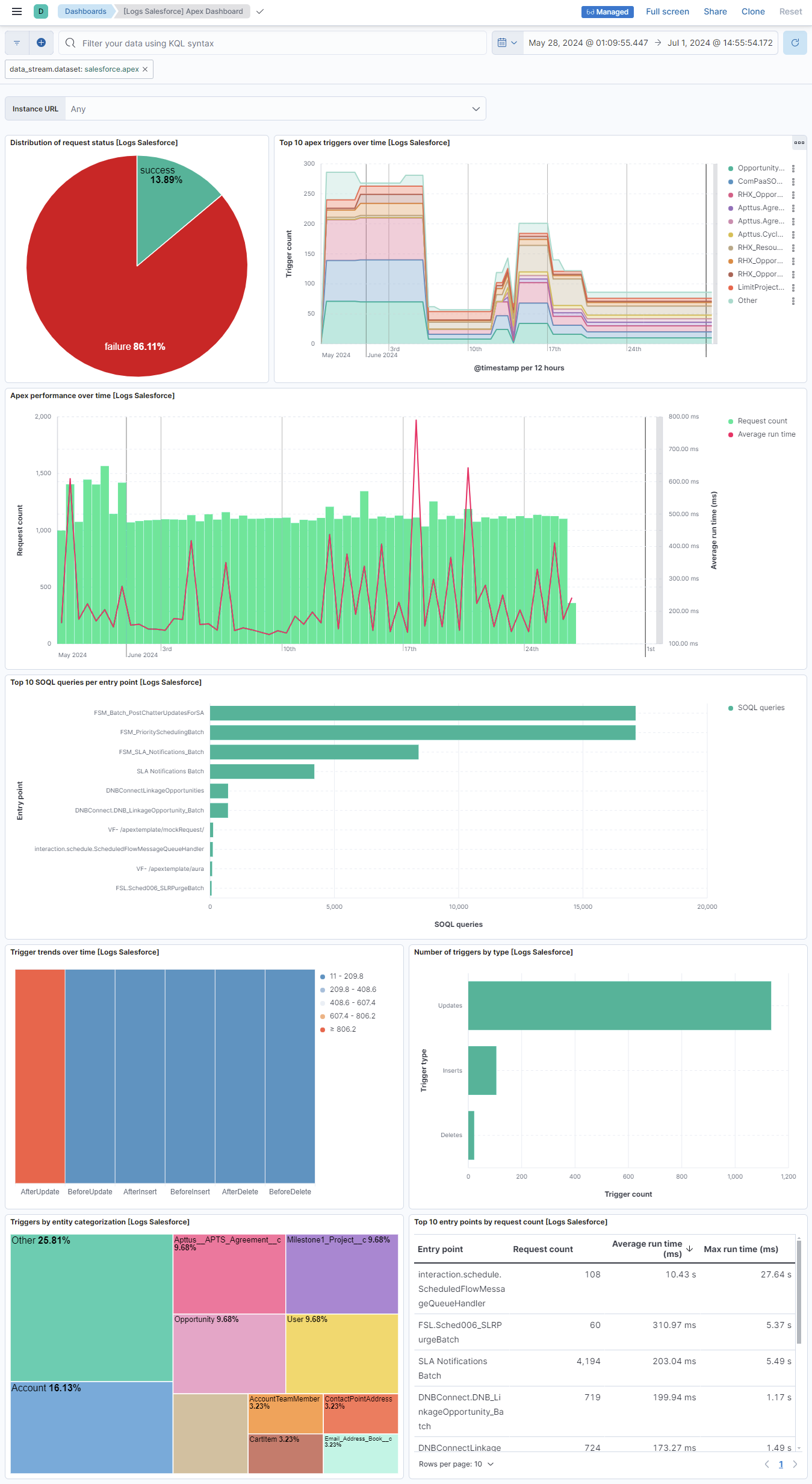
The apex data stream captures events related to Apex operations, enabling developers to access the Salesforce platform back-end database and client-server interfaces to create third-party SaaS applications.
Example
{
    "@timestamp": "2022-11-22T04:46:15.591Z",
    "agent": {
        "ephemeral_id": "bcd82746-7d4f-4c15-8288-e159f8223e86",
        "id": "ea40bcb3-cd35-4db9-b0d3-81d94e75b64d",
        "name": "docker-fleet-agent",
        "type": "filebeat",
        "version": "8.14.0"
    },
    "data_stream": {
        "dataset": "salesforce.apex",
        "namespace": "ep",
        "type": "logs"
    },
    "ecs": {
        "version": "8.11.0"
    },
    "elastic_agent": {
        "id": "ea40bcb3-cd35-4db9-b0d3-81d94e75b64d",
        "snapshot": false,
        "version": "8.14.0"
    },
    "event": {
        "action": "apex-callout",
        "agent_id_status": "verified",
        "category": [
            "network"
        ],
        "dataset": "salesforce.apex",
        "duration": 1293,
        "ingested": "2024-06-21T16:36:07Z",
        "kind": "event",
        "original": "{\"CLIENT_IP\":\"81.2.69.142\",\"CPU_TIME\":\"10\",\"EVENT_TYPE\":\"ApexCallout\",\"LOGIN_KEY\":\"Obv9123BzbaxqCo1\",\"METHOD\":\"GET\",\"ORGANIZATION_ID\":\"00D5j000000001V\",\"REQUEST_ID\":\"4exLFFQZ1234xFl1cJNwOV\",\"REQUEST_SIZE\":\"10\",\"RESPONSE_SIZE\":\"256\",\"RUN_TIME\":\"1305\",\"SESSION_KEY\":\"WvtsJ1235oW24EbH\",\"SUCCESS\":\"1\",\"TIME\":\"1293\",\"TIMESTAMP\":\"20221122044615.591\",\"TIMESTAMP_DERIVED\":\"2022-11-22T04:46:15.591Z\",\"TYPE\":\"OData\",\"URI\":\"CALLOUT-LOG\",\"URI_ID_DERIVED\":\"0055j000000utlPAQZB\",\"URL\":\"https://temp.sh/odata/Accounts\",\"USER_ID\":\"0055j0000000001\",\"USER_ID_DERIVED\":\"0055j012345utlPAAQ\"}",
        "outcome": "success",
        "provider": "EventLogFile",
        "type": [
            "connection"
        ],
        "url": "https://temp.sh/odata/Accounts"
    },
    "host": {
        "architecture": "x86_64",
        "containerized": true,
        "hostname": "docker-fleet-agent",
        "id": "345c85cf1fe945e2b19719b370c09a48",
        "ip": [
            "192.168.251.7"
        ],
        "mac": [
            "02-42-C0-A8-FB-07"
        ],
        "name": "docker-fleet-agent",
        "os": {
            "codename": "focal",
            "family": "debian",
            "kernel": "3.10.0-1160.114.2.el7.x86_64",
            "name": "Ubuntu",
            "platform": "ubuntu",
            "type": "linux",
            "version": "20.04.6 LTS (Focal Fossa)"
        }
    },
    "http": {
        "request": {
            "bytes": 10,
            "method": "GET"
        },
        "response": {
            "bytes": 256
        }
    },
    "input": {
        "type": "salesforce"
    },
    "related": {
        "ip": [
            "81.2.69.142"
        ]
    },
    "salesforce": {
        "apex": {
            "cpu_time": 10,
            "event_type": "ApexCallout",
            "login_key": "Obv9123BzbaxqCo1",
            "organization_id": "00D5j000000001V",
            "request_id": "4exLFFQZ1234xFl1cJNwOV",
            "run_time": 1305,
            "type": "OData",
            "uri": "CALLOUT-LOG",
            "uri_derived_id": "0055j000000utlPAQZB",
            "user_id_derived": "0055j012345utlPAAQ"
        },
        "instance_url": "http://elastic-package-service-salesforce-1:8010"
    },
    "source": {
        "geo": {
            "city_name": "London",
            "continent_name": "Europe",
            "country_iso_code": "GB",
            "country_name": "United Kingdom",
            "location": {
                "lat": 51.5142,
                "lon": -0.0931
            },
            "region_iso_code": "GB-ENG",
            "region_name": "England"
        },
        "ip": "81.2.69.142"
    },
    "tags": [
        "preserve_original_event",
        "salesforce-apex"
    ],
    "user": {
        "id": "0055j0000000001"
    }
}
Exported fields
| Field | Description | Type | Unit | Metric Type |
|---|---|---|---|---|
| @timestamp | Event timestamp. | date | ||
| data_stream.dataset | Data stream dataset. | constant_keyword | ||
| data_stream.namespace | Data stream namespace. | constant_keyword | ||
| data_stream.type | Data stream type. | constant_keyword | ||
| input.type | Input type. | keyword | ||
| salesforce.apex.action | Action performed by the callout. | keyword | ||
| salesforce.apex.callout_time | Time spent waiting on web service callouts, in milliseconds. | float | ms | gauge |
| salesforce.apex.class_name | The Apex class name. If the class is part of a managed package, this string includes the package namespace. | keyword | ||
| salesforce.apex.client_name | The name of the client that's using Salesforce services. This field is an optional parameter that can be passed in API calls. If blank, the caller didn't specify a client in the CallOptions header. | keyword | ||
| salesforce.apex.cpu_time | The CPU time in milliseconds used to complete the request. | float | ms | gauge |
| salesforce.apex.db_blocks | Indicates how much activity is occurring in the database. A high value for this field suggests that adding indexes or filters on your queries would benefit performance. | long | gauge | |
| salesforce.apex.db_cpu_time | The CPU time in milliseconds to complete the request. Indicates the amount of activity taking place in the database layer during the request. | float | ms | gauge |
| salesforce.apex.db_total_time | Time (in milliseconds) spent waiting for database processing in aggregate for all operations in the request. Compare this field to cpu_time to determine whether performance issues are occurring in the database layer or in your own code. | float | ms | gauge |
| salesforce.apex.entity | Name of the external object being accessed. | keyword | ||
| salesforce.apex.entity_name | The name of the object affected by the trigger. | keyword | ||
| salesforce.apex.entry_point | The entry point for this Apex execution. | keyword | ||
| salesforce.apex.event_type | The type of event. | keyword | ||
| salesforce.apex.execute_ms | How long it took (in milliseconds) for Salesforce to prepare and execute the query. Available in API version 42.0 and later. | float | ms | gauge |
| salesforce.apex.fetch_ms | How long it took (in milliseconds) to retrieve the query results from the external system. Available in API version 42.0 and later. | float | ms | gauge |
| salesforce.apex.fields_count | The number of fields or columns, where applicable. | long | ||
| salesforce.apex.filter | Field expressions to filter which rows to return. Corresponds to WHERE in SOQL queries. | keyword | ||
| salesforce.apex.is_long_running_request | Indicates whether the request is counted against your org's concurrent long-running Apex request limit. | boolean | ||
| salesforce.apex.limit | Maximum number of rows to return for a query. Corresponds to LIMIT in SOQL queries. | long | ||
| salesforce.apex.limit_usage_pct | The percentage of Apex SOAP calls that were made against the organization's limit. | float | percent | gauge |
| salesforce.apex.login_key | The string that ties together all events in a given user's login session. It starts with a login event and ends with either a logout event or the user session expiring. | keyword | ||
| salesforce.apex.media_type | The media type of the response. | keyword | ||
| salesforce.apex.message | Error or warning message associated with the failed call. | text | ||
| salesforce.apex.method_name | The name of the calling Apex method. | keyword | ||
| salesforce.apex.offset | Number of rows to skip when paging through a result set. Corresponds to OFFSET in SOQL queries. | long | ||
| salesforce.apex.orderby | Field or column to use for sorting query results, and whether to sort the results in ascending (default) or descending order. Corresponds to ORDER BY in SOQL queries. | keyword | ||
| salesforce.apex.organization_id | The 15-character ID of the organization. | keyword | ||
| salesforce.apex.query | The SOQL query, if one was performed. | keyword | ||
| salesforce.apex.quiddity | The type of outer execution associated with this event. | keyword | ||
| salesforce.apex.request_id | The unique ID of a single transaction. A transaction can contain one or more events. Each event in a given transaction has the same request_id. | keyword | ||
| salesforce.apex.request_status | The status of the request for a page view or user interface action. | keyword | ||
| salesforce.apex.rows_fetched | Number of rows fetched by the callout. Available in API version 42.0 and later. | long | ||
| salesforce.apex.rows_processed | The number of rows that were processed in the request. | long | ||
| salesforce.apex.rows_total | Total number of records in the result set. The value is always -1 if the custom adapter's DataSource.Provider class doesn't declare the QUERY_TOTAL_SIZE capability. | long | ||
| salesforce.apex.run_time | The amount of time that the request took in milliseconds. | float | ms | gauge |
| salesforce.apex.select | Comma-separated list of fields being queried. Corresponds to SELECT in SOQL queries. | keyword | ||
| salesforce.apex.soql_queries_count | The number of SOQL queries that were executed during the event. | long | ||
| salesforce.apex.subqueries | Reserved for future use. | keyword | ||
| salesforce.apex.throughput | Number of records retrieved in one second. | float | gauge | |
| salesforce.apex.trigger_id | The 15-character ID of the trigger that was fired. | keyword | ||
| salesforce.apex.trigger_name | For triggers coming from managed packages, trigger_name includes a namespace prefix separated with a dot (.) character. If no namespace prefix is present, the trigger is from an unmanaged trigger. | keyword | ||
| salesforce.apex.trigger_type | The type of this trigger. | keyword | ||
| salesforce.apex.type | The type of Apex callout. | keyword | ||
| salesforce.apex.uri | The URI of the page that's receiving the request. | keyword | ||
| salesforce.apex.uri_derived_id | The 18-character case-safe ID of the URI of the page that's receiving the request. | keyword | ||
| salesforce.apex.user_agent | The numeric code for the type of client used to make the request (for example, the browser, application, or API). | keyword | ||
| salesforce.apex.user_id_derived | The 18-character case-safe ID of the user who's using Salesforce services through the UI or the API. | keyword | ||
| salesforce.instance_url | The Salesforce instance URL. | keyword |
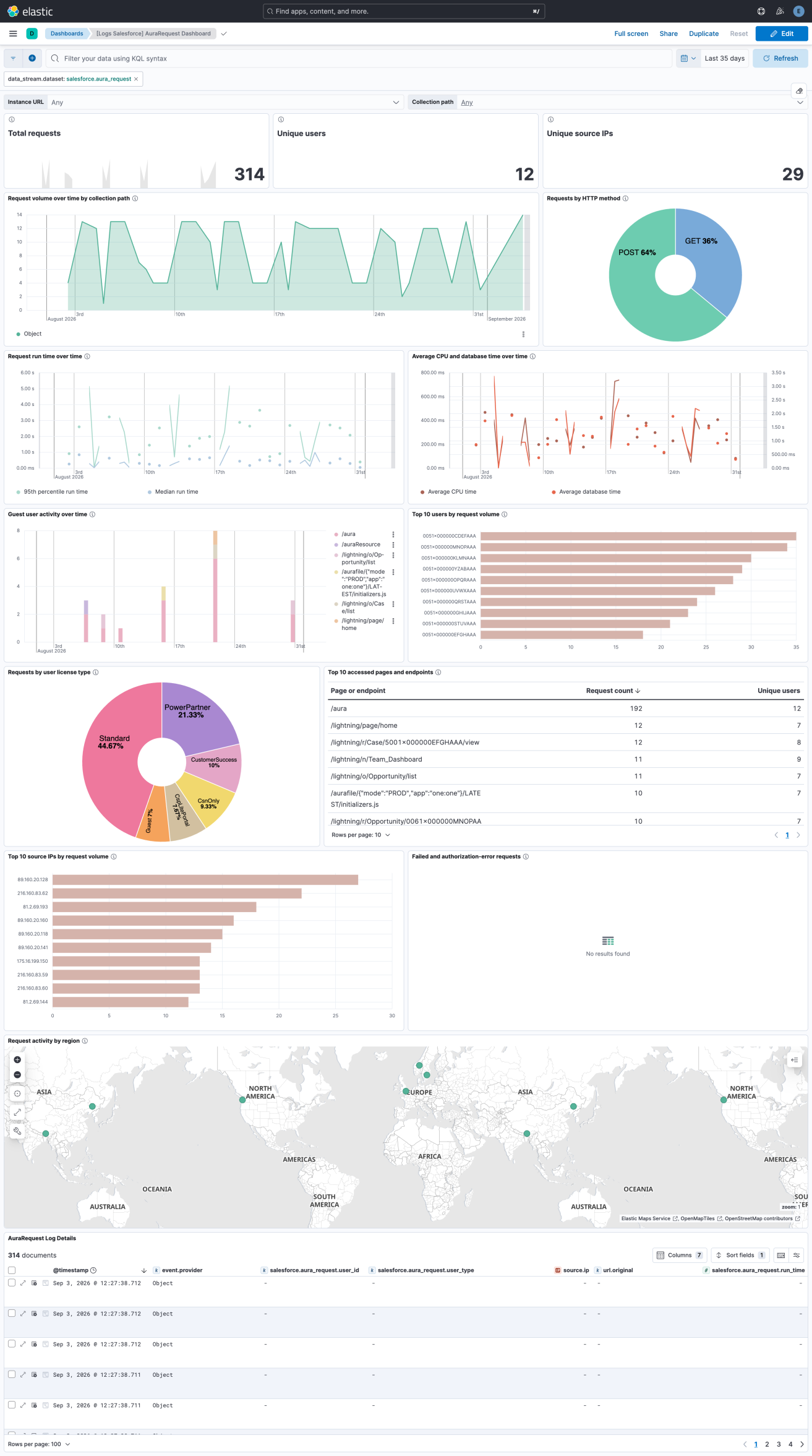
The aura_request data stream captures the server-side Aura framework requests that Salesforce Lightning Experience makes when users load pages, open records, or when components fetch data. It is the record and component level access log for the modern Salesforce UI, which makes it useful for detecting UI-driven data scraping, guest user misuse, and atypical access patterns.
Example
{
    "@timestamp": "2026-08-03T06:18:45.933Z",
    "agent": {
        "ephemeral_id": "31a03624-5323-426d-bf9a-f8e8fe2622fb",
        "id": "981c7440-3a3b-4935-8ddf-5a359ee534b9",
        "name": "elastic-agent-48140",
        "type": "filebeat",
        "version": "8.16.0"
    },
    "data_stream": {
        "dataset": "salesforce.aura_request",
        "namespace": "34338",
        "type": "logs"
    },
    "ecs": {
        "version": "8.11.0"
    },
    "elastic_agent": {
        "id": "981c7440-3a3b-4935-8ddf-5a359ee534b9",
        "snapshot": false,
        "version": "8.16.0"
    },
    "event": {
        "action": "aura-request",
        "agent_id_status": "verified",
        "category": [
            "web"
        ],
        "dataset": "salesforce.aura_request",
        "duration": 677000000,
        "ingested": "2026-08-21T10:24:49Z",
        "kind": "event",
        "original": "{\"ACTION_MESSAGE\":\"1$serviceComponent://ui.force.components.controllers.hoverAction.HoverActionController/ACTION$getActions=52;2$aura://RecordUiController/ACTION$getRecordWithFields=118\",\"ACTION_MESSAGE_LENGTH\":\"10098\",\"CLIENT_IP\":\"81.2.69.142\",\"CPU_TIME\":\"372\",\"DB_TOTAL_TIME\":\"167546388\",\"EASY_SUITE_VALUE\":\"C360SuiteEE\",\"EVENT_TYPE\":\"AuraRequest\",\"LOGIN_KEY\":\"Obv9123BzbaxqCo1\",\"ORGANIZATION_ID\":\"00D5j000000VI3n\",\"REQUEST_ID\":\"SLB:9b1c4de8f0a2b3c4d5e6f708192a3b4c\",\"REQUEST_METHOD\":\"POST\",\"REQUEST_STATUS\":\"S\",\"RUN_TIME\":\"677\",\"SESSION_KEY\":\"WvtsJ1235oW24EbH\",\"TIMESTAMP\":\"20260803061845.933\",\"TIMESTAMP_DERIVED\":\"2026-08-03T06:18:45.933Z\",\"URI\":\"/aura\",\"URI_ID_DERIVED\":\"\",\"USER_AGENT\":\"Mozilla/5.0 (Macintosh; Intel Mac OS X 10_15_7) AppleWebKit/537.36 (KHTML, like Gecko) Chrome/150.0.0.0 Safari/537.36\",\"USER_ID\":\"0055j000000utlP\",\"USER_ID_DERIVED\":\"0055j000000utlPAAQ\",\"USER_TYPE\":\"Standard\"}",
        "outcome": "success",
        "provider": "EventLogFile",
        "type": [
            "access"
        ]
    },
    "host": {
        "architecture": "aarch64",
        "containerized": false,
        "hostname": "elastic-agent-48140",
        "ip": [
            "172.19.0.2",
            "172.18.0.4"
        ],
        "mac": [
            "B6-A4-1C-D0-D1-9A",
            "EA-A0-6D-CF-AB-7C"
        ],
        "name": "elastic-agent-48140",
        "os": {
            "kernel": "7.0.12-linuxkit",
            "name": "Wolfi",
            "platform": "wolfi",
            "type": "linux",
            "version": "20230201"
        }
    },
    "http": {
        "request": {
            "id": "SLB:9b1c4de8f0a2b3c4d5e6f708192a3b4c",
            "method": "POST"
        }
    },
    "input": {
        "type": "salesforce"
    },
    "organization": {
        "id": "00D5j000000VI3n"
    },
    "related": {
        "ip": [
            "81.2.69.142"
        ],
        "user": [
            "0055j000000utlPAAQ",
            "0055j000000utlP"
        ]
    },
    "salesforce": {
        "aura_request": {
            "action_message": "1$serviceComponent://ui.force.components.controllers.hoverAction.HoverActionController/ACTION$getActions=52;2$aura://RecordUiController/ACTION$getRecordWithFields=118",
            "action_message_length": 10098,
            "actions": [
                {
                    "controller": "ui.force.components.controllers.hoverAction.HoverActionController",
                    "duration": 52,
                    "id": "1",
                    "method": "getActions",
                    "scheme": "serviceComponent"
                },
                {
                    "controller": "RecordUiController",
                    "duration": 118,
                    "id": "2",
                    "method": "getRecordWithFields",
                    "scheme": "aura"
                }
            ],
            "cpu_time": 372,
            "db_total_time": 167546388,
            "easy_suite_value": "C360SuiteEE",
            "login_key": "Obv9123BzbaxqCo1",
            "request_status": "S",
            "run_time": 677,
            "session_key": "WvtsJ1235oW24EbH",
            "user_id": "0055j000000utlP",
            "user_type": "Standard"
        },
        "instance_url": "http://svc-salesforce:8010"
    },
    "source": {
        "geo": {
            "city_name": "London",
            "continent_name": "Europe",
            "country_iso_code": "GB",
            "country_name": "United Kingdom",
            "location": {
                "lat": 51.5142,
                "lon": -0.0931
            },
            "region_iso_code": "GB-ENG",
            "region_name": "England"
        },
        "ip": "81.2.69.142"
    },
    "tags": [
        "preserve_original_event",
        "salesforce-aura_request"
    ],
    "url": {
        "original": "/aura",
        "path": "/aura"
    },
    "user": {
        "id": "0055j000000utlPAAQ"
    },
    "user_agent": {
        "device": {
            "name": "Mac"
        },
        "name": "Chrome",
        "original": "Mozilla/5.0 (Macintosh; Intel Mac OS X 10_15_7) AppleWebKit/537.36 (KHTML, like Gecko) Chrome/150.0.0.0 Safari/537.36",
        "os": {
            "full": "Mac OS X 10.15.7",
            "name": "Mac OS X",
            "version": "10.15.7"
        },
        "version": "150.0.0.0"
    }
}
Exported fields
| Field | Description | Type | Unit | Metric Type |
|---|---|---|---|---|
| @timestamp | Date/time when the event originated. This is the date/time extracted from the event, typically representing when the event was generated by the source. If the event source has no original timestamp, this value is typically populated by the first time the event was received by the pipeline. Required field for all events. | date | ||
| data_stream.dataset | The field can contain anything that makes sense to signify the source of the data. Examples include nginx.access, prometheus, endpoint etc. For data streams that otherwise fit, but that do not have dataset set we use the value "generic" for the dataset value. event.dataset should have the same value as data_stream.dataset. Beyond the Elasticsearch data stream naming criteria noted above, the dataset value has additional restrictions: * Must not contain - * No longer than 100 characters |
constant_keyword | ||
| data_stream.namespace | A user defined namespace. Namespaces are useful to allow grouping of data. Many users already organize their indices this way, and the data stream naming scheme now provides this best practice as a default. Many users will populate this field with default. If no value is used, it falls back to default. Beyond the Elasticsearch index naming criteria noted above, namespace value has the additional restrictions: * Must not contain - * No longer than 100 characters |
constant_keyword | ||
| data_stream.type | An overarching type for the data stream. Currently allowed values are "logs" and "metrics". We expect to also add "traces" and "synthetics" in the near future. | constant_keyword | ||
| event.dataset | Name of the dataset. If an event source publishes more than one type of log or events (e.g. access log, error log), the dataset is used to specify which one the event comes from. It's recommended but not required to start the dataset name with the module name, followed by a dot, then the dataset name. | constant_keyword | ||
| event.module | Name of the module this data is coming from. If your monitoring agent supports the concept of modules or plugins to process events of a given source (e.g. Apache logs), event.module should contain the name of this module. |
constant_keyword | ||
| input.type | Type of filebeat input. | keyword | ||
| salesforce.aura_request.action_message | The action (Apex method) names and times for all the actions in the request. Salesforce documents the format as 1action1Name=action1Time;action2Name=action2Time..., and observed values take the form \<actionId\>$\<scheme\>://\<controller\>/ACTION$\<method\>=\<milliseconds\> with ; between actions. The parsed form is available under salesforce.aura_request.actions. |
keyword | ||
| salesforce.aura_request.action_message_length | long | |||
| salesforce.aura_request.actions.controller | The Aura or Apex controller that handled the action, either a fully qualified path or a bare class name. | keyword | ||
| salesforce.aura_request.actions.duration | The time the action took, in milliseconds, as reported in ACTION_MESSAGE. Zero is a common and valid value. |
long | ms | gauge |
| salesforce.aura_request.actions.id | The Aura client-assigned identifier of the action within the request. This is an identifier rather than a positional index, so the identifiers of a multi-action request are frequently out of order. | keyword | ||
| salesforce.aura_request.actions.method | The name of the controller method invoked by the action. | keyword | ||
| salesforce.aura_request.actions.scheme | The Aura descriptor scheme of the action. Observed values are serviceComponent, aura, and java. |
keyword | ||
| salesforce.aura_request.client_ip | The IP address of the client that's using Salesforce services. A Salesforce internal IP (such as a login from AppExchange) is shown as Salesforce.com IP. Values that are usable IP addresses are mapped to source.ip instead, so only the non-address values remain here. |
keyword | ||
| salesforce.aura_request.cpu_time | The CPU time in milliseconds used to complete the request. This field indicates the amount of activity taking place in the app server layer. | long | ms | gauge |
| salesforce.aura_request.db_total_time | The time in nanoseconds for a database round trip. Includes time spent in the JDBC driver, network to the database, and DB_CPU_TIME. Compare this field to salesforce.aura_request.cpu_time to determine whether performance issues are occurring in the database layer or in your own code. |
long | nanos | gauge |
| salesforce.aura_request.easy_suite_value | The org's Small Business Suite Edition, if applicable. This field populates only for Small Business Suite editions and Salesforce Foundations. Otherwise, it will be empty. Documented values: Freemium (Salesforce Free Suite), Starter (Salesforce Starter Suite), Pro (Salesforce Pro Suite), and C360SuiteEE (Salesforce Foundations). Available in API version 66.0 and later. |
keyword | ||
| salesforce.aura_request.id | The record ID of the AuraRequestEventLog object on the real-time collection path. |
keyword | ||
| salesforce.aura_request.login_key | The string that ties together all events in a given user's login session. It starts with a login event and ends with either a logout event or the user session expiring. | keyword | ||
| salesforce.aura_request.request_status | The status of the request for a page view or user interface action: S Success, which is also returned when an Apex controller throws an exception; F Failure, typically 4xx or 5xx HTTP codes; U Undefined; A Authorization Error; R Redirect, typically a 3xx HTTP code; N Not Found, a 404 error. This field can have a blank value. |
keyword | ||
| salesforce.aura_request.run_time | The amount of time that the request took in milliseconds. | long | ms | gauge |
| salesforce.aura_request.session_key | The user's unique session ID. You can use this value to identify all user events within a session. When a user logs out and logs in again, a new session is started. | keyword | ||
| salesforce.aura_request.uri_id | The 18-character case insensitive ID of the URI of the page that's receiving the request. | keyword | ||
| salesforce.aura_request.user_agent_code | The numeric code for the type of client used to make the request, for example the browser, application, or API. AuraRequest rows now carry the raw User-Agent header, which is mapped to user_agent.original instead, so only legacy numeric codes remain here. |
keyword | ||
| salesforce.aura_request.user_id | The 15-character ID of the user who's using Salesforce services through the UI or the API. The 18-character case insensitive form of the same ID is mapped to user.id. |
keyword | ||
| salesforce.aura_request.user_type | The category of user license. Documented values: CsnOnly, CspLitePortal, CustomerSuccess, Guest, PowerCustomerSuccess, PowerPartner, SelfService, and Standard. |
keyword | ||
| salesforce.instance_url | The Salesforce instance URL. | keyword |
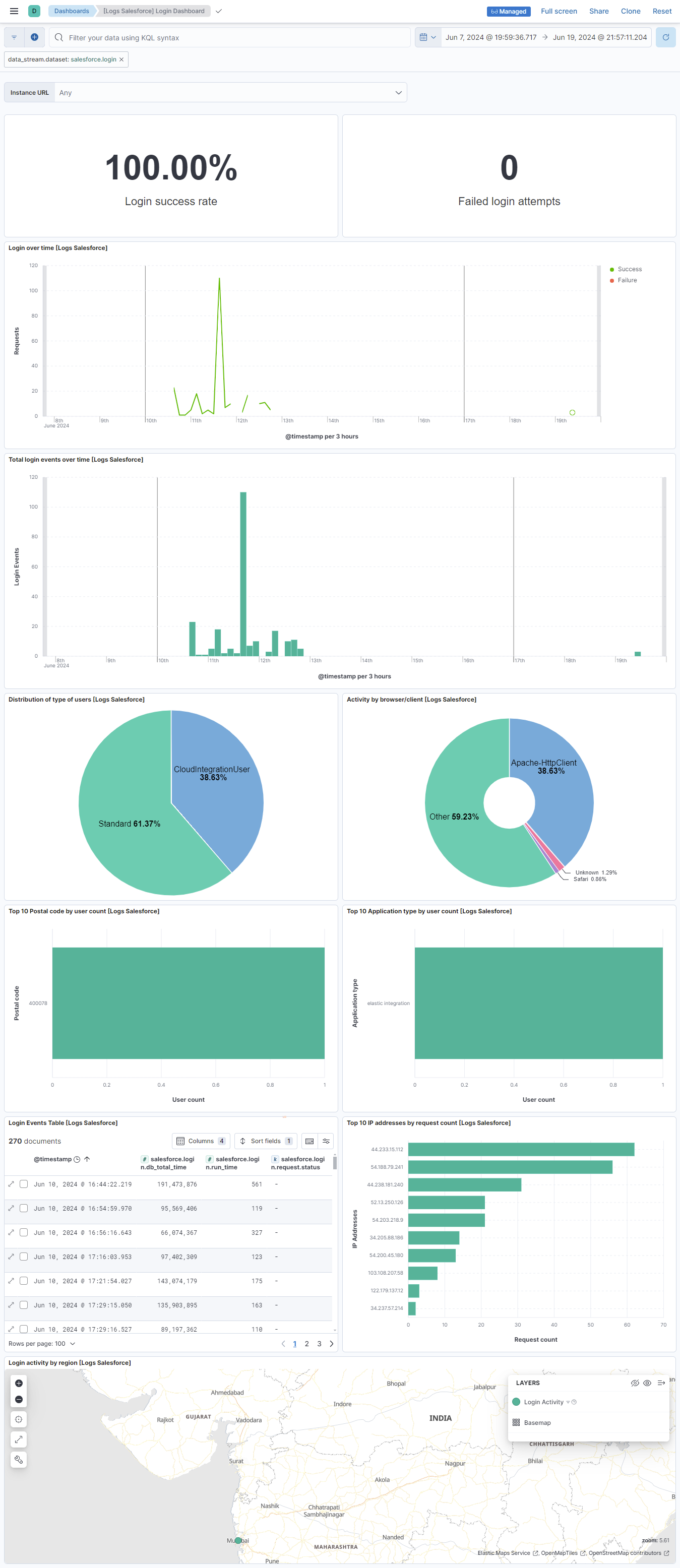
The login data stream captures events that detail the login history of users within your Salesforce organization. This data stream provides insights into user authentication activities, helping you monitor and analyze login patterns, detect anomalies, and ensure security compliance.
Example
{
    "@timestamp": "2022-11-22T04:46:15.591Z",
    "agent": {
        "ephemeral_id": "b02f2751-9a38-4438-8b75-937262b340bc",
        "id": "ea40bcb3-cd35-4db9-b0d3-81d94e75b64d",
        "name": "docker-fleet-agent",
        "type": "filebeat",
        "version": "8.14.0"
    },
    "data_stream": {
        "dataset": "salesforce.login",
        "namespace": "ep",
        "type": "logs"
    },
    "ecs": {
        "version": "8.11.0"
    },
    "elastic_agent": {
        "id": "ea40bcb3-cd35-4db9-b0d3-81d94e75b64d",
        "snapshot": false,
        "version": "8.14.0"
    },
    "event": {
        "action": "login-attempt",
        "agent_id_status": "verified",
        "category": [
            "authentication"
        ],
        "dataset": "salesforce.login",
        "ingested": "2024-06-21T16:46:09Z",
        "kind": "event",
        "module": "salesforce",
        "original": "{\"API_TYPE\":\"f\",\"API_VERSION\":\"9998.0\",\"AUTHENTICATION_METHOD_REFERENCE\":\"\",\"BROWSER_TYPE\":\"Mozilla/5.0 (Windows NT 10.0; Win64; x64) AppleWebKit/537.36 (KHTML, like Gecko) Chrome/94.0.4606.71 Safari/537.36\",\"CIPHER_SUITE\":\"ECDHE-RSA-AES256-GCM-SHA384\",\"CLIENT_IP\":\"81.2.69.142\",\"CPU_TIME\":\"30\",\"DB_TOTAL_TIME\":\"52435102\",\"EVENT_TYPE\":\"Login\",\"LOGIN_KEY\":\"QfNecrLXSII6fsBq\",\"LOGIN_STATUS\":\"LOGIN_NO_ERROR\",\"ORGANIZATION_ID\":\"00D5j000000VI3n\",\"REQUEST_ID\":\"4ehU_U-nbQyAPFl1cJILm-\",\"REQUEST_STATUS\":\"Success\",\"RUN_TIME\":\"83\",\"SESSION_KEY\":\"\",\"SOURCE_IP\":\"81.2.69.142\",\"TIMESTAMP\":\"20221122044615.591\",\"TIMESTAMP_DERIVED\":\"2022-11-22T04:46:15.591Z\",\"TLS_PROTOCOL\":\"TLSv1.2\",\"URI\":\"/index.jsp\",\"URI_ID_DERIVED\":\"s4heK3WbH-lcJIL3-n\",\"USER_ID\":\"0055j000000utlP\",\"USER_ID_DERIVED\":\"0055j000000utlPAAQ\",\"USER_NAME\":\"user@elastic.co\",\"USER_TYPE\":\"Standard\"}",
        "outcome": "success",
        "provider": "EventLogFile",
        "type": [
            "info"
        ],
        "url": "/index.jsp"
    },
    "host": {
        "architecture": "x86_64",
        "containerized": true,
        "hostname": "docker-fleet-agent",
        "id": "345c85cf1fe945e2b19719b370c09a48",
        "ip": [
            "192.168.251.7"
        ],
        "mac": [
            "02-42-C0-A8-FB-07"
        ],
        "name": "docker-fleet-agent",
        "os": {
            "codename": "focal",
            "family": "debian",
            "kernel": "3.10.0-1160.114.2.el7.x86_64",
            "name": "Ubuntu",
            "platform": "ubuntu",
            "type": "linux",
            "version": "20.04.6 LTS (Focal Fossa)"
        }
    },
    "input": {
        "type": "salesforce"
    },
    "related": {
        "ip": [
            "81.2.69.142"
        ]
    },
    "salesforce": {
        "instance_url": "http://elastic-package-service-salesforce-1:8010",
        "login": {
            "api": {
                "type": "Feed",
                "version": "9998.0"
            },
            "client": {
                "ip": "81.2.69.142"
            },
            "cpu_time": 30,
            "db_total_time": 52435102,
            "event_type": "Login",
            "key": "QfNecrLXSII6fsBq",
            "organization_id": "00D5j000000VI3n",
            "request": {
                "id": "4ehU_U-nbQyAPFl1cJILm-",
                "status": "Success"
            },
            "run_time": 83,
            "uri": {
                "id": "s4heK3WbH-lcJIL3-n"
            },
            "user_id": "0055j000000utlP"
        }
    },
    "source": {
        "geo": {
            "city_name": "London",
            "continent_name": "Europe",
            "country_iso_code": "GB",
            "country_name": "United Kingdom",
            "location": {
                "lat": 51.5142,
                "lon": -0.0931
            },
            "region_iso_code": "GB-ENG",
            "region_name": "England"
        },
        "ip": "81.2.69.142"
    },
    "tags": [
        "preserve_original_event",
        "salesforce-login"
    ],
    "tls": {
        "cipher": "ECDHE-RSA-AES256-GCM-SHA384",
        "version": "1.2",
        "version_protocol": "TLS"
    },
    "user": {
        "email": "user@elastic.co",
        "id": "0055j000000utlPAAQ",
        "roles": [
            "Standard"
        ]
    },
    "user_agent": {
        "device": {
            "name": "Other"
        },
        "name": "Chrome",
        "os": {
            "full": "Windows 10",
            "name": "Windows",
            "version": "10"
        }
    }
}
Exported fields
| Field | Description | Type | Unit | Metric Type |
|---|---|---|---|---|
| @timestamp | Event timestamp. | date | ||
| data_stream.dataset | Data stream dataset. | constant_keyword | ||
| data_stream.namespace | Data stream namespace. | constant_keyword | ||
| data_stream.type | Data stream type. | constant_keyword | ||
| input.type | Input type. | keyword | ||
| salesforce.instance_url | The Salesforce instance URL. | keyword | ||
| salesforce.login.additional_info | Additional information that's captured from the HTTP headers during a login request. | match_only_text | ||
| salesforce.login.api.type | The type of Salesforce API request. | keyword | ||
| salesforce.login.api.version | The version of the Salesforce API used for the login request. | keyword | ||
| salesforce.login.application | The application used to access the Salesforce organization. | keyword | ||
| salesforce.login.auth.method_reference | The authentication method reference used by a third-party identity provider for SSO using the OpenID Connect protocol. This field is available in API version 51.0 and later. | keyword | ||
| salesforce.login.auth.service_id | The authentication service ID used by a third-party identity provider for single sign-on (SSO) using the OpenID Connect protocol. | keyword | ||
| salesforce.login.client.ip | The IP address of the client using Salesforce services. Internal Salesforce IP addresses are shown as "Salesforce.com IP". | ip | ||
| salesforce.login.client_version | The version of the client used for the login request. | keyword | ||
| salesforce.login.cpu_time | The CPU time in milliseconds used to complete the login request, indicating the amount of activity in the application server layer. | long | ms | gauge |
| salesforce.login.db_total_time | The time in nanoseconds for the database round trip during login, including time spent in the JDBC driver, network, and database CPU time. | long | nanos | gauge |
| salesforce.login.evaluation_time | The amount of time it took to evaluate the transaction security policy, in milliseconds. This field is available in API version 46.0 and later. | double | ms | gauge |
| salesforce.login.event_type | The type of event. For login events, the value is always "Login". | keyword | ||
| salesforce.login.geo_id | The Salesforce ID of the LoginGeo object associated with the user's IP address during login. | keyword | ||
| salesforce.login.history_id | The identifier that tracks a user session, allowing correlation of user activity with a specific login instance. | keyword | ||
| salesforce.login.key | The string that ties together all events in a given user's login session, starting with the login event and ending with either a logout event or the user session expiring. | keyword | ||
| salesforce.login.organization_id | The 15-character ID of the Salesforce organization. | keyword | ||
| salesforce.login.related_event_identifier | The identifier of a related event associated with the login event. | keyword | ||
| salesforce.login.request.id | The unique identifier for the login request transaction. | keyword | ||
| salesforce.login.request.status | The status of the login request (e.g., Success, Failed). | keyword | ||
| salesforce.login.run_time | The total time in milliseconds taken by the login request. | long | ms | gauge |
| salesforce.login.transaction_security.policy.id | The ID of the transaction security policy used to evaluate the login event. | keyword | ||
| salesforce.login.transaction_security.policy.outcome | The outcome of the transaction security policy evaluation (e.g., Block, Notified, NoAction). | keyword | ||
| salesforce.login.type | The type of login used to access the session. | keyword | ||
| salesforce.login.uri.id | The 18-character case-safe ID of the URI of the page receiving the login request. | keyword | ||
| salesforce.login.user_id | The 15-character ID of the user logging in to Salesforce. | keyword |
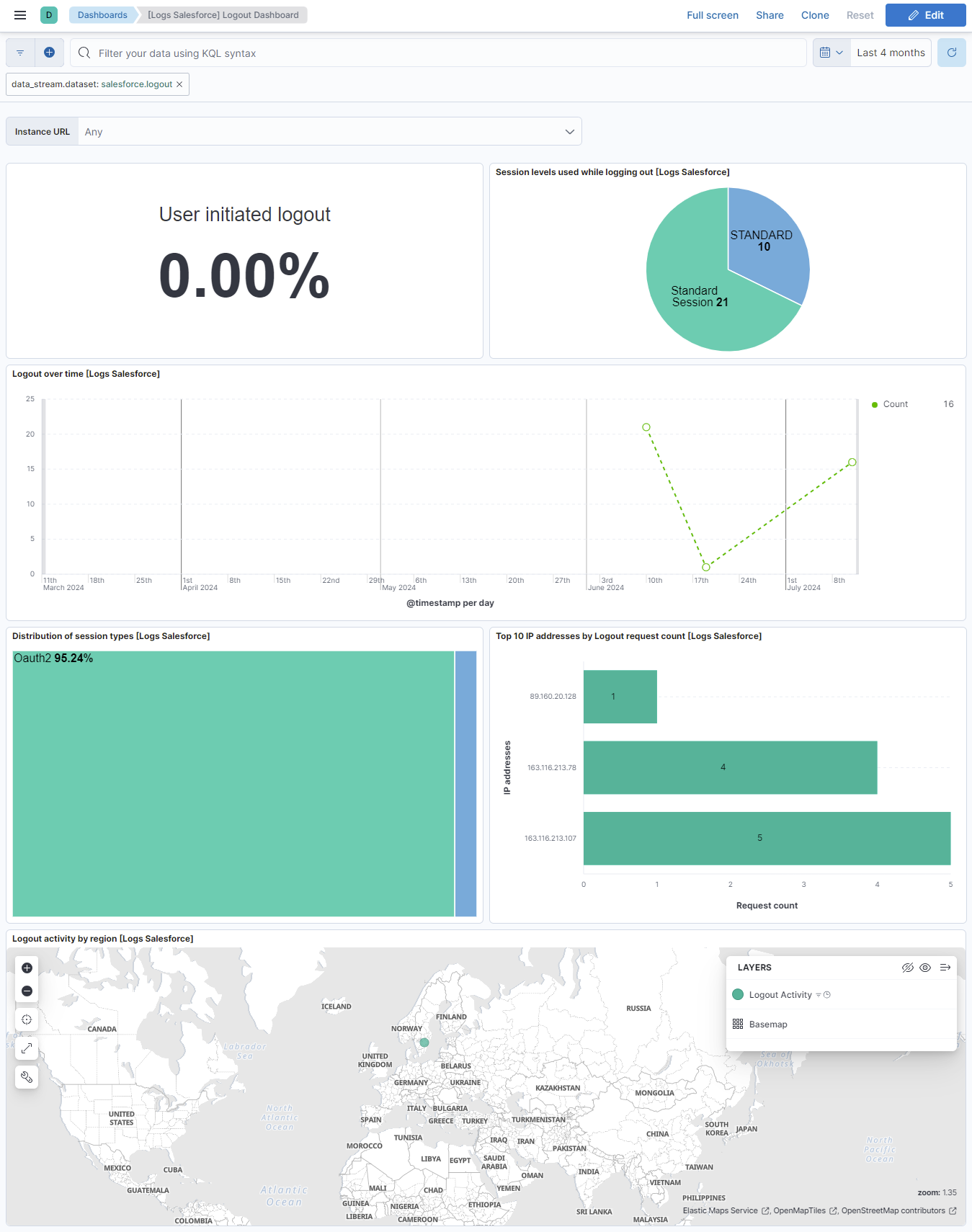
The logout data stream captures events that detail the logout history of users within your Salesforce organization. This data stream provides insights into user authentication activities, helping you monitor and analyze logout patterns, detect anomalies, and ensure security compliance.
Example
{
    "@timestamp": "2022-11-22T07:37:25.779Z",
    "agent": {
        "ephemeral_id": "222f4fde-1141-42af-adaf-4b86e6aa9c18",
        "id": "ea40bcb3-cd35-4db9-b0d3-81d94e75b64d",
        "name": "docker-fleet-agent",
        "type": "filebeat",
        "version": "8.14.0"
    },
    "data_stream": {
        "dataset": "salesforce.logout",
        "namespace": "ep",
        "type": "logs"
    },
    "ecs": {
        "version": "8.11.0"
    },
    "elastic_agent": {
        "id": "ea40bcb3-cd35-4db9-b0d3-81d94e75b64d",
        "snapshot": false,
        "version": "8.14.0"
    },
    "event": {
        "action": "logout",
        "agent_id_status": "verified",
        "category": [
            "authentication"
        ],
        "code": "4exLFFQZ1234xFl1cJNwOV",
        "dataset": "salesforce.logout",
        "ingested": "2024-06-21T16:47:21Z",
        "kind": "event",
        "module": "salesforce",
        "original": "{\"API_TYPE\":\"f\",\"API_VERSION\":\"54.0\",\"APP_TYPE\":\"1000\",\"BROWSER_TYPE\":\"Mozilla/5.0 (Windows NT 10.0; Win64; x64) AppleWebKit/537.36 (KHTML, like Gecko) Chrome/94.0.4606.81 Safari/537.36\",\"CLIENT_IP\":\"81.2.69.142\",\"CLIENT_VERSION\":\"9998\",\"EVENT_TYPE\":\"Logout\",\"LOGIN_KEY\":\"Obv9123BzbaxqCo1\",\"ORGANIZATION_ID\":\"00D5j001234VI3n\",\"PLATFORM_TYPE\":\"1015\",\"REQUEST_ID\":\"4exLFFQZ1234xFl1cJNwOV\",\"RESOLUTION_TYPE\":\"9999\",\"SESSION_KEY\":\"WvtsJ1235oW24EbH\",\"SESSION_LEVEL\":\"1\",\"SESSION_TYPE\":\"O\",\"TIMESTAMP\":\"20221122073725.779\",\"TIMESTAMP_DERIVED\":\"2022-11-22T07:37:25.779Z\",\"USER_ID\":\"0055j000000utlP\",\"USER_ID_DERIVED\":\"0055j000000utlPAAQ\",\"USER_INITIATED_LOGOUT\":\"0\",\"USER_TYPE\":\"S\"}",
        "provider": "EventLogFile",
        "type": [
            "info"
        ]
    },
    "host": {
        "architecture": "x86_64",
        "containerized": true,
        "hostname": "docker-fleet-agent",
        "id": "345c85cf1fe945e2b19719b370c09a48",
        "ip": [
            "192.168.251.7"
        ],
        "mac": [
            "02-42-C0-A8-FB-07"
        ],
        "name": "docker-fleet-agent",
        "os": {
            "codename": "focal",
            "family": "debian",
            "kernel": "3.10.0-1160.114.2.el7.x86_64",
            "name": "Ubuntu",
            "platform": "ubuntu",
            "type": "linux",
            "version": "20.04.6 LTS (Focal Fossa)"
        }
    },
    "input": {
        "type": "salesforce"
    },
    "related": {
        "ip": [
            "81.2.69.142"
        ]
    },
    "salesforce": {
        "instance_url": "http://elastic-package-service-salesforce-1:8010",
        "logout": {
            "api": {
                "type": "Feed",
                "version": "54.0"
            },
            "app_type": "Application",
            "browser_type": "Mozilla/5.0 (Windows NT 10.0; Win64; x64) AppleWebKit/537.36 (KHTML, like Gecko) Chrome/94.0.4606.81 Safari/537.36",
            "client_version": "9998",
            "event_type": "Logout",
            "login_key": "Obv9123BzbaxqCo1",
            "organization_id": "00D5j001234VI3n",
            "platform_type": "Windows 10",
            "resolution_type": "9999",
            "session": {
                "level": "Standard Session",
                "type": "Oauth2"
            },
            "user": {
                "roles": [
                    "Standard"
                ]
            },
            "user_id": "0055j000000utlP",
            "user_initiated_logout": "0"
        }
    },
    "source": {
        "geo": {
            "city_name": "London",
            "continent_name": "Europe",
            "country_iso_code": "GB",
            "country_name": "United Kingdom",
            "location": {
                "lat": 51.5142,
                "lon": -0.0931
            },
            "region_iso_code": "GB-ENG",
            "region_name": "England"
        },
        "ip": "81.2.69.142"
    },
    "tags": [
        "preserve_original_event",
        "salesforce-logout"
    ],
    "user": {
        "id": "0055j000000utlPAAQ"
    }
}
Exported fields
| Field | Description | Type |
|---|---|---|
| @timestamp | Event timestamp. | date |
| data_stream.dataset | Data stream dataset. | constant_keyword |
| data_stream.namespace | Data stream namespace. | constant_keyword |
| data_stream.type | Data stream type. | constant_keyword |
| input.type | Input type. | keyword |
| salesforce.instance_url | The Salesforce instance URL. | keyword |
| salesforce.logout.api.type | The type of Salesforce API request. | keyword |
| salesforce.logout.api.version | The version of the Salesforce API that's being used. | keyword |
| salesforce.logout.app_type | The application type that was in use upon logging out. | keyword |
| salesforce.logout.browser_type | The identifier string returned by the browser used at login. | keyword |
| salesforce.logout.client_version | The version of the client that was in use upon logging out. | keyword |
| salesforce.logout.event_identifier | Unique identifier of this logout event. Salesforce populates EventIdentifier on every LogoutEvent. RelatedEventIdentifier is the field that is blank unless extra authentication generated related events. | keyword |
| salesforce.logout.event_type | The type of event. The value is always Logout. | keyword |
| salesforce.logout.login_key | The string that ties together all events in a given user's login session. It starts with a login event and ends with either a logout event or the user session expiring. | keyword |
| salesforce.logout.organization_id | The 15-character ID of the organization. | keyword |
| salesforce.logout.platform_type | The code for the client platform. If a timeout caused the logout, this field is null. | keyword |
| salesforce.logout.resolution_type | The screen resolution of the client. If a timeout caused the logout, this field is null. | keyword |
| salesforce.logout.session.key | The user's unique session ID. You can use this value to identify all user events within a session. When a user logs out and logs in again, a new session is started. | keyword |
| salesforce.logout.session.level | The security level of the session that was used when logging out (e.g. Standard Session or High-Assurance Session). | keyword |
| salesforce.logout.session.type | The session type that was used when logging out (for example, API, OAuth 2.0, or UI). | keyword |
| salesforce.logout.user.roles | The roles of the user who's using Salesforce services through the UI or the API. | keyword |
| salesforce.logout.user_id | The 15-character ID of the user who's using Salesforce services through the UI or the API. | keyword |
| salesforce.logout.user_id_derived | The 18-character case-safe ID of the user who's using Salesforce services through the UI or the API. | keyword |
| salesforce.logout.user_initiated_logout | The value is true if the user intentionally logged out of the organization by clicking the Logout button. If the user's session timed out due to inactivity or another implicit logout action, the value is false. | boolean |
The setupaudittrail data stream captures and records changes made by users in the organization's Setup area. By default, it collects data from the last week, but users can configure it to collect data from up to the last 180 days by adjusting the initial interval in the configuration.
Example
{
    "@timestamp": "2022-08-16T09:26:38.000Z",
    "agent": {
        "ephemeral_id": "cef7c9c7-0840-4353-ab0f-c7566d56cb92",
        "id": "20144ad6-195d-44c9-9d2e-33fc4bf15207",
        "name": "elastic-agent-93629",
        "type": "filebeat",
        "version": "8.18.1"
    },
    "data_stream": {
        "dataset": "salesforce.setupaudittrail",
        "namespace": "70319",
        "type": "logs"
    },
    "ecs": {
        "version": "8.11.0"
    },
    "elastic_agent": {
        "id": "20144ad6-195d-44c9-9d2e-33fc4bf15207",
        "snapshot": false,
        "version": "8.18.1"
    },
    "event": {
        "action": "insertConnectedApplication",
        "agent_id_status": "verified",
        "created": "2022-08-16T09:26:38.000Z",
        "dataset": "salesforce.setupaudittrail",
        "id": "0Ym5j000019nwonCAA",
        "ingested": "2025-06-03T15:55:33Z",
        "kind": "event",
        "module": "salesforce",
        "original": "{\"Action\":\"insertConnectedApplication\",\"CreatedByContext\":\"Einstein\",\"CreatedById\":\"0055j000000utlPAAQ\",\"CreatedDate\":\"2022-08-16T09:26:38.000+0000\",\"DelegateUser\":\"user1\",\"Display\":\"For user user@elastic.co, the User Verified Email status changed to verified\",\"Id\":\"0Ym5j000019nwonCAA\",\"Section\":\"Connected Apps\"}",
        "provider": "Object",
        "type": [
            "admin"
        ]
    },
    "host": {
        "architecture": "aarch64",
        "containerized": false,
        "hostname": "elastic-agent-93629",
        "ip": [
            "172.19.0.2",
            "172.18.0.4"
        ],
        "mac": [
            "02-42-AC-12-00-04",
            "02-42-AC-13-00-02"
        ],
        "name": "elastic-agent-93629",
        "os": {
            "kernel": "6.10.14-linuxkit",
            "name": "Wolfi",
            "platform": "wolfi",
            "type": "linux",
            "version": "20230201"
        }
    },
    "input": {
        "type": "salesforce"
    },
    "related": {
        "user": [
            "0055j000000utlPAAQ",
            "user",
            "user@elastic.co"
        ]
    },
    "salesforce": {
        "instance_url": "http://svc-salesforce:8010",
        "setup_audit_trail": {
            "created_by_context": "Einstein",
            "created_by_id": "0055j000000utlPAAQ",
            "delegate_user": "user1",
            "display": "For user user@elastic.co, the User Verified Email status changed to verified",
            "section": "Connected Apps"
        }
    },
    "tags": [
        "preserve_original_event",
        "salesforce-setupaudittrail"
    ],
    "user": {
        "domain": "elastic.co",
        "email": "user@elastic.co",
        "id": "0055j000000utlPAAQ",
        "name": "user"
    }
}
Exported fields
| Field | Description | Type |
|---|---|---|
| @timestamp | Event timestamp. | date |
| data_stream.dataset | Data stream dataset. | constant_keyword |
| data_stream.namespace | Data stream namespace. | constant_keyword |
| data_stream.type | Data stream type. | constant_keyword |
| input.type | Input type. | keyword |
| salesforce.instance_url | The Salesforce instance URL. | keyword |
| salesforce.setup_audit_trail.created_by_context | The context under which the Setup change was made. For example, if Einstein uses cloud-to-cloud services to make a change in Setup, the value of this field is Einstein. | keyword |
| salesforce.setup_audit_trail.created_by_id | The ID under which the Setup change was made. For example, if Einstein uses cloud-to-cloud services to make a change in Setup, this field contains the ID of Einstein. | keyword |
| salesforce.setup_audit_trail.created_by_issuer | Reserved for future use. | keyword |
| salesforce.setup_audit_trail.delegate_user | The Login-As user who executed the action in Setup. If a Login-As user didn't perform the action, this field is blank. This field is available in API version 35.0 and later. | keyword |
| salesforce.setup_audit_trail.display | The full description of changes made in Setup. For example, if the Action field has a value of PermSetCreate, the Display field might be “Created permission set MAD: with user license Salesforce.” | keyword |
| salesforce.setup_audit_trail.responsible_namespace_prefix | The namespace of the package responsible for this change, if applicable. | keyword |
| salesforce.setup_audit_trail.section | The section in the Setup menu where the action occurred. For example, Manage Users or Company Profile. | keyword |
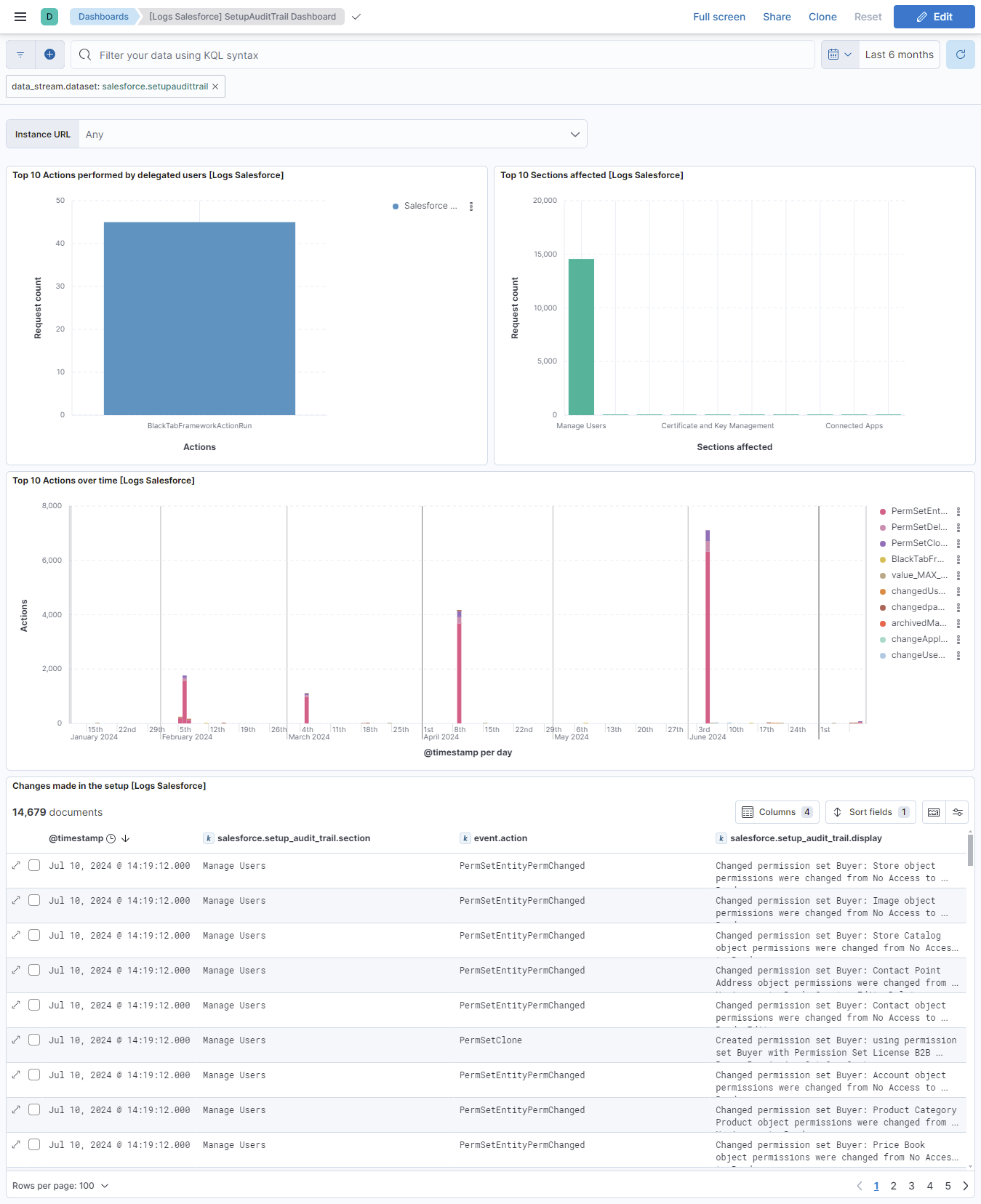
This integration includes one or more Kibana dashboards that visualizes the data collected by the integration. The screenshots below illustrate how the ingested data is displayed.
Changelog
| Version | Details | Minimum Kibana version |
|---|---|---|
| 1.10.0 | Enhancement (View pull request) Add aura_request data stream to collect Salesforce Lightning (Aura) framework request logs, from either the AuraRequest EventLogFile event type or the AuraRequestEventLog object. The data stream is disabled by default. |
9.0.0 8.16.0 |
| 1.9.0 | Bug fix (View pull request) Deduplicate retried Login, Logout, and Apex events by setting a stable Elasticsearch document id. Real-time Login and Logout use EventIdentifier. Login EventLogFile uses request id, timestamp, and organization id; Logout EventLogFile also includes user and session identifiers because a single request can log out multiple sessions; Apex EventLogFile also includes event type plus per-event fields (URI, URL, trigger, class/method) because request id is transaction-scoped. Bug fix (View pull request) Resume EventLogFile and Setup Audit Trail queries by timestamp and Salesforce Id so rows that share a timestamp are not skipped or duplicated. EventLogFile historical lookback now uses file creation time (CreatedDate). Bug fix (View pull request) Keep Apex, Login, and Logout EventLogFile collection on daily log files (Sequence = 0) when no EventLogFile Interval is configured, so the Salesforce Id resume tie-breaker does not unintentionally pull hourly log files. |
9.0.0 8.16.0 |
| 1.8.1 | Bug fix (View pull request) Fix EventLogFile cursor not advancing by ordering the Apex, Login, and Logout queries by CreatedDate (the cursor field) instead of LogDate. Previously the mismatch let the persisted cursor regress, causing repeated re-collection of old data. |
9.0.0 8.16.0 |
| 1.8.0 | Enhancement (View pull request) Expose the Request Timeout (resource.timeout) setting for all data streams so the HTTP client timeout can be increased when log collection (for example, large Apex EventLogFile downloads) times out. |
9.0.0 8.16.0 |
| 1.7.1 | Enhancement (View pull request) Improve documentation. |
9.0.0 8.16.0 |
| 1.7.0 | Enhancement (View pull request) Improve documentation and field descriptions. |
9.0.0 8.16.0 |
| 1.6.0 | Enhancement (View pull request) Improve documentation |
9.0.0 8.16.0 |
| 1.5.0 | Enhancement (View pull request) Improve documentation |
9.0.0 8.16.0 |
| 1.4.1 | Bug fix (View pull request) Fix query cursor for setupaudittrail |
9.0.0 8.16.0 |
| 1.4.0 | Enhancement (View pull request) Improve documentation |
9.0.0 8.16.0 |
| 1.3.0 | Enhancement (View pull request) Standardize user fields processing across integrations. |
9.0.0 8.16.0 |
| 1.2.0 | Enhancement (View pull request) Allow @custom pipeline access to event.original without setting preserve_original_event. |
9.0.0 8.16.0 |
| 1.1.0 | Enhancement (View pull request) Add support for Kibana 9.0.0. |
9.0.0 8.16.0 |
| 1.0.2 | Bug fix (View pull request) Update links to getting started docs |
8.16.0 |
| 1.0.1 | Bug fix (View pull request) Remove indentation from processors to avoid syntax error when adding new processors. |
8.16.0 |
| 1.0.0 | Enhancement (View pull request) GA release of the Salesforce integration. Enhancement (View pull request) Improve the Salesforce integration documentation and field descriptions. Enhancement (View pull request) Update docs to reflect the use of optional security token. |
8.16.0 |
| 0.15.1 | Enhancement (View pull request) Improve the Salesforce integration documentation. |
8.14.0 |
| 0.15.0 | Breaking change (View pull request) Revamp Salesforce integration. Enhancement (View pull request) Add dashboards for the salesforce integration. |
8.14.0 |
| 0.14.1 | Enhancement (View pull request) Update README with reindexing steps. |
8.12.0 |
| 0.14.0 | Enhancement (View pull request) Enable secrets for sensitive fields. For more details, refer https://www.elastic.co/guide/en/fleet/current/agent-policy.html#agent-policy-secret-values |
8.12.0 |
| 0.13.1 | Bug fix (View pull request) Disable secrets for older stack versions due to errors. |
8.7.1 |
| 0.13.0 | Enhancement (View pull request) Enable 'secret' for the sensitive fields, supported from 8.12. |
8.7.1 |
| 0.12.1 | Bug fix (View pull request) Add null and ignore_missing check to handle event.original field. |
8.7.1 |
| 0.12.0 | Enhancement (View pull request) Limit request tracer log count to five. |
8.7.1 |
| 0.11.0 | Enhancement (View pull request) Update the package format_version to 3.0.0. |
8.7.1 |
| 0.10.1 | Enhancement (View pull request) Add 'Request timeout' configuration. |
8.7.1 |
| 0.10.0 | Enhancement (View pull request) Rename ownership from obs-service-integrations to obs-infraobs-integrations |
8.7.1 |
| 0.9.0 | Enhancement (View pull request) Add a new flag to enable request tracing |
8.7.1 |
| 0.8.0 | Enhancement (View pull request) Make dashboard compatible with meta fields for Kibana 8.6.0 and above. |
8.7.0 |
| 0.7.0 | Enhancement (View pull request) Salesforce integration package with "logout_stream" data stream. |
8.7.0 |
| 0.6.0 | Enhancement (View pull request) Salesforce integration package with "login_stream" data stream. |
8.7.0 |
| 0.5.0 | Enhancement (View pull request) Migrate visualizations to lens. |
8.5.0 |
| 0.4.1 | Enhancement (View pull request) Added categories and/or subcategories. |
8.5.0 |
| 0.4.0 | Enhancement (View pull request) Salesforce integration package with "setupaudittrail" data stream. |
8.5.0 |
| 0.3.0 | Enhancement (View pull request) Salesforce integration package with "apex" data stream. |
8.5.0 |
| 0.2.1 | Bug fix (View pull request) Add pagination support for "login_rest" and "logout_rest". |
8.4.0 |
| 0.2.0 | Enhancement (View pull request) Salesforce integration package with "logout_rest" data stream. |
8.4.0 |
| 0.1.0 | Enhancement (View pull request) Salesforce integration package with "login_rest" data stream. |
8.4.0 |