Tenable OT Security
| Version | 2.2.0 (View all) |
| Managed integration release status | GA |
| Subscription level What's this? |
Basic |
| Developed by What's this? |
Elastic |
| Ingestion method(s) | API |
| Minimum Kibana version(s) | 9.1.4 8.19.2 |
You can use this integration as an Elastic Managed integration on Elastic Cloud Hosted deployments running this version or later.
The Elastic integration for Tenable OT Security enables real-time monitoring and analysis of operational technology security events within industrial environments. This integration collects data from Tenable OT Security platform to provide visibility into cyber threats, malicious insider activities, and human errors.
Agentless integrations allow you to collect data without having to manage Elastic Agent in your cloud. They make manual agent deployment unnecessary, so you can focus on your data instead of the agent that collects it. For more information, refer to Agentless integrations and the Agentless integrations FAQ. Agentless deployments are only supported in Elastic Serverless and Elastic Cloud environments. This functionality is in beta and is subject to change. Beta features are not subject to the support SLA of official GA features.
Assets: Assets represent the inventory of devices and systems monitored by Tenable OT Security, including their properties, classifications, and security posture.
Events: Events are notifications generated by Tenable OT Security to alert on potentially harmful activities in the industrial network, categorized by severity and type.
System_Logs: System logs provides detailed records of events, activities, and changes occurring within the OT environment. These logs are critical for monitoring, auditing, and investigating security incidents. They capture data from various OT assets, such as PLCs (Programmable Logic Controllers), RTUs (Remote Terminal Units), HMIs (Human-Machine Interfaces), and other industrial devices.
Log in to Tenable's cloud platform to generate an API key. This key allows applications to authenticate with Tenable's API without requiring a session.
To generate an API key, please refer to the API documentation here
The API Key will be visible once, when it is created. It must be provided when creating the integration policy.
Assets documents can be found by setting the following filter: event.dataset : "tenable_ot_security.assets"
Example
{
    "@timestamp": "2025-04-01T09:45:48Z",
    "agent": {
        "ephemeral_id": "e4143ea9-6edb-47f5-b711-43dda27896e9",
        "id": "49934b6e-d1c4-4a6d-9745-e82197ba288f",
        "name": "elastic-agent-80535",
        "type": "filebeat",
        "version": "8.15.0"
    },
    "data_stream": {
        "dataset": "tenable_ot_security.assets",
        "namespace": "95790",
        "type": "logs"
    },
    "ecs": {
        "version": "8.11.0"
    },
    "elastic_agent": {
        "id": "49934b6e-d1c4-4a6d-9745-e82197ba288f",
        "snapshot": false,
        "version": "8.15.0"
    },
    "event": {
        "agent_id_status": "verified",
        "category": [
            "iam"
        ],
        "dataset": "tenable_ot_security.assets",
        "id": "00b1e0a5-31ce-4b30-9af7-a6e1aa4616b8",
        "ingested": "2025-04-01T09:45:48Z",
        "kind": "event",
        "module": "tenable_ot_security",
        "type": [
            "info"
        ]
    },
    "event.original": "{\"category\":\"ControllersCategory\",\"criticality\":\"HighCriticality\",\"directIps\":{\"nodes\":[\"10.100.101.150\"]},\"directMacs\":{\"nodes\":[\"00:1d:9c:d4:c3:95\"]},\"firstSeen\":\"2024-06-25T17:05:14.23377Z\",\"hidden\":false,\"id\":\"00b1e0a5-31ce-4b30-9af7-a6e1aa4616b8\",\"ips\":{\"nodes\":[\"10.100.101.151\",\"10.100.101.155\",\"10.100.101.150\"]},\"lastHit\":\"2025-03-06T11:13:29.933248Z\",\"lastSeen\":\"2025-03-09T05:02:19.186828Z\",\"lastSnapshot\":null,\"lastUpdate\":\"2024-06-25T17:07:00.687828Z\",\"macs\":{\"nodes\":[]},\"name\":\"DeviceNet_L81\",\"purdueLevel\":\"Level1\",\"risk\":{\"totalRisk\":\"72.8374829734034\"},\"runStatus\":\"Unknown\",\"runStatusTime\":\"0001-01-01T00:00:00Z\",\"segments\":{\"nodes\":[{\"id\":\"663dab4a-1d09-4f0d-b455-4a52d1964f0d\"}]},\"superType\":\"Controller\",\"type\":\"Plc\"}",
    "host": {
        "ip": [
            "10.100.101.150"
        ]
    },
    "input": {
        "type": "cel"
    },
    "related": {
        "hosts": [
            "10.100.101.150",
            "00:1d:9c:d4:c3:95"
        ]
    },
    "tags": [
        "preserve_original_event",
        "forwarded",
        "tenable_ot_security"
    ],
    "tenable_ot_security": {
        "assets": {
            "category": "ControllersCategory",
            "criticality": "HighCriticality",
            "direct_ips": [
                "10.100.101.150"
            ],
            "direct_macs": [
                "00:1d:9c:d4:c3:95"
            ],
            "first_seen": "2024-06-25T17:05:14.23377Z",
            "hidden": false,
            "id": "00b1e0a5-31ce-4b30-9af7-a6e1aa4616b8",
            "ips": [
                "10.100.101.151",
                "10.100.101.155",
                "10.100.101.150"
            ],
            "last_hit": "2025-03-06T11:13:29.933248Z",
            "last_seen": "2025-03-09T05:02:19.186828Z",
            "last_update": "2024-06-25T17:07:00.687828Z",
            "name": "DeviceNet_L81",
            "purdue_level": "Level1",
            "risk": {
                "total_risk": 72.8374829734034
            },
            "run_status": "Unknown",
            "run_status_time": "0001-01-01T00:00:00Z",
            "segments": [
                {
                    "id": "663dab4a-1d09-4f0d-b455-4a52d1964f0d"
                }
            ],
            "super_type": "Controller",
            "type": "Plc"
        }
    }
}
ECS Field Reference
Please refer to the following document for detailed information on ECS fields.
The following non-ECS fields are used in assets documents:
Exported fields
| Field | Description | Type |
|---|---|---|
| @timestamp | Date/time when the event originated. This is the date/time extracted from the event, typically representing when the event was generated by the source. If the event source has no original timestamp, this value is typically populated by the first time the event was received by the pipeline. Required field for all events. | date |
| data_stream.dataset | The field can contain anything that makes sense to signify the source of the data. Examples include nginx.access, prometheus, endpoint etc. For data streams that otherwise fit, but that do not have dataset set we use the value "generic" for the dataset value. event.dataset should have the same value as data_stream.dataset. Beyond the Elasticsearch data stream naming criteria noted above, the dataset value has additional restrictions: * Must not contain - * No longer than 100 characters |
constant_keyword |
| data_stream.namespace | A user defined namespace. Namespaces are useful to allow grouping of data. Many users already organize their indices this way, and the data stream naming scheme now provides this best practice as a default. Many users will populate this field with default. If no value is used, it falls back to default. Beyond the Elasticsearch index naming criteria noted above, namespace value has the additional restrictions: * Must not contain - * No longer than 100 characters |
constant_keyword |
| data_stream.type | An overarching type for the data stream. Currently allowed values are "logs" and "metrics". We expect to also add "traces" and "synthetics" in the near future. | constant_keyword |
| input.type | Input type. | keyword |
| tenable_ot_security.assets.category | The category of the asset. | keyword |
| tenable_ot_security.assets.criticality | The criticality level of the asset. | keyword |
| tenable_ot_security.assets.direct_ips | A list of directly assigned IP addresses for the asset. | keyword |
| tenable_ot_security.assets.direct_macs | A list of directly assigned MAC addresses for the asset. | keyword |
| tenable_ot_security.assets.first_seen | The ISO 8601 timestamp when the asset was first detected. | date |
| tenable_ot_security.assets.hidden | Indicates whether the asset is hidden. | boolean |
| tenable_ot_security.assets.id | The UUID of the asset. Use this value as the unique key for the asset. | keyword |
| tenable_ot_security.assets.ips | A list of IP addresses associated with the asset. | keyword |
| tenable_ot_security.assets.last_hit | The ISO 8601 timestamp when the asset was last accessed. | date |
| tenable_ot_security.assets.last_seen | The ISO 8601 timestamp when the asset was last seen. | date |
| tenable_ot_security.assets.last_snapshot | The ISO 8601 timestamp of the last asset snapshot. | date |
| tenable_ot_security.assets.last_update | The timestamp of the last update for the asset. | date |
| tenable_ot_security.assets.macs | A list of MAC addresses associated with the asset. | keyword |
| tenable_ot_security.assets.name | The name of the asset. | keyword |
| tenable_ot_security.assets.purdue_level | The Purdue level classification of the asset. | keyword |
| tenable_ot_security.assets.risk.total_risk | The overall risk score of the asset. | double |
| tenable_ot_security.assets.run_status | The current operational status of the asset. | keyword |
| tenable_ot_security.assets.run_status_time | The timestamp when the run status was last updated. | date |
| tenable_ot_security.assets.segments.archived | Indicates whether the segment is archived. | boolean |
| tenable_ot_security.assets.segments.id | The UUID of the segment. | keyword |
| tenable_ot_security.assets.segments.key | The key associated with the segment. | keyword |
| tenable_ot_security.assets.segments.last_modified_by | The user who last modified the segment. | keyword |
| tenable_ot_security.assets.segments.last_modified_date | The timestamp of the last modification to the segment. | date |
| tenable_ot_security.assets.segments.name | The name of the segment. | keyword |
| tenable_ot_security.assets.segments.policies | A list of policies associated with the segment. | keyword |
| tenable_ot_security.assets.segments.queries | A list of queries associated with the segment. | keyword |
| tenable_ot_security.assets.segments.system | Indicates whether the segment is system-defined. | boolean |
| tenable_ot_security.assets.segments.type | The type of segment. | keyword |
| tenable_ot_security.assets.super_type | The higher-level classification of the asset. | keyword |
| tenable_ot_security.assets.type | The type of asset. | keyword |
Event documents can be found by setting the following filter: event.dataset : "tenable_ot_security.events"
Example
{
    "@timestamp": "2024-12-18T06:20:30.293664Z",
    "agent": {
        "ephemeral_id": "c3df92cb-eb58-44ee-a389-df83801cf069",
        "id": "2c95e7a6-2fca-4a33-9c4d-ad0244f8d0be",
        "name": "elastic-agent-60415",
        "type": "filebeat",
        "version": "8.15.0"
    },
    "data_stream": {
        "dataset": "tenable_ot_security.events",
        "namespace": "97717",
        "type": "logs"
    },
    "destination": {
        "ip": [
            "172.26.22.1"
        ],
        "mac": [
            "00-50-56-BD-67-66"
        ]
    },
    "ecs": {
        "version": "8.11.0"
    },
    "elastic_agent": {
        "id": "2c95e7a6-2fca-4a33-9c4d-ad0244f8d0be",
        "snapshot": false,
        "version": "8.15.0"
    },
    "event": {
        "agent_id_status": "verified",
        "category": [
            "iam"
        ],
        "dataset": "tenable_ot_security.events",
        "id": "f84bb6c7-464c-4fa8-b177-69ed2f328696",
        "ingested": "2025-04-01T09:58:47Z",
        "kind": "event",
        "module": "tenable_ot_security",
        "type": [
            "info"
        ]
    },
    "event.original": "{\"category\":\"NetworkEvents\",\"comment\":null,\"completion\":\"CompletionUnknown\",\"continuous\":false,\"dstIP\":\"172.26.22.1\",\"dstInterface\":null,\"dstMac\":\"00:50:56:BD:67:66\",\"dstNames\":{\"nodes\":[]},\"eventType\":{\"actions\":[\"Syslog\",\"Email\"],\"canCapture\":false,\"category\":\"NetworkEvents\",\"description\":\"Asset Not Seen for 1 Hour\",\"exclusion\":\"Asset\",\"family\":null,\"group\":\"InactiveNetworkInterfaceEvent\",\"schema\":\"AssetSchema\",\"type\":\"InactiveAssetOneHour\"},\"hasDetails\":true,\"hitId\":\"f84bb6c7-464c-4fa8-b177-69ed2f328696\",\"id\":\"f84bb6c7-464c-4fa8-b177-69ed2f328696\",\"logId\":4165781,\"payloadSize\":0,\"policy\":{\"actions\":{\"nodes\":[]},\"aggregatedEventsCount\":{\"last24h\":0,\"last30d\":20059,\"last7d\":3458},\"archived\":false,\"continuous\":false,\"disableAfterHit\":false,\"disabled\":false,\"eventTypeDetails\":{\"actions\":[\"Syslog\",\"Email\"],\"canCapture\":false,\"category\":\"NetworkEvents\",\"description\":\"Asset Not Seen for 1 Hour\",\"exclusion\":\"Asset\",\"family\":null,\"group\":\"InactiveNetworkInterfaceEvent\",\"schema\":\"AssetSchema\",\"type\":\"InactiveAssetOneHour\"},\"exclusions\":{\"nodes\":[]},\"id\":\"bd04e427-3af1-4111-87b0-60ecfffa516b\",\"index\":164,\"key\":\"P3-1\",\"lastModifiedBy\":null,\"lastModifiedDate\":null,\"level\":\"Low\",\"paused\":false,\"portGroup\":null,\"protocolGroup\":null,\"ruleGroup\":null,\"schedule\":{\"group\":{\"archived\":false,\"id\":\"d9342125-4728-43da-9e12-3b96661d40f5\",\"key\":\"PG4-2\",\"lastModifiedBy\":null,\"lastModifiedDate\":null,\"name\":\"Any Time\",\"system\":true,\"type\":\"Function\",\"usageInfo\":{\"editable\":false,\"used\":true},\"usedInRestrictions\":false},\"negate\":false},\"schema\":\"AssetSchema\",\"snapshot\":false,\"system\":true,\"tagGroup\":null,\"title\":\"Asset Not Seen for 1 Hour\",\"valueGroup\":null},\"port\":null,\"protocol\":\"Unknown\",\"protocolNiceName\":null,\"protocolRaw\":\"UNKNOWN\",\"resolved\":false,\"resolvedTs\":null,\"resolvedUser\":null,\"severity\":\"Low\",\"srcIP\":\"172.26.22.1\",\"srcInterface\":{\"dnsNames\":{\"nodes\":[]},\"family\":\"VMware\",\"firstSeen\":\"2024-06-25T17:19:17.949295Z\",\"id\":\"349bd5ea-59f8-4585-b407-601cb7f55ec7\",\"ipTrail\":{\"nodes\":[{\"endTime\":null,\"ip\":\"172.26.22.1\",\"isActive\":true,\"startTime\":\"2024-06-25T17:19:17.949295Z\"}]},\"ips\":{\"nodes\":[{\"dnsNames\":{\"nodes\":[]},\"ip\":\"172.26.22.1\",\"openPorts\":{\"inOnDemandScan\":false,\"ports\":{\"nodes\":[]},\"scannedOnce\":false}}]},\"lastSeen\":\"2025-03-08T05:00:03.145012Z\",\"mac\":\"00:50:56:bd:65:66\"},\"srcMac\":\"00:50:56:bd:65:66\",\"srcNames\":{\"nodes\":[\"NPW-PT1-WINXP32\"]},\"time\":\"2024-12-18T06:20:30.293664Z\",\"type\":\"InactiveAssetOneHour\"}",
    "host": {
        "ip": [
            "172.26.22.1"
        ]
    },
    "input": {
        "type": "cel"
    },
    "network": {
        "protocol": [
            "UNKNOWN"
        ]
    },
    "source": {
        "ip": [
            "172.26.22.1"
        ],
        "mac": [
            "00-50-56-BD-65-66"
        ]
    },
    "tags": [
        "preserve_original_event",
        "forwarded",
        "tenable_ot_security"
    ],
    "tenable_ot_security": {
        "events": {
            "category": "NetworkEvents",
            "completion": "CompletionUnknown",
            "continuous": false,
            "dst_ip": "172.26.22.1",
            "dst_mac": "00-50-56-BD-67-66",
            "event_type": {
                "actions": [
                    "Syslog",
                    "Email"
                ],
                "can_capture": false,
                "category": "NetworkEvents",
                "description": "Asset Not Seen for 1 Hour",
                "exclusion": "Asset",
                "group": "InactiveNetworkInterfaceEvent",
                "schema": "AssetSchema",
                "type": "InactiveAssetOneHour"
            },
            "has_details": true,
            "hit_id": "f84bb6c7-464c-4fa8-b177-69ed2f328696",
            "id": "f84bb6c7-464c-4fa8-b177-69ed2f328696",
            "log_id": 4165781,
            "payload_size": 0,
            "policy": {
                "aggregated_events_count": {
                    "last24h": 0,
                    "last30d": 20059,
                    "last7d": 3458
                },
                "archived": false,
                "continuous": false,
                "disable_after_hit": false,
                "disabled": false,
                "event_type_details": {
                    "actions": [
                        "Syslog",
                        "Email"
                    ],
                    "can_capture": false,
                    "category": "NetworkEvents",
                    "description": "Asset Not Seen for 1 Hour",
                    "exclusion": "Asset",
                    "group": "InactiveNetworkInterfaceEvent",
                    "schema": "AssetSchema",
                    "type": "InactiveAssetOneHour"
                },
                "id": "bd04e427-3af1-4111-87b0-60ecfffa516b",
                "index": 164,
                "key": "P3-1",
                "level": "Low",
                "paused": false,
                "schedule": {
                    "group": {
                        "archived": false,
                        "id": "d9342125-4728-43da-9e12-3b96661d40f5",
                        "key": "PG4-2",
                        "name": "Any Time",
                        "system": true,
                        "type": "Function",
                        "usage_info": {
                            "editable": false,
                            "used": true
                        },
                        "used_in_restrictions": false
                    },
                    "negate": false
                },
                "schema": "AssetSchema",
                "snapshot": false,
                "system": true,
                "title": "Asset Not Seen for 1 Hour"
            },
            "protocol": "Unknown",
            "protocol_raw": "UNKNOWN",
            "resolved": false,
            "severity": "Low",
            "src_interface": {
                "family": "VMware",
                "first_seen": "2024-06-25T17:19:17.949295Z",
                "id": "349bd5ea-59f8-4585-b407-601cb7f55ec7",
                "ip_trail": [
                    {
                        "ip": "172.26.22.1",
                        "is_active": true,
                        "start_time": "2024-06-25T17:19:17.949295Z"
                    }
                ],
                "ips": [
                    {
                        "ip": "172.26.22.1",
                        "open_ports": {
                            "in_on_demand_scan": false,
                            "scanned_once": false
                        }
                    }
                ],
                "last_seen": "2025-03-08T05:00:03.145012Z",
                "mac": "00-50-56-BD-65-66"
            },
            "src_ip": "172.26.22.1",
            "src_mac": "00-50-56-BD-65-66",
            "src_names": [
                "NPW-PT1-WINXP32"
            ],
            "time": "2024-12-18T06:20:30.293664Z",
            "type": "InactiveAssetOneHour"
        }
    }
}
ECS Field Reference
Please refer to the following document for detailed information on ECS fields.
The following non-ECS fields are used in events documents:
Exported fields
| Field | Description | Type |
|---|---|---|
| @timestamp | Date/time when the event originated. This is the date/time extracted from the event, typically representing when the event was generated by the source. If the event source has no original timestamp, this value is typically populated by the first time the event was received by the pipeline. Required field for all events. | date |
| data_stream.dataset | The field can contain anything that makes sense to signify the source of the data. Examples include nginx.access, prometheus, endpoint etc. For data streams that otherwise fit, but that do not have dataset set we use the value "generic" for the dataset value. event.dataset should have the same value as data_stream.dataset. Beyond the Elasticsearch data stream naming criteria noted above, the dataset value has additional restrictions: * Must not contain - * No longer than 100 characters |
constant_keyword |
| data_stream.namespace | A user defined namespace. Namespaces are useful to allow grouping of data. Many users already organize their indices this way, and the data stream naming scheme now provides this best practice as a default. Many users will populate this field with default. If no value is used, it falls back to default. Beyond the Elasticsearch index naming criteria noted above, namespace value has the additional restrictions: * Must not contain - * No longer than 100 characters |
constant_keyword |
| data_stream.type | An overarching type for the data stream. Currently allowed values are "logs" and "metrics". We expect to also add "traces" and "synthetics" in the near future. | constant_keyword |
| input.type | Input type. | keyword |
| tenable_ot_security.events.category | Category classification of the event. | keyword |
| tenable_ot_security.events.comment | Comments or notes related to the event. | text |
| tenable_ot_security.events.completion | Completion status of the event. | keyword |
| tenable_ot_security.events.continuous | Indicates if the traffic is continuous. | boolean |
| tenable_ot_security.events.dst_interface.dns_names | List of DNS names. | keyword |
| tenable_ot_security.events.dst_interface.family | The family of the destination interface. | keyword |
| tenable_ot_security.events.dst_interface.first_seen | The first time the interface was observed. | date |
| tenable_ot_security.events.dst_interface.id | The unique identifier of the destination interface. | keyword |
| tenable_ot_security.events.dst_interface.ip_trail.end_time | The end time of the IP trail. | date |
| tenable_ot_security.events.dst_interface.ip_trail.ip | The IP address in the history trail. | keyword |
| tenable_ot_security.events.dst_interface.ip_trail.is_active | Indicates if the IP is currently active. | boolean |
| tenable_ot_security.events.dst_interface.ip_trail.start_time | The start time of the IP trail. | date |
| tenable_ot_security.events.dst_interface.ips.dns_names | List of DNS names. | keyword |
| tenable_ot_security.events.dst_interface.ips.ip | The IP address of the destination interface. | keyword |
| tenable_ot_security.events.dst_interface.ips.open_ports.in_on_demand_scan | Indicates if the port was part of an on-demand scan. | boolean |
| tenable_ot_security.events.dst_interface.ips.open_ports.ports.description | The description of the open port. | text |
| tenable_ot_security.events.dst_interface.ips.open_ports.ports.name | The name of the open port. | keyword |
| tenable_ot_security.events.dst_interface.ips.open_ports.ports.port | The port number. | integer |
| tenable_ot_security.events.dst_interface.ips.open_ports.ports.scan_time | The time the port was scanned. | date |
| tenable_ot_security.events.dst_interface.ips.open_ports.ports.source | The source of the scan. | keyword |
| tenable_ot_security.events.dst_interface.ips.open_ports.scanned_once | Indicates if the port was scanned once. | boolean |
| tenable_ot_security.events.dst_interface.last_seen | The last time the interface was observed. | date |
| tenable_ot_security.events.dst_interface.mac | The MAC address of the destination interface. | keyword |
| tenable_ot_security.events.dst_ip | The destination IP address associated with the event. | ip |
| tenable_ot_security.events.dst_mac | Destination MAC address associated with the event. | keyword |
| tenable_ot_security.events.dst_names | List of destination names. | keyword |
| tenable_ot_security.events.event_type.actions | List of actions associated with the event. | keyword |
| tenable_ot_security.events.event_type.can_capture | Indicates whether this event can be captured. | boolean |
| tenable_ot_security.events.event_type.category | The category this event falls under. | keyword |
| tenable_ot_security.events.event_type.description | A textual description of the event type. | text |
| tenable_ot_security.events.event_type.exclusion | Any exclusions that apply to this event type. | keyword |
| tenable_ot_security.events.event_type.family | The family classification of the event. | keyword |
| tenable_ot_security.events.event_type.group | The group classification of the event. | keyword |
| tenable_ot_security.events.event_type.schema | The schema associated with the event type. | keyword |
| tenable_ot_security.events.event_type.type | The specific type of the event. | keyword |
| tenable_ot_security.events.has_details | Indicates if the network traffic has additional details. | boolean |
| tenable_ot_security.events.hit_id | Unique identifier for the hit event. | keyword |
| tenable_ot_security.events.id | The unique identifier of the event. | keyword |
| tenable_ot_security.events.log_id | Unique identifier for the log entry. | double |
| tenable_ot_security.events.payload_size | Size of the network payload in bytes. | long |
| tenable_ot_security.events.policy.actions.aid | Unique identifier for the action. | keyword |
| tenable_ot_security.events.policy.actions.type | Type of action executed. | keyword |
| tenable_ot_security.events.policy.aggregated_events_count.last24h | The number of events in the last 24 hours. | integer |
| tenable_ot_security.events.policy.aggregated_events_count.last30d | The number of events in the last 30 days. | integer |
| tenable_ot_security.events.policy.aggregated_events_count.last7d | The number of events in the last 7 days. | integer |
| tenable_ot_security.events.policy.archived | Indicates whether the policy is archived. | boolean |
| tenable_ot_security.events.policy.continuous | Indicates whether the policy is continuous. | boolean |
| tenable_ot_security.events.policy.disable_after_hit | Indicates whether the policy should be disabled after a hit. | boolean |
| tenable_ot_security.events.policy.disabled | Indicates whether the policy is disabled. | boolean |
| tenable_ot_security.events.policy.event_type_details.actions | Actions associated with the event type. | keyword |
| tenable_ot_security.events.policy.event_type_details.can_capture | Indicates whether the event type can be captured. | boolean |
| tenable_ot_security.events.policy.event_type_details.category | The category of the event type. | keyword |
| tenable_ot_security.events.policy.event_type_details.description | A description of the event type. | text |
| tenable_ot_security.events.policy.event_type_details.exclusion | Exclusion rules related to the event type. | keyword |
| tenable_ot_security.events.policy.event_type_details.family | The family classification of the event type. | keyword |
| tenable_ot_security.events.policy.event_type_details.group | The group classification of the event type. | keyword |
| tenable_ot_security.events.policy.event_type_details.schema | The schema associated with the event type. | keyword |
| tenable_ot_security.events.policy.event_type_details.type | The type of event related to the policy. | keyword |
| tenable_ot_security.events.policy.exclusions.comment | Additional comments about the exclusion. | text |
| tenable_ot_security.events.policy.exclusions.count | The count of occurrences for the exclusion. | integer |
| tenable_ot_security.events.policy.exclusions.created | The creation date of the exclusion. | date |
| tenable_ot_security.events.policy.exclusions.created_by | The user who created the exclusion. | keyword |
| tenable_ot_security.events.policy.exclusions.id | The unique identifier of the exclusion. | keyword |
| tenable_ot_security.events.policy.exclusions.type | The type of exclusion. | keyword |
| tenable_ot_security.events.policy.id | The unique identifier of the policy. | keyword |
| tenable_ot_security.events.policy.index | The index position of the policy. | integer |
| tenable_ot_security.events.policy.key | The unique key associated with the policy. | keyword |
| tenable_ot_security.events.policy.last_modified_by | The user who last modified the policy. | keyword |
| tenable_ot_security.events.policy.last_modified_date | The last modified date of the policy. | date |
| tenable_ot_security.events.policy.level | The severity level of the policy. | keyword |
| tenable_ot_security.events.policy.paused | Indicates whether the process is paused. | boolean |
| tenable_ot_security.events.policy.port_group.group.archived | Indicates if the port group is archived. | boolean |
| tenable_ot_security.events.policy.port_group.group.id | The unique identifier of the port group. | keyword |
| tenable_ot_security.events.policy.port_group.group.items.end_port | The end port of the port range. | integer |
| tenable_ot_security.events.policy.port_group.group.items.start_port | The start port of the port range. | integer |
| tenable_ot_security.events.policy.port_group.group.key | A key associated with the port group. | keyword |
| tenable_ot_security.events.policy.port_group.group.last_modified_by | The user who last modified the port group. | keyword |
| tenable_ot_security.events.policy.port_group.group.last_modified_date | The last modification date of the port group. | date |
| tenable_ot_security.events.policy.port_group.group.name | The name of the port group. | keyword |
| tenable_ot_security.events.policy.port_group.group.system | Indicates if the port group is system-managed. | boolean |
| tenable_ot_security.events.policy.port_group.group.type | The type of port group. | keyword |
| tenable_ot_security.events.policy.port_group.group.usage_info.editable | Indicates if the port group is editable. | boolean |
| tenable_ot_security.events.policy.port_group.group.usage_info.used | Indicates if the port group is in use. | boolean |
| tenable_ot_security.events.policy.port_group.negate | Indicates if the port group is negated. | boolean |
| tenable_ot_security.events.policy.protocol_group.group.archived | Indicates if the protocol group is archived. | boolean |
| tenable_ot_security.events.policy.protocol_group.group.id | The unique identifier of the protocol group. | keyword |
| tenable_ot_security.events.policy.protocol_group.group.items.end_port | The end port of the protocol range. | integer |
| tenable_ot_security.events.policy.protocol_group.group.items.protocol | The protocol associated with the group item. | keyword |
| tenable_ot_security.events.policy.protocol_group.group.items.start_port | The start port of the protocol range. | integer |
| tenable_ot_security.events.policy.protocol_group.group.key | A key associated with the protocol group. | keyword |
| tenable_ot_security.events.policy.protocol_group.group.last_modified_by | The user who last modified the protocol group. | keyword |
| tenable_ot_security.events.policy.protocol_group.group.last_modified_date | The last modification date of the protocol group. | date |
| tenable_ot_security.events.policy.protocol_group.group.name | The name of the protocol group. | keyword |
| tenable_ot_security.events.policy.protocol_group.group.system | Indicates if the protocol group is system-managed. | boolean |
| tenable_ot_security.events.policy.protocol_group.group.type | The type of protocol group. | keyword |
| tenable_ot_security.events.policy.protocol_group.group.usage_info.editable | Indicates if the protocol group is editable. | boolean |
| tenable_ot_security.events.policy.protocol_group.group.usage_info.used | Indicates if the protocol group is in use. | boolean |
| tenable_ot_security.events.policy.protocol_group.negate | Indicates if the protocol group is negated. | boolean |
| tenable_ot_security.events.policy.rule_group.group.archived | Indicates if the rule group is archived. | boolean |
| tenable_ot_security.events.policy.rule_group.group.id | The unique identifier of the rule group. | keyword |
| tenable_ot_security.events.policy.rule_group.group.items.bidirectional | Indicates if the rule applies bidirectionally. | boolean |
| tenable_ot_security.events.policy.rule_group.group.items.category | The category of the rule. | keyword |
| tenable_ot_security.events.policy.rule_group.group.items.classification | The classification of the rule. | keyword |
| tenable_ot_security.events.policy.rule_group.group.items.created_at | The creation timestamp of the rule. | date |
| tenable_ot_security.events.policy.rule_group.group.items.dst_ips | Destination IP addresses for the rule. | keyword |
| tenable_ot_security.events.policy.rule_group.group.items.dst_ports | Destination ports for the rule. | keyword |
| tenable_ot_security.events.policy.rule_group.group.items.enabled | Indicates if the rule is enabled. | boolean |
| tenable_ot_security.events.policy.rule_group.group.items.msg | Message or description of the rule. | text |
| tenable_ot_security.events.policy.rule_group.group.items.payload | The payload of the rule. | text |
| tenable_ot_security.events.policy.rule_group.group.items.protocol | The protocol associated with the rule. | keyword |
| tenable_ot_security.events.policy.rule_group.group.items.references.rev | The revision number of the reference. | integer |
| tenable_ot_security.events.policy.rule_group.group.items.references.sid | The security identifier of the reference. | keyword |
| tenable_ot_security.events.policy.rule_group.group.items.references.type | The type of reference. | keyword |
| tenable_ot_security.events.policy.rule_group.group.items.references.value | The value of the reference. | text |
| tenable_ot_security.events.policy.rule_group.group.items.references_by_type.arachnids | Arachnids reference ID. | keyword |
| tenable_ot_security.events.policy.rule_group.group.items.references_by_type.bid | BID reference ID. | keyword |
| tenable_ot_security.events.policy.rule_group.group.items.references_by_type.bugtraq | Bugtraq reference ID. | keyword |
| tenable_ot_security.events.policy.rule_group.group.items.references_by_type.cve | CVE reference ID. | keyword |
| tenable_ot_security.events.policy.rule_group.group.items.references_by_type.et | ET reference ID. | keyword |
| tenable_ot_security.events.policy.rule_group.group.items.references_by_type.etpro | ETPro reference ID. | keyword |
| tenable_ot_security.events.policy.rule_group.group.items.references_by_type.exploitdb | ExploitDB reference ID. | keyword |
| tenable_ot_security.events.policy.rule_group.group.items.references_by_type.mcafee | McAfee reference ID. | keyword |
| tenable_ot_security.events.policy.rule_group.group.items.references_by_type.md5 | MD5 reference ID. | keyword |
| tenable_ot_security.events.policy.rule_group.group.items.references_by_type.msft | Microsoft Security reference ID. | keyword |
| tenable_ot_security.events.policy.rule_group.group.items.references_by_type.nessus | Nessus reference ID. | keyword |
| tenable_ot_security.events.policy.rule_group.group.items.references_by_type.openpacket | OpenPacket reference ID. | keyword |
| tenable_ot_security.events.policy.rule_group.group.items.references_by_type.osvdb | OSVDB reference ID. | keyword |
| tenable_ot_security.events.policy.rule_group.group.items.references_by_type.secunia | Secunia reference ID. | keyword |
| tenable_ot_security.events.policy.rule_group.group.items.references_by_type.securitytracker | SecurityTracker reference ID. | keyword |
| tenable_ot_security.events.policy.rule_group.group.items.references_by_type.telus | Telus reference ID. | keyword |
| tenable_ot_security.events.policy.rule_group.group.items.references_by_type.threatexpert | ThreatExpert reference ID. | keyword |
| tenable_ot_security.events.policy.rule_group.group.items.references_by_type.url | URL reference ID. | keyword |
| tenable_ot_security.events.policy.rule_group.group.items.references_by_type.xforce | X-Force reference ID. | keyword |
| tenable_ot_security.events.policy.rule_group.group.items.rev | The revision number of the rule. | integer |
| tenable_ot_security.events.policy.rule_group.group.items.sid | The security identifier of the rule. | keyword |
| tenable_ot_security.events.policy.rule_group.group.items.src_ips | Source IP addresses for the rule. | keyword |
| tenable_ot_security.events.policy.rule_group.group.items.src_ports | Source ports for the rule. | keyword |
| tenable_ot_security.events.policy.rule_group.group.items.updated_at | The last update timestamp of the rule. | date |
| tenable_ot_security.events.policy.rule_group.group.key | A key associated with the rule group. | keyword |
| tenable_ot_security.events.policy.rule_group.group.last_modified_by | The user who last modified the rule group. | keyword |
| tenable_ot_security.events.policy.rule_group.group.last_modified_date | The last modification date of the rule group. | date |
| tenable_ot_security.events.policy.rule_group.group.name | The name of the rule group. | keyword |
| tenable_ot_security.events.policy.rule_group.group.system | Indicates if the rule group is system-managed. | boolean |
| tenable_ot_security.events.policy.rule_group.group.type | The type of rule group. | keyword |
| tenable_ot_security.events.policy.rule_group.group.usage_info.editable | Indicates if the rule group is editable. | boolean |
| tenable_ot_security.events.policy.rule_group.group.usage_info.used | Indicates if the rule group is in use. | boolean |
| tenable_ot_security.events.policy.rule_group.negate | Indicates if the rule group is negated. | boolean |
| tenable_ot_security.events.policy.schedule.group.archived | Indicates if the schedule group is archived. | boolean |
| tenable_ot_security.events.policy.schedule.group.id | The unique identifier of the schedule group. | keyword |
| tenable_ot_security.events.policy.schedule.group.key | A key associated with the schedule group. | keyword |
| tenable_ot_security.events.policy.schedule.group.last_modified_by | The user who last modified the schedule group. | keyword |
| tenable_ot_security.events.policy.schedule.group.last_modified_date | The last modification date of the schedule group. | date |
| tenable_ot_security.events.policy.schedule.group.name | The name of the schedule group. | keyword |
| tenable_ot_security.events.policy.schedule.group.system | Indicates if the schedule group is system-managed. | boolean |
| tenable_ot_security.events.policy.schedule.group.type | The type of schedule group. | keyword |
| tenable_ot_security.events.policy.schedule.group.usage_info.editable | Indicates if the schedule group is editable. | boolean |
| tenable_ot_security.events.policy.schedule.group.usage_info.used | Indicates if the schedule group is in use. | boolean |
| tenable_ot_security.events.policy.schedule.group.used_in_restrictions | Indicates if the schedule group is used in restrictions. | boolean |
| tenable_ot_security.events.policy.schedule.negate | Indicates if the schedule group is negated. | boolean |
| tenable_ot_security.events.policy.schema | The schema associated with the policy. | keyword |
| tenable_ot_security.events.policy.snapshot | Indicates whether the policy is a snapshot. | boolean |
| tenable_ot_security.events.policy.system | Indicates whether the policy is a system policy. | boolean |
| tenable_ot_security.events.policy.tag_group.group.archived | Indicates if the tag group is archived. | boolean |
| tenable_ot_security.events.policy.tag_group.group.id | The unique identifier of the tag group. | keyword |
| tenable_ot_security.events.policy.tag_group.group.items.tag_id | The ID of the tag. | keyword |
| tenable_ot_security.events.policy.tag_group.group.items.tag_type | The type of the tag. | keyword |
| tenable_ot_security.events.policy.tag_group.group.key | A key associated with the tag group. | keyword |
| tenable_ot_security.events.policy.tag_group.group.last_modified_by | The user who last modified the tag group. | keyword |
| tenable_ot_security.events.policy.tag_group.group.last_modified_date | The last modification date of the tag group. | date |
| tenable_ot_security.events.policy.tag_group.group.name | The name of the tag group. | keyword |
| tenable_ot_security.events.policy.tag_group.group.system | Indicates if the tag group is system-managed. | boolean |
| tenable_ot_security.events.policy.tag_group.group.tag_type | The type of tags used in the group. | keyword |
| tenable_ot_security.events.policy.tag_group.group.type | The type of tag group. | keyword |
| tenable_ot_security.events.policy.tag_group.group.usage_info.editable | Indicates if the tag group is editable. | boolean |
| tenable_ot_security.events.policy.tag_group.group.usage_info.used | Indicates if the tag group is in use. | boolean |
| tenable_ot_security.events.policy.tag_group.negate | Indicates if the tag group is negated. | boolean |
| tenable_ot_security.events.policy.title | The title of the policy. | text |
| tenable_ot_security.events.policy.value_group.group.any | Indicates if any value is allowed in the group. | boolean |
| tenable_ot_security.events.policy.value_group.group.id | The unique identifier of the value group. | keyword |
| tenable_ot_security.events.policy.value_group.group.max | The maximum value in the group. | double |
| tenable_ot_security.events.policy.value_group.group.min | The minimum value in the group. | double |
| tenable_ot_security.events.policy.value_group.group.type | The type of value group. | keyword |
| tenable_ot_security.events.port | Network port associated with the traffic. | integer |
| tenable_ot_security.events.protocol | Network protocol used in the traffic. | keyword |
| tenable_ot_security.events.protocol_nice_name | User-friendly name of the protocol used. | keyword |
| tenable_ot_security.events.protocol_raw | The raw protocol information for the event. | keyword |
| tenable_ot_security.events.resolved | Indicates if the event has been resolved. | boolean |
| tenable_ot_security.events.resolved_ts | Timestamp of when the event was resolved. | date |
| tenable_ot_security.events.resolved_user | User who resolved the event. | keyword |
| tenable_ot_security.events.severity | Severity level of the event. | keyword |
| tenable_ot_security.events.src_interface.dns_names | A DNS name associated with the source interface. | keyword |
| tenable_ot_security.events.src_interface.family | The network family of the source interface. | keyword |
| tenable_ot_security.events.src_interface.first_seen | The first time the source interface was seen. | date |
| tenable_ot_security.events.src_interface.id | The unique identifier of the source interface. | keyword |
| tenable_ot_security.events.src_interface.ip_trail.end_time | The end time of this IP address usage. | date |
| tenable_ot_security.events.src_interface.ip_trail.ip | An IP address in the trail. | ip |
| tenable_ot_security.events.src_interface.ip_trail.is_active | Indicates if this IP address is currently active. | boolean |
| tenable_ot_security.events.src_interface.ip_trail.start_time | The start time of this IP address usage. | date |
| tenable_ot_security.events.src_interface.ips.dns_names | A DNS name associated with the IP address. | keyword |
| tenable_ot_security.events.src_interface.ips.ip | The IP address associated with the source interface. | ip |
| tenable_ot_security.events.src_interface.ips.open_ports.in_on_demand_scan | Indicates if the port was scanned as part of an on-demand scan. | boolean |
| tenable_ot_security.events.src_interface.ips.open_ports.ports.description | A description of the open port service. | text |
| tenable_ot_security.events.src_interface.ips.open_ports.ports.name | The name of the service running on the port. | keyword |
| tenable_ot_security.events.src_interface.ips.open_ports.ports.port | The open port number. | integer |
| tenable_ot_security.events.src_interface.ips.open_ports.ports.scan_time | The time the port was scanned. | date |
| tenable_ot_security.events.src_interface.ips.open_ports.ports.source | The source of the scan. | keyword |
| tenable_ot_security.events.src_interface.ips.open_ports.scanned_once | Indicates if the port has been scanned at least once. | boolean |
| tenable_ot_security.events.src_interface.last_seen | The last time the source interface was seen. | date |
| tenable_ot_security.events.src_interface.mac | The MAC address of the source interface. | keyword |
| tenable_ot_security.events.src_ip | The source IP address associated with the event. | ip |
| tenable_ot_security.events.src_mac | Source MAC address associated with the event. | keyword |
| tenable_ot_security.events.src_names | List of source names. | keyword |
| tenable_ot_security.events.time | Timestamp of the event. | date |
| tenable_ot_security.events.type | Type of the event. | keyword |
System Log documents can be found by setting the following filter: event.dataset : "tenable_ot_security.system_log"
Example
{
    "@timestamp": "2024-06-24T22:03:44.998273Z",
    "agent": {
        "ephemeral_id": "57efaa19-fa2c-4d11-8baa-b98b18516014",
        "id": "73c855fc-5a19-4cb2-99af-0f67e5411c6a",
        "name": "elastic-agent-23287",
        "type": "filebeat",
        "version": "8.15.0"
    },
    "data_stream": {
        "dataset": "tenable_ot_security.system_log",
        "namespace": "94152",
        "type": "logs"
    },
    "ecs": {
        "version": "8.11.0"
    },
    "elastic_agent": {
        "id": "73c855fc-5a19-4cb2-99af-0f67e5411c6a",
        "snapshot": false,
        "version": "8.15.0"
    },
    "event": {
        "agent_id_status": "verified",
        "category": [
            "iam"
        ],
        "dataset": "tenable_ot_security.system_log",
        "ingested": "2025-04-01T11:21:05Z",
        "kind": "event",
        "module": "tenable_ot_security",
        "type": [
            "info"
        ]
    },
    "event.original": "{\"message\":\"Login by local user \\\"admin\\\" failed\",\"timeStamp\":\"2024-06-24T22:03:44.998273Z\",\"userName\":\"admin\"}",
    "input": {
        "type": "cel"
    },
    "message": "Login by local user \"admin\" failed",
    "related": {
        "user": [
            "admin"
        ]
    },
    "tags": [
        "preserve_original_event",
        "forwarded",
        "tenable_ot_security"
    ],
    "user": {
        "name": "admin"
    }
}
ECS Field Reference
Please refer to the following document for detailed information on ECS fields.
The following non-ECS fields are used in system log documents:
Exported fields
| Field | Description | Type |
|---|---|---|
| @timestamp | Date/time when the event originated. This is the date/time extracted from the event, typically representing when the event was generated by the source. If the event source has no original timestamp, this value is typically populated by the first time the event was received by the pipeline. Required field for all events. | date |
| data_stream.dataset | The field can contain anything that makes sense to signify the source of the data. Examples include nginx.access, prometheus, endpoint etc. For data streams that otherwise fit, but that do not have dataset set we use the value "generic" for the dataset value. event.dataset should have the same value as data_stream.dataset. Beyond the Elasticsearch data stream naming criteria noted above, the dataset value has additional restrictions: * Must not contain - * No longer than 100 characters |
constant_keyword |
| data_stream.namespace | A user defined namespace. Namespaces are useful to allow grouping of data. Many users already organize their indices this way, and the data stream naming scheme now provides this best practice as a default. Many users will populate this field with default. If no value is used, it falls back to default. Beyond the Elasticsearch index naming criteria noted above, namespace value has the additional restrictions: * Must not contain - * No longer than 100 characters |
constant_keyword |
| data_stream.type | An overarching type for the data stream. Currently allowed values are "logs" and "metrics". We expect to also add "traces" and "synthetics" in the near future. | constant_keyword |
| input.type | Input type. | keyword |
| message | For log events the message field contains the log message, optimized for viewing in a log viewer. For structured logs without an original message field, other fields can be concatenated to form a human-readable summary of the event. If multiple messages exist, they can be combined into one message. | match_only_text |
| tenable_ot_security.system_log.message | The detailed message of the log. | keyword |
| tenable_ot_security.system_log.time_stamp | The timestamp of the log. | date |
| tenable_ot_security.system_log.user_name | The username in the log. | keyword |
| user.name | Short name or login of the user. | keyword |
| user.name.text | Multi-field of user.name. |
match_only_text |
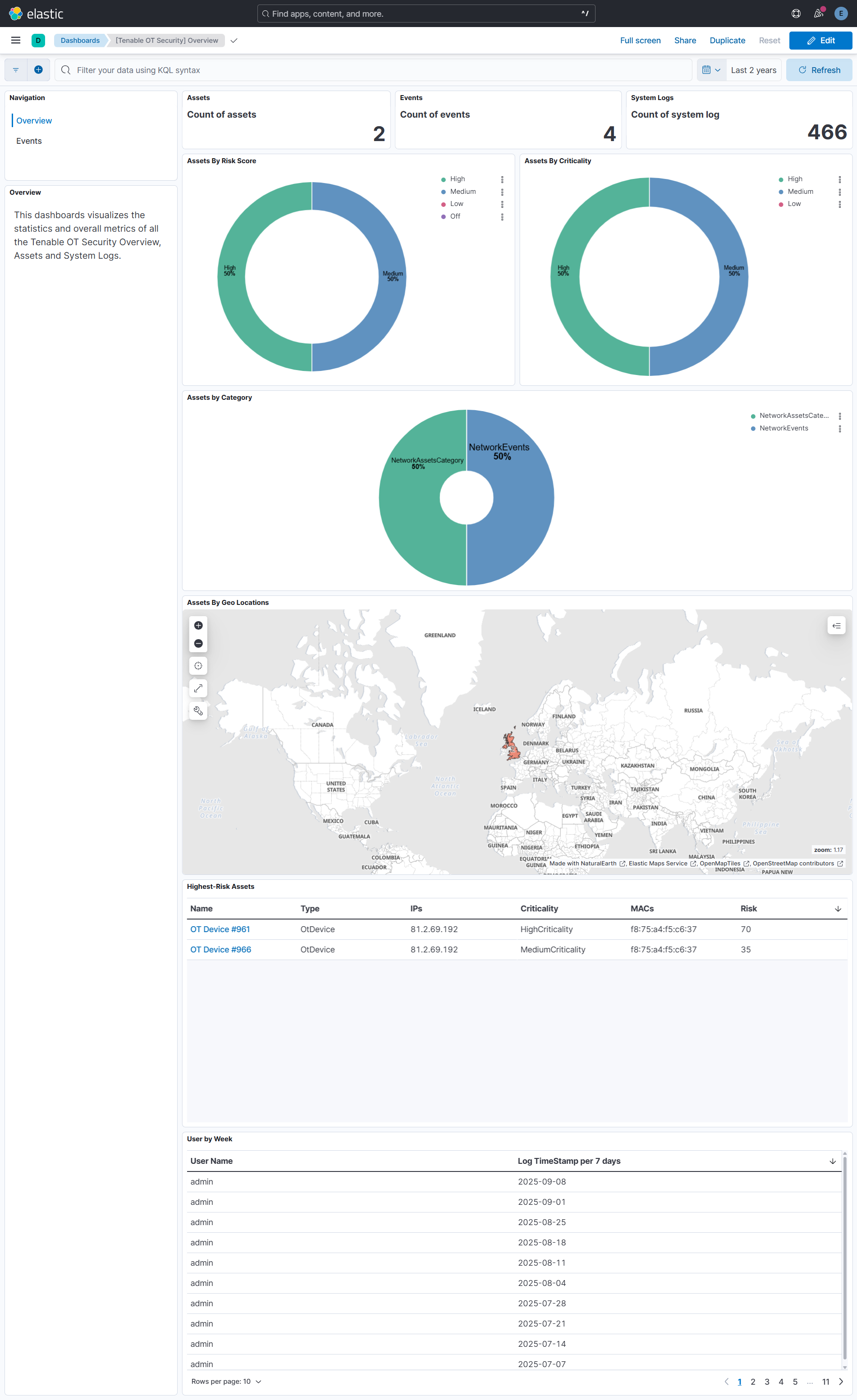
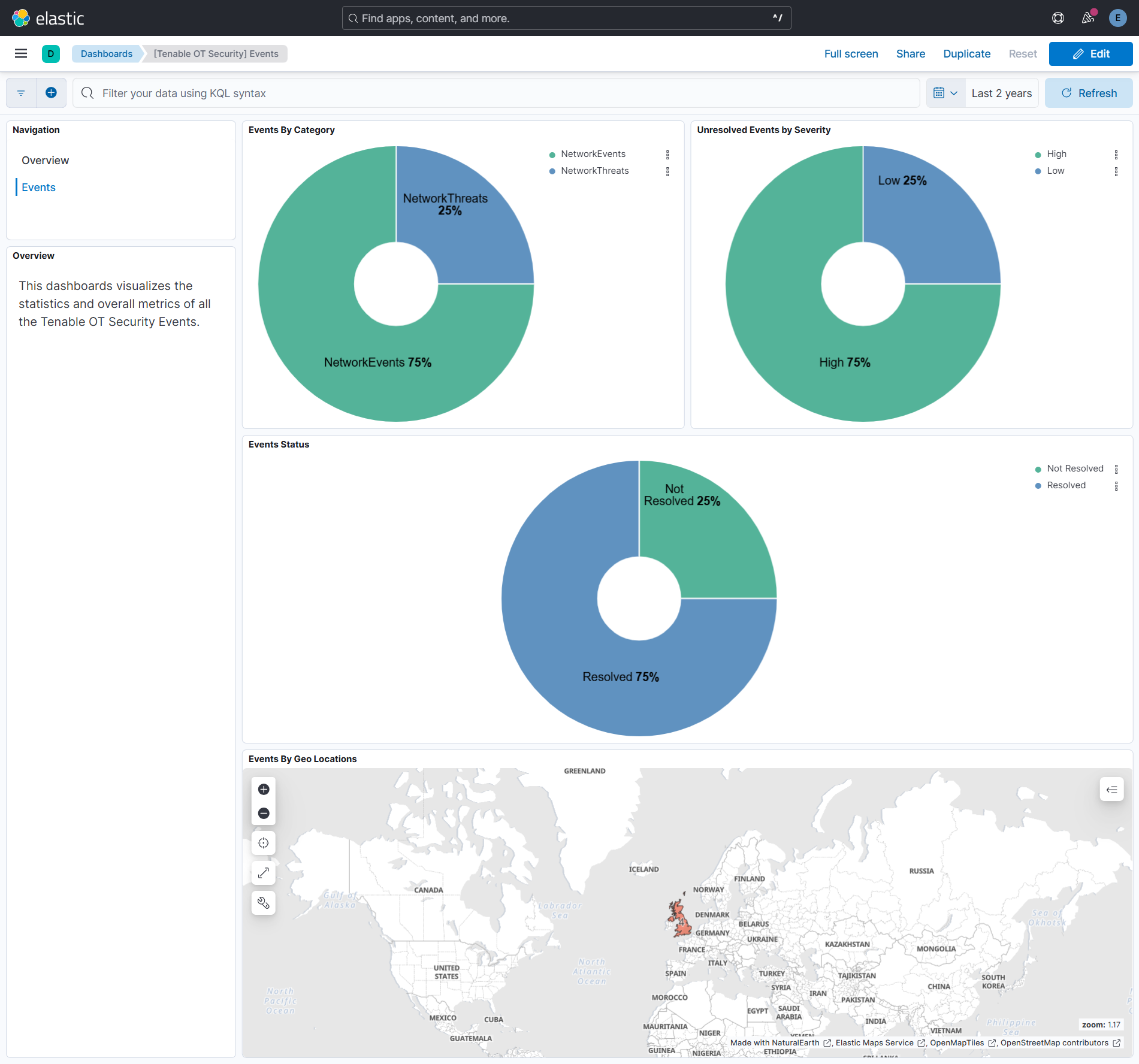
This integration includes one or more Kibana dashboards that visualizes the data collected by the integration. The screenshots below illustrate how the ingested data is displayed.
Changelog
| Version | Details | Minimum Kibana version |
|---|---|---|
| 2.2.0 | Enhancement (View pull request) Add tags to ingest pipeline processors and add preserve_original_event to pipeline-level on_failure handlers. |
9.1.4 8.19.2 |
| 2.1.1 | Enhancement (View pull request) Set agentless deployment mode release field to ga. |
9.1.4 8.19.2 |
| 2.1.0 | Enhancement (View pull request) Enable Agentless deployment. |
9.1.4 8.19.2 |
| 2.0.0 | Enhancement (View pull request) Change assets document fingerprint from full-body hash to id plus timestamps. Assets now produce a new document only when a timestamp field changes, preserving update history without creating duplicates from non-temporal field noise. Enhancement (View pull request) Change assets risk.total_risk field type from keyword to double. Breaking change (View pull request) The _id scheme change means every existing asset document will be duplicated until lifecycle policy removes the old versions. Where possible, upgrade to 1.1.0 first and allow at least one successful asset collection interval before upgrading to this version. Where this is not possible, the risk.total_risk field type change triggers an automatic data stream rollover on upgrade, so the old backing index begins aging out immediately without manual intervention. |
9.1.4 8.16.1 |
| 1.1.1 | Bug fix (View pull request) Fix pagination loop across all data streams when multiple records share the same timestamp. |
9.0.0 8.16.1 |
| 1.1.0 | Bug fix (View pull request) Fix assets data stream to use time-based incremental fetching instead of cursor-based pagination, preventing stale cursor errors after max_executions interruptions. Change @timestamp from firstSeen to ingest time so assets appear in recent dashboard time ranges. Guard max_executions template variable across all data streams. Upgrade note: a follow-up release will change the document fingerprint from a full-body hash to an id plus timestamps hash. To avoid duplicate asset documents, upgrade to this version first and allow at least one successful asset collection interval before upgrading to the fingerprint release. Do not skip this version. |
9.0.0 8.16.1 |
| 1.0.1 | Bug fix (View pull request) Use triple-brace Mustache templating when referencing variables in ingest pipelines. |
9.0.0 8.16.1 |
| 1.0.0 | Enhancement (View pull request) Release package as GA. Enhancement (View pull request) ECS version updated to 8.17.0. Bug fix (View pull request) Fix dashboard link for Serverless Project. |
9.0.0 8.16.1 |
| 0.4.0 | Enhancement (View pull request) Update Kibana constraint to support 9.0.0. |
9.0.0 8.16.1 |
| 0.3.0 | Breaking change (View pull request) Breaking change to correct the field type and eliminate the use of the ECS message field in the visualization. |
8.16.1 |
| 0.2.1 | Bug fix (View pull request) Fix default request trace enabled behavior. |
8.16.1 |
| 0.2.0 | Enhancement (View pull request) Enable request trace log removal. |
8.16.1 |
| 0.1.0 | Enhancement (View pull request) Initial release of the package. |
8.16.1 |